



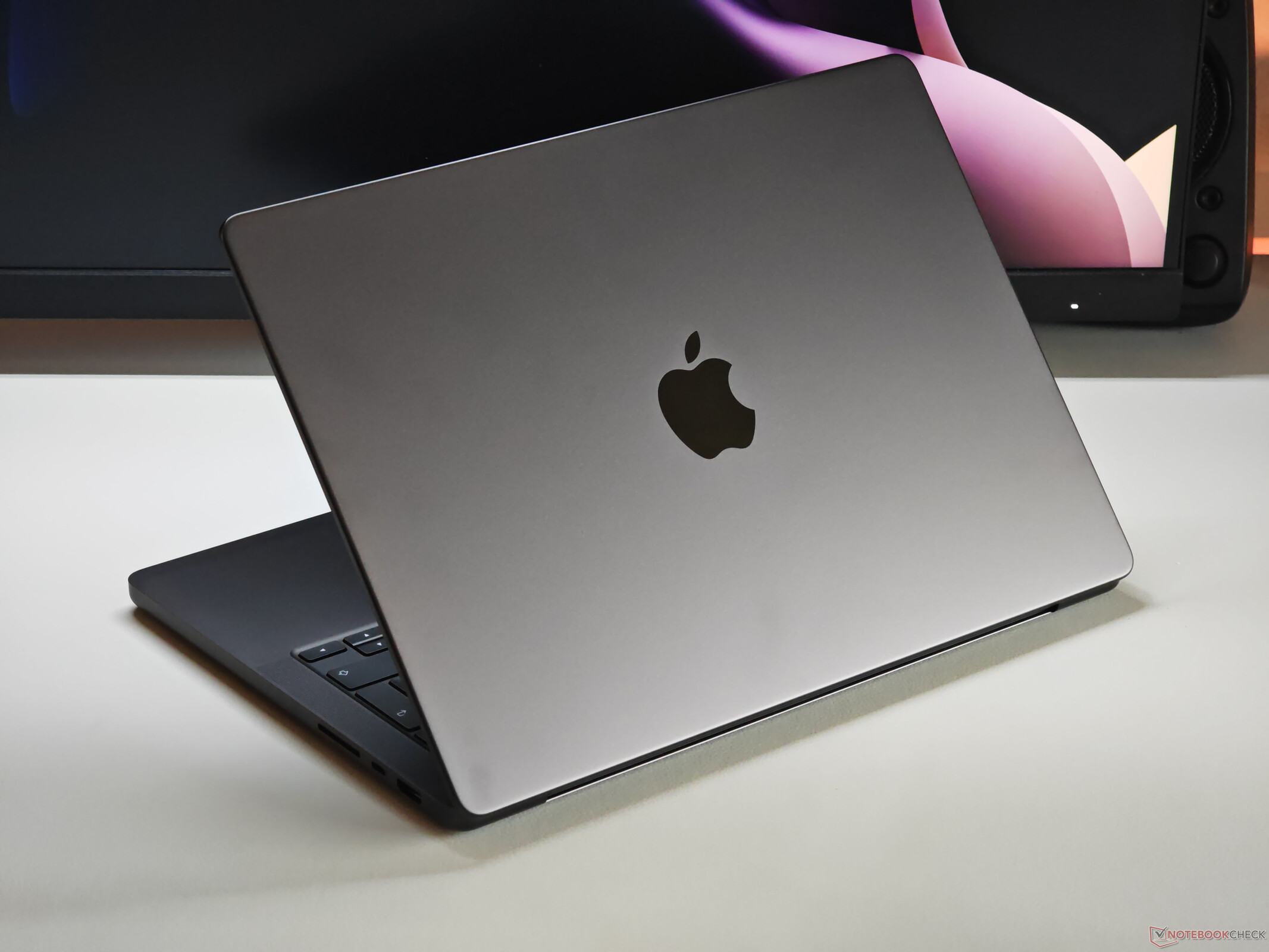
Verdict - The MacBook Pro 14 M6 is once again a very good multimedia laptop with one big weakness
The entry-level MacBook Pro 14 is once again the first Apple laptop with the new M6 SoC. It is a very good multimedia laptop overall and the new chip improves both performance and efficiency. However, the biggest weakness of the entry-level MacBook Pro 14 is still the cooling solution, because it only has one fan, whereas the more expensive SKUs with the M5 Pro/M5 Max chips get two fans. As a result, the less powerful M6 MacBook Pro 14 gets considerably louder in demanding scenarios, especially when you stress the CPU.
The improved efficiency also results in longer battery runtimes, even though the panel brightness is still the decisive factor here. We determine a range between ~6-18.5 hours in our Wi-Fi test depending on the brightness setting. The panel itself is still very good and you can also get the base model with the matte nanotexture-coating, which helps reduce reflections. It is still a very good panel with accurate colors and very high brightness levels, which is only topped by Microsoft's new Surface Laptop Ultra and the new MacBook Pro 14 with the PROLED XDR panel, even though the PWM behavior can be an issue for some users, so the Mini-LED version will be the better choice in this regard.
Pros
Cons

Specifications
Case, Connectivity, Input Devices & Display
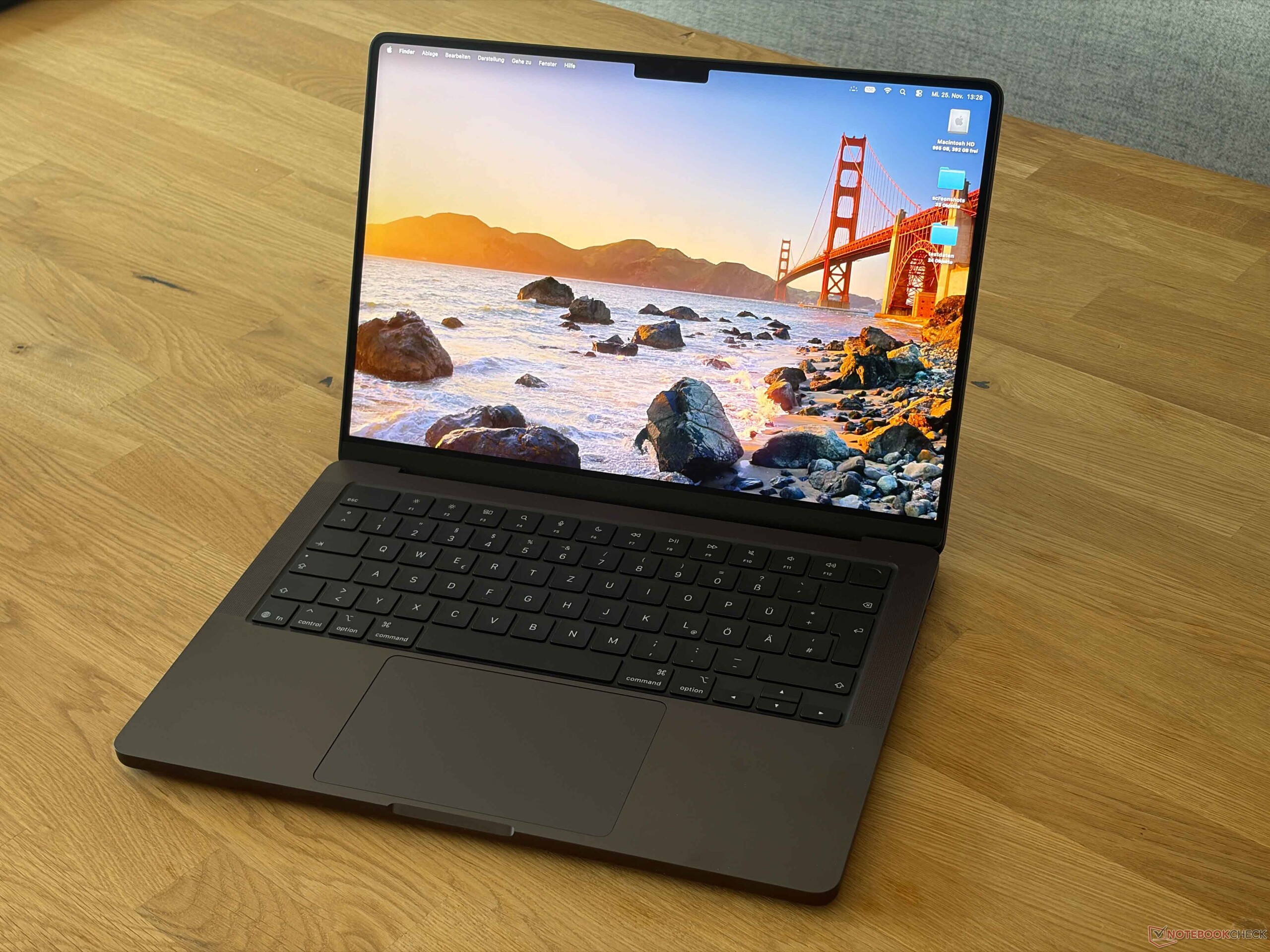
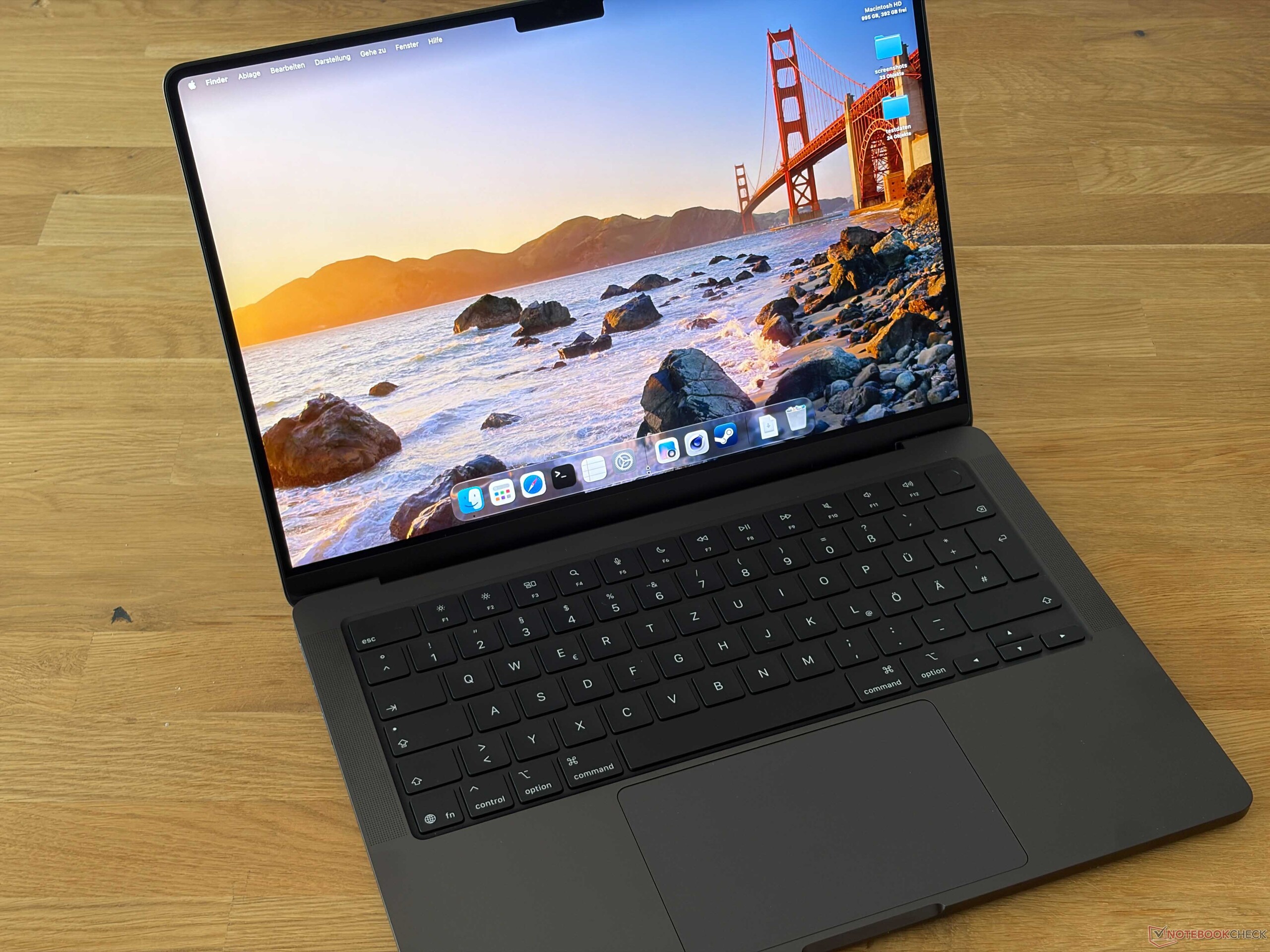
The overall design of the MacBook Pro 14 M6 did not change compared to the previous model, so please see our full review of the MacBook Pro 14 M5 for more information about the case, the ports, the connectivity, the input devices as well as the display.


Performance - M6 SoC
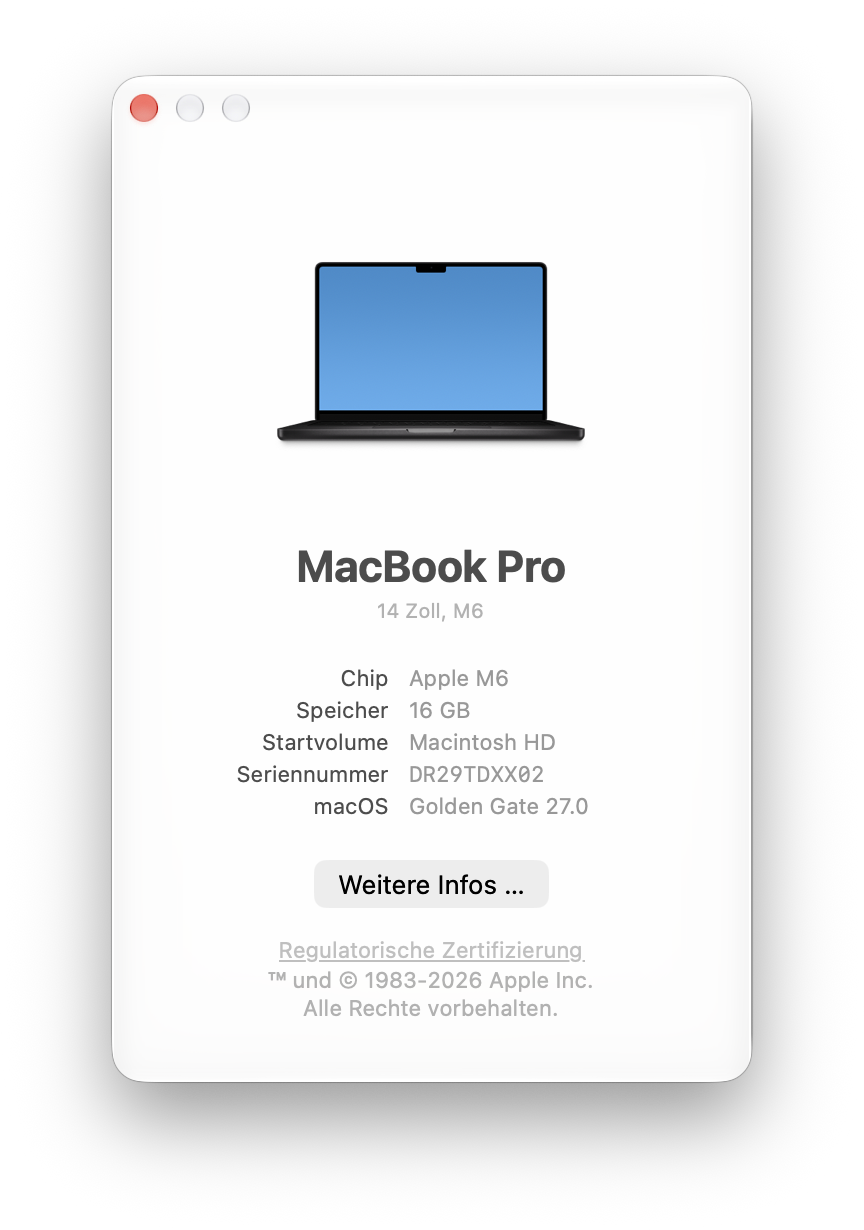
Our review unit is the base model of the new MacBook Pro 14 with the 12-core M6 SoC, 16 GB RAM as well as 1 TB storage. You can configure up to 32 GB RAM and up to 4 TB SSD storage. If you require more memory or storage, you have to get the M5 Pro/Max SKUs.
Processor Performance
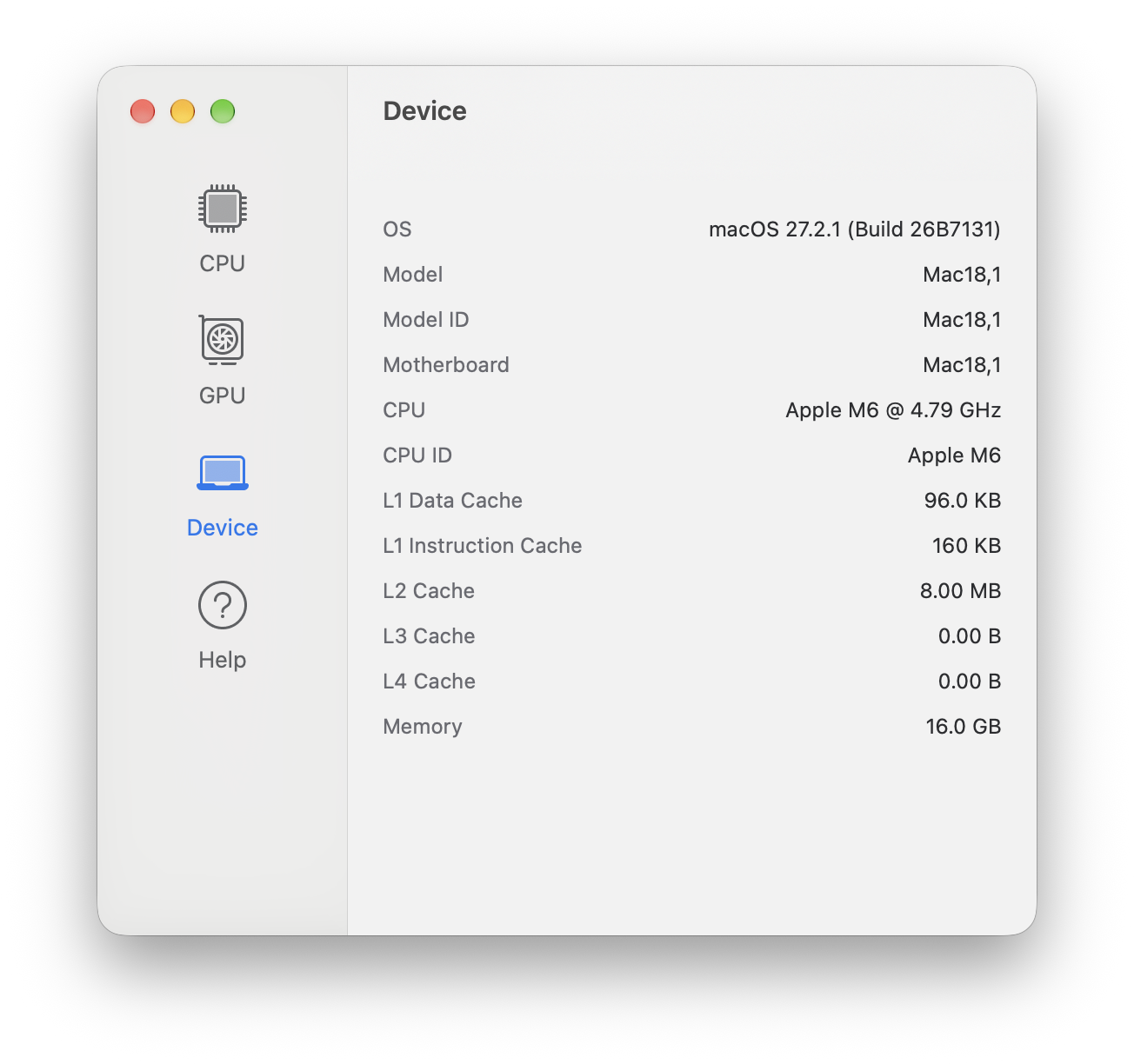
The new M6 SoC is Apple's first 2 nm chip for laptops and we already reviewed it in the Mac mini. It offers 12 cores with a maximum clock of up to 4.78 GHz (or 2.94 GHz for the efficiency cores) and while the internal tools do not report the CPU consumption, our power measurements indicate that the maximum consumption is similar to the previous M5 generation at around 30 Watts. The 2 nm manufacturing process therefore improves both performance and efficiency. For more in-depth information and efficiency measurements, please see our comprehensive analysis of the new M6 SoC.
In terms of single-core performance, the new M6 generation is roughly 10 % faster than the previous M5 generation and therefore at least two or three generations ahead of every other chip manufacturer. The multi-core performance is around 20 % higher compared to the M5 SoC and pretty much on par with the smaller M4 Pro SoC. The latest high-end Snapdragon X2 chips are slightly faster, while Intel's Panther Lake chips are considerably slower. As always, the performance is not reduced on battery power.
Cinebench 2024: CPU Multi Core | CPU Single Core
Geekbench 6.7: Multi-Core | Single-Core
Cinebench 2024: CPU Multi Core | CPU Single Core
Geekbench 6.7: Multi-Core | Single-Core
Cinebench R15 Multi Loop
System and Storage Devices
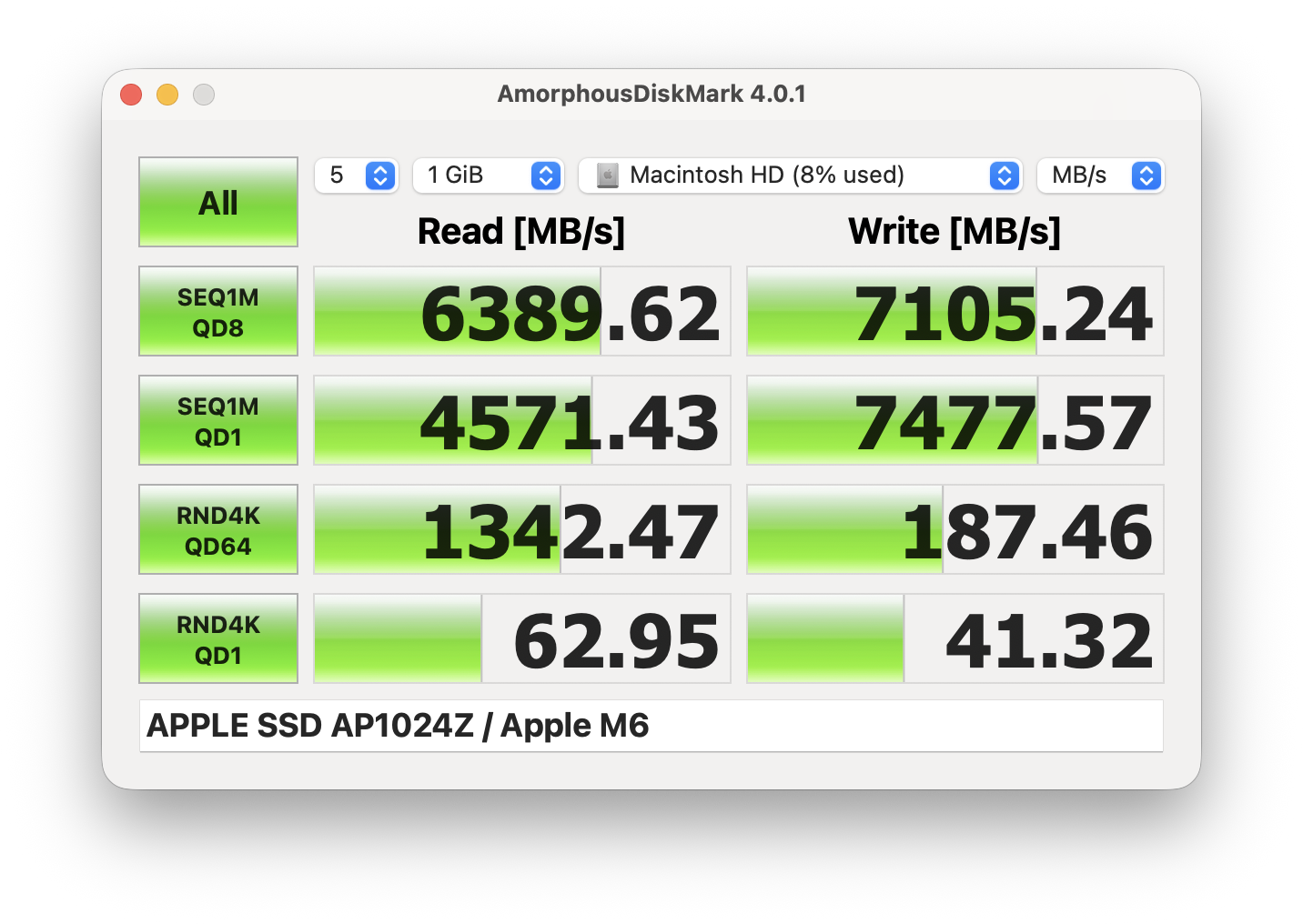
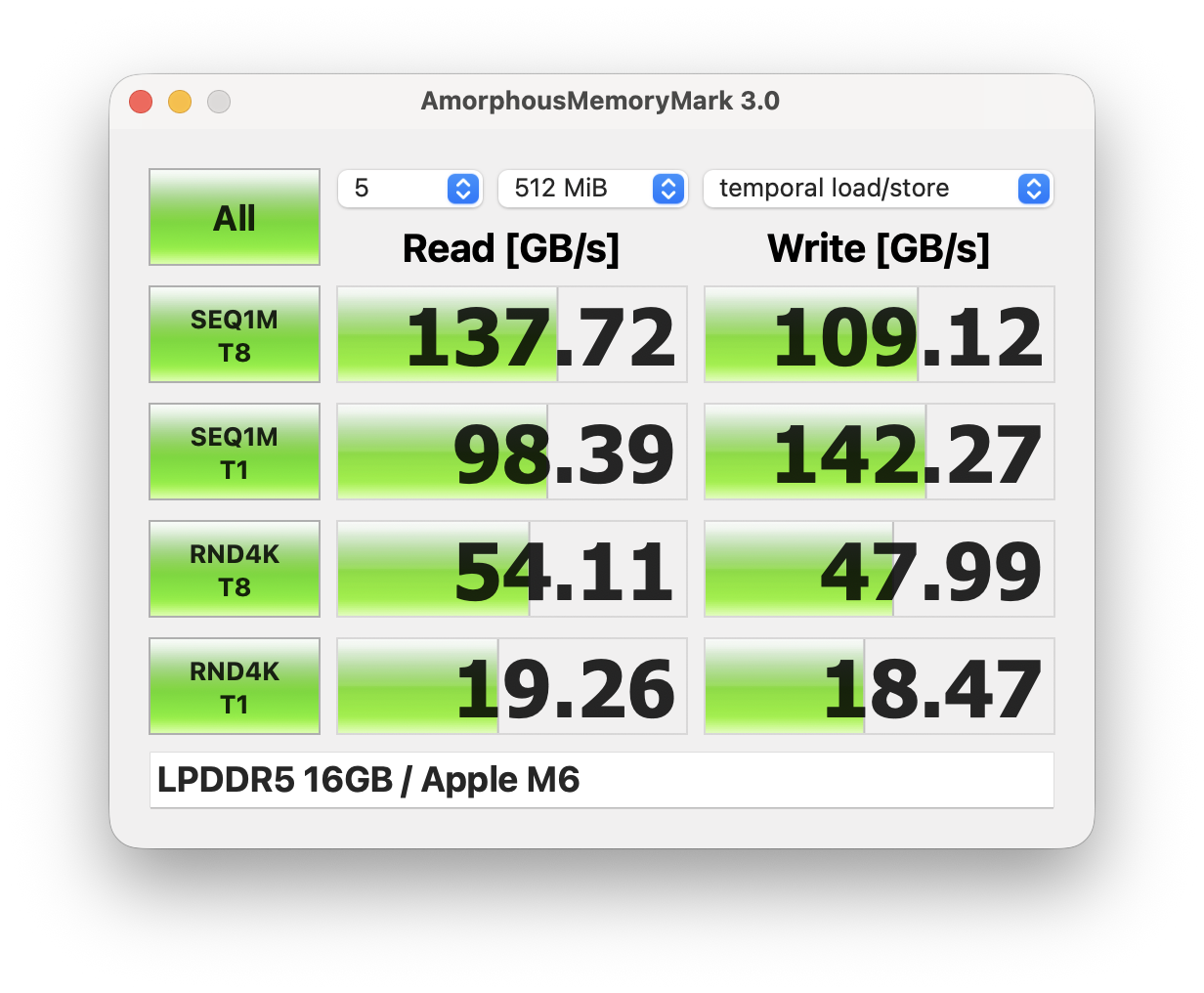
The system performance is excellent and this is a very responsive system, just like any MacBook Pro on the market. The SSD is limited to PCIe 4.0 speeds (MBP 14 with the M5 Pro/M5 Max supports PCIe 5.0), but the transfer rates are very good, so this is not really a big issue.
CrossMark: Overall | Productivity | Creativity | Responsiveness
WebXPRT 4: Overall
WebXPRT 5: Overall
Mozilla Kraken 1.1: Total
| Performance rating | |
| Apple MacBook Pro 14 M6 | |
| Average Apple M6, Apple M6 12-Core GPU | |
| Apple MacBook Pro 14 2025 M5 -1! | |
| Asus Zenbook A14 UX3704NA | |
| Lenovo Yoga Slim 7 14Q8Y11 -2! | |
| Asus ZenBook S14 UX5406AA | |
| HP OmniBook Ultra 14 Core Ultra X9 -1! | |
| Average of class Multimedia | |
| Dell XPS 14 Core Ultra X7 358H -1! | |
| Honor MagicBook Pro 14 2026 -1! | |
| CrossMark / Overall | |
| Apple MacBook Pro 14 M6 | |
| Average Apple M6, Apple M6 12-Core GPU (2706 - 2738, n=2) | |
| Apple MacBook Pro 14 2025 M5 | |
| Asus ZenBook S14 UX5406AA | |
| HP OmniBook Ultra 14 Core Ultra X9 | |
| Dell XPS 14 Core Ultra X7 358H | |
| Average of class Multimedia (866 - 3231, n=59, last 2 years) | |
| Asus Zenbook A14 UX3704NA | |
| Lenovo Yoga Slim 7 14Q8Y11 | |
| Honor MagicBook Pro 14 2026 | |
| CrossMark / Productivity | |
| Apple MacBook Pro 14 M6 | |
| Average Apple M6, Apple M6 12-Core GPU (2535 - 2558, n=2) | |
| Apple MacBook Pro 14 2025 M5 | |
| Asus ZenBook S14 UX5406AA | |
| HP OmniBook Ultra 14 Core Ultra X9 | |
| Average of class Multimedia (931 - 2677, n=59, last 2 years) | |
| Asus Zenbook A14 UX3704NA | |
| Honor MagicBook Pro 14 2026 | |
| Lenovo Yoga Slim 7 14Q8Y11 | |
| Dell XPS 14 Core Ultra X7 358H | |
| CrossMark / Creativity | |
| Apple MacBook Pro 14 M6 | |
| Average Apple M6, Apple M6 12-Core GPU (3301 - 3349, n=2) | |
| Apple MacBook Pro 14 2025 M5 | |
| Asus ZenBook S14 UX5406AA | |
| Dell XPS 14 Core Ultra X7 358H | |
| HP OmniBook Ultra 14 Core Ultra X9 | |
| Average of class Multimedia (907 - 4522, n=59, last 2 years) | |
| Lenovo Yoga Slim 7 14Q8Y11 | |
| Asus Zenbook A14 UX3704NA | |
| Honor MagicBook Pro 14 2026 | |
| CrossMark / Responsiveness | |
| Asus Zenbook A14 UX3704NA | |
| Apple MacBook Pro 14 M6 | |
| Asus ZenBook S14 UX5406AA | |
| Average Apple M6, Apple M6 12-Core GPU (1815 - 1832, n=2) | |
| Lenovo Yoga Slim 7 14Q8Y11 | |
| HP OmniBook Ultra 14 Core Ultra X9 | |
| Apple MacBook Pro 14 2025 M5 | |
| Honor MagicBook Pro 14 2026 | |
| Average of class Multimedia (605 - 2073, n=59, last 2 years) | |
| Dell XPS 14 Core Ultra X7 358H | |
| WebXPRT 4 / Overall | |
| Apple MacBook Pro 14 M6 | |
| Average Apple M6, Apple M6 12-Core GPU (380 - 433, n=2) | |
| Apple MacBook Pro 14 2025 M5 | |
| Asus Zenbook A14 UX3704NA | |
| HP OmniBook Ultra 14 Core Ultra X9 | |
| Asus ZenBook S14 UX5406AA | |
| Dell XPS 14 Core Ultra X7 358H | |
| Average of class Multimedia (111 - 433, n=59, last 2 years) | |
| Honor MagicBook Pro 14 2026 | |
| WebXPRT 5 / Overall | |
| Apple MacBook Pro 14 M6 | |
| Average Apple M6, Apple M6 12-Core GPU (143 - 145, n=2) | |
| Asus ZenBook S14 UX5406AA | |
| Average of class Multimedia (100 - 145, n=24, last 2 years) | |
| Asus Zenbook A14 UX3704NA | |
| Lenovo Yoga Slim 7 14Q8Y11 | |
| Mozilla Kraken 1.1 / Total | |
| Honor MagicBook Pro 14 2026 | |
| Asus ZenBook S14 UX5406AA | |
| Dell XPS 14 Core Ultra X7 358H | |
| HP OmniBook Ultra 14 Core Ultra X9 | |
| Average of class Multimedia (212 - 835, n=61, last 2 years) | |
| Asus Zenbook A14 UX3704NA | |
| Apple MacBook Pro 14 2025 M5 | |
| Apple MacBook Pro 14 M6 | |
| Average Apple M6, Apple M6 12-Core GPU (202 - 212, n=2) | |
* ... smaller is better
GPU and Gaming Performance
The graphics performance of the new M6 12-core GPU is around 30 % better compared to the old M5 10-core GPU and also roughly on par with Intel's powerful Arc B370/B390 Panther Lake iGPUs. You can even play AAA games like Cyberpunk 2077 and Baldur's Gate 3 with high details. For more benchmarks and efficiency comparisons, please see our analysis of the M6 SoC.
| 3DMark Steel Nomad Score | 1472 points | |
| 3DMark Steel Nomad Light Score | 6999 points | |
Help | ||
| Blender / v4.3 Barbershop Metal | |
| Apple MacBook Pro 14 M6 | |
| Average Apple M6 12-Core GPU (164 - 165, n=2) | |
| Average of class Multimedia (83.2 - 165, n=4, last 2 years) | |
| Apple MacBook Pro 14 M5 Pro OLED | |
| Blender / v3.3 Classroom METAL | |
| Apple MacBook Pro 14 2025 M5 | |
| Apple MacBook Pro 14 M6 | |
| Average Apple M6 12-Core GPU (49 - 51, n=2) | |
| Average of class Multimedia (17.8 - 68, n=7, last 2 years) | |
| Apple MacBook Pro 14 M5 Pro OLED | |
| Blender / v3.3 Classroom CPU | |
| Apple MacBook Pro 14 2025 M5 | |
| Lenovo Yoga Slim 7 14Q8Y11 | |
| Asus Zenbook A14 UX3704NA | |
| Average of class Multimedia (133 - 1042, n=60, last 2 years) | |
| Honor MagicBook Pro 14 2026 | |
| Asus ZenBook S14 UX5406AA | |
| Dell XPS 14 Core Ultra X7 358H | |
| HP OmniBook Ultra 14 Core Ultra X9 | |
| Apple MacBook Pro 14 M6 | |
| Average Apple M6 12-Core GPU (231 - 233, n=2) | |
| Apple MacBook Pro 14 M5 Pro OLED | |
| Blender / v3.3 Classroom oneAPI/Intel | |
| Average of class Multimedia (105 - 492, n=16, last 2 years) | |
| Dell XPS 14 Core Ultra X7 358H | |
| HP OmniBook Ultra 14 Core Ultra X9 | |
* ... smaller is better
| Total War Pharaoh - 1920x1080 Ultra Preset | |
| Asus Zenbook A14 UX3704NA | |
| Average of class Multimedia (49 - 84.1, n=9, last 2 years) | |
| Apple MacBook Pro 14 M5 Pro OLED | |
| Apple MacBook Pro 14 M6 | |
| Apple MacBook Pro 14 2025 M5 | |
| low | med. | high | ultra | QHD | |
|---|---|---|---|---|---|
| Baldur's Gate 3 (2023) | 79.2 | 65.1 | 54.9 | 53.5 | 36.9 |
| Cyberpunk 2077 (2023) | 68.7 | 53.1 | 41.9 | 35.6 | 20.3 |
| Total War Pharaoh (2023) | 68 | 52.5 | 50.7 | 49.6 | 44.3 |
| Assassin's Creed Shadows (2025) | 44 | 40 | 35 | 22 | 18 |
Emissions & Power Consumption
System Noise
The cooling unit is the biggest drawback of the entry-level MacBook Pro 14, because Apple still uses only a single fan. While it can handle the M6 SoC, the fan turns on faster under load and the maximum fan noise at 49 dB(A) is very loud and even louder compared to the MacBook Pro 14 with the significantly faster M5 Pro SoC, which uses two fans. During gaming, we measured between 25 and 34 dB(A) depending on the title, but demanding CPU workloads will quickly result in high fan activity. It is still a quiet device in light workloads, but considering that Apple calls it a Pro model, this cost-cutting measure is still unfortunate and it would be a much better experience with the more powerful dual-fan solution.
Noise level
| Idle |
| 24.3 / 24.3 / 24.3 dB(A) |
| Load |
| 25.5 / 49 dB(A) |
 | ||
30 dB silent 40 dB(A) audible 50 dB(A) loud |
||
min:  , med:  , max:  Earthworks M23R, Arta (15 cm distance) environment noise: 24.3 dB(A) | ||
| Apple MacBook Pro 14 M6 M6, M6 12-Core GPU | Apple MacBook Pro 14 2025 M5 M5 10-Core, M5 10-Core GPU | HP OmniBook Ultra 14 Core Ultra X9 Ultra X9 388H, Arc B390 | Lenovo Yoga Slim 7 14Q8Y11 X2E-88-100, X2-90 | Asus Zenbook A14 UX3704NA X2E-88-100, X2-90 | Asus ZenBook S14 UX5406AA Ultra 9 386H, Intel Graphics 4 Xe3 PTL | Honor MagicBook Pro 14 2026 Ultra 5 338H, Arc B370 | Dell XPS 14 Core Ultra X7 358H Ultra X7 358H, Arc B390 | Apple MacBook Pro 14 M5 Pro OLED M5 Pro 18-Core, M5 Pro 20-Core GPU | |
|---|---|---|---|---|---|---|---|---|---|
| Noise | -3% | -17% | -15% | -19% | -24% | -12% | -11% | -11% | |
| off / environment * (dB) | 24.3 | 24.5 -1% | 23.3 4% | 23.8 2% | 24.2 -0% | 24.1 1% | 25.7 -6% | 22.9 6% | 24.2 -0% |
| Idle Minimum * (dB) | 24.3 | 24.5 -1% | 23.3 4% | 23.8 2% | 24.2 -0% | 24.1 1% | 25.7 -6% | 23.3 4% | 24.2 -0% |
| Idle Average * (dB) | 24.3 | 24.5 -1% | 23.3 4% | 23.8 2% | 24.2 -0% | 24.1 1% | 25.7 -6% | 23.3 4% | 24.2 -0% |
| Idle Maximum * (dB) | 24.3 | 24.5 -1% | 23.3 4% | 23.8 2% | 24.2 -0% | 24.1 1% | 25.7 -6% | 23.3 4% | 24.2 -0% |
| Load Average * (dB) | 25.5 | 25.2 1% | 42.9 -68% | 41.4 -62% | 41.3 -62% | 45.4 -78% | 30.2 -18% | 34 -33% | 27.5 -8% |
| Cyberpunk 2077 ultra * (dB) | 25.5 | 30 -18% | 44.4 -74% | 42.4 -66% | 41.3 -62% | 49.1 -93% | 39.4 -55% | 43.5 -71% | 44.6 -75% |
| Load Maximum * (dB) | 49 | 48 2% | 44.1 10% | 42.4 13% | 51.7 -6% | 49.1 -0% | 42.9 12% | 45.7 7% | 44.6 9% |
* ... smaller is better
Temperature
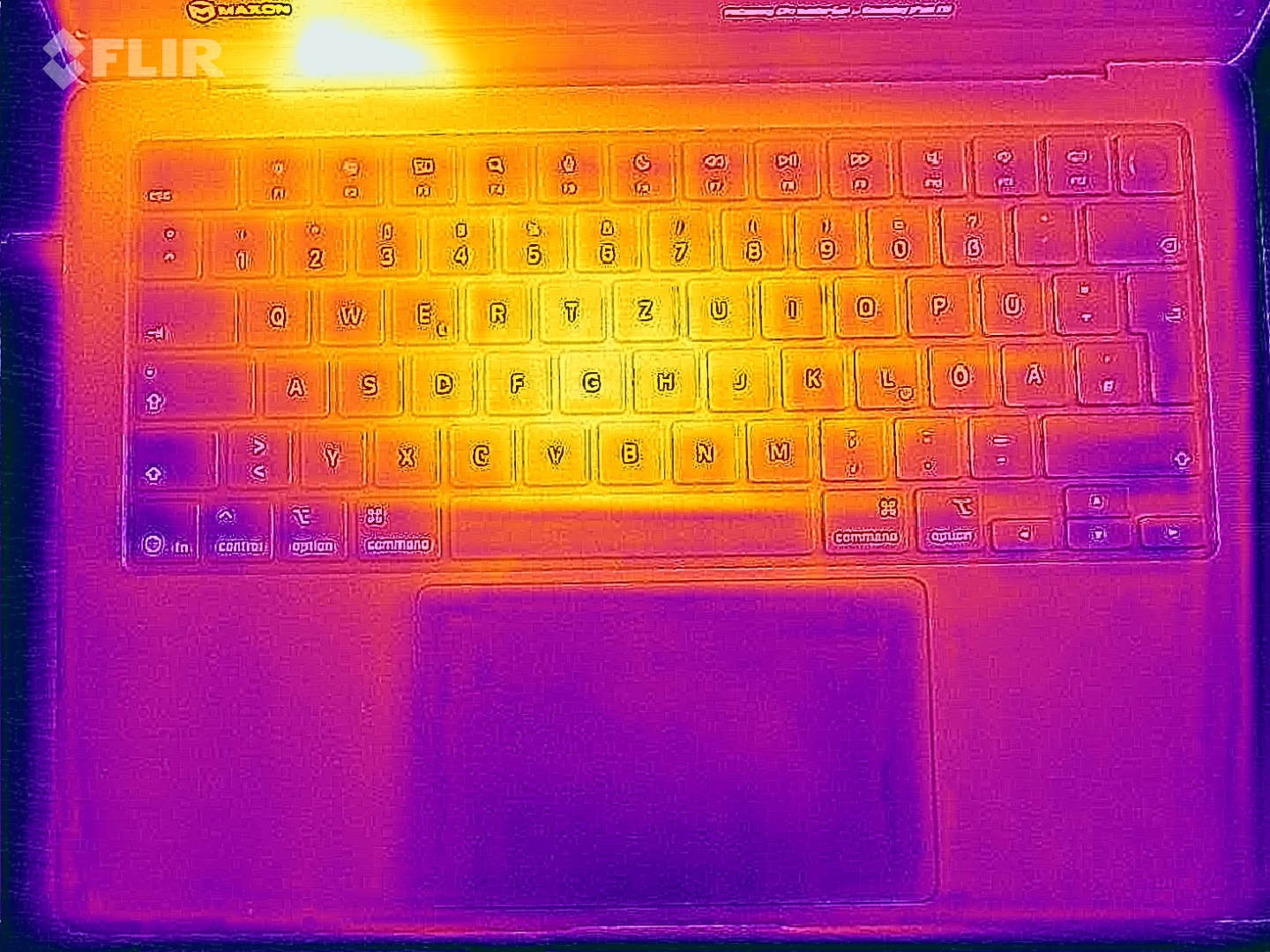
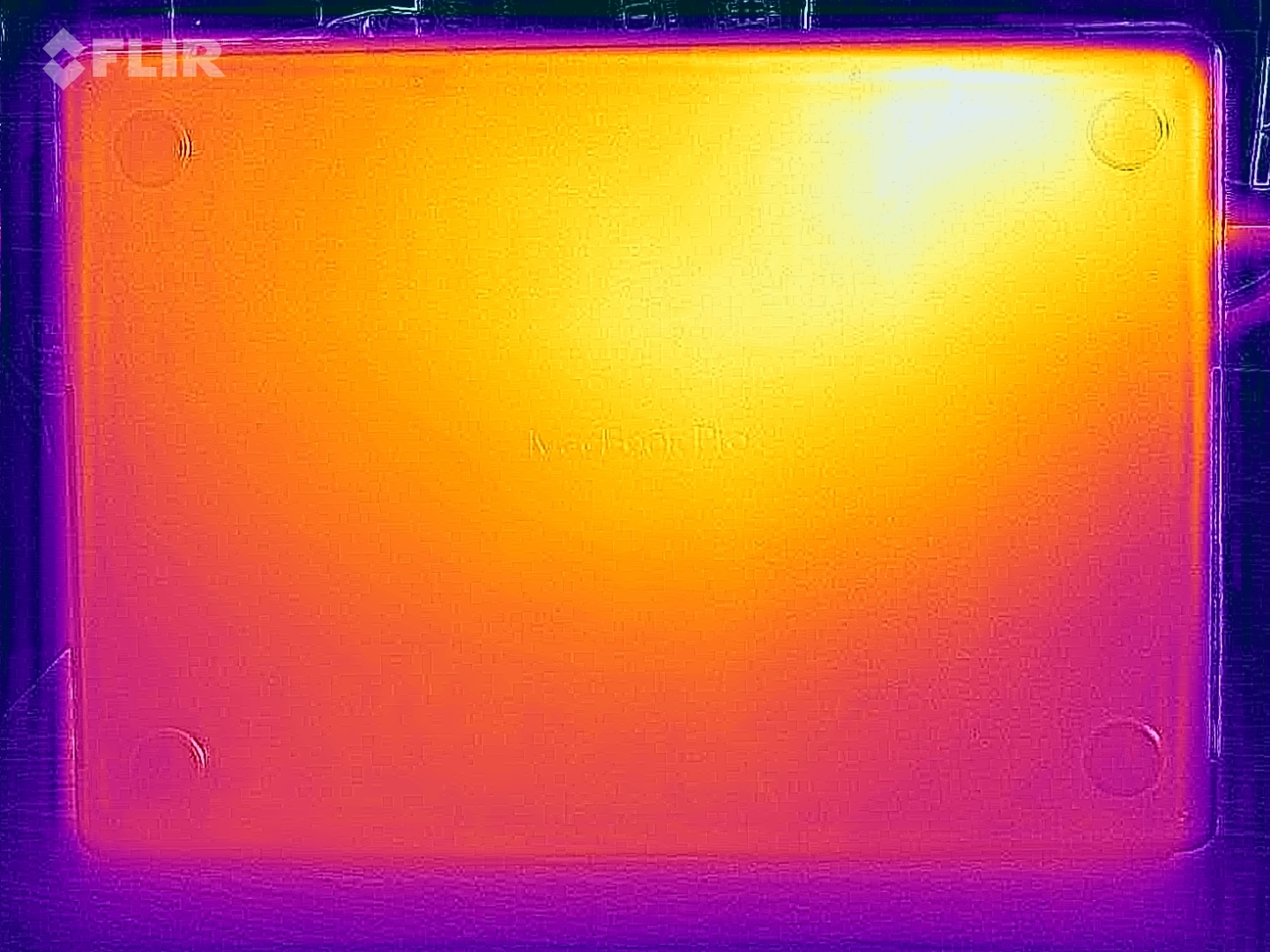
The metal chassis stays very cool in light workloads, but warms up noticeably under high loads. Our thermal images also clearly show the effect of the single fan, because the left side of the chassis is considerably warmer than the right side. It is still no problem to type or use it on your lap.
(-) The maximum temperature on the upper side is 45.1 °C / 113 F, compared to the average of 36.8 °C / 98 F, ranging from 21 to 71 °C for the class Multimedia.
(±) The bottom heats up to a maximum of 42 °C / 108 F, compared to the average of 39.1 °C / 102 F
(+) In idle usage, the average temperature for the upper side is 23.4 °C / 74 F, compared to the device average of 31.3 °C / 88 F.
(+) The palmrests and touchpad are reaching skin temperature as a maximum (32.9 °C / 91.2 F) and are therefore not hot.
(-) The average temperature of the palmrest area of similar devices was 28.7 °C / 83.7 F (-4.2 °C / -7.5 F).
| Apple MacBook Pro 14 M6 M6, M6 12-Core GPU | Apple MacBook Pro 14 2025 M5 M5 10-Core, M5 10-Core GPU | HP OmniBook Ultra 14 Core Ultra X9 Ultra X9 388H, Arc B390 | Lenovo Yoga Slim 7 14Q8Y11 X2E-88-100, X2-90 | Asus Zenbook A14 UX3704NA X2E-88-100, X2-90 | Asus ZenBook S14 UX5406AA Ultra 9 386H, Intel Graphics 4 Xe3 PTL | Honor MagicBook Pro 14 2026 Ultra 5 338H, Arc B370 | Dell XPS 14 Core Ultra X7 358H Ultra X7 358H, Arc B390 | |
|---|---|---|---|---|---|---|---|---|
| Heat | 4% | 3% | -1% | -2% | -6% | 4% | 5% | |
| Maximum Upper Side * (°C) | 45.1 | 43.8 3% | 40.2 11% | 40.6 10% | 40.9 9% | 43.5 4% | 39.1 13% | 34 25% |
| Maximum Bottom * (°C) | 42 | 40.6 3% | 44.2 -5% | 39.2 7% | 47.2 -12% | 47.1 -12% | 35.7 15% | 35.8 15% |
| Idle Upper Side * (°C) | 23.5 | 22.9 3% | 22.8 3% | 25.4 -8% | 24.5 -4% | 25.5 -9% | 25.2 -7% | 25.6 -9% |
| Idle Bottom * (°C) | 23.8 | 22.5 5% | 23.4 2% | 26.4 -11% | 24 -1% | 25.6 -8% | 24.9 -5% | 26.4 -11% |
* ... smaller is better
Speakers
The six-speaker sound system is still excellent and only the HP OmniBook Ultra 14 performs slightly better in our analysis.
Apple MacBook Pro 14 M6 audio analysis
(+) | speakers can play relatively loud (84.6 dB)
Bass 100 - 315 Hz
(+) | good bass - only 3.7% away from median
(+) | bass is linear (6.6% delta to prev. frequency)
Mids 400 - 2000 Hz
(+) | balanced mids - only 2.4% away from median
(+) | mids are linear (4.6% delta to prev. frequency)
Highs 2 - 16 kHz
(+) | balanced highs - only 3.5% away from median
(+) | highs are linear (3.4% delta to prev. frequency)
Overall 100 - 16.000 Hz
(+) | overall sound is linear (6.7% difference to median)
Compared to same class
» 5% of all tested devices in this class were better, 1% similar, 94% worse
» The best had a delta of 5%, average was 17%, worst was 45%
Compared to all devices tested
» 1% of all tested devices were better, 0% similar, 99% worse
» The best had a delta of 4%, average was 23%, worst was 136%
Apple MacBook Pro 14 2025 M5 audio analysis
(+) | speakers can play relatively loud (84.8 dB)
Bass 100 - 315 Hz
(+) | good bass - only 4.2% away from median
(+) | bass is linear (6.5% delta to prev. frequency)
Mids 400 - 2000 Hz
(+) | balanced mids - only 2% away from median
(+) | mids are linear (3.2% delta to prev. frequency)
Highs 2 - 16 kHz
(+) | balanced highs - only 3.3% away from median
(+) | highs are linear (3.7% delta to prev. frequency)
Overall 100 - 16.000 Hz
(+) | overall sound is linear (6.4% difference to median)
Compared to same class
» 4% of all tested devices in this class were better, 1% similar, 94% worse
» The best had a delta of 5%, average was 17%, worst was 45%
Compared to all devices tested
» 1% of all tested devices were better, 0% similar, 99% worse
» The best had a delta of 4%, average was 23%, worst was 136%
HP OmniBook Ultra 14 Core Ultra X9 audio analysis
(+) | speakers can play relatively loud (85.3 dB)
Bass 100 - 315 Hz
(±) | reduced bass - on average 10% lower than median
(±) | linearity of bass is average (11.6% delta to prev. frequency)
Mids 400 - 2000 Hz
(+) | balanced mids - only 2.6% away from median
(+) | mids are linear (4% delta to prev. frequency)
Highs 2 - 16 kHz
(+) | balanced highs - only 1.3% away from median
(+) | highs are linear (2.6% delta to prev. frequency)
Overall 100 - 16.000 Hz
(+) | overall sound is linear (7.3% difference to median)
Compared to same class
» 1% of all tested devices in this class were better, 1% similar, 98% worse
» The best had a delta of 5%, average was 18%, worst was 53%
Compared to all devices tested
» 1% of all tested devices were better, 0% similar, 98% worse
» The best had a delta of 4%, average was 23%, worst was 136%
Lenovo Yoga Slim 7 14Q8Y11 audio analysis
(±) | speaker loudness is average but good (81.8 dB)
Bass 100 - 315 Hz
(±) | reduced bass - on average 14.3% lower than median
(±) | linearity of bass is average (13.4% delta to prev. frequency)
Mids 400 - 2000 Hz
(±) | higher mids - on average 8.7% higher than median
(+) | mids are linear (4.4% delta to prev. frequency)
Highs 2 - 16 kHz
(+) | balanced highs - only 3.9% away from median
(+) | highs are linear (5.4% delta to prev. frequency)
Overall 100 - 16.000 Hz
(±) | linearity of overall sound is average (17% difference to median)
Compared to same class
» 44% of all tested devices in this class were better, 8% similar, 48% worse
» The best had a delta of 5%, average was 18%, worst was 53%
Compared to all devices tested
» 31% of all tested devices were better, 8% similar, 61% worse
» The best had a delta of 4%, average was 23%, worst was 136%
Asus Zenbook A14 UX3704NA audio analysis
(+) | speakers can play relatively loud (84.5 dB)
Bass 100 - 315 Hz
(±) | reduced bass - on average 14.8% lower than median
(±) | linearity of bass is average (9.1% delta to prev. frequency)
Mids 400 - 2000 Hz
(+) | balanced mids - only 2.9% away from median
(+) | mids are linear (4.7% delta to prev. frequency)
Highs 2 - 16 kHz
(+) | balanced highs - only 3.2% away from median
(+) | highs are linear (3.9% delta to prev. frequency)
Overall 100 - 16.000 Hz
(+) | overall sound is linear (12.2% difference to median)
Compared to same class
» 16% of all tested devices in this class were better, 5% similar, 80% worse
» The best had a delta of 5%, average was 18%, worst was 53%
Compared to all devices tested
» 10% of all tested devices were better, 3% similar, 87% worse
» The best had a delta of 4%, average was 23%, worst was 136%
Asus ZenBook S14 UX5406AA audio analysis
(±) | speaker loudness is average but good (79.8 dB)
Bass 100 - 315 Hz
(±) | reduced bass - on average 8.5% lower than median
(±) | linearity of bass is average (9.1% delta to prev. frequency)
Mids 400 - 2000 Hz
(+) | balanced mids - only 3% away from median
(+) | mids are linear (3.8% delta to prev. frequency)
Highs 2 - 16 kHz
(+) | balanced highs - only 1.5% away from median
(+) | highs are linear (3.3% delta to prev. frequency)
Overall 100 - 16.000 Hz
(+) | overall sound is linear (9.6% difference to median)
Compared to same class
» 6% of all tested devices in this class were better, 2% similar, 92% worse
» The best had a delta of 5%, average was 18%, worst was 53%
Compared to all devices tested
» 4% of all tested devices were better, 1% similar, 95% worse
» The best had a delta of 4%, average was 23%, worst was 136%
Honor MagicBook Pro 14 2026 audio analysis
(±) | speaker loudness is average but good (81.2 dB)
Bass 100 - 315 Hz
(±) | reduced bass - on average 12.8% lower than median
(±) | linearity of bass is average (8.9% delta to prev. frequency)
Mids 400 - 2000 Hz
(+) | balanced mids - only 4.5% away from median
(+) | mids are linear (5.2% delta to prev. frequency)
Highs 2 - 16 kHz
(+) | balanced highs - only 1.1% away from median
(+) | highs are linear (3.9% delta to prev. frequency)
Overall 100 - 16.000 Hz
(+) | overall sound is linear (12.1% difference to median)
Compared to same class
» 23% of all tested devices in this class were better, 3% similar, 74% worse
» The best had a delta of 5%, average was 17%, worst was 45%
Compared to all devices tested
» 10% of all tested devices were better, 2% similar, 87% worse
» The best had a delta of 4%, average was 23%, worst was 136%
Dell XPS 14 Core Ultra X7 358H audio analysis
(+) | speakers can play relatively loud (87 dB)
Bass 100 - 315 Hz
(±) | reduced bass - on average 7.6% lower than median
(+) | bass is linear (5.9% delta to prev. frequency)
Mids 400 - 2000 Hz
(+) | balanced mids - only 3.2% away from median
(+) | mids are linear (3.6% delta to prev. frequency)
Highs 2 - 16 kHz
(+) | balanced highs - only 3.3% away from median
(+) | highs are linear (5.8% delta to prev. frequency)
Overall 100 - 16.000 Hz
(+) | overall sound is linear (7.3% difference to median)
Compared to same class
» 7% of all tested devices in this class were better, 1% similar, 92% worse
» The best had a delta of 5%, average was 17%, worst was 45%
Compared to all devices tested
» 1% of all tested devices were better, 0% similar, 98% worse
» The best had a delta of 4%, average was 23%, worst was 136%
Power Consumption and Battery Life
The MacBook Pro 14 M6 is a very efficient laptop and the maximum idle power consumption is still okay considering the high brightness levels of the Mini-LED panel. We measure up to 84 Watts during our stress test, which levels off at around 74 Watts. We therefore recommend a 90W power adapter to ensure that the battery will not be drained, even in demanding scenarios.
The battery runtime also benefits from the more efficient M6 SoC, but the display brightness still has a bigger effect on the runtimes. At 150 nits, our Wi-Fi test runs for almost 18.5 hours and therefore two hours more than on the previous M5 MacBook Pro 14, but the advantage drops to just 10 minutes at maximum SDR brightness.
| Off / Standby | 0.09 / 0.2 Watt |
| Idle | 1.8 / 11.2 / 11.4 Watt |
| Load |
45.3 / 84.3 Watt |
   
| |
Key:
min: ,
med: ,
max: Metrahit Energy | |
Power Consumption Cyberpunk / Stress Test
Power Consumption external Monitor
Notebookcheck Rating
Apple MacBook Pro 14 M6
- 11/26/2026 v8
Andreas Osthoff
 Total Sustainability Score:
Potential Competitors in Comparison
Image | Model / Review | Price | Weight | Height | Display |
|---|---|---|---|---|---|
1. 91.8%  | Apple MacBook Pro 14 M6 Apple M6 ⎘ Apple M6 12-Core GPU ⎘ 16 GB Memory, 1024 GB SSD | Amazon: 1. $1,799.00 Apple 2026 MacBook Pro Lapto... 2. $2,049.00 Apple 2026 MacBook Pro Lapto... 3. $2,249.00 Apple 2026 MacBook Pro Lapto... List Price: 2464€ | 1.5 kg | 15.5 mm | 14.20" 3024x1964 254 PPI Mini-LED |
2. 90.9%  | Apple MacBook Pro 14 2025 M5 Apple M5 10-Core ⎘ Apple M5 10-Core GPU ⎘ 32 GB Memory, 1024 GB SSD | List Price: 2739€ | 1.5 kg | 15.5 mm | 14.20" 3024x1964 254 PPI Mini-LED |
3. 87.9%  | HP OmniBook Ultra 14 Core Ultra X9 Intel Core Ultra X9 388H ⎘ Intel Arc B390 ⎘ 32 GB Memory | List Price: 2800 USD | 1.3 kg | 10.7 mm | 14.00" 2880x1800 243 PPI OLED |
4. 85.9%  | Lenovo Yoga Slim 7 14Q8Y11 Qualcomm Snapdragon X2 Elite X2E-88-100 ⎘ Qualcomm Adreno X2-90 ⎘ 32 GB Memory | List Price: 1150 USD | 1.3 kg | 13.9 mm | 14.00" 1920x1200 162 PPI OLED |
5. 87.5%  | Asus Zenbook A14 UX3704NA Qualcomm Snapdragon X2 Elite X2E-88-100 ⎘ Qualcomm Adreno X2-90 ⎘ 32 GB Memory, 1024 GB SSD | Amazon: 1. $919.00 ASUS Zenbook A14 AI Laptop 1... 2. $868.99 ASUS Zenbook A14 Copilot+ PC... 3. $609.99 ASUS Zenbook A14 AI Business... | 992 g | 15.9 mm | 14.00" 1920x1200 162 PPI OLED |
6. 88%  | Asus ZenBook S14 UX5406AA Intel Core Ultra 9 386H ⎘ Intel Graphics 4 Xe3 (Panther Lake) ⎘ 32 GB Memory, 1000 GB SSD | Amazon: 1. $2,099.00 EXCaliberPC [2026] ASUS Zenb... 2. $1,840.85 ASUS Zenbook S14 Laptop, Int... 3. $1,919.00 ASUS Zenbook S14 Laptop, Int... List Price: 1899€ | 1.2 kg | 12.9 mm | 14.00" 2880x1800 243 PPI OLED |
7. 88.9%  | Honor MagicBook Pro 14 2026 Intel Core Ultra 5 338H ⎘ Intel Arc B370 ⎘ 32 GB Memory, 1024 GB SSD | Amazon: 1. $39.99 Laptop Sleeve with Stand for... 2. $39.99 Laptop Sleeve with Stand for... 3. $39.99 Laptop Sleeve with Stand for... | 1.4 kg | 15.9 mm | 14.60" 3120x2080 257 PPI OLED |
8. 87.4%  | Dell XPS 14 Core Ultra X7 358H Intel Core Ultra X7 358H ⎘ Intel Arc B390 ⎘ 32 GB Memory, 1000 GB SSD | Amazon: 1. $1,599.00 Dell XPS 14 Premium Laptop D... 2. $1,079.99 Dell XPS 13 9350 13.4" FHD+ ... 3. $1,799.99 Dell XPS 13 9350, 13.4" FHD+... List Price: 2200 USD | 1.4 kg | 14.62 mm | 14.00" 2880x1800 243 PPI OLED |
Transparency
The selection of devices to be reviewed is made by our editorial team. The test sample was provided to the author as a loan by the manufacturer or retailer for the purpose of this review. The lender had no influence on this review, nor did the manufacturer receive a copy of this review before publication. There was no obligation to publish this review. As an independent media company, Notebookcheck is not subjected to the authority of manufacturers, retailers or publishers.
This is how Notebookcheck is testing
Every year, Notebookcheck independently reviews hundreds of laptops and smartphones using standardized procedures to ensure that all results are comparable. We have continuously developed our test methods for around 20 years and set industry standards in the process. In our test labs, high-quality measuring equipment is utilized by experienced technicians and editors. These tests involve a multi-stage validation process. Our complex rating system is based on hundreds of well-founded measurements and benchmarks, which maintains objectivity. Further information on our test methods can be found here.
 Add as a preferred source on Google


