




Apple M6 SoC Analysis - Apple's 2 nm chip crushes AMD, Intel & Qualcomm
Andreas Osthoff 👁 Published 🇩🇪 🇪🇸 ...
Apple's new Mac mini is the first device that gets the new M6 SoC, the first 2 nm chip for Macs. The new manufacturing process promises performance as well as efficiency improvements and already had the chance to test the new M6 SoC extensively. Did Apple manage increase to the gap even further or were our expectations too high?
Specifications Apple M6
The M6 SoC is Apple's first Mac chip manufactured in a 2 nm process (N2) at TMSC and contains two CPU clusters. You get a performance cluster with two Super cores and four Performance cores as well as an efficiency cluster with six efficiency cores. The maximum clocks are 4.78 GHz for Super and Performance cores as well as 2.94 GHz for the Efficiency cores. The new chip also features two neural engines (instead of one for the M5 generation) and the new M6 GPU features 12 cores.
In terms of memory, the new M6 SoC can once again be combined with up to 32 GB RAM, but memory bandwidth depends on the size of the memory installed. Apple lists a bandwidth of 153 GB/s for SKUs with 16 GB RAM and up to 170 GB/s for SKUs with 24 or 32 GB RAM. We expect a version with less CPU and GPU cores for the upcoming entry-level MacBook Air 13.
Test System - Apple Mac mini

Our test system is the new Mac mini 2026 with the M6 SoC, 24 GB RAM as well as a 512 GB SSD. It is once again a very compact device and as we have seen in our comprehensive review, it is usually silent or very quiet and the maximum fan noise is also slightly lower compared to the previous M4 generation.
We are usually able to check the power draw of the CPU and the GPU via powermetrics, but this time the system does not show the CPU consumption. This means we have to rely on our own power measurements in relation to the Mac mini M4 to estimate the actual TDP numbers for the CPU. We estimate the multi-core consumption is higher than the M4 generation, but on par with the M5 generation at up to 30 Watts and around 7 Watts for single-core workloads. The GPU consumption of 18 Watts on the other hand is shown by powermetrics and is therefore slightly lower compared to the M5 generation (18-19 Watts).
Test Procedure
In order to make a meaningful comparison between the different CPUs and GPUs, we look at the power consumption in addition to pure performance in synthetic benchmarks and then use this to determine the efficiency. The consumption measurements are always carried out on an external display so that we can eliminate the different internal displays as influencing factors and also compare mini-PCs with laptops.
Nevertheless, we measure the overall consumption of the system here and do not just rely on the displayed values for the CPU and GPU consumption, so different memory configurations can influence the results as well.
Single-Core Performance & Efficiency
We start with the single-core performance and since Apple already had a big lead over the competition with their M-series SoCs (the latest Snapdragon X2 Elite Extreme only somewhat caught up to the M4 generation), it is no surprise that the new M6 SoC once again offers the highest single-core performance you can get right now.
In the two native benchmarks (across all platforms) Cinebench 2024 and Geekbench 6, we see an advantage of around 25 % over the M4 generation and around 10 % over the M5 generation. To put that into perspective, the new M6 is more than 30 % faster than the fastest Snapdragon X2 Elite Extreme CPU and more than 70 % faster than Intel's Panther Lake CPUs as well as AMD's Zen 5 chips.
The single-core consumption should be around 7 Watts compared to our power measurements and therefore pretty similar (maybe slightly lower) to the previous M5 generation. Combined with the higher performance, the result is improved efficiency of 13-15 % compared to the M4 and M5 generation. Qualcomm's Snapdragon CPUs with a noticeable margin and the x86 competition from intel and AMD is far behind.
* ... smaller is better
Multi-Core Performance & Efficiency
The multi-core performance is also very impressive considering this is Apple's entry-level chip. We see an advantage of 44 % over the old M4 SoC and 21 % over the M5 SoC in the MacBook Pro 14. The new M6 is also faster than the old M4 Pro with 12 cores and just slightly slower than M4 Pro with 14 cores. The M6 also beats most Snapdragon X2 models, only the high-end Snapdragon X2 Elite Extreme offers ~14 % faster multi-core performance. Panther Lake chips and AMD's Zen 5 models (Gorgon Point) are also clearly beaten.
In terms of efficiency, the new M6 in the Mac mini is worse compared to the MacBook Air models with the M4 SoC, but this is a result of the passive cooling and the lower power consumption. The important comparison here is the M6 vs. the M5 in the MacBook Pro 14, where the TDP is very stable. Here we can see a performance improvement of 18 % for the new M6, which is also the case for the comparison with the Snapdragon X2 Elite in the Surface Pro. The advantage over the M4 SoC is around 30 % and both AMD as well as Intel are once again far behind.
* ... smaller is better
Memory Performance
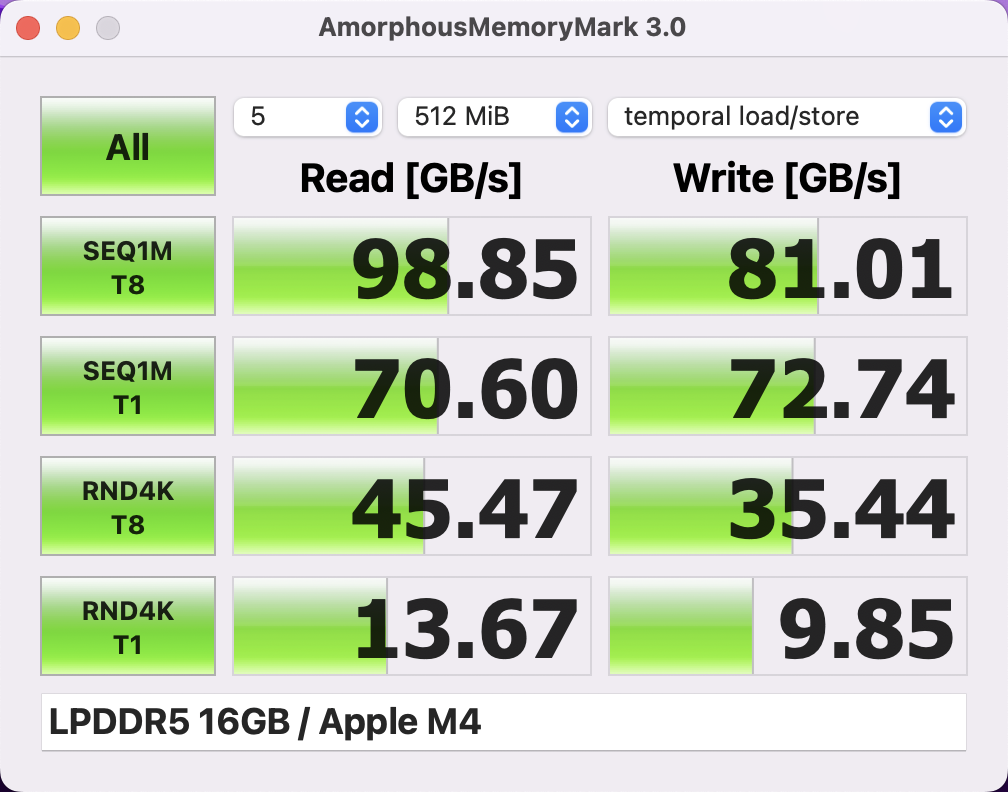
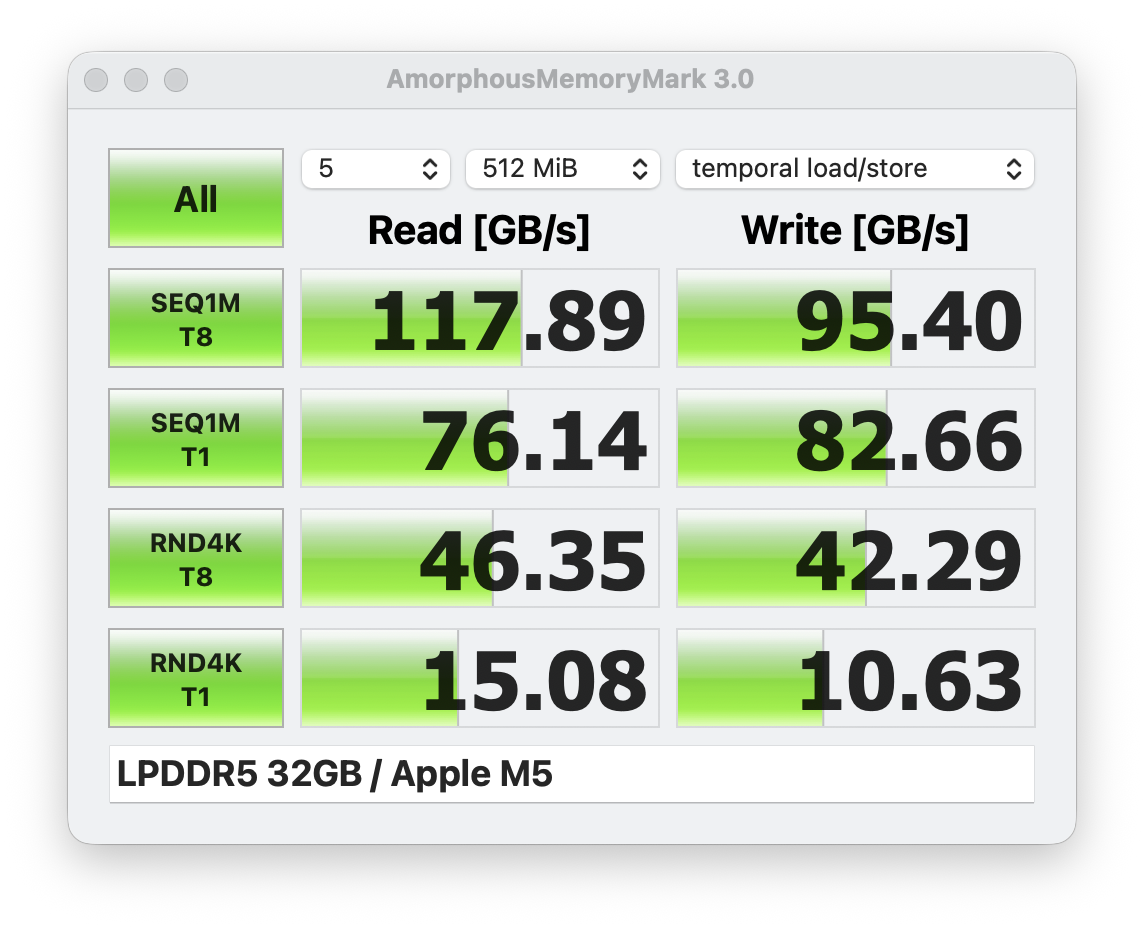
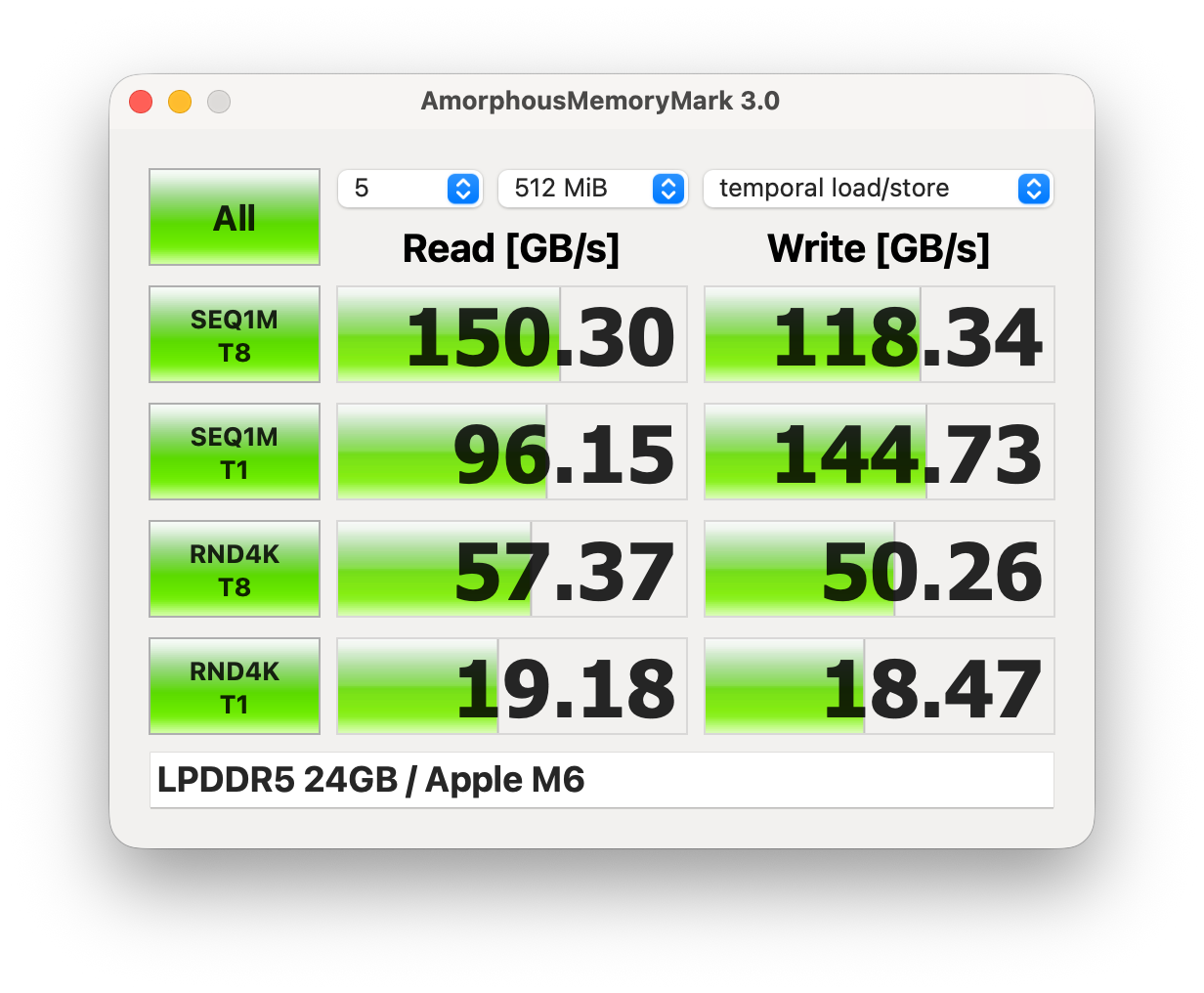
As mentioned before, the memory bandwidth depends on the amount of system memory. M6 systems with 16 GB RAM have an advertised memory bandwidth of 153 GB/s, which is comparable to the previous M5 generation. Our test system with 24 GB RAM is advertised with a memory bandwidth of up to 170 GB/s and we can confirm higher results in the Memory Mark benchmark as shown by the pictures below.
AI Performance
While the Mac mini is obviously not designed for large AI models with its memory limitations, it is a pretty capable chip and the benchmarks results in Geekbench AI are very good. It usually beats the old M5 generation 20-40 % depending on the benchmark and is also faster than the Panther Lake chips and much faster than the Snapdragon X2 chips.
GPU Performance & Efficiency
The performance of the new M6 GPU with 12 cores is right between the old M4 Pro GPUs with 16 and 20 cores and also between the powerful Arc B370 and Arc B390 Intel Panther Lake iGPUs. The advantage over the M5 GPU with 10 cores is 30 % and the advantage over the M4 10-core GPU is around 80 %. The fastest iGPU from Qualcomm, the Adreno X2-90, is beaten by 23 %. All the other iGPUs from Intel and AMD (except Strix Halo) are considerably slower than the M6 GPU.
3DMark: Steel Nomad Score | Steel Nomad Light Score | Wild Life Extreme
Cyberpunk 2077: 1920x1080 Ultra Preset (FSR off)
Baldur's Gate 3: 1920x1080 Ultra Preset AA:T
| Cyberpunk 2077 / Ultra Preset (FSR off) | |
| Apple M5 Pro 20-Core GPU | |
| Intel Arc B390 12 Xe3 Panther Lake iGPU (2.21) | |
| Intel Arc B390 12 Xe3 Panther Lake iGPU (2.31) | |
| Intel Arc B370 10 Xe3 Panther Lake iGPU (2.31) | |
| Apple M4 Pro 16-Core GPU (2.3) | |
| Apple M4 Pro 16-Core GPU (2.13 Crossover) | |
| Apple M4 Pro 20-Core GPU | |
| Qualcomm Adreno X2-90 (2.31) | |
| Apple M6 12-Core GPU | |
| Qualcomm Adreno X2-90 (2.31) | |
| Apple M5 10-Core GPU | |
| Qualcomm Adreno X2-85 (2.31) | |
| Apple M5 10-Core GPU | |
| Intel Arc Graphics 140V (2.21) | |
| Intel Graphics 4 Xe3 Panther Lake iGPU (2.31) | |
| Qualcomm SD X2 Adreno X2-45 (2.31) | |
| AMD Radeon 860M (2.31) | |
| Apple M4 10-core GPU | |
| AMD Radeon 890M (2.31) | |
| Apple M4 8-Core GPU | |
| Qualcomm SD X Adreno X1-45 1.7 TFLOPS | |
3DMark: Steel Nomad Score | Steel Nomad Light Score | Wild Life Extreme
Cyberpunk 2077: 1920x1080 Ultra Preset (FSR off)
Baldur's Gate 3: 1920x1080 Ultra Preset AA:T
We use Cyberpunk 2077 for our GPU efficiency measurements, but until the end of 2025 we used the emulated version on Macs, which also includes the MacBook Pro 14 M5. The only M5 10-core comparison data with the native version of Cyberpunk is from the passively cooled MacBook Air, where the TDP throttles significantly and the overall performance is much lower. The MacBook Air 15 M5 is slightly more efficient, but the difference is not huge and the updated MacBook Air M6 models will be much better based on our M6 measurements.
The Adreno X2-90 in the Zenbook A14 is pretty close in terms of efficiency, but the overall performance is once again much lower (-27 %). However, Qualcomm definitely reduced the gap with their Snapdragon X2 generation. Intel's Arc B390 also performs well here, but all the other rivals are clearly falling behind.
* ... smaller is better
Verdict - Apple's new M6 SoC crushes the competition
Apple new M6 SoC is an impressive chip, especially considering this is the new entry-level SoC and you can get it for $899 in the new Mac mini. It offers the highest single-core performance you can currently get in any personal computer, easily beats the competition in the form of Intel's Panther Lake chips and AMD Gorgon Point in multi-core scenarios and also outperforms Qualcomm's Snapdragon X2 generation (except for the high-end Snapdragon X2 Elite Extreme) in multi-core scenarios. The GPU performance is also excellent and not far off the Panther Lake Arc B390 iGPU while being more efficient.
The advantage is also pretty healthy compared to the M4 and M5 generations, but the new M6 SoC is also more efficient across the board thanks to the new 2 nm manufacturing process. These chips will once again be great for the fanless MacBook Air models or the base MacBook Pro 14. AI performance is impressive as well, even though the M6 is limited to 32 GB RAM. Apple clearly sees M6 systems as entry points for AI workloads and leaves more complex AI scenarios for the Pro SoCs with higher memory configurations.
All in all, the new M6 SoC is an excellent chip and it once again increases the gap over the competition.
 Add as a preferred source on Google


