Notebookcheck Logo
Teaser

Apple MacBook Neo Review - Surprisingly good and capable laptop for $599 with one big flaw

A problem for budget Windows laptops.

Apple's new MacBook Neo is the first budget MacBook powered by the A18 Pro smartphone processor for $599. The result is a laptop that looks and feels like a MacBook, and is also surprisingly powerful for what it is. There is one big flaw though.
Andreas Osthoff 👁 Published
AI Apple ARM Laptop MacBook macOS

Verdict - MacBook Neo is a surprisingly good laptop for $599

The new MacBook Neo feels like a typical MacBook, which means you do not have to make any compromises in terms of chassis quality, typing experience and also the display. Yes, the screen is not as good as on the MacBook Air, but it is also not that far off and considering the low price, the quality is really good. The panel does not support P3 color gamut (which is not really a big deal) or True Tone, even though a brightness sensor is included. The screen is very sharp and accurate in return, so even picture editing is possible. There is no PWM flickering, but the screen uses temporal dithering. The brightness is good at more than 500 nits, even though it is more reflective compared to the MacBook Air.

In terms of performance, the A18 Pro smartphone processor is surprisingly powerful and offers more single-core as well as graphics performance compared to the entry-level Snapdragon-X-CPUs from Qualcomm, only the multi-core performance is lower. However, it is still sufficient for everyday tasks and the overall experience feels snappy. Sure, heavy multitasking will be an issue and also fill the 8 GB RAM very quickly, but this is not the target scenario for the MacBook Neo anyway. And if you keep it light and primarily use Apple's native apps, it will be a very snappy and silent daily companion. While neither the memory, nor the SSD can be upgraded, the repairability of the components is actually pretty good (no glue, all parts accessible).

There are additional drawbacks: You only get two USB-C ports and one of them is limited the old 2.0 standard, but it can at least be used for charging. Only the more expensive model with 512 GB SSD storage gets Touch-ID, but the biggest issue in our opinion is definitely the lack of a keyboard backlight. The battery runtime also drops significantly when you use a higher display brightness.

Sure, the MacBook Air M4 is a better device overall if you find a good deal, it might be an alternative if you want the $699 MacBook Neo, but we think the base model for $599 (or $499 for education customers) will be very successful and to be honest, Windows does not really offer an alternative. Yes, you could get a refurbished or used device, but this is not the target audience for the new MacBook Neo. The Neo could also be better right now (A19 Pro with 12 GB RAM, backlit keyboard), but we are pretty sure it would have been more expensive, and Apple probably wants to keep some things for an improved second generation of the MacBook Neo. 

Pros

+ high-quality and stable aluminum chassis
+ always silent
+ bright IPS screen with very accurate colors and sRGB
+ good system performance
+ comfortable input devices
+ good speakers
+ long battery runtime at 150 nits
+ no PWM
+ improved repairability

Cons

- no keyboard backlight
- only 8 GB soldered RAM/SSD not upgradeable
- only 2x USB-C (1x USB 2.0)
- Touch-ID reserved for the more expensive SKU
- short battery runtime at high brightness levels
- slow charging speeds
- temporal dithering and very reflective screen

Price and Availability

You can get the new MacBook Neo from Amazon for $599.

Apple is entering uncharted territory with the new 13-inch MacBook Neo, which starts at just $599 (or $499 for education customers) powered by the smartphone chip A18 Pro, 8 GB RAM and 256 GB SSD storage. We bought our base model at a local Apple store on launch day. The optional SKU for $699 offers a larger 512 GB SSD as well as a Touch-ID fingerprint scanner.

Specifications

Apple MacBook Neo 256 GB
Processor
Apple A18 Pro 6c/6t, 2 x 4.0 GHz Apple A18 P-Core, 4 x 2.4 GHz Apple A18 E-Core, 6 W PL2 / Short Burst, 3.8 W PL1 / Sustained
Graphics adapter
Apple A18 GPU, 6 W TDP
Memory
8 GB 
, LPDDR5-6400, onboard
Display
13.00 inch 16:10, 2408 x 1506 pixel 218 PPI, IPS, glossy: yes, 60 Hz
Storage
Apple SSD AP0256Z, 256 GB 
, 194 GB free
Connections
1 USB 2.0, 1 USB 3.1 Gen2, USB-C Power Delivery (PD), 1 DisplayPort, Audio Connections: 3.5 mm Stereo, Brightness Sensor
Networking
Wi-Fi 6E (a/b/g/n = Wi-Fi 4/ac = Wi-Fi 5/ax = Wi-Fi 6/ Wi-Fi 6E 6 GHz), Bluetooth 6
Size
height x width x depth (in mm): 12.7 x 297.5 x 206.4 ( = 0.5 x 11.71 x 8.13 in)
Battery
36.5 Wh Lithium-Ion
Operating System
Apple macOS 26 Tahoe
Camera
Webcam: FaceTime HD
Primary Camera: 2 MPix
Additional features
Speakers: Stereo, Keyboard: Chiclet, USB-C cable, 12 Months Warranty
Weight
1.235 kg ( = 43.56 oz / 2.72 pounds) ( = 0 oz / 0 pounds)
Price
699 Euro
Note: The manufacturer may use components from different suppliers including display panels, drives or memory sticks with similar specifications.


Case - MacBook Neo feels like a regular MacBook

MacBook Neo in Silver, Blush, Citrus & Indigo
ⓘ Apple
MacBook Neo in Silver, Blush, Citrus & Indigo

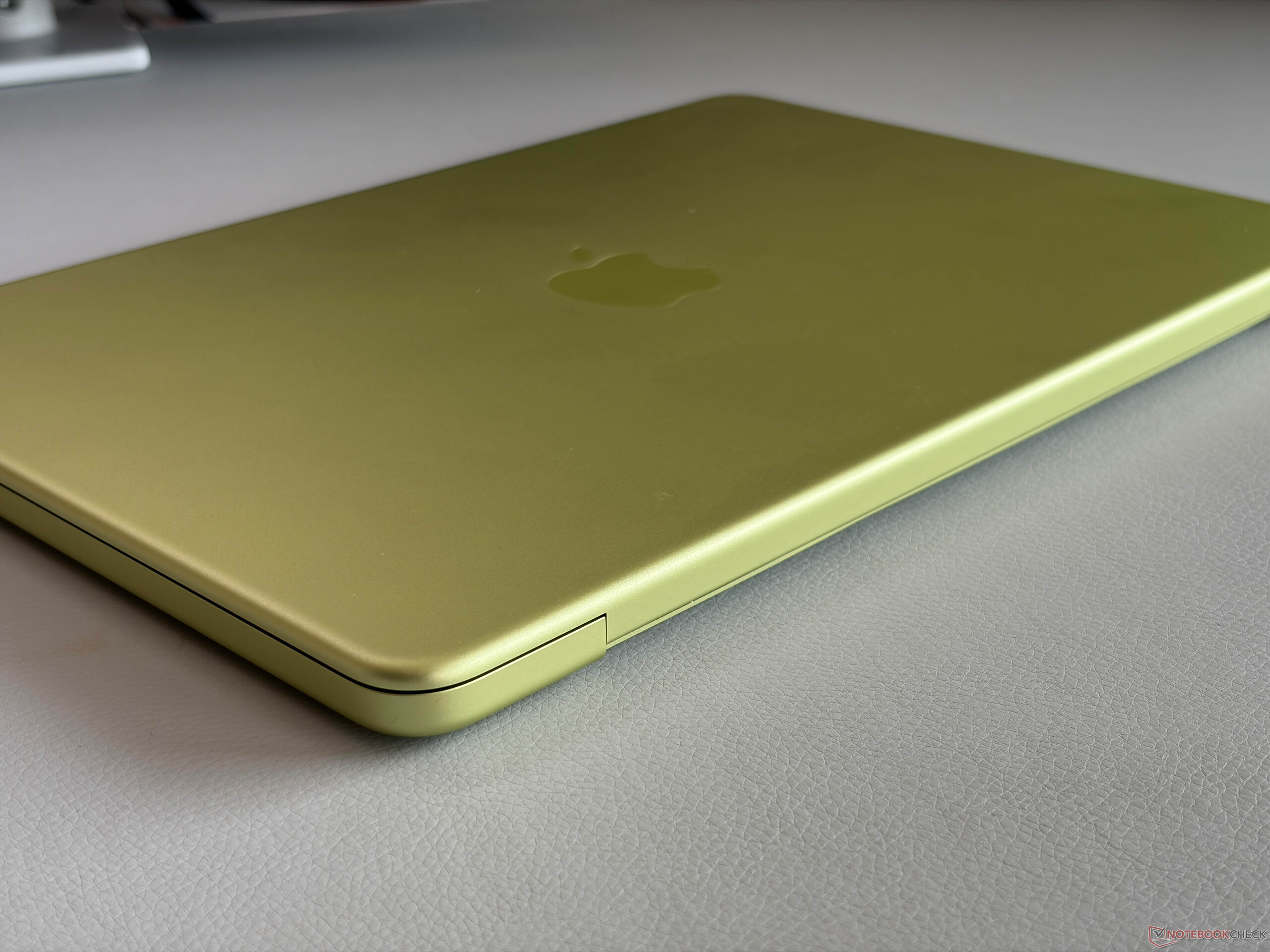
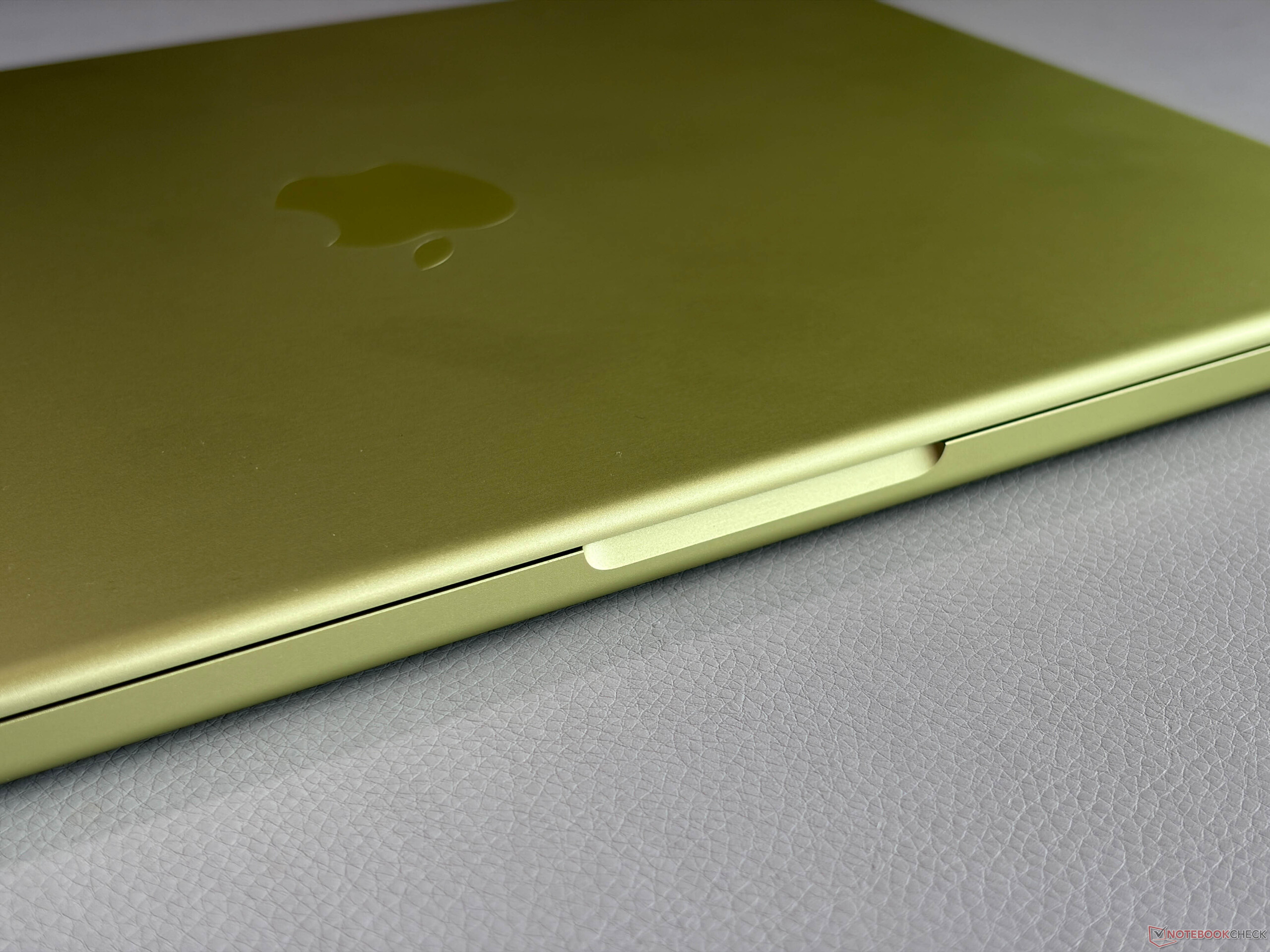
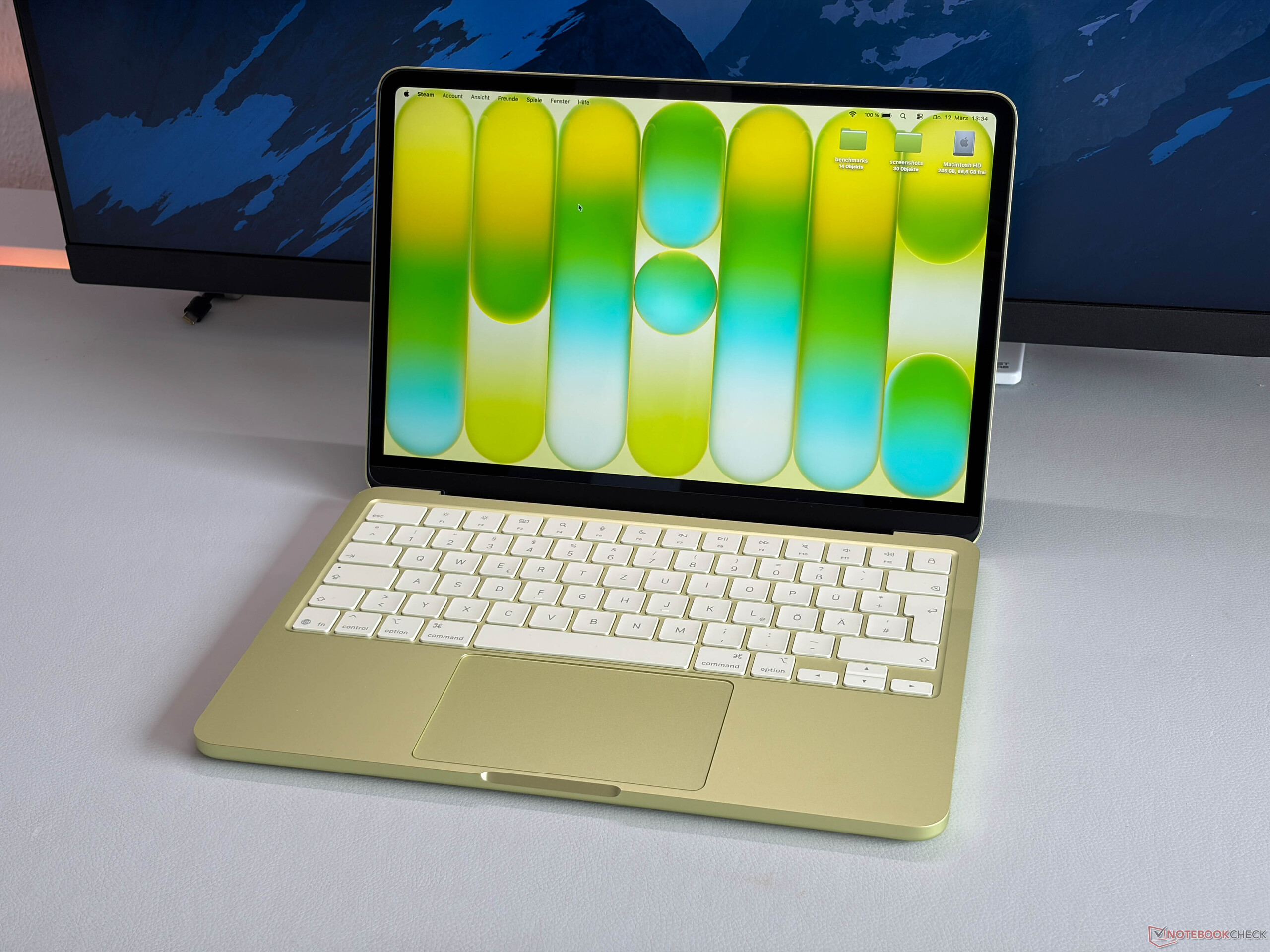
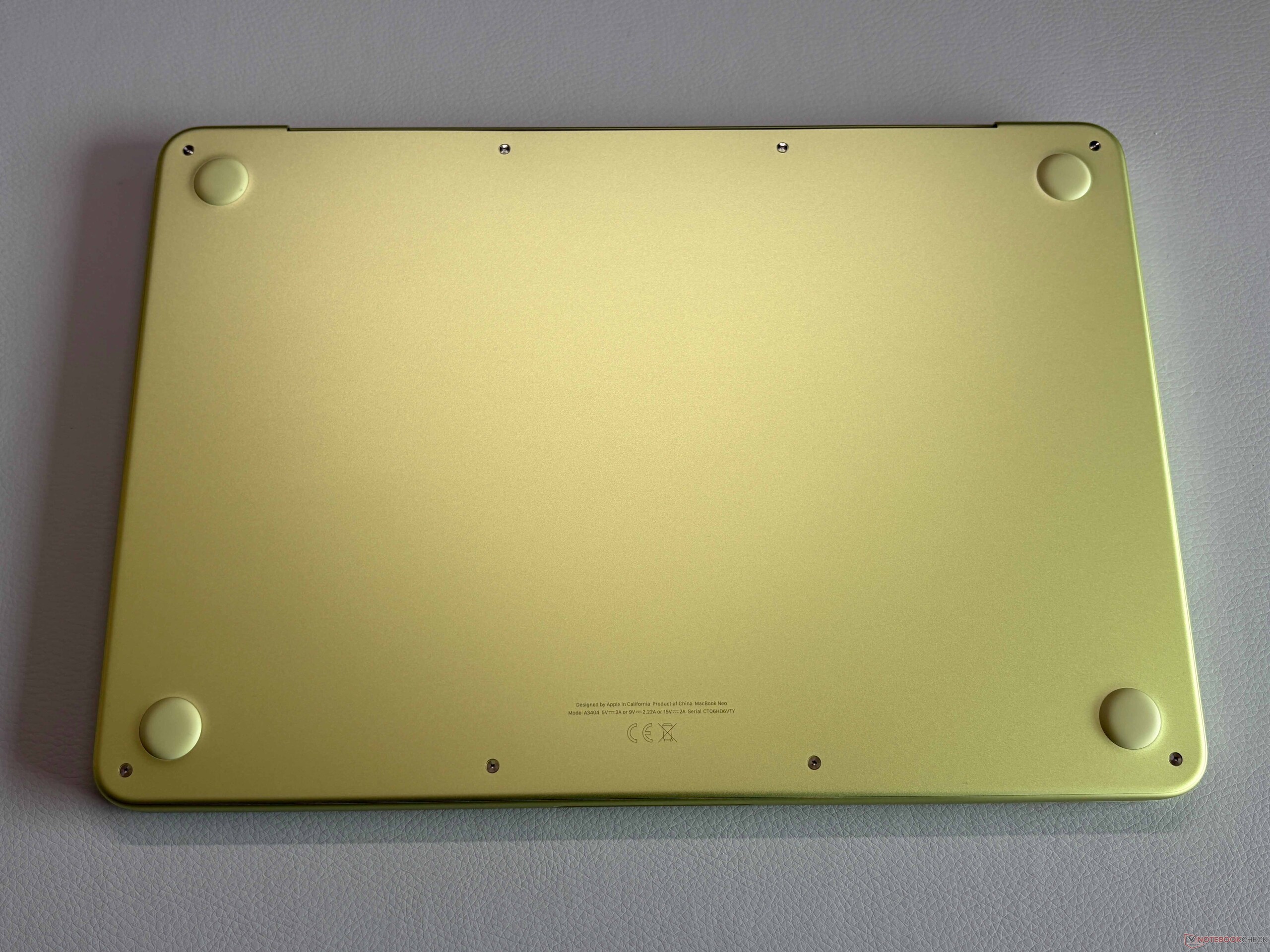
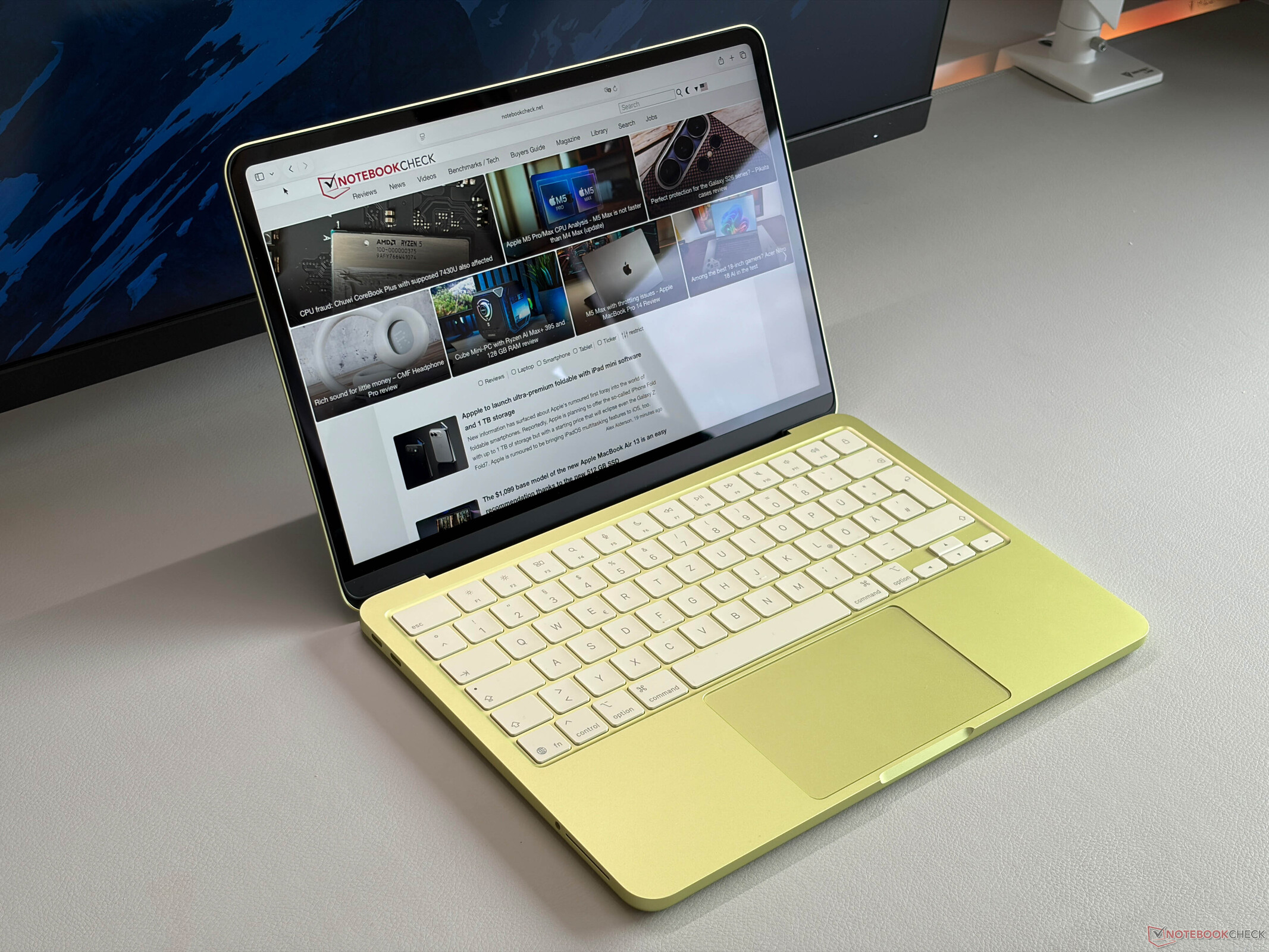
Apple offers the new MacBook Neo in four different colors, and we got the Citrus version. It is definitely pretty fresh, but this is obviously a matter of taste. If you prefer a lower profile, there is also the silver version. Apple also colored the rubber feet and also the macOS colors, even though this can be changed. The keyboard on our model also has a slight color hue towards yellow, but it is subtle.

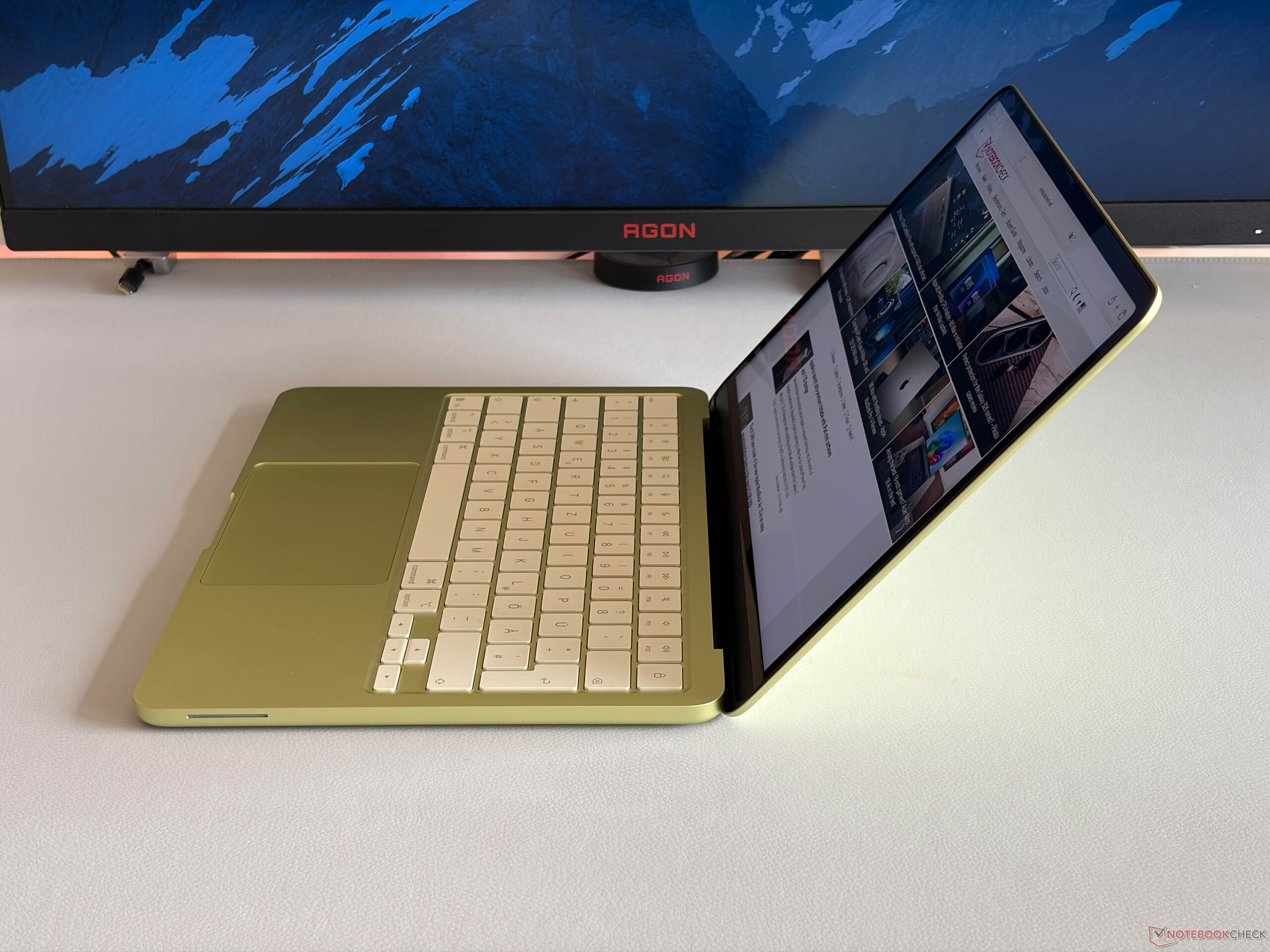
Apple uses an aluminum chassis and the quality is better than what you expect for $599 and pretty much like on all the other and more expensive MacBooks. It also feels like a regular MacBook when you use it and both the build quality as well as the stability are very good. This is also the case for the lid, and we cannot provoke picture distortions with pressure from the back. The hinges are well adjusted and there is no significant wobble, but at the same time you can easily open the lid with one hand (max. opening angle 135 degrees). There is no display notch, which improves the design in our opinion, even though the bezels are very thick.
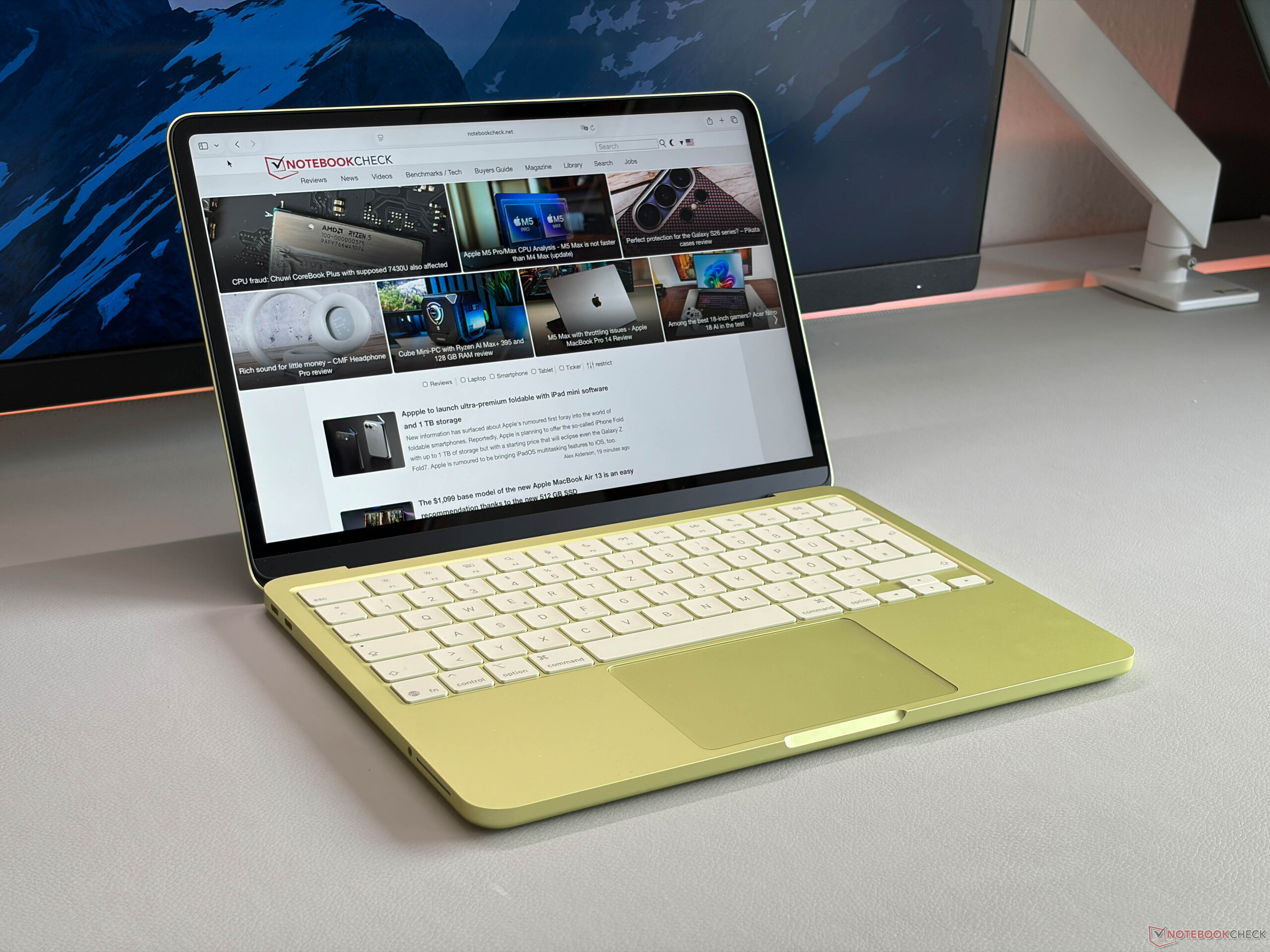
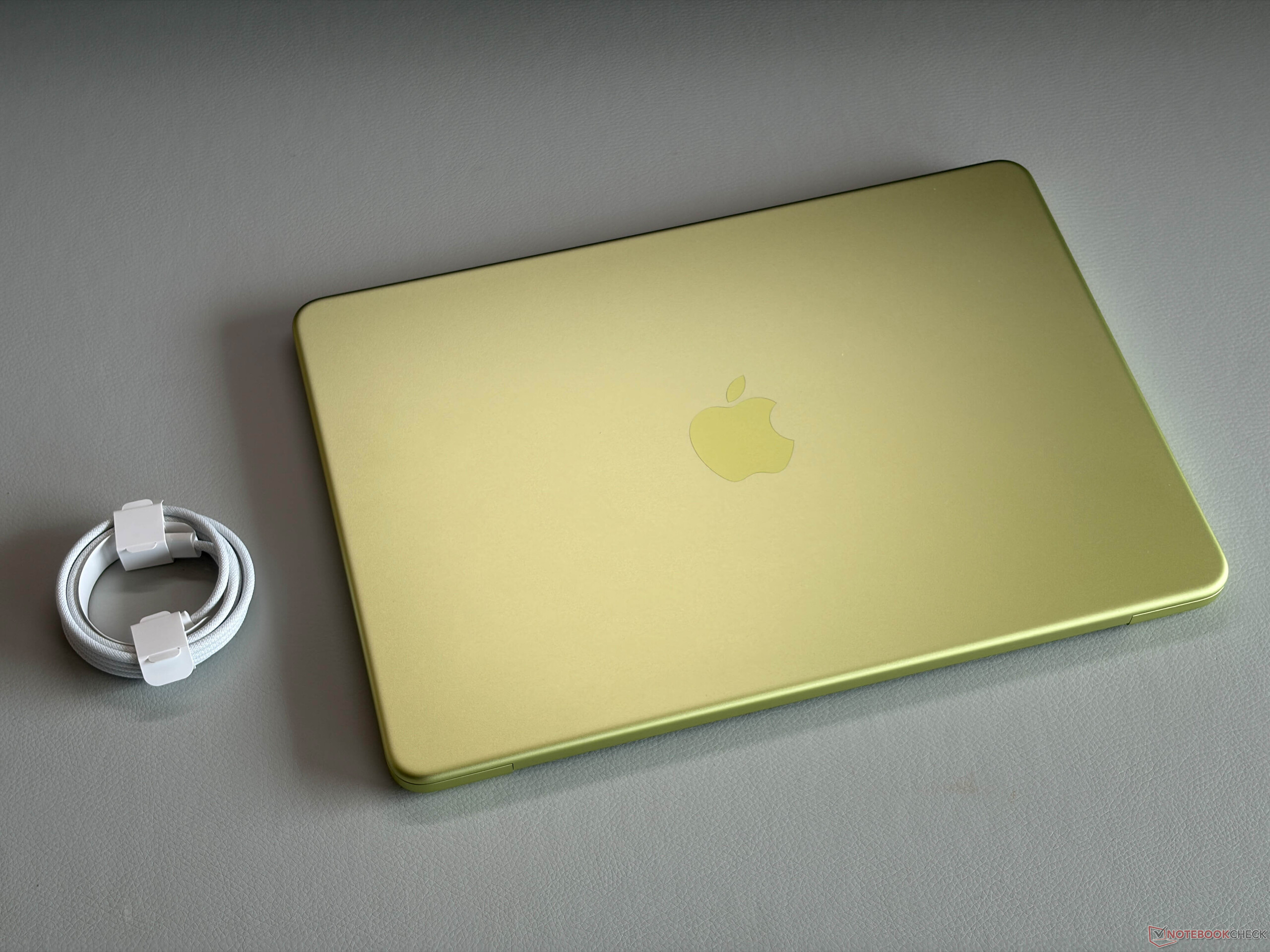
The MacBook Neo (12.7 mm) is a bit thicker compared to the current MacBook Air (11.3 mm). It weighs pretty much the same as the current MacBook Air at 1.235 kg, so it is very compact overall. We also took some pictures with our own MacBook Air M1 for comparison, which has a slightly larger footprint.

MacBook Neo (left) vs. MacBook Air M1 (right)

Size Comparison

314.4 mm / 12.4 in 222.1 mm / 8.74 in 17.9 mm / 0.705 in 1.5 kg3.2 lbs312 mm / 12.3 in 217.4 mm / 8.56 in 12.7 mm / 0.5 in 1.3 kg2.85 lbs304.1 mm / 12 in 215 mm / 8.46 in 11.3 mm / 0.4449 in 1.2 kg2.7 lbs297.5 mm / 11.7 in 206.4 mm / 8.13 in 12.7 mm / 0.5 in 1.2 kg2.72 lbs285.7 mm / 11.2 in 214.1 mm / 8.43 in 15.6 mm / 0.614 in 1.2 kg2.69 lbs297 mm / 11.7 in 210 mm / 8.27 in 1 mm / 0.03937 in 5.7 g0.01257 lbs

Connectivity - Neo with USB 3.0 & 2.0

The MacBook Neo works fine attached to a 4K screen with peripherals.

The connectivity is one area where you notice the low price. Apple only includes two USB-C ports, and one of them is limited to the old USB 2.0 standard. It can at least be used for charging as well, so it is not completely useless. The rear USB-C port (3.2 Gen. 2) can be used to attach an external screen, and the Neo supports one external screen at up to 4K resolution (60 Hz) in addition to the internal screen. We tried it with our regular desk setup, and it worked fine with our screen via USB-C (charging and using the speakers as well as input devices that are directly connected to the screen). The two USB-C ports are located at the left rear, while the 3.5 mm stereo jack is positioned more towards the front. 

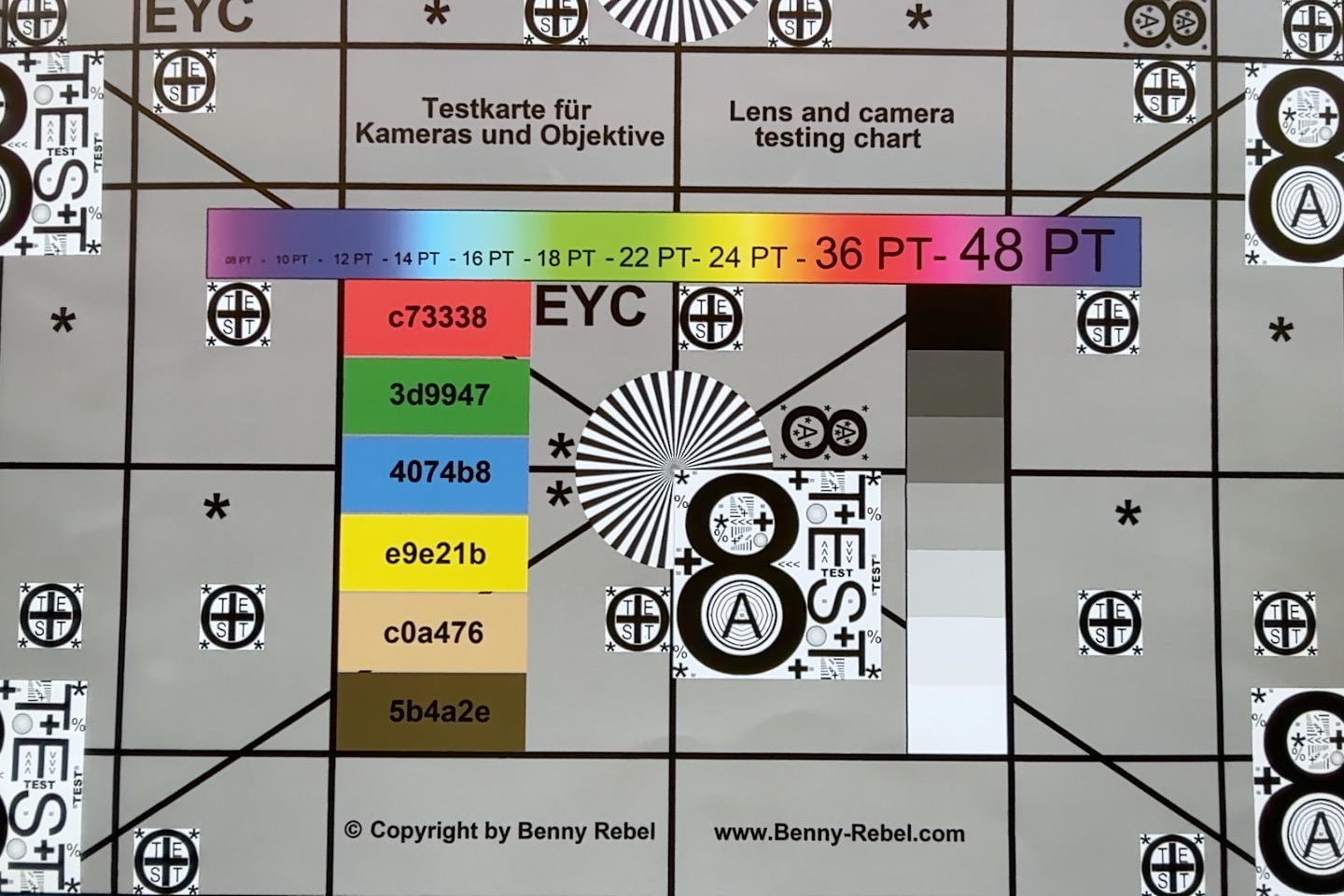
The Wi-Fi module supports Wi-Fi 6E and the results in our standardized test were okay. The receiving performance was pretty solid at around 1.1-1.3 Gbps, but while sending data, there were bigger fluctuations. Still, we did not experience any issues while downloading games, files or simply watching YouTube videos. The 1080p FaceTime HD webcam takes decent pictures and the microphones also work well, but it does not support Center Stage.

Left: USB-C 3.2 Gen.2 (10 Gbps, DisplayPort 1.4, Power Delivery), USB-C 2.0 (480 Mbps, Power Delivery), 3.5 mm stereo jack
Right: No ports
Right: No ports
Networking
Apple MacBook Neo 256 GB
Wi-Fi 6E
iperf3 transmit AXE11000
1118 (min: 876) MBit/s ∼69%
iperf3 receive AXE11000
1293 (min: 1243) MBit/s ∼76%
Microsoft Surface Laptop 13
Qualcomm FastConnect 7800
iperf3 transmit AXE11000
1467 (min: 1397) MBit/s ∼91%
iperf3 receive AXE11000
1706 (min: 1635) MBit/s ∼100%
HP Omnibook 5 14
Qualcomm Fast Connect 6900 Wi-Fi 6E Dual Band Simultaneous
iperf3 transmit AXE11000
923 (min: 757) MBit/s ∼57%
iperf3 receive AXE11000
1300 (min: 1008) MBit/s ∼76%
iperf3 transmit AXE11000 6GHz
524 (min: 496) MBit/s ∼100%
iperf3 receive AXE11000 6GHz
1628 (min: 1583) MBit/s ∼100%
Lenovo IdeaPad Slim 3 14 AHP G10
Mediatek Wi-Fi 7 MT7925 Wireless LAN Card
iperf3 transmit AXE11000
1611 (min: 1556) MBit/s ∼100%
iperf3 receive AXE11000
1710 (min: 1679) MBit/s ∼100%
050100150200250300350400450500550600650700750800850900950100010501100115012001250130013501400Tooltip
Apple MacBook Neo 256 GB; iperf3 transmit AXE11000: Ø1118 (876-1401)
Apple MacBook Neo 256 GB; iperf3 receive AXE11000: Ø1293 (1243-1368)
ColorChecker
19 ∆E
9.8 ∆E
16.3 ∆E
20.9 ∆E
13.3 ∆E
10.6 ∆E
6.7 ∆E
13.9 ∆E
10.8 ∆E
11.3 ∆E
9.7 ∆E
4.9 ∆E
10.8 ∆E
14.6 ∆E
12.8 ∆E
3.6 ∆E
12.5 ∆E
17.5 ∆E
2.4 ∆E
6.7 ∆E
14 ∆E
20.3 ∆E
25 ∆E
4.6 ∆E
ColorChecker Apple MacBook Neo 256 GB: 12.18 ∆E min: 2.44 - max: 25.05 ∆E

Maintenance

The bottom panel is secured by pentalobe screws and can be easily removed. While neither the RAM nor the storage can be upgraded, the MacBook Neo is actually pretty easy to repair and all components like the battery, the speaker modules, the ports etc. are fixed with screws and Apple uses no adhesives. This is definitely a step in the right direction.

Internal layout
Internal layout
Mechanical clickpad mechanism
Small motherboard at the top

Sustainability

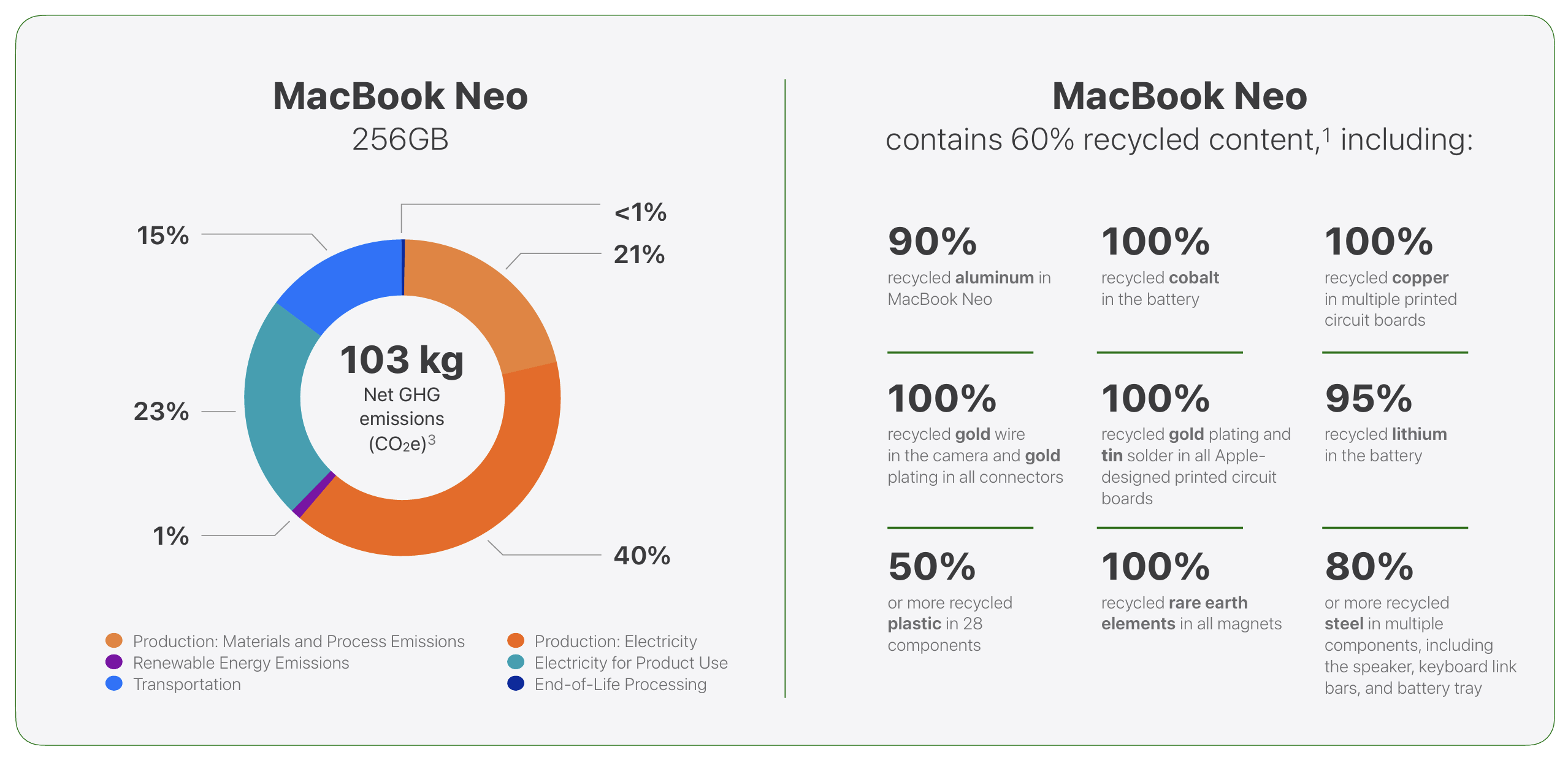
Apple offers a comprehensive environmental report for the MacBook Neo with data about CO2 emissions as well as the use of recycled materials for the device as well as packaging. The projected carbon footprint for our base model is 103 kg CO2e.
Environmental data
ⓘ Apple
Environmental data

Input Devices - Familiar typing experience, good mechanical trackpad

The keyboard offers a familiar typing experience for anyone who has used a MacBook over the last couple of years. Key travel is rather shallow, but the feedback is precise and it is comfortable overall. Our base model does not feature the Touch-ID fingerprint scanner and just has a regular power button with lock feature. The biggest issue we have with the keyboard is the lack of background illumination.

Input devices
Input devices

Apple drops the haptic trackpad from the MacBook Air and uses a mechanical version instead. Contrary to clickpads on Windows laptops (which can only be clicked in the lower half), however, Apple's version can be clicked everywhere, because the mechanism uses a button in the center. This results in a very even feedback and we had no issues with the pad, even though it is pretty small for a modern laptop at 11.5 x 7.2 cm.

Display - IPS with 500 nits

Subpixel array
Subpixel array
Visible backlight bleeding at max. brightness

Apple uses a 13-inch IPS-screen with the resolution of 2408 x 1506 pixels (16:10) and 60 Hz, which provides sharp as well as crisp colors. One thing you will immediately notice is the lack of the notch, but to be honest, the menu bar now eats into the vertical space of the regular 16:10 display, which is not the case on the MacBook Air (where the menu bar is sitting next to the notch and on top of the regular 16:10 screen). Overall, the image quality is really good for this price. The brightness can be adjusted automatically, but there is no True Tone. Compared to other glossy MacBook screens, the panel of the MacBook Neo is noticeably more reflective and that can quickly be an issue outdoors.

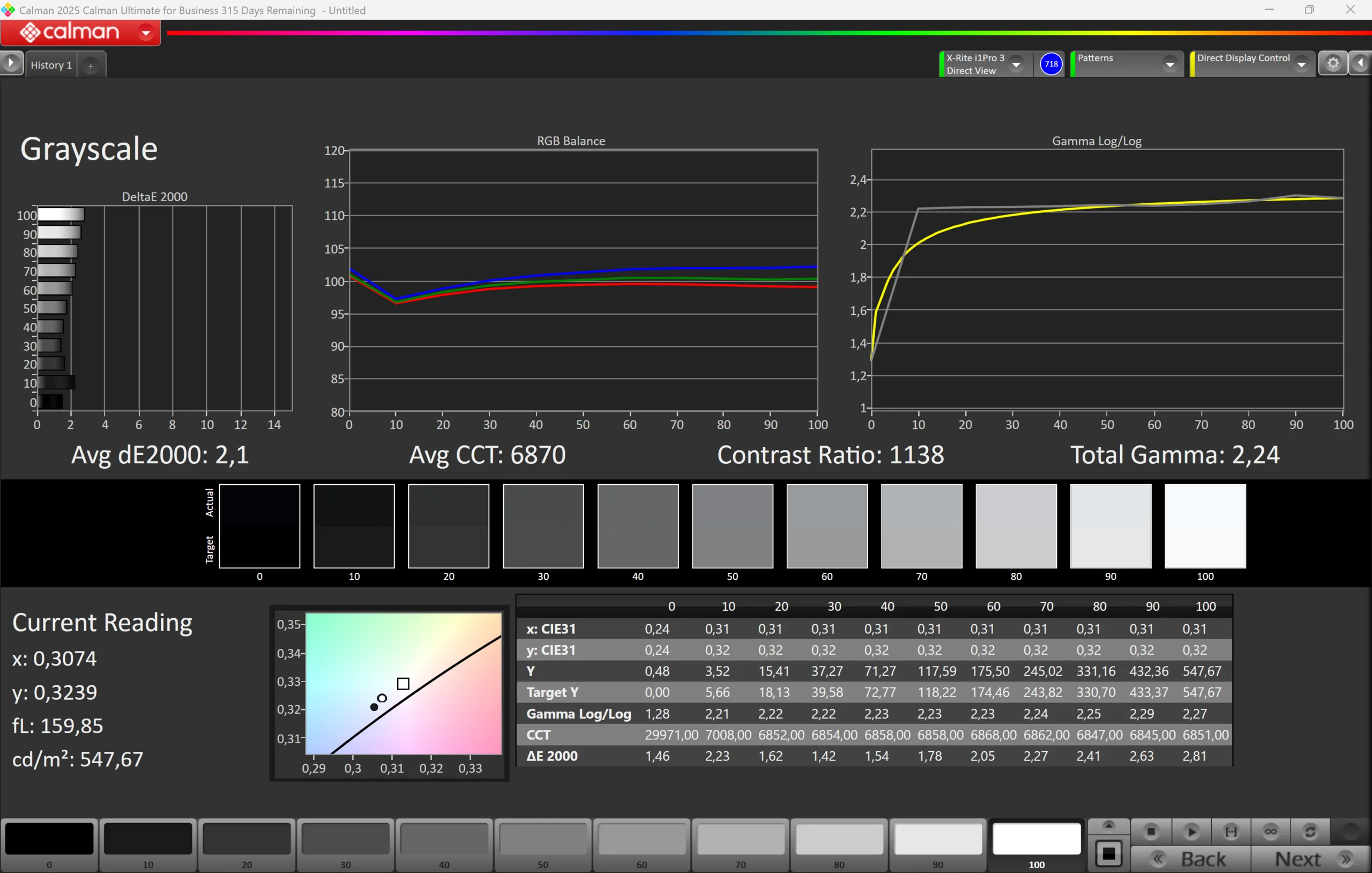
The brightness is very good at more than 500 nits, but the black value is pretty high at 0.48, so the maximum contrast ratio is just ~1150:1 and black contents look more like dark gray. There is also some backlight bleeding around the corners at high brightness values. 

500
cd/m²
531
cd/m²
499
cd/m²
524
cd/m²
548
cd/m²
513
cd/m²
512
cd/m²
532
cd/m²
514
cd/m²
Distribution of brightness
tested with X-Rite i1Pro 3
Maximum: 548 cd/m² (Nits) Average: 519.2 cd/m² Minimum: 1.8 cd/m²
Brightness Distribution: 91 %
Center on Battery: 548 cd/m²
Contrast: 1142:1 (Black: 0.48 cd/m²)
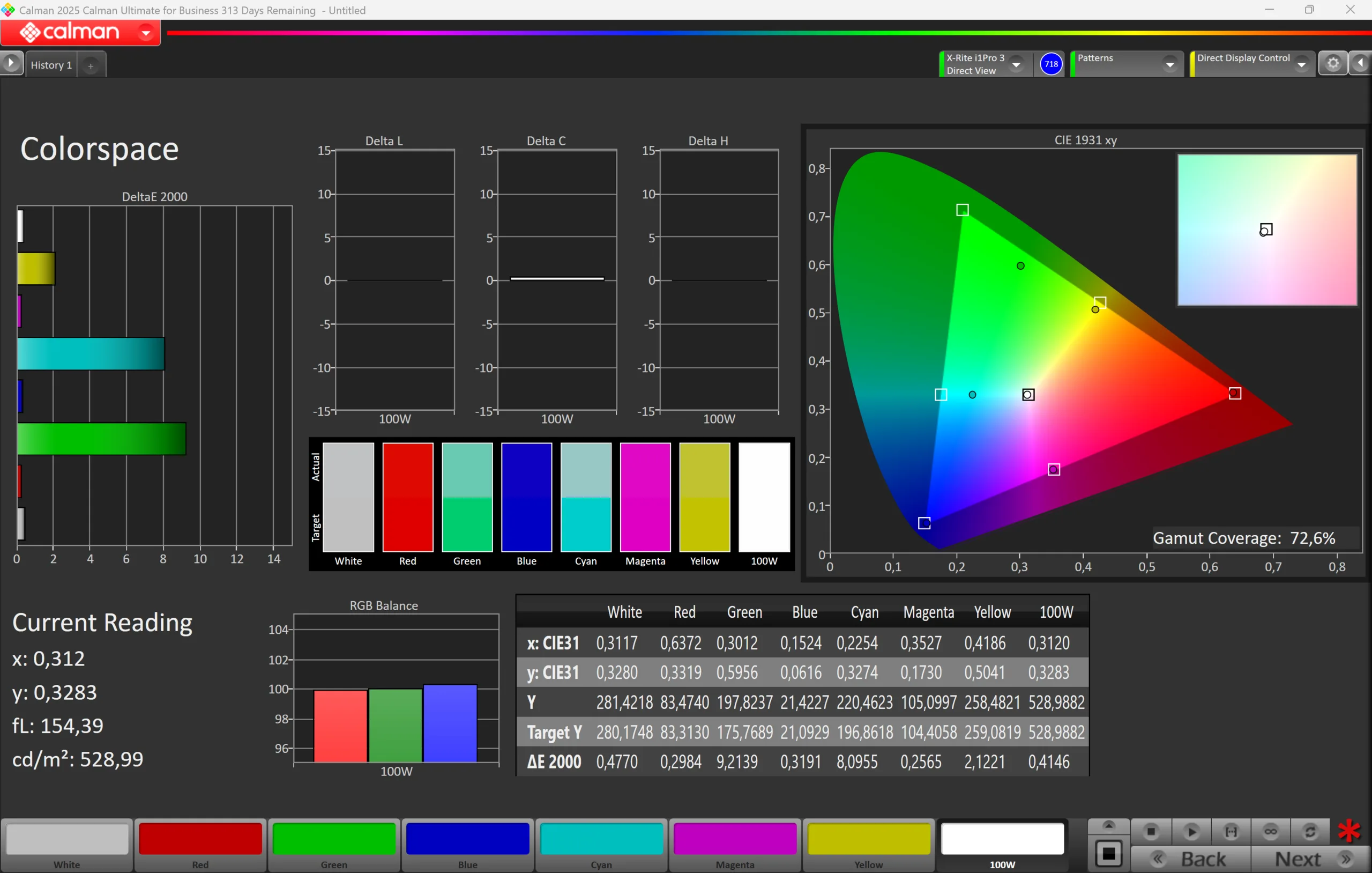
ΔE ColorChecker Calman: 1.4 | ∀{0.5-29.43 Ø4.75}
calibrated: 0.4
ΔE Greyscale Calman: 2.1 | ∀{0.09-98 Ø5}
72.6% AdobeRGB 1998 (Argyll 3D)
72.2% sRGB (Argyll 3D)
97.9% Display P3 (Argyll 3D)
Gamma: 2.24
CCT: 6870 K
Apple MacBook Neo 256 GB
IPS, 2408x1506, 13", 60 Hz
Microsoft Surface Laptop 13
LP130WU112413, IPS, 1920x1280, 13", 60 Hz
HP Omnibook 5 14
Samsung SDC4213, OLED, 1920x1200, 14", 60 Hz
Lenovo IdeaPad Slim 3 14 AHP G10
LEN140WUXGA, IPS, 1920x1200, 14", 60 Hz
Apple MacBook Air 13 M4 Entry
IPS, 2560x1664, 13.6", 60 Hz
Display
3%
-3%
-41%
20%
Display P3 Coverage (%)
97.9
72.4
-26%
95
-3%
39.1
-60%
98.4
1%
sRGB Coverage (%)
72.2
97.6
35%
58.4
-19%
99.9
38%
AdobeRGB 1998 Coverage (%)
72.6
72.6
0%
40.4
-44%
87.9
21%
Response Times
-104%
90%
-49%
-76%
Response Time Grey 50% / Grey 80% * (ms)
20.8 ?(9.2, 11.6)
48.7 ?(22.5, 26.2)
-134%
1.67 ?(0.91, 0.76)
92%
31.4 ?(14.8, 16.6)
-51%
34.5 ?(16.9, 17.6)
-66%
Response Time Black / White * (ms)
14.6 ?(4.3, 10.3)
25.3 ?(12.4, 12.9)
-73%
1.84 ?(0.87, 0.97)
87%
21.3 ?(12.3, 9)
-46%
27.2 ?(15.5, 11.7)
-86%
PWM Frequency (Hz)
480
PWM Amplitude * (%)
13.5
Screen
19%
-53%
-227%
4%
Brightness middle (cd/m²)
548
417
-24%
288.7
-47%
304
-45%
525
-4%
Brightness (cd/m²)
519
409
-21%
289
-44%
281
-46%
506
-3%
Brightness Distribution (%)
91
92
1%
98
8%
89
-2%
92
1%
Black Level * (cd/m²)
0.48
0.17
65%
0.22
54%
0.42
12%
Contrast (:1)
1142
2453
115%
1382
21%
1250
9%
Colorchecker dE 2000 *
1.4
1.3
7%
3.43
-145%
5.9
-321%
1.4
-0%
Colorchecker dE 2000 max. *
3.1
2.9
6%
7.04
-127%
19.2
-519%
2.8
10%
Colorchecker dE 2000 calibrated *
0.4
4.7
-1075%
Greyscale dE 2000 *
2.1
2
5%
1.3
38%
4.5
-114%
2
5%
Gamma
2.24 98%
2.18 101%
2.2 100%
2.21 100%
2.2 100%
CCT
6870 95%
6890 94%
6336 103%
6098 107%
6876 95%
Total Average (Program / Settings)
-27% / -3%
11% / -16%
-106% / -162%
-17% / -5%

* ... smaller is better

CalMAN Grayscale
CalMAN Grayscale
CalMAN Saturation
CalMAN Saturation
CalMAN ColorChecker
CalMAN ColorChecker
CalMAN Grayscale calibrated
CalMAN Saturation calibrated
CalMAN ColorChecker calibrated

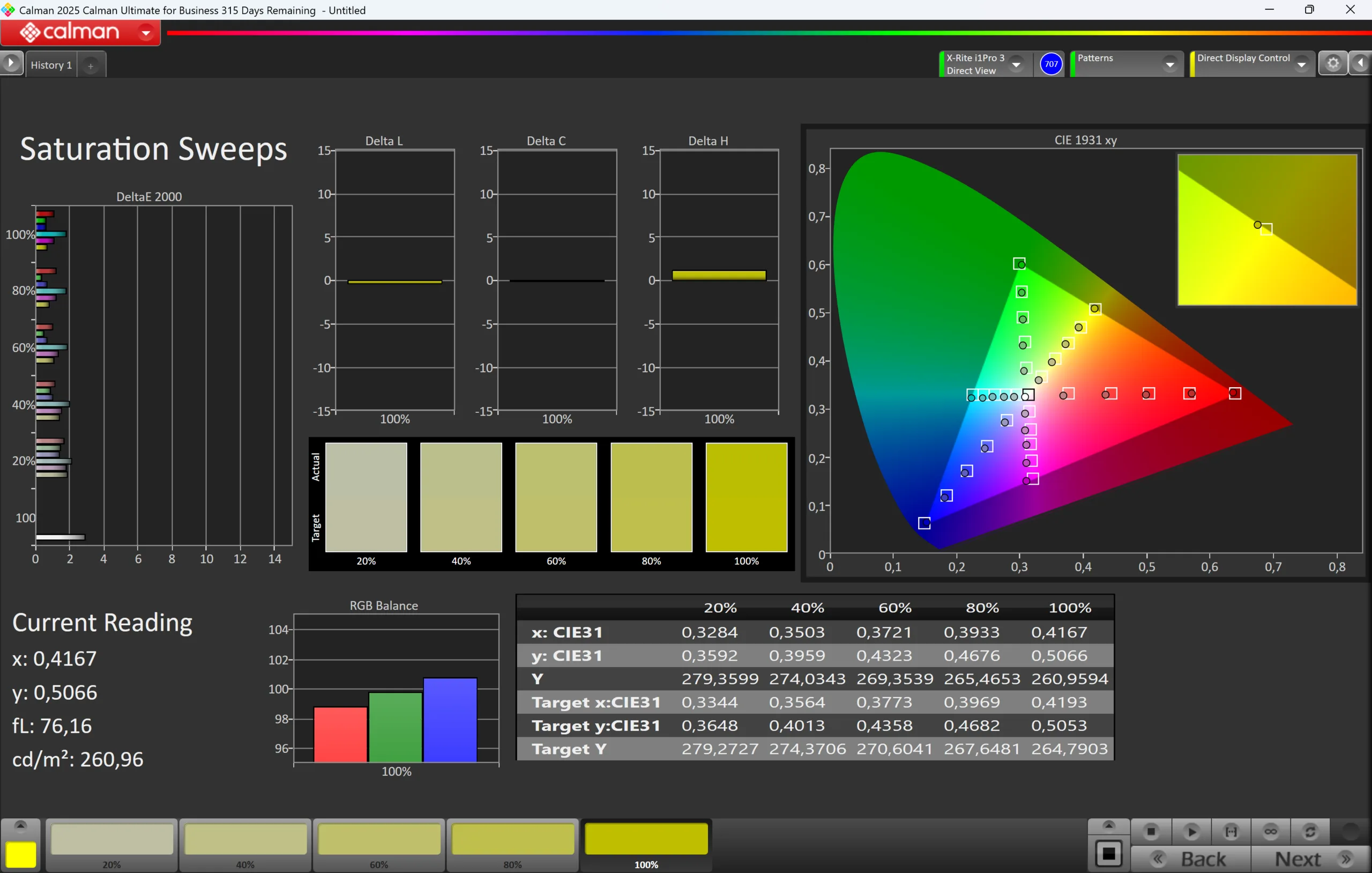
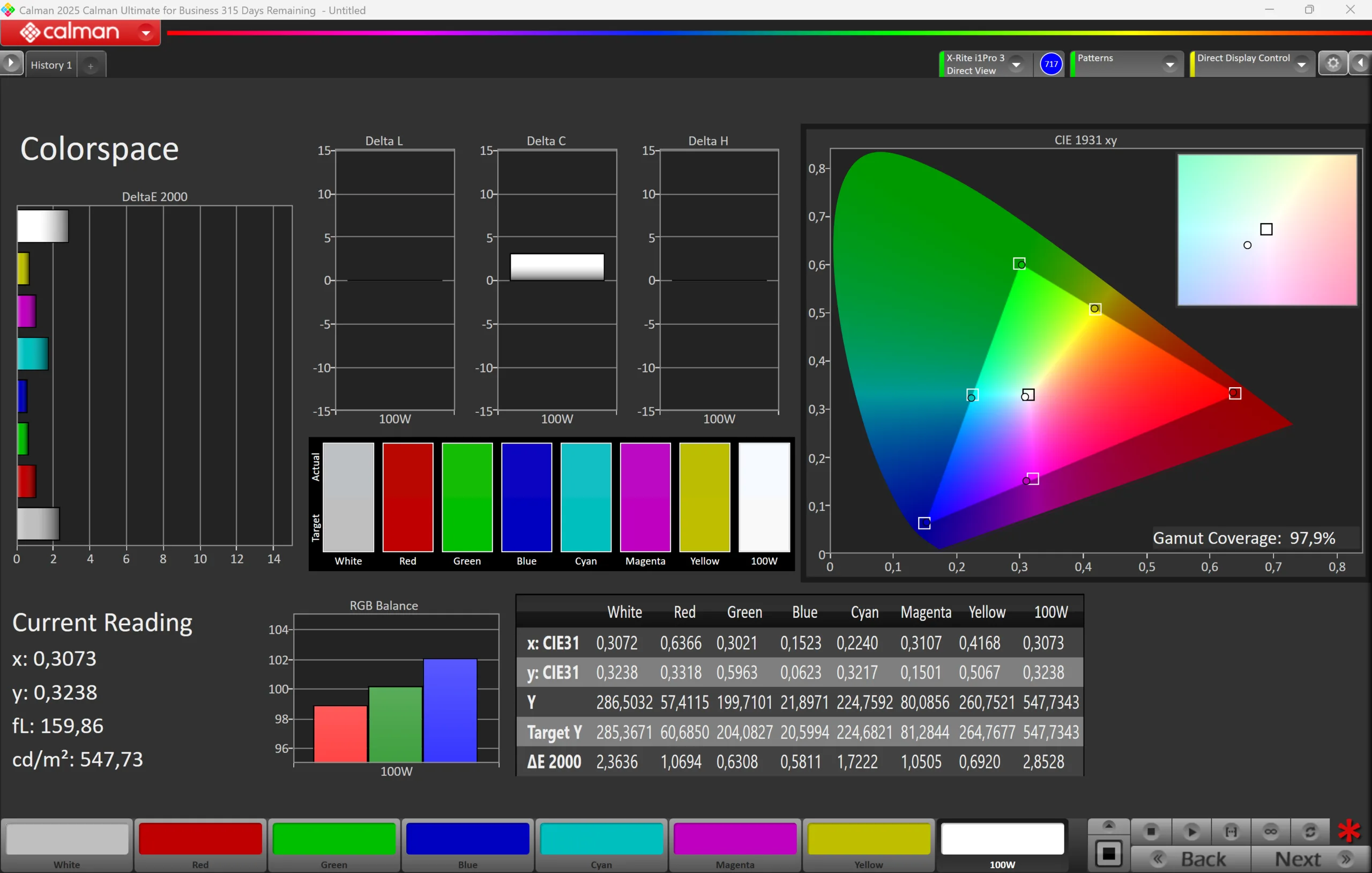
We analyzed the panel with the professional CalMAN software (X-Rite i1 Pro 3) and the picture is already very good out of the box. There is a small blue cast and the color temperature is a bit cool, but you wouldn't really notice it unless you have it right next to a calibrated screen. The panel has even more potential though, because we managed to improve the grayscale performance as well as the color accuracy noticeably with our own calibration. The corresponding color profile can be downloaded for free in the box above. Thanks to full sRGB color gamut, you can also use the MacBook Neo for picture/video editing.
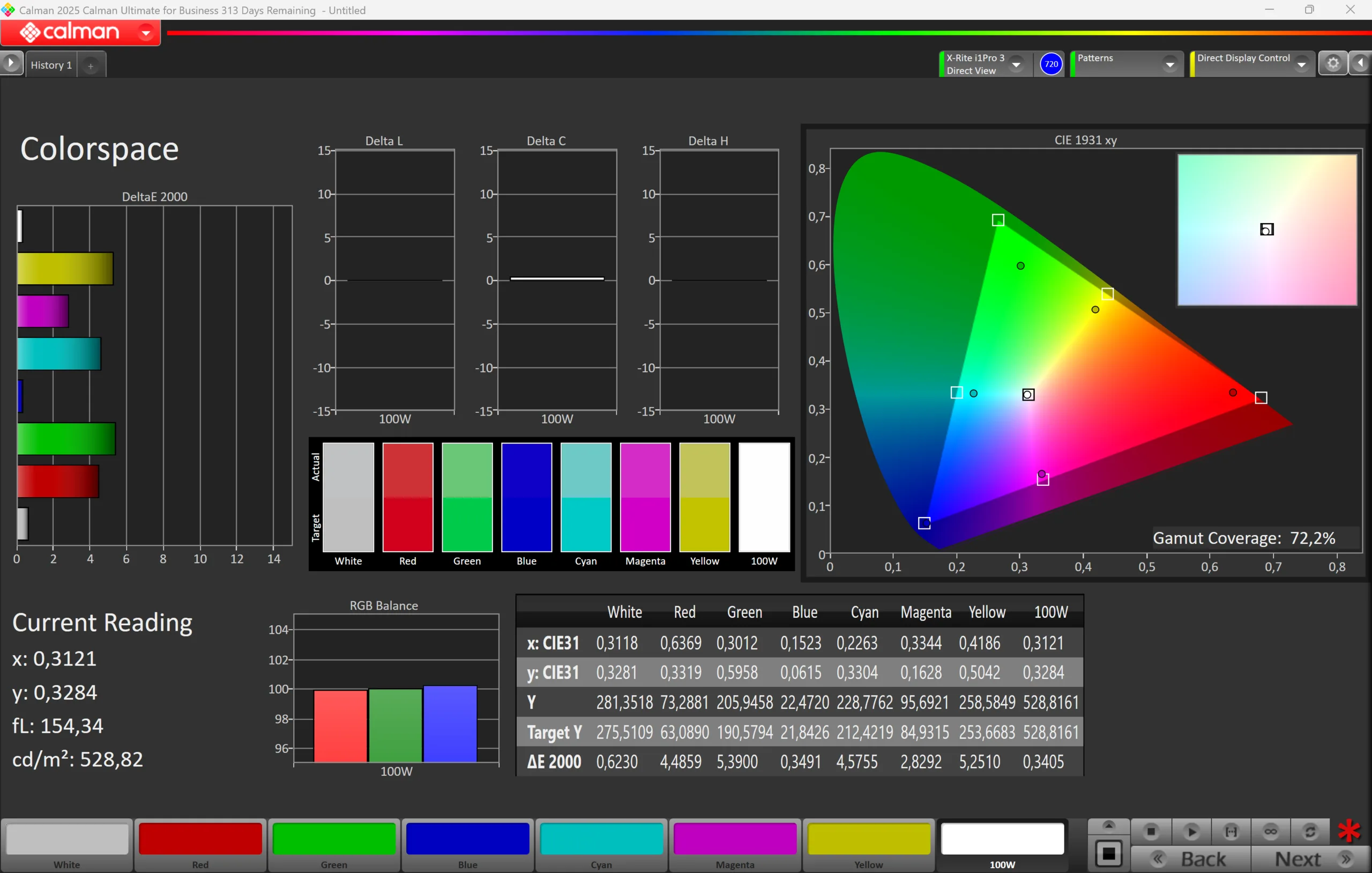
vs. sRGB
vs. sRGB
vs. P3
vs. P3
vs. AdobeRGB
vs. AdobeRGB

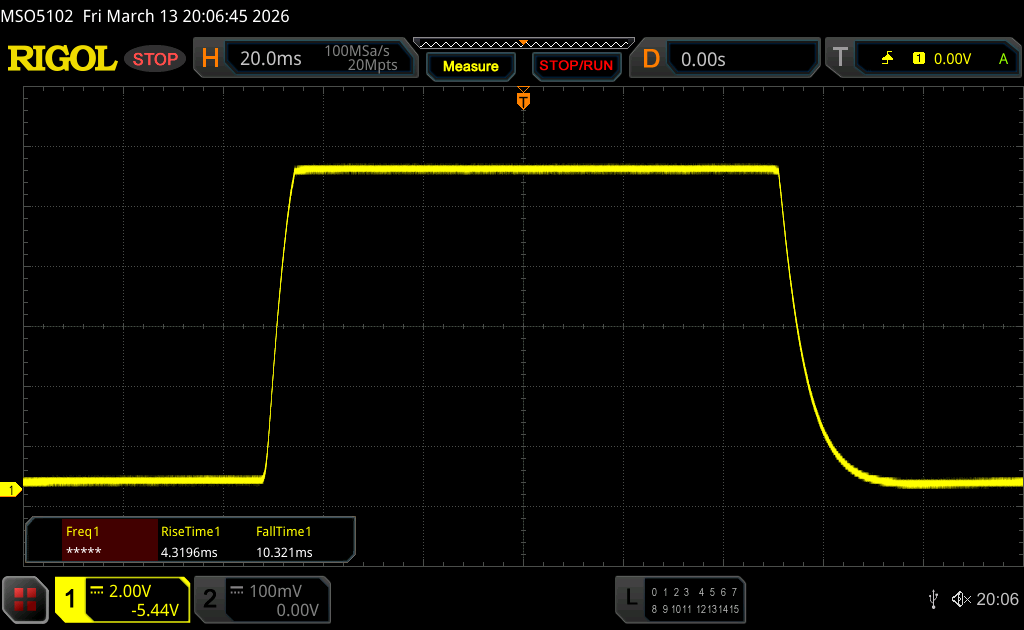
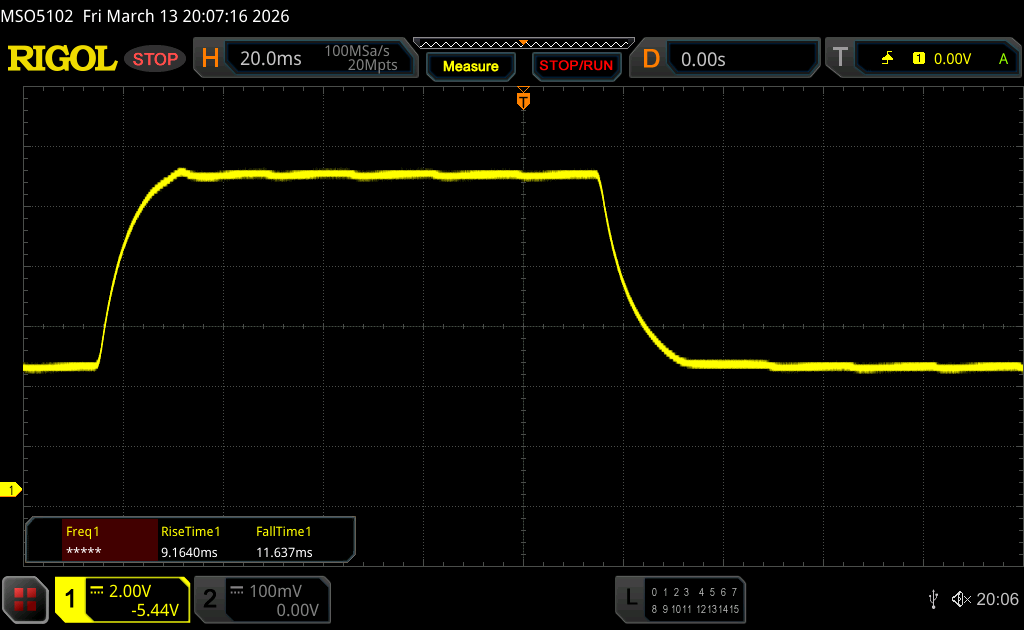
Display Response Times

Display response times show how fast the screen is able to change from one color to the next. Slow response times can lead to afterimages and can cause moving objects to appear blurry (ghosting). Gamers of fast-paced 3D titles should pay special attention to fast response times.
       Response Time Black to White
14.6 ms ... rise ↗ and fall ↘ combined↗ 4.3 ms rise
↘ 10.3 ms fall
The screen shows good response rates in our tests, but may be too slow for competitive gamers.
In comparison, all tested devices range from 0.1 (minimum) to 240 (maximum) ms. » 35 % of all devices are better.
This means that the measured response time is better than the average of all tested devices (20.1 ms).
       Response Time 50% Grey to 80% Grey
20.8 ms ... rise ↗ and fall ↘ combined↗ 9.2 ms rise
↘ 11.6 ms fall
The screen shows good response rates in our tests, but may be too slow for competitive gamers.
In comparison, all tested devices range from 0.165 (minimum) to 636 (maximum) ms. » 32 % of all devices are better.
This means that the measured response time is better than the average of all tested devices (31.4 ms).

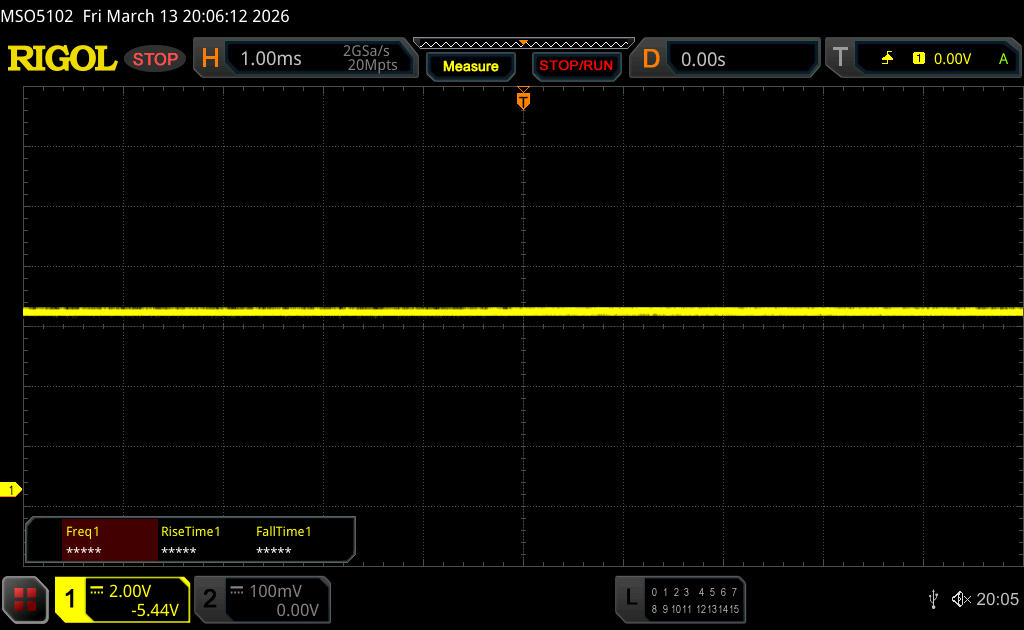
Screen Flickering / PWM (Pulse-Width Modulation)

To dim the screen, some notebooks will simply cycle the backlight on and off in rapid succession - a method called Pulse Width Modulation (PWM) . This cycling frequency should ideally be undetectable to the human eye. If said frequency is too low, users with sensitive eyes may experience strain or headaches or even notice the flickering altogether.
Screen flickering / PWM not detected

In comparison: 53 % of all tested devices do not use PWM to dim the display. If PWM was detected, an average of 7996 (minimum: 5 - maximum: 343500) Hz was measured.

We did not determine PWM flickering and the response times are completely okay for an IPS screen, but there is temporal dithering. We captured it with a slow-motion video (240 Hz) and went through different levels of gray as you can see in the video below. You can start seeing the flicker at 74 % gray, but it is really noticeable at 60 % and lower. If you are sensitive to temporal dithering, you will not be happy with the MacBook Neo.

In the sun
In the sun
Outdoors (bright day, no direct sunlight)
Viewing angles
Viewing angles

Performance - A18 Pro with 8 GB RAM
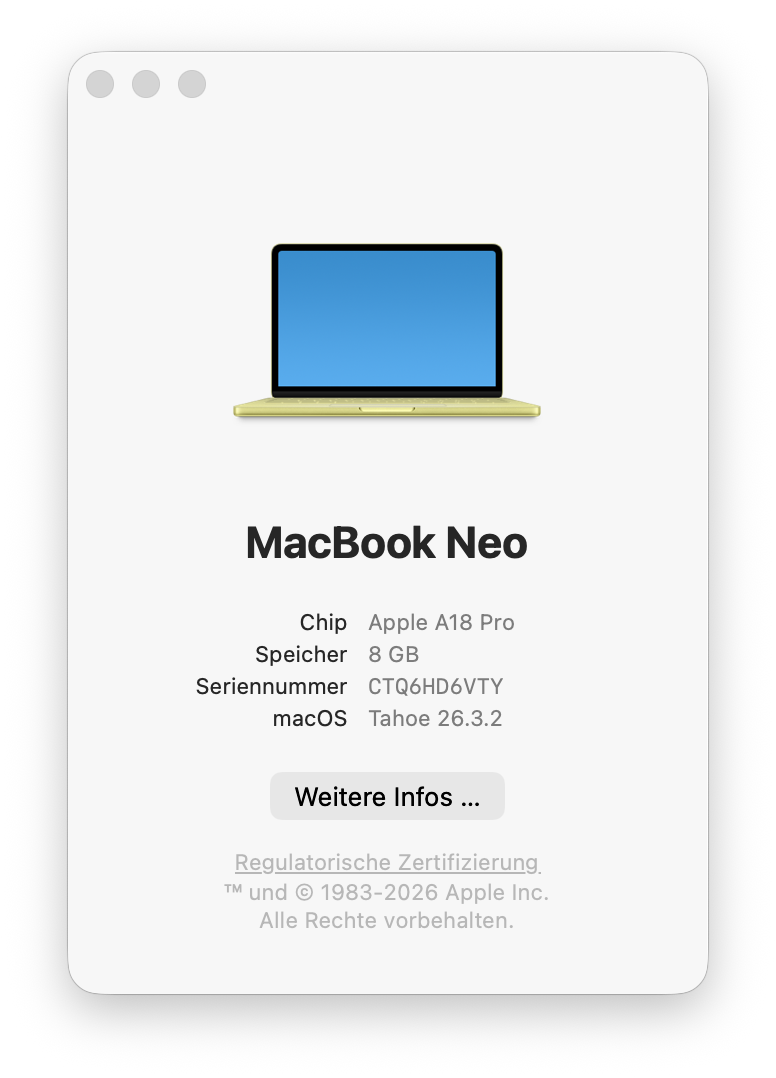
Processor

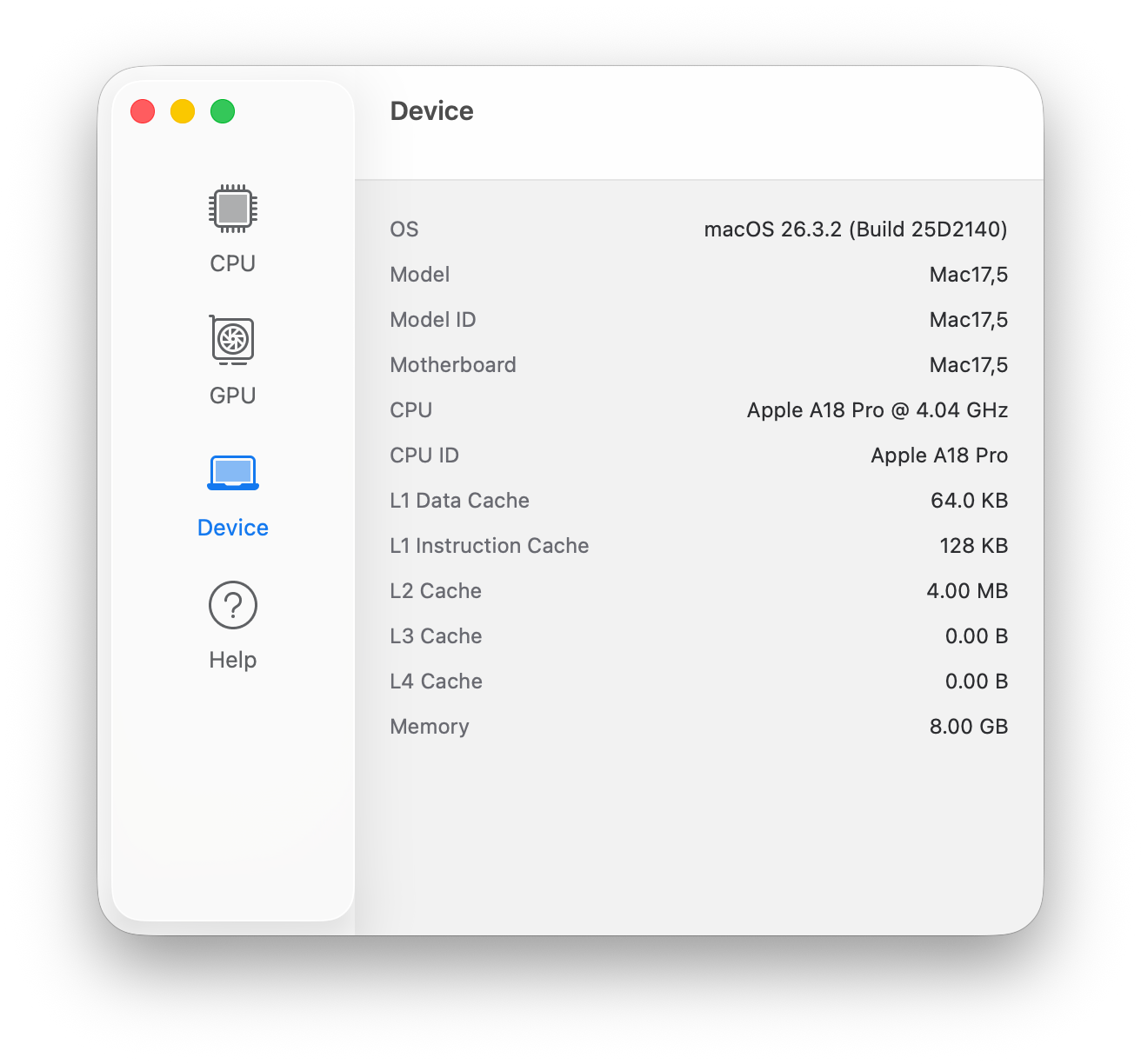
Apple uses the A18 Pro SoC, which is the processor from the old iPhone 16 Pro. It offers 6 cores (2x Performance at up to 4.0 GHz, 4x Efficiency at up to 2.4 GHz) and consumes up to 6 Watts in multi-core scenarios (settles at 3.8 to 4W under sustained workloads) and 3.5-4 Watt under single-core load. Considering these values, the performance here is exceptional. We have already reported on the excellent single-core performance, which easily surpasses every other mobile processor from AMD, Intel, or Qualcomm and is only beaten by Apple's M4 and M5 generation. 

The multi-core performance is lower, but keep in mind that the Cinebench 20204 Multi test takes a couple of minutes and it is a passively cooled device. It is still not far off from Intel's Lunar Lake Core Ultra 5 chips. The performance is also completely stable on battery power.

CPU Performance rating: Percent
Cinebench 2024: CPU Multi Core | CPU Single Core
Geekbench 6.5: Multi-Core | Single-Core
CPU Performance rating
Apple MacBook Air 13 M4 Entry
Apple M4 10-Core
97.6 pt
Microsoft Surface Laptop 7 13.8 Copilot+
Qualcomm Snapdragon X Elite X1E-80-100
84.9 pt
HP Omnibook 5 14
Qualcomm Snapdragon X Plus X1P-42-100
77.6 pt
Apple MacBook Air 13 M3 10C GPU
Apple M3
76.3 pt
Average of class Subnotebook
 
73.6 pt
Apple MacBook Neo 256 GB
Apple A18 Pro
71.6 pt
Average Apple A18 Pro
 
70.3 pt
Microsoft Surface Laptop 13
Qualcomm Snapdragon X Plus X1P-42-100
69.4 pt
Lenovo IdeaPad Slim 3 14 AHP G10
AMD Ryzen 7 8840HS
67.4 pt
Samsung Galaxy Book5 Pro 14 940XHA
Intel Core Ultra 5 226V
65.6 pt
HP EliteBook 8 Flip G1i 13
Intel Core Ultra 7 265U
63.3 pt
Apple MacBook Air 2020 M1 Entry
Apple M1
58.1 pt
Lenovo ThinkBook 13x G4 21KR0008GE
Intel Core Ultra 5 125H
57.2 pt
Lenovo ThinkPad L13 2in1 G5 21LNS4AM00
Intel Core Ultra 5 125U
55.6 pt
Cinebench 2024 / CPU Multi Core
Microsoft Surface Laptop 7 13.8 Copilot+
Qualcomm Snapdragon X Elite X1E-80-100
897 Points +116%
Apple MacBook Air 13 M4 Entry
Apple M4 10-Core
815 Points +96%
Microsoft Surface Laptop 13
Qualcomm Snapdragon X Plus X1P-42-100
723 Points +74%
HP Omnibook 5 14
Qualcomm Snapdragon X Plus X1P-42-100
698 Points +68%
Average of class Subnotebook
  (148 - 1162, n=71, last 2 years)
690 Points +66%
Lenovo IdeaPad Slim 3 14 AHP G10
AMD Ryzen 7 8840HS
675 Points +62%
Apple MacBook Air 13 M3 10C GPU
Apple M3
576 Points +38%
Samsung Galaxy Book5 Pro 14 940XHA
Intel Core Ultra 5 226V
539 Points +30%
HP EliteBook 8 Flip G1i 13
Intel Core Ultra 7 265U
517 Points +24%
Lenovo ThinkPad L13 2in1 G5 21LNS4AM00
Intel Core Ultra 5 125U
447 Points +7%
Apple MacBook Air 2020 M1 Entry
Apple M1
444 Points +7%
Apple MacBook Neo 256 GB
Apple A18 Pro
416 Points
Average Apple A18 Pro
  (n=1)
416 Points 0%
Lenovo ThinkBook 13x G4 21KR0008GE
Intel Core Ultra 5 125H
331 Points -20%
Cinebench 2024 / CPU Single Core
Apple MacBook Air 13 M4 Entry
Apple M4 10-Core
173 Points +18%
Apple MacBook Neo 256 GB
Apple A18 Pro
147 Points
Average Apple A18 Pro
  (n=1)
147 Points 0%
Apple MacBook Air 13 M3 10C GPU
Apple M3
141 Points -4%
Microsoft Surface Laptop 7 13.8 Copilot+
Qualcomm Snapdragon X Elite X1E-80-100
123 Points -16%
Average of class Subnotebook
  (35 - 200, n=57, last 2 years)
115.8 Points -21%
Samsung Galaxy Book5 Pro 14 940XHA
Intel Core Ultra 5 226V
114.1 Points -22%
Apple MacBook Air 2020 M1 Entry
Apple M1
110 Points -25%
Microsoft Surface Laptop 13
Qualcomm Snapdragon X Plus X1P-42-100
109 Points -26%
HP Omnibook 5 14
Qualcomm Snapdragon X Plus X1P-42-100
108 Points -27%
Lenovo IdeaPad Slim 3 14 AHP G10
AMD Ryzen 7 8840HS
103.6 Points -30%
HP EliteBook 8 Flip G1i 13
Intel Core Ultra 7 265U
102.3 Points -30%
Lenovo ThinkBook 13x G4 21KR0008GE
Intel Core Ultra 5 125H
100 Points -32%
Lenovo ThinkPad L13 2in1 G5 21LNS4AM00
Intel Core Ultra 5 125U
93.3 Points -37%
Geekbench 6.5 / Multi-Core
HP Omnibook 5 14
Qualcomm Snapdragon X Plus X1P-42-100
14998 Points +64%
Apple MacBook Air 13 M4 Entry
Apple M4 10-Core
14903 Points +63%
Microsoft Surface Laptop 7 13.8 Copilot+
Qualcomm Snapdragon X Elite X1E-80-100
14234 Points +56%
Average of class Subnotebook
  (2244 - 17489, n=76, last 2 years)
12065 Points +32%
Apple MacBook Air 13 M3 10C GPU
Apple M3
12034 Points +32%
Lenovo ThinkBook 13x G4 21KR0008GE
Intel Core Ultra 5 125H
11192 Points +22%
Microsoft Surface Laptop 13
Qualcomm Snapdragon X Plus X1P-42-100
11125 Points +22%
HP EliteBook 8 Flip G1i 13
Intel Core Ultra 7 265U
10707 Points +17%
Samsung Galaxy Book5 Pro 14 940XHA
Intel Core Ultra 5 226V
10114 Points +11%
Lenovo IdeaPad Slim 3 14 AHP G10
AMD Ryzen 7 8840HS
9922 Points +9%
Lenovo ThinkPad L13 2in1 G5 21LNS4AM00
Intel Core Ultra 5 125U
9351 Points +2%
Apple MacBook Neo 256 GB
Apple A18 Pro
9140 Points
Average Apple A18 Pro
  (8524 - 9140, n=3)
8744 Points -4%
Apple MacBook Air 2020 M1 Entry
Apple M1
8622 Points -6%
Geekbench 6.5 / Single-Core
Apple MacBook Air 13 M4 Entry
Apple M4 10-Core
3820 Points +6%
Apple MacBook Neo 256 GB
Apple A18 Pro
3589 Points
Average Apple A18 Pro
  (3443 - 3589, n=3)
3504 Points -2%
Apple MacBook Air 13 M3 10C GPU
Apple M3
3026 Points -16%
Microsoft Surface Laptop 7 13.8 Copilot+
Qualcomm Snapdragon X Elite X1E-80-100
2805 Points -22%
Average of class Subnotebook
  (960 - 4195, n=70, last 2 years)
2679 Points -25%
HP Omnibook 5 14
Qualcomm Snapdragon X Plus X1P-42-100
2675 Points -25%
Samsung Galaxy Book5 Pro 14 940XHA
Intel Core Ultra 5 226V
2627 Points -27%
Lenovo IdeaPad Slim 3 14 AHP G10
AMD Ryzen 7 8840HS
2602 Points -28%
HP EliteBook 8 Flip G1i 13
Intel Core Ultra 7 265U
2477 Points -31%
Apple MacBook Air 2020 M1 Entry
Apple M1
2363 Points -34%
Microsoft Surface Laptop 13
Qualcomm Snapdragon X Plus X1P-42-100
2287 Points -36%
Lenovo ThinkBook 13x G4 21KR0008GE
Intel Core Ultra 5 125H
2279 Points -37%
Lenovo ThinkPad L13 2in1 G5 21LNS4AM00
Intel Core Ultra 5 125U
2150 Points -40%
CPU Performance rating: Percent
Cinebench 2024: CPU Multi Core | CPU Single Core
Geekbench 6.5: Multi-Core | Single-Core
Cinebench 2024 CPU Single Core
147 Points
Cinebench 2024 CPU Multi Core
416 Points
Help

System Performance

Memory Mark
Memory Mark

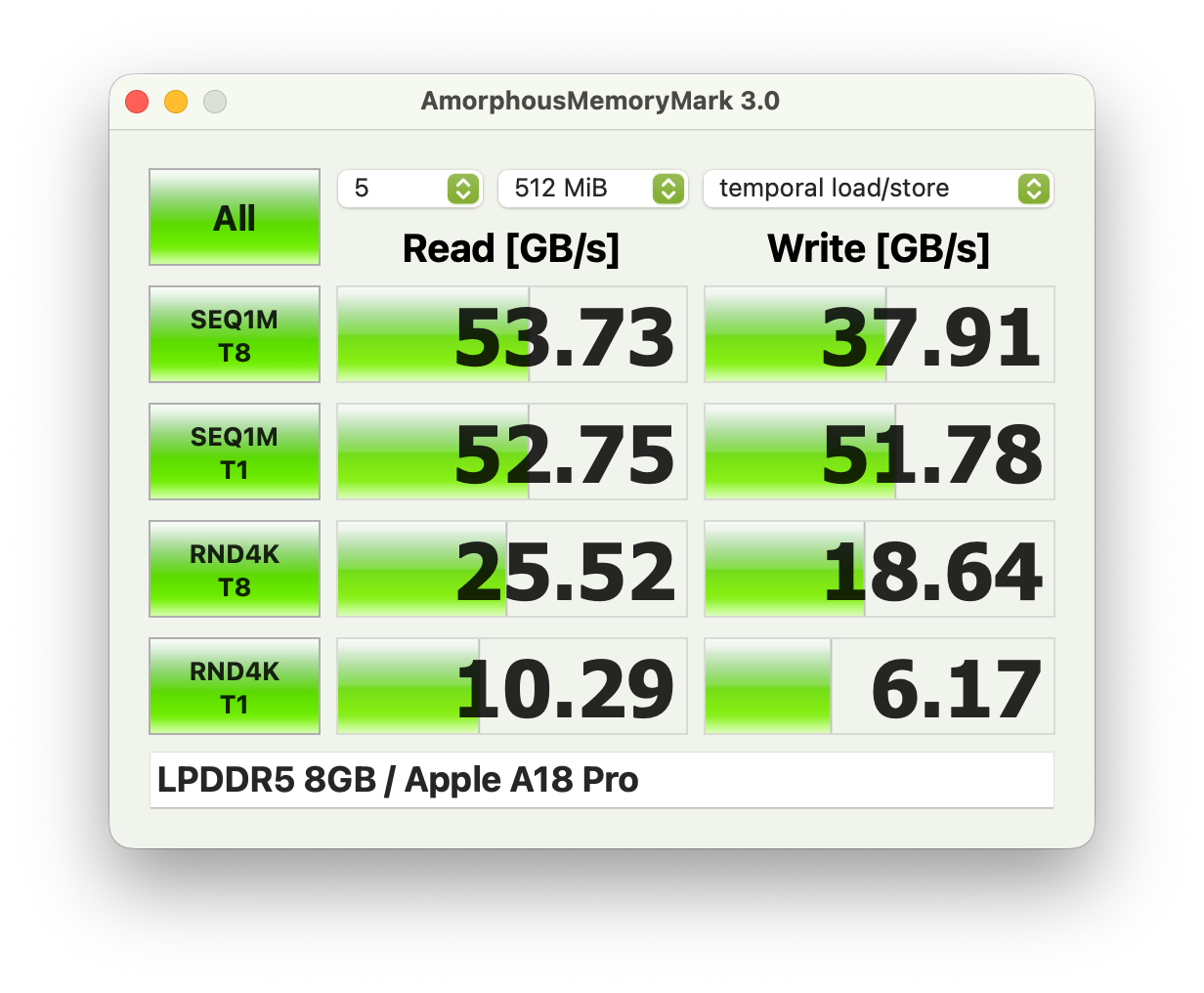
The MacBook Neo is a snappy system and the benchmark scores are also very good. It easily beats the Snapdragon competition in CrossMark as well as the browser benchmarks. 8 GB RAM is obviously not very generous, but if you primarily use Apple's native apps anyway, you should be fine. We are still using an entry-level MacBook Air M1 with 8 GB RAM every day and it still works very well.

Performance rating: Percent
CrossMark: Overall | Productivity | Creativity | Responsiveness
WebXPRT 3: Overall
WebXPRT 4: Overall
Mozilla Kraken 1.1: Total
Performance rating
Apple MacBook Air 13 M4 Entry
M4 8-Core GPU, M4 10-Core, Apple SSD AP0256Z
93.7 pt
Apple MacBook Air 13 M3 10C GPU
M3 10-Core GPU, M3, Apple SSD AP0512Z
83.3 pt
Apple MacBook Neo 256 GB
A18 GPU, A18 Pro, Apple SSD AP0256Z
82.7 pt
Average Apple A18 Pro, Apple A18 GPU
 
82.7 pt
Microsoft Surface Laptop 7 13.8 Copilot+
Adreno X1-85 3.8 TFLOPS, SD X Elite X1E-80-100, Samsung MZ9L4512HBLU-00BMV
71.9 pt
Average of class Subnotebook
 
69.6 pt
Lenovo IdeaPad Slim 3 14 AHP G10
Radeon 780M, R7 8840HS, Micron 2500 MTFDKBA512QGN
69.3 pt
Samsung Galaxy Book5 Pro 14 940XHA
Arc 130V, Core Ultra 5 226V, Samsung PM9C1 MZVL8512HELU
67.7 pt
HP EliteBook 8 Flip G1i 13 -1!
Graphics 4-Core iGPU (Arrow Lake), Ultra 7 265U, Samsung PM9A1 MZVL2512HCJQ
64.4 pt
HP Omnibook 5 14
Adreno X1-45 1.7 TFLOPS, SD X Plus X1P-42-100, Samsung PM9C1 MZVL81T0HELB-00BTW
62.7 pt
Lenovo ThinkBook 13x G4 21KR0008GE
Arc 7-Core, Ultra 5 125H, Samsung PM9C1a MZAL8512HDLU
62.5 pt
Lenovo ThinkPad L13 2in1 G5 21LNS4AM00
Graphics 4-Core iGPU (Arrow Lake), Ultra 5 125U, Kioxia BG6 KBG6AZNV1T02
59.8 pt
Apple MacBook Air 2020 M1 Entry
M1 7-Core GPU, M1, Apple SSD AP0256Q
57.9 pt
Microsoft Surface Laptop 13
Adreno X1-45 1.7 TFLOPS, SD X Plus X1P-42-100
57.6 pt
CrossMark / Overall
Apple MacBook Air 13 M4 Entry
M4 8-Core GPU, M4 10-Core, Apple SSD AP0256Z
2038 Points +19%
Apple MacBook Air 13 M3 10C GPU
M3 10-Core GPU, M3, Apple SSD AP0512Z
1847 Points +8%
Apple MacBook Neo 256 GB
A18 GPU, A18 Pro, Apple SSD AP0256Z
1715 Points
Average Apple A18 Pro, Apple A18 GPU
  (n=1)
1715 Points 0%
Lenovo IdeaPad Slim 3 14 AHP G10
Radeon 780M, R7 8840HS, Micron 2500 MTFDKBA512QGN
1672 Points -3%
Samsung Galaxy Book5 Pro 14 940XHA
Arc 130V, Core Ultra 5 226V, Samsung PM9C1 MZVL8512HELU
1620 Points -6%
Average of class Subnotebook
  (365 - 2356, n=67, last 2 years)
1619 Points -6%
HP EliteBook 8 Flip G1i 13
Graphics 4-Core iGPU (Arrow Lake), Ultra 7 265U, Samsung PM9A1 MZVL2512HCJQ
1561 Points -9%
Lenovo ThinkBook 13x G4 21KR0008GE
Arc 7-Core, Ultra 5 125H, Samsung PM9C1a MZAL8512HDLU
1548 Points -10%
Lenovo ThinkPad L13 2in1 G5 21LNS4AM00
Graphics 4-Core iGPU (Arrow Lake), Ultra 5 125U, Kioxia BG6 KBG6AZNV1T02
1463 Points -15%
Microsoft Surface Laptop 7 13.8 Copilot+
Adreno X1-85 3.8 TFLOPS, SD X Elite X1E-80-100, Samsung MZ9L4512HBLU-00BMV
1402 Points -18%
Apple MacBook Air 2020 M1 Entry
M1 7-Core GPU, M1, Apple SSD AP0256Q
1355 Points -21%
HP Omnibook 5 14
Adreno X1-45 1.7 TFLOPS, SD X Plus X1P-42-100, Samsung PM9C1 MZVL81T0HELB-00BTW
1168 Points -32%
Microsoft Surface Laptop 13
Adreno X1-45 1.7 TFLOPS, SD X Plus X1P-42-100
1061 Points -38%
CrossMark / Productivity
Apple MacBook Air 13 M4 Entry
M4 8-Core GPU, M4 10-Core, Apple SSD AP0256Z
1918 Points +6%
Apple MacBook Neo 256 GB
A18 GPU, A18 Pro, Apple SSD AP0256Z
1808 Points
Average Apple A18 Pro, Apple A18 GPU
  (n=1)
1808 Points 0%
Apple MacBook Air 13 M3 10C GPU
M3 10-Core GPU, M3, Apple SSD AP0512Z
1716 Points -5%
Lenovo IdeaPad Slim 3 14 AHP G10
Radeon 780M, R7 8840HS, Micron 2500 MTFDKBA512QGN
1666 Points -8%
Samsung Galaxy Book5 Pro 14 940XHA
Arc 130V, Core Ultra 5 226V, Samsung PM9C1 MZVL8512HELU
1575 Points -13%
Average of class Subnotebook
  (364 - 2277, n=67, last 2 years)
1548 Points -14%
HP EliteBook 8 Flip G1i 13
Graphics 4-Core iGPU (Arrow Lake), Ultra 7 265U, Samsung PM9A1 MZVL2512HCJQ
1498 Points -17%
Lenovo ThinkBook 13x G4 21KR0008GE
Arc 7-Core, Ultra 5 125H, Samsung PM9C1a MZAL8512HDLU
1483 Points -18%
Lenovo ThinkPad L13 2in1 G5 21LNS4AM00
Graphics 4-Core iGPU (Arrow Lake), Ultra 5 125U, Kioxia BG6 KBG6AZNV1T02
1416 Points -22%
Microsoft Surface Laptop 7 13.8 Copilot+
Adreno X1-85 3.8 TFLOPS, SD X Elite X1E-80-100, Samsung MZ9L4512HBLU-00BMV
1334 Points -26%
Apple MacBook Air 2020 M1 Entry
M1 7-Core GPU, M1, Apple SSD AP0256Q
1274 Points -30%
HP Omnibook 5 14
Adreno X1-45 1.7 TFLOPS, SD X Plus X1P-42-100, Samsung PM9C1 MZVL81T0HELB-00BTW
1095 Points -39%
Microsoft Surface Laptop 13
Adreno X1-45 1.7 TFLOPS, SD X Plus X1P-42-100
1059 Points -41%
CrossMark / Creativity
Apple MacBook Air 13 M4 Entry
M4 8-Core GPU, M4 10-Core, Apple SSD AP0256Z
2388 Points +32%
Apple MacBook Air 13 M3 10C GPU
M3 10-Core GPU, M3, Apple SSD AP0512Z
2199 Points +22%
Average of class Subnotebook
  (372 - 2743, n=67, last 2 years)
1812 Points 0%
Apple MacBook Neo 256 GB
A18 GPU, A18 Pro, Apple SSD AP0256Z
1809 Points
Average Apple A18 Pro, Apple A18 GPU
  (n=1)
1809 Points 0%
Samsung Galaxy Book5 Pro 14 940XHA
Arc 130V, Core Ultra 5 226V, Samsung PM9C1 MZVL8512HELU
1746 Points -3%
Lenovo IdeaPad Slim 3 14 AHP G10
Radeon 780M, R7 8840HS, Micron 2500 MTFDKBA512QGN
1739 Points -4%
Lenovo ThinkBook 13x G4 21KR0008GE
Arc 7-Core, Ultra 5 125H, Samsung PM9C1a MZAL8512HDLU
1727 Points -5%
HP EliteBook 8 Flip G1i 13
Graphics 4-Core iGPU (Arrow Lake), Ultra 7 265U, Samsung PM9A1 MZVL2512HCJQ
1721 Points -5%
Apple MacBook Air 2020 M1 Entry
M1 7-Core GPU, M1, Apple SSD AP0256Q
1593 Points -12%
Lenovo ThinkPad L13 2in1 G5 21LNS4AM00
Graphics 4-Core iGPU (Arrow Lake), Ultra 5 125U, Kioxia BG6 KBG6AZNV1T02
1544 Points -15%
Microsoft Surface Laptop 7 13.8 Copilot+
Adreno X1-85 3.8 TFLOPS, SD X Elite X1E-80-100, Samsung MZ9L4512HBLU-00BMV
1497 Points -17%
HP Omnibook 5 14
Adreno X1-45 1.7 TFLOPS, SD X Plus X1P-42-100, Samsung PM9C1 MZVL81T0HELB-00BTW
1292 Points -29%
Microsoft Surface Laptop 13
Adreno X1-45 1.7 TFLOPS, SD X Plus X1P-42-100
1070 Points -41%
CrossMark / Responsiveness
Apple MacBook Air 13 M4 Entry
M4 8-Core GPU, M4 10-Core, Apple SSD AP0256Z
1518 Points +22%
Lenovo IdeaPad Slim 3 14 AHP G10
Radeon 780M, R7 8840HS, Micron 2500 MTFDKBA512QGN
1498 Points +20%
Samsung Galaxy Book5 Pro 14 940XHA
Arc 130V, Core Ultra 5 226V, Samsung PM9C1 MZVL8512HELU
1408 Points +13%
Lenovo ThinkPad L13 2in1 G5 21LNS4AM00
Graphics 4-Core iGPU (Arrow Lake), Ultra 5 125U, Kioxia BG6 KBG6AZNV1T02
1378 Points +10%
Apple MacBook Air 13 M3 10C GPU
M3 10-Core GPU, M3, Apple SSD AP0512Z
1364 Points +9%
Microsoft Surface Laptop 7 13.8 Copilot+
Adreno X1-85 3.8 TFLOPS, SD X Elite X1E-80-100, Samsung MZ9L4512HBLU-00BMV
1338 Points +7%
Average of class Subnotebook
  (312 - 1889, n=67, last 2 years)
1336 Points +7%
HP EliteBook 8 Flip G1i 13
Graphics 4-Core iGPU (Arrow Lake), Ultra 7 265U, Samsung PM9A1 MZVL2512HCJQ
1319 Points +6%
Lenovo ThinkBook 13x G4 21KR0008GE
Arc 7-Core, Ultra 5 125H, Samsung PM9C1a MZAL8512HDLU
1270 Points +2%
Apple MacBook Neo 256 GB
A18 GPU, A18 Pro, Apple SSD AP0256Z
1248 Points
Average Apple A18 Pro, Apple A18 GPU
  (n=1)
1248 Points 0%
HP Omnibook 5 14
Adreno X1-45 1.7 TFLOPS, SD X Plus X1P-42-100, Samsung PM9C1 MZVL81T0HELB-00BTW
1048 Points -16%
Microsoft Surface Laptop 13
Adreno X1-45 1.7 TFLOPS, SD X Plus X1P-42-100
1037 Points -17%
Apple MacBook Air 2020 M1 Entry
M1 7-Core GPU, M1, Apple SSD AP0256Q
1004 Points -20%
WebXPRT 3 / Overall
Apple MacBook Air 13 M4 Entry
M4 8-Core GPU, M4 10-Core, Apple SSD AP0256Z
482 Points +7%
Apple MacBook Neo 256 GB
A18 GPU, A18 Pro, Apple SSD AP0256Z
450 Points
Average Apple A18 Pro, Apple A18 GPU
  (n=1)
450 Points 0%
Apple MacBook Air 13 M3 10C GPU
M3 10-Core GPU, M3, Apple SSD AP0512Z
445 Points -1%
Microsoft Surface Laptop 7 13.8 Copilot+
Adreno X1-85 3.8 TFLOPS, SD X Elite X1E-80-100, Samsung MZ9L4512HBLU-00BMV
434 Points -4%
HP Omnibook 5 14
Adreno X1-45 1.7 TFLOPS, SD X Plus X1P-42-100, Samsung PM9C1 MZVL81T0HELB-00BTW
414 Points -8%
Microsoft Surface Laptop 13
Adreno X1-45 1.7 TFLOPS, SD X Plus X1P-42-100
361 Points -20%
Average of class Subnotebook
  (156 - 530, n=64, last 2 years)
324 Points -28%
Apple MacBook Air 2020 M1 Entry
M1 7-Core GPU, M1, Apple SSD AP0256Q
304 Points -32%
Apple MacBook Air 2020 M1 Entry
M1 7-Core GPU, M1, Apple SSD AP0256Q
281 Points -38%
Lenovo IdeaPad Slim 3 14 AHP G10
Radeon 780M, R7 8840HS, Micron 2500 MTFDKBA512QGN
299 Points -34%
Samsung Galaxy Book5 Pro 14 940XHA
Arc 130V, Core Ultra 5 226V, Samsung PM9C1 MZVL8512HELU
281 Points -38%
Lenovo ThinkBook 13x G4 21KR0008GE
Arc 7-Core, Ultra 5 125H, Samsung PM9C1a MZAL8512HDLU
250 Points -44%
Lenovo ThinkPad L13 2in1 G5 21LNS4AM00
Graphics 4-Core iGPU (Arrow Lake), Ultra 5 125U, Kioxia BG6 KBG6AZNV1T02
247 Points -45%
WebXPRT 4 / Overall
Apple MacBook Air 13 M4 Entry
M4 8-Core GPU, M4 10-Core, Apple SSD AP0256Z
345 Points +6%
Apple MacBook Neo 256 GB
A18 GPU, A18 Pro, Apple SSD AP0256Z
326 Points
Average Apple A18 Pro, Apple A18 GPU
  (n=1)
326 Points 0%
Apple MacBook Air 13 M3 10C GPU
M3 10-Core GPU, M3, Apple SSD AP0512Z
313 Points -4%
Microsoft Surface Laptop 7 13.8 Copilot+
Adreno X1-85 3.8 TFLOPS, SD X Elite X1E-80-100, Samsung MZ9L4512HBLU-00BMV
309 Points -5%
HP Omnibook 5 14
Adreno X1-45 1.7 TFLOPS, SD X Plus X1P-42-100, Samsung PM9C1 MZVL81T0HELB-00BTW
282 Points -13%
Average of class Subnotebook
  (132 - 378, n=69, last 2 years)
268 Points -18%
Microsoft Surface Laptop 13
Adreno X1-45 1.7 TFLOPS, SD X Plus X1P-42-100
263 Points -19%
HP EliteBook 8 Flip G1i 13
Graphics 4-Core iGPU (Arrow Lake), Ultra 7 265U, Samsung PM9A1 MZVL2512HCJQ
252 Points -23%
Lenovo IdeaPad Slim 3 14 AHP G10
Radeon 780M, R7 8840HS, Micron 2500 MTFDKBA512QGN
250 Points -23%
Samsung Galaxy Book5 Pro 14 940XHA
Arc 130V, Core Ultra 5 226V, Samsung PM9C1 MZVL8512HELU
248 Points -24%
Lenovo ThinkBook 13x G4 21KR0008GE
Arc 7-Core, Ultra 5 125H, Samsung PM9C1a MZAL8512HDLU
240 Points -26%
Lenovo ThinkPad L13 2in1 G5 21LNS4AM00
Graphics 4-Core iGPU (Arrow Lake), Ultra 5 125U, Kioxia BG6 KBG6AZNV1T02
225 Points -31%
Apple MacBook Air 2020 M1 Entry
M1 7-Core GPU, M1, Apple SSD AP0256Q
189 Points -42%
Mozilla Kraken 1.1 / Total
HP EliteBook 8 Flip G1i 13
Graphics 4-Core iGPU (Arrow Lake), Ultra 7 265U, Samsung PM9A1 MZVL2512HCJQ
599 ms * -119%
Lenovo ThinkPad L13 2in1 G5 21LNS4AM00
Graphics 4-Core iGPU (Arrow Lake), Ultra 5 125U, Kioxia BG6 KBG6AZNV1T02
591 ms * -116%
Lenovo ThinkBook 13x G4 21KR0008GE
Arc 7-Core, Ultra 5 125H, Samsung PM9C1a MZAL8512HDLU
560 ms * -105%
Lenovo IdeaPad Slim 3 14 AHP G10
Radeon 780M, R7 8840HS, Micron 2500 MTFDKBA512QGN
540 ms * -98%
Samsung Galaxy Book5 Pro 14 940XHA
Arc 130V, Core Ultra 5 226V, Samsung PM9C1 MZVL8512HELU
503 ms * -84%
Average of class Subnotebook
  (234 - 1104, n=69, last 2 years)
491 ms * -80%
Apple MacBook Air 2020 M1 Entry
M1 7-Core GPU, M1, Apple SSD AP0256Q
489 ms * -79%
Apple MacBook Air 2020 M1 Entry
M1 7-Core GPU, M1, Apple SSD AP0256Q
418 ms * -53%
Microsoft Surface Laptop 13
Adreno X1-45 1.7 TFLOPS, SD X Plus X1P-42-100
407.5 ms * -49%
HP Omnibook 5 14
Adreno X1-45 1.7 TFLOPS, SD X Plus X1P-42-100, Samsung PM9C1 MZVL81T0HELB-00BTW
396.1 ms * -45%
Microsoft Surface Laptop 7 13.8 Copilot+
Adreno X1-85 3.8 TFLOPS, SD X Elite X1E-80-100, Samsung MZ9L4512HBLU-00BMV
390.9 ms * -43%
Apple MacBook Air 13 M3 10C GPU
M3 10-Core GPU, M3, Apple SSD AP0512Z
373.2 ms * -37%
Apple MacBook Neo 256 GB
A18 GPU, A18 Pro, Apple SSD AP0256Z
273.4 ms *
Average Apple A18 Pro, Apple A18 GPU
  (n=1)
273 ms * -0%
Apple MacBook Air 13 M4 Entry
M4 8-Core GPU, M4 10-Core, Apple SSD AP0256Z
265.4 ms * +3%
Performance rating: Percent
CrossMark: Overall | Productivity | Creativity | Responsiveness
WebXPRT 3: Overall
WebXPRT 4: Overall
Mozilla Kraken 1.1: Total

* ... smaller is better

Storage Devices
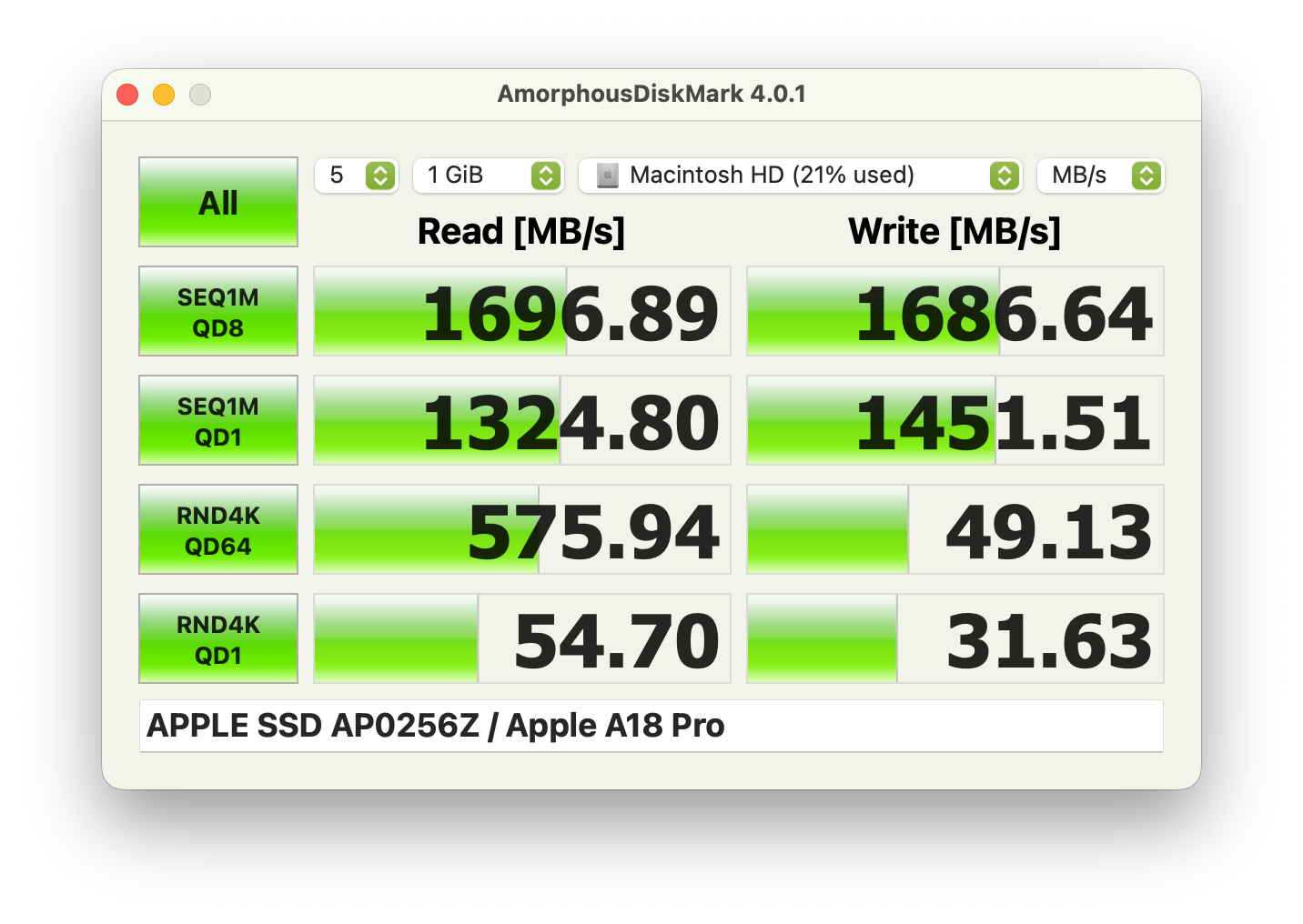
Disk Mark
Disk Mark

The SSD performance is around 1,5 GB/s and therefore like the MacBook Air M1, so it is fast enough for everyday stuff as well as swap cache. You can use 194 GB for your own files.

Drive Performance rating - Percent
Apple MacBook Air 13 M5
Apple SSD AP0512Z
100 pt
Average of class Subnotebook
 
60.9 pt
Apple MacBook Air 2020 M1 Entry
Apple SSD AP0256Q
39.8 pt
Apple MacBook Air 13 M4 Entry
Apple SSD AP0256Z
37 pt
Average Apple SSD AP0256Z
 
27.5 pt
Apple MacBook Neo 256 GB
Apple SSD AP0256Z
24 pt
Apple MacBook Air M2 Entry
Apple SSD AP0256Z
24 pt
Blackmagic Disk Speed Test
5GB Read
Apple MacBook Air 13 M5
Apple SSD AP0512Z
6473.4 MB/s +307%
Average of class Subnotebook
  (1592 - 6473, n=5, last 2 years)
4023 MB/s +153%
Apple MacBook Air 13 M4 Entry
Apple SSD AP0256Z
2833.3 MB/s +78%
Apple MacBook Air 2020 M1 Entry
Apple SSD AP0256Q
2756 MB/s +73%
Average Apple SSD AP0256Z
  (1327 - 2833, n=4)
1807 MB/s +14%
Apple MacBook Neo 256 GB
Apple SSD AP0256Z
1591.7 MB/s
Apple MacBook Air M2 Entry
Apple SSD AP0256Z
1475.8 MB/s -7%
5GB Write
Apple MacBook Air 13 M5
Apple SSD AP0512Z
6558.6 MB/s +326%
Average of class Subnotebook
  (1541 - 6559, n=5, last 2 years)
3917 MB/s +154%
Apple MacBook Air 2020 M1 Entry
Apple SSD AP0256Q
2431 MB/s +58%
Apple MacBook Air 13 M4 Entry
Apple SSD AP0256Z
1987.7 MB/s +29%
Average Apple SSD AP0256Z
  (1541 - 1988, n=4)
1777 MB/s +15%
Apple MacBook Air M2 Entry
Apple SSD AP0256Z
1652.8 MB/s +7%
Apple MacBook Neo 256 GB
Apple SSD AP0256Z
1540.6 MB/s

GPU Performance

Steel Nomad Light stress test

The A18 Pro features a 6-core GPU and the maximum power consumption is 6 Watts, which will eventually drop to 4.4 Watts. The sustained performance is still pretty good and you only lose around 10 % in the Steel Nomad Light stress test. The graphics performance is actually pretty decent and easily beats the Adreno X1-45 GPU and it is also not much slower than the X1-85 model in the Surface Laptop 7 13.8. Compared to Intel's iGPUs, it is faster than the Iris Xe Graphics G7, for example. All in all, it is a capable iGPU for everyday tasks including high-resolution video playback or some light video editing.

3DMark / Wild Life Extreme
Apple MacBook Air 13 M4 Entry
Apple M4 8-Core GPU, Apple M4 10-Core
7585 Points +90%
Average of class Subnotebook
  (659 - 11498, n=32, last 2 years)
5910 Points +48%
Lenovo IdeaPad Slim 3 14 AHP G10
AMD Radeon 780M, AMD Ryzen 7 8840HS
4796 Points +20%
Apple MacBook Air 2020 M1 Entry
Apple M1 7-Core GPU, Apple M1
4491 Points +12%
Apple MacBook Air 2020 M1 Entry
Apple M1 7-Core GPU, Apple M1
4487 Points +12%
Apple MacBook Neo 256 GB
Apple A18 GPU, Apple A18 Pro
3999 Points
Xiaomi RedmiBook 14 2025
Intel Iris Xe Graphics G7 80EUs, Intel Core 5 220H
3894 Points -3%
Average Apple A18 GPU
  (3330 - 4255, n=4)
3841 Points -4%
Lenovo ThinkPad L13 2in1 G5 21LNS4AM00
Intel Graphics 4-Core iGPU (Meteor / Arrow Lake), Intel Core Ultra 5 125U
3753 Points -6%
Microsoft Surface Laptop 13
Qualcomm SD X Adreno X1-45 1.7 TFLOPS, Qualcomm Snapdragon X Plus X1P-42-100
3274 Points -18%
3DMark / Steel Nomad Light Score
Apple MacBook Air 13 M4 Entry
Apple M4 8-Core GPU, Apple M4 10-Core
3168 Points +77%
Average of class Subnotebook
  (1034 - 5084, n=29, last 2 years)
2697 Points +51%
Lenovo IdeaPad Slim 3 14 AHP G10
AMD Radeon 780M, AMD Ryzen 7 8840HS
2447 Points +37%
Microsoft Surface Laptop 7 13.8 Copilot+
Qualcomm SD X Adreno X1-85 3.8 TFLOPS, Qualcomm Snapdragon X Elite X1E-80-100
2005 Points +12%
Apple MacBook Air 2020 M1 Entry
Apple M1 7-Core GPU, Apple M1
1842 Points +3%
Apple MacBook Neo 256 GB
Apple A18 GPU, Apple A18 Pro
1786 Points
Average Apple A18 GPU
  (1517 - 1803, n=4)
1685 Points -6%
Lenovo ThinkPad L13 2in1 G5 21LNS4AM00
Intel Graphics 4-Core iGPU (Meteor / Arrow Lake), Intel Core Ultra 5 125U
1667 Points -7%
Xiaomi RedmiBook 14 2025
Intel Iris Xe Graphics G7 80EUs, Intel Core 5 220H
1201 Points -33%
Microsoft Surface Laptop 13
Qualcomm SD X Adreno X1-45 1.7 TFLOPS, Qualcomm Snapdragon X Plus X1P-42-100
1096 Points -39%
3DMark / Steel Nomad Score
Apple MacBook Air 13 M4 Entry
Apple M4 8-Core GPU, Apple M4 10-Core
716 Points +86%
Average of class Subnotebook
  (184 - 1070, n=32, last 2 years)
552 Points +43%
Microsoft Surface Laptop 7 13.8 Copilot+
Qualcomm SD X Adreno X1-85 3.8 TFLOPS, Qualcomm Snapdragon X Elite X1E-80-100
476 Points +24%
Lenovo IdeaPad Slim 3 14 AHP G10
AMD Radeon 780M, AMD Ryzen 7 8840HS
407 Points +6%
Apple MacBook Air 2020 M1 Entry
Apple M1 7-Core GPU, Apple M1
392 Points +2%
Apple MacBook Neo 256 GB
Apple A18 GPU, Apple A18 Pro
385 Points
Average Apple A18 GPU
  (n=1)
385 Points 0%
Microsoft Surface Laptop 13
Qualcomm SD X Adreno X1-45 1.7 TFLOPS, Qualcomm Snapdragon X Plus X1P-42-100
228 Points -41%
Alliwava GH9, i9-12900HK
Intel Iris Xe Graphics G7 96EUs, Intel Core i9-12900HK
221 Points -43%
Alliwava GH9, i9-12900HK
Intel Iris Xe Graphics G7 96EUs, Intel Core i9-12900HK
180 Points -53%
Geekbench 6.5 / GPU Metal
Average of class Subnotebook
  (31469 - 76530, n=5, last 2 years)
55566 Points +77%
Apple MacBook Air 13 M4 Entry
Apple M4 8-Core GPU, Apple M4 10-Core
48032 Points +53%
Apple MacBook Air 13 M3 10C GPU
Apple M3 10-Core GPU, Apple M3
47686 Points +52%
Apple MacBook Neo 256 GB
Apple A18 GPU, Apple A18 Pro
31469 Points
Apple MacBook Air 2020 M1 Entry
Apple M1 7-Core GPU, Apple M1
30112 Points -4%
Average Apple A18 GPU
  (28031 - 31469, n=2)
29750 Points -5%
Geekbench 6.5 / GPU OpenCL
HP Omnibook 5 14
Qualcomm SD X Adreno X1-45 1.7 TFLOPS, Qualcomm Snapdragon X Plus X1P-42-100
206281 Points +940%
Apple MacBook Air 13 M4 Entry
Apple M4 8-Core GPU, Apple M4 10-Core
30872 Points +56%
Apple MacBook Air 13 M3 10C GPU
Apple M3 10-Core GPU, Apple M3
30506 Points +54%
Average of class Subnotebook
  (9487 - 206281, n=68, last 2 years)
30390 Points +53%
Lenovo ThinkBook 13x G4 21KR0008GE
Intel Arc 7-Core iGPU, Intel Core Ultra 5 125H
29619 Points +49%
Samsung Galaxy Book5 Pro 14 940XHA
Intel Arc Graphics 130V, Intel Core Ultra 5 226V
26884 Points +36%
Lenovo IdeaPad Slim 3 14 AHP G10
AMD Radeon 780M, AMD Ryzen 7 8840HS
26609 Points +34%
HP EliteBook 8 Flip G1i 13
Intel Graphics 4-Core iGPU (Meteor / Arrow Lake), Intel Core Ultra 7 265U
20750 Points +5%
Microsoft Surface Laptop 7 13.8 Copilot+
Qualcomm SD X Adreno X1-85 3.8 TFLOPS, Qualcomm Snapdragon X Elite X1E-80-100
20147 Points +2%
Apple MacBook Neo 256 GB
Apple A18 GPU, Apple A18 Pro
19832 Points
Average Apple A18 GPU
  (n=1)
19832 Points 0%
Apple MacBook Air 2020 M1 Entry
Apple M1 7-Core GPU, Apple M1
18341 Points -8%
Lenovo ThinkPad L13 2in1 G5 21LNS4AM00
Intel Graphics 4-Core iGPU (Meteor / Arrow Lake), Intel Core Ultra 5 125U
18092 Points -9%
Alliwava GH9, i9-12900HK
Intel Iris Xe Graphics G7 96EUs, Intel Core i9-12900HK
15850 Points -20%
Xiaomi RedmiBook 14 2025
Intel Iris Xe Graphics G7 80EUs, Intel Core 5 220H
14628 Points -26%
Microsoft Surface Laptop 13
Qualcomm SD X Adreno X1-45 1.7 TFLOPS, Qualcomm Snapdragon X Plus X1P-42-100
9487 Points -52%
3DMark Steel Nomad Score
385 points
3DMark Steel Nomad Light Score
1786 points
Help
Blender / v3.3 Classroom METAL
Apple MacBook Air 2020 M1 Entry
Apple M1 7-Core GPU, Apple M1
956 Seconds * -321%
Apple MacBook Neo 256 GB
Apple A18 GPU, Apple A18 Pro
227 Seconds *
Average Apple A18 GPU
  (n=1)
227 Seconds * -0%
Apple MacBook Air 13 M3 10C GPU
Apple M3 10-Core GPU, Apple M3
134 Seconds * +41%
Average of class Subnotebook
  (76.3 - 227, n=5, last 2 years)
121.9 Seconds * +46%
Apple MacBook Air 13 M4 Entry
Apple M4 8-Core GPU, Apple M4 10-Core
110 Seconds * +52%
Blender / v3.3 Classroom CPU
Apple MacBook Air 2020 M1 Entry
Apple M1 7-Core GPU, Apple M1
964 Seconds * -19%
Microsoft Surface Laptop 13
Qualcomm SD X Adreno X1-45 1.7 TFLOPS, Qualcomm Snapdragon X Plus X1P-42-100
861 Seconds * -6%
HP Omnibook 5 14
Qualcomm SD X Adreno X1-45 1.7 TFLOPS, Qualcomm Snapdragon X Plus X1P-42-100
828 Seconds * -2%
Apple MacBook Neo 256 GB
Apple A18 GPU, Apple A18 Pro
813 Seconds *
Average Apple A18 GPU
  (n=1)
813 Seconds * -0%
Lenovo ThinkPad L13 2in1 G5 21LNS4AM00
Intel Graphics 4-Core iGPU (Meteor / Arrow Lake), Intel Core Ultra 5 125U
719 Seconds * +12%
Lenovo ThinkBook 13x G4 21KR0008GE
Intel Arc 7-Core iGPU, Intel Core Ultra 5 125H
667 Seconds * +18%
HP EliteBook 8 Flip G1i 13
Intel Graphics 4-Core iGPU (Meteor / Arrow Lake), Intel Core Ultra 7 265U
667 Seconds * +18%
Microsoft Surface Laptop 7 13.8 Copilot+
Qualcomm SD X Adreno X1-85 3.8 TFLOPS, Qualcomm Snapdragon X Elite X1E-80-100
628 Seconds * +23%
Samsung Galaxy Book5 Pro 14 940XHA
Intel Arc Graphics 130V, Intel Core Ultra 5 226V
593 Seconds * +27%
Average of class Subnotebook
  (241 - 861, n=67, last 2 years)
527 Seconds * +35%
Apple MacBook Air 13 M3 10C GPU
Apple M3 10-Core GPU, Apple M3
517 Seconds * +36%
Xiaomi RedmiBook 14 2025
Intel Iris Xe Graphics G7 80EUs, Intel Core 5 220H
505 Seconds * +38%
Lenovo IdeaPad Slim 3 14 AHP G10
AMD Radeon 780M, AMD Ryzen 7 8840HS
486 Seconds * +40%
Alliwava GH9, i9-12900HK
Intel Iris Xe Graphics G7 96EUs, Intel Core i9-12900HK
475 Seconds * +42%
Apple MacBook Air 13 M4 Entry
Apple M4 8-Core GPU, Apple M4 10-Core
389 Seconds * +52%
Blender / v3.3 Classroom oneAPI/Intel
HP EliteBook 8 Flip G1i 13
Intel Graphics 4-Core iGPU (Meteor / Arrow Lake), Intel Core Ultra 7 265U
313 Seconds *
Average of class Subnotebook
  (195 - 396, n=12, last 2 years)
253 Seconds *

* ... smaller is better

Gaming Performance

The gaming performance is very limited and you should focus on older titles. Modern games like Cyberpunk 2077 are only barely playable in the lowest settings and resolutions with MetalFX upscaling, but to be honest, the game does not look very pretty and we still experienced frame drops below 30 fps in crowded areas. You should therefore focus on the Apple Arcade games or use streaming services. We also performed some tests with the internal display resolution, but the situation is not much better for demanding titles, as you can see below. We will add more gaming tests over the next couple of days.

Gaming performance at 1408 x 881 pixels
Low Medium High Ultra
Cyberpunk 2077 24.2 fps 19.3 fps 13.8 fps 11.3 fps
Cyberpunk 2077 MetalFX Auto 33.1 fps 28.5 fps 17 fps 15.4 fps
Baldur's Gate 3 26.3 fps 21.5 fps 18.1 fps 17.7 fps
Cyberpunk 2077 - 1920x1080 Low Preset (FSR off)
Samsung Galaxy Book5 Pro 14 940XHA
Intel Core Ultra 5 226V, Intel Arc Graphics 130V
40.9 (34.4min) fps +230%
Average of class Subnotebook
  (12.4 - 49, n=69, last 2 years)
34 fps +174%
Lenovo IdeaPad Slim 3 14 AHP G10
AMD Ryzen 7 8840HS, AMD Radeon 780M
30 (23.6min) fps +142%
Apple MacBook Air 13 M4 Entry
Apple M4 10-Core, Apple M4 8-Core GPU
25.9 fps +109%
Lenovo ThinkBook 13x G4 21KR0008GE
Intel Core Ultra 5 125H, Intel Arc 7-Core iGPU
23.2 (13.7min) fps +87%
Microsoft Surface Laptop 7 13.8 Copilot+
Qualcomm Snapdragon X Elite X1E-80-100, Qualcomm SD X Adreno X1-85 3.8 TFLOPS
22.7 (17.6min) fps +83%
HP EliteBook 8 Flip G1i 13
Intel Core Ultra 7 265U, Intel Graphics 4-Core iGPU (Meteor / Arrow Lake)
21.1 (17.8min, 16.2P1) fps +70%
Lenovo ThinkPad L13 2in1 G5 21LNS4AM00
Intel Core Ultra 5 125U, Intel Graphics 4-Core iGPU (Meteor / Arrow Lake)
19.5 (16.5min) fps +57%
Apple MacBook Air 2020 M1 Entry
Apple M1, Apple M1 7-Core GPU
17.8 (15min) fps +44%
Xiaomi RedmiBook 14 2025
Intel Core 5 220H, Intel Iris Xe Graphics G7 80EUs
17.2 (13.5min) fps +39%
HP Omnibook 5 14
Qualcomm Snapdragon X Plus X1P-42-100, Qualcomm SD X Adreno X1-45 1.7 TFLOPS
15.6 (12.4min, 11.7P1) fps +26%
Microsoft Surface Laptop 13
Qualcomm Snapdragon X Plus X1P-42-100, Qualcomm SD X Adreno X1-45 1.7 TFLOPS
15.3 (12.2min) fps +23%
Apple MacBook Neo 256 GB
Apple A18 Pro, Apple A18 GPU
12.4 fps
Baldur's Gate 3 - 1920x1080 Low Preset AA:SM
Apple MacBook Air 13 M4 Entry
Apple M4 10-Core, Apple M4 8-Core GPU
39.7 fps +108%
Lenovo IdeaPad Slim 3 14 AHP G10
AMD Ryzen 7 8840HS, AMD Radeon 780M
33.1 fps +73%
Average of class Subnotebook
  (13.1 - 60.3, n=61, last 2 years)
33 fps +73%
Samsung Galaxy Book5 Pro 14 940XHA
Intel Core Ultra 5 226V, Intel Arc Graphics 130V
31.9 fps +67%
Apple MacBook Air 13 M3 10C GPU
Apple M3, Apple M3 10-Core GPU
31 fps +62%
Microsoft Surface Laptop 7 13.8 Copilot+
Qualcomm Snapdragon X Elite X1E-80-100, Qualcomm SD X Adreno X1-85 3.8 TFLOPS
24.7 fps +29%
Lenovo ThinkPad L13 2in1 G5 21LNS4AM00
Intel Core Ultra 5 125U, Intel Graphics 4-Core iGPU (Meteor / Arrow Lake)
19.4 fps +2%
Apple MacBook Neo 256 GB
Apple A18 Pro, Apple A18 GPU
19.1 fps
Xiaomi RedmiBook 14 2025
Intel Core 5 220H, Intel Iris Xe Graphics G7 80EUs
19 fps -1%
HP EliteBook 8 Flip G1i 13
Intel Core Ultra 7 265U, Intel Graphics 4-Core iGPU (Meteor / Arrow Lake)
18.1 fps -5%
Microsoft Surface Laptop 13
Qualcomm Snapdragon X Plus X1P-42-100, Qualcomm SD X Adreno X1-45 1.7 TFLOPS
13.4 fps -30%
HP Omnibook 5 14
Qualcomm Snapdragon X Plus X1P-42-100, Qualcomm SD X Adreno X1-45 1.7 TFLOPS
13.4 fps -30%
Total War Pharaoh - 1920x1080 Low Preset
Apple MacBook Air 13 M3 10C GPU
Apple M3, Apple M3 10-Core GPU
123 fps +124%
Microsoft Surface Laptop 7 13.8 Copilot+
Qualcomm Snapdragon X Elite X1E-80-100, Qualcomm SD X Adreno X1-85 3.8 TFLOPS
87.6 fps +60%
Average of class Subnotebook
  (46.1 - 114, n=11, last 2 years)
73.8 fps +34%
Apple MacBook Neo 256 GB
Apple A18 Pro, Apple A18 GPU
54.9 fps
Apple MacBook Air 13 M4 Entry
Apple M4 10-Core, Apple M4 8-Core GPU
53.2 fps -3%
Shadow of the Tomb Raider - 1280x720 Lowest Preset
Apple MacBook Air 13 M3 10C GPU
Apple M3, Apple M3 10-Core GPU
103 fps +140%
Apple MacBook Air 13 M4 Entry
Apple M4 10-Core, Apple M4 8-Core GPU
103 fps +140%
Average of class Subnotebook
  (41 - 106, n=7, last 2 years)
77 fps +79%
Apple MacBook Air 2020 M1 Entry
Apple M1, Apple M1 7-Core GPU
65 (46min) fps +51%
Microsoft Surface Laptop 7 13.8 Copilot+
Qualcomm Snapdragon X Elite X1E-80-100, Qualcomm SD X Adreno X1-85 3.8 TFLOPS
60 fps +40%
Apple MacBook Neo 256 GB
Apple A18 Pro, Apple A18 GPU
43 fps
lowmed.highultra
Shadow of the Tomb Raider (2018) 43 20 18 17
Baldur's Gate 3 (2023) 19.1 15.5 13.9 13.6
Cyberpunk 2077 (2023) 12.4 9.2 7 5.6
Total War Pharaoh (2023) 54.9 36.4 19.9 14.9

Emissions - MacBook Neo is always silent

System Noise

The MacBook Neo does not use fans and is therefore always silent, which is a huge advantage over its Windows rivals. We did not experience any other electronic noises, either.

Apple MacBook Neo 256 GB
A18 Pro, A18 GPU
Microsoft Surface Laptop 13
SD X Plus X1P-42-100, Adreno X1-45 1.7 TFLOPS
HP Omnibook 5 14
SD X Plus X1P-42-100, Adreno X1-45 1.7 TFLOPS
Lenovo IdeaPad Slim 3 14 AHP G10
R7 8840HS, Radeon 780M
Apple MacBook Air 13 M4 Entry
M4 10-Core, M4 8-Core GPU
Noise
off / environment * (dB)
23.5
25.8
24.2
Idle Minimum * (dB)
23.5
25.8
24.2
Idle Average * (dB)
23.5
25.8
24.2
Idle Maximum * (dB)
23.5
25.8
26.8
Load Average * (dB)
23.5
29
40.8
Cyberpunk 2077 ultra * (dB)
29.9
29.2
38
Load Maximum * (dB)
43.6
37.8
40.8

* ... smaller is better

Temperature

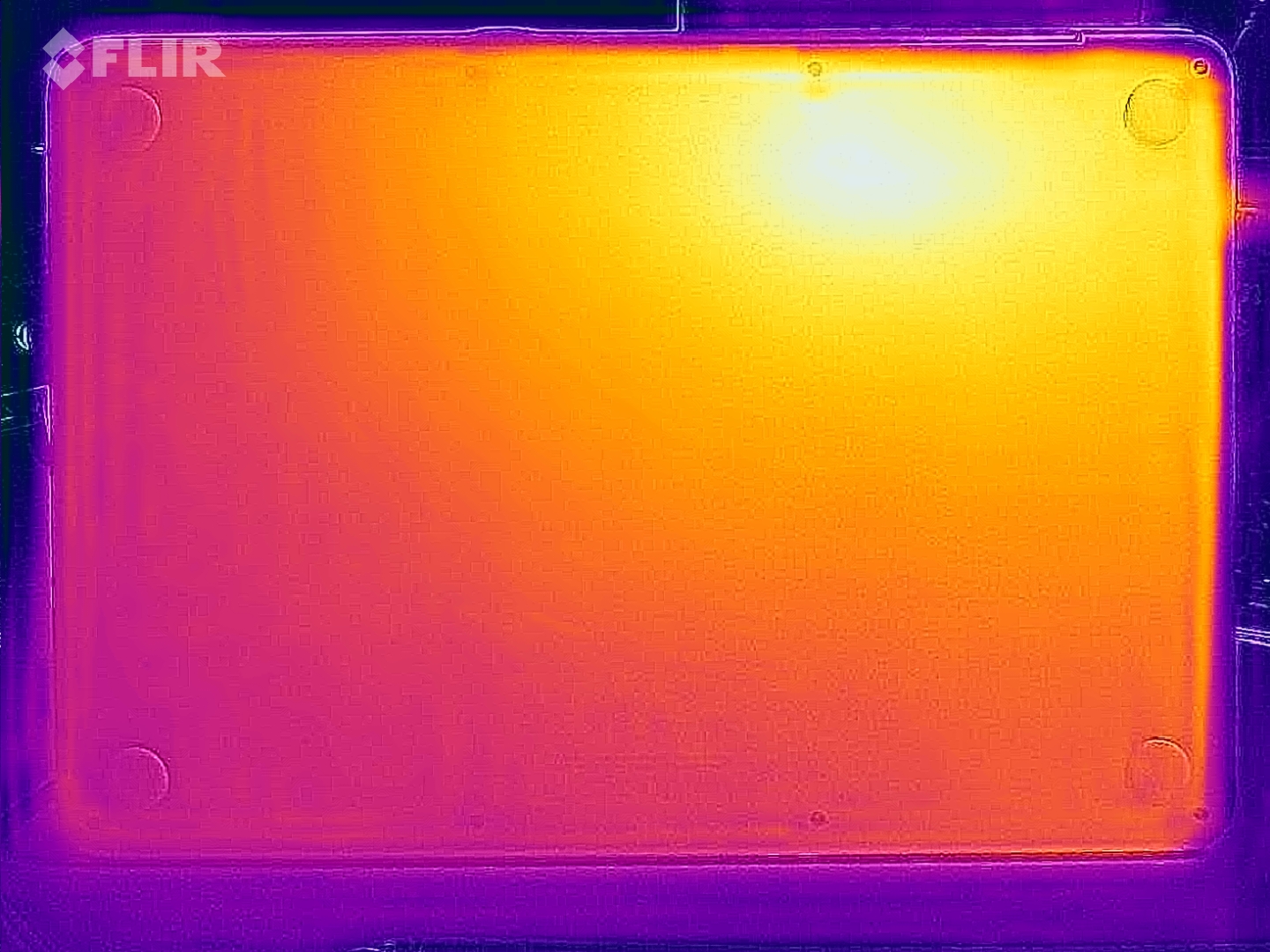
The surface temperatures of the aluminum chassis are always pretty cool, even when you stress the system. We only measured 40 °C at two spots, all the other areas remained much cooler, so there are absolutely no limitations here. During the stress test, the A18 Pro consumes up to 8.8 Watts, but quickly levels off at around 5 Watts.

Max. Load
 40 °C
104 F
40.8 °C
105 F
32 °C
90 F
 
 34 °C
93 F
34.9 °C
95 F
29 °C
84 F
 
 30.3 °C
87 F
27.9 °C
82 F
27.7 °C
82 F
 
Maximum: 40.8 °C = 105 F
Average: 33 °C = 91 F
31.8 °C
89 F
37.8 °C
100 F
38 °C
100 F
29.8 °C
86 F
32.4 °C
90 F
33.2 °C
92 F
28.4 °C
83 F
29.6 °C
85 F
30 °C
86 F
Maximum: 38 °C = 100 F
Average: 32.3 °C = 90 F
Room Temperature 20.7 °C = 69 F | Fluke t3000FC (calibrated), Voltcraft IR-900
(±) The average temperature for the upper side under maximal load is 33 °C / 91 F, compared to the average of 30.8 °C / 87 F for the devices in the class Subnotebook.
(±) The maximum temperature on the upper side is 40.8 °C / 105 F, compared to the average of 35.9 °C / 97 F, ranging from 21.4 to 59 °C for the class Subnotebook.
(+) The bottom heats up to a maximum of 38 °C / 100 F, compared to the average of 39.2 °C / 103 F
(+) In idle usage, the average temperature for the upper side is 23.1 °C / 74 F, compared to the device average of 30.8 °C / 87 F.
(+) 3: The average temperature for the upper side is 31 °C / 88 F, compared to the average of 30.8 °C / 87 F for the class Subnotebook.
(+) The palmrests and touchpad are cooler than skin temperature with a maximum of 30.3 °C / 86.5 F and are therefore cool to the touch.
(-) The average temperature of the palmrest area of similar devices was 28.2 °C / 82.8 F (-2.1 °C / -3.7 F).
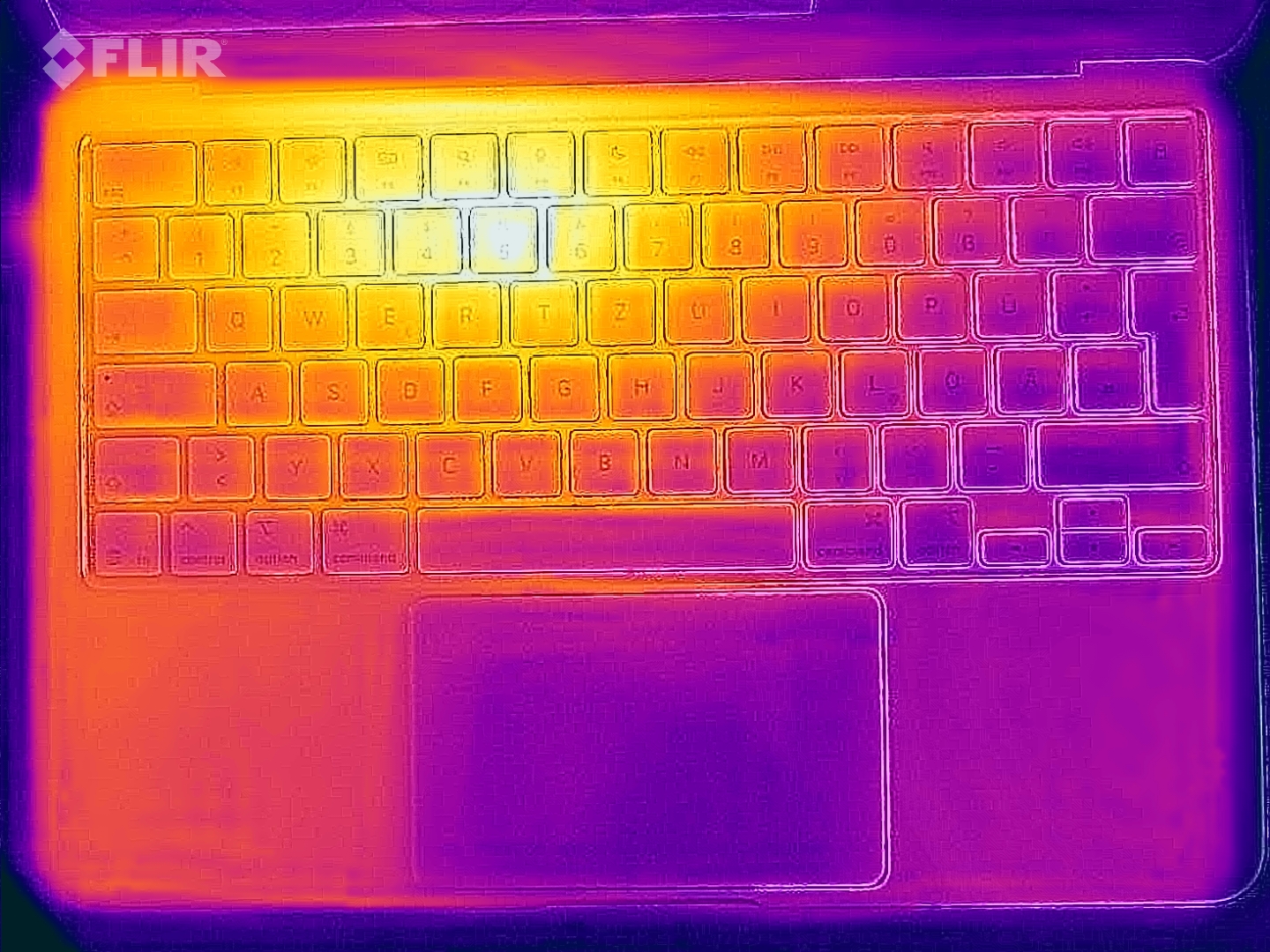
Heatmap stress (top)
Heatmap stress (bottom)
Apple MacBook Neo 256 GB
A18 Pro, A18 GPU
Microsoft Surface Laptop 13
SD X Plus X1P-42-100, Adreno X1-45 1.7 TFLOPS
HP Omnibook 5 14
SD X Plus X1P-42-100, Adreno X1-45 1.7 TFLOPS
Lenovo IdeaPad Slim 3 14 AHP G10
R7 8840HS, Radeon 780M
Apple MacBook Air 13 M4 Entry
M4 10-Core, M4 8-Core GPU
Heat
-3%
-9%
-17%
-7%
Maximum Upper Side * (°C)
40.8
39
4%
32.4
21%
38.3
6%
44.9
-10%
Maximum Bottom * (°C)
38
42.2
-11%
33.6
12%
51.5
-36%
42.6
-12%
Idle Upper Side * (°C)
23.8
23.9
-0%
30.2
-27%
25.8
-8%
23.9
-0%
Idle Bottom * (°C)
22.8
24
-5%
32
-40%
29.5
-29%
24
-5%

* ... smaller is better

012345678910111213Tooltip
Apple MacBook Neo 256 GB A18 GPU, A18 Pro, Apple SSD AP0256Z; Cinebench R23 Multi + 3DMark Wild Life Extreme Stress Test CPU Power: Ø2.15 (1.904-3.78)
Apple MacBook Air 13 M5 M5 8-Core GPU, M5 10-Core, Apple SSD AP0512Z; Cinebench R23 Multi + 3DMark Wild Life Extreme Stress Test CPU Power: Ø4.33 (3.832-11.708)
Apple MacBook Neo 256 GB A18 GPU, A18 Pro, Apple SSD AP0256Z; Cinebench R23 Multi + 3DMark Wild Life Extreme Stress Test GPU Power: Ø3 (2.492-5.019)
Apple MacBook Air 13 M5 M5 8-Core GPU, M5 10-Core, Apple SSD AP0512Z; Cinebench R23 Multi + 3DMark Wild Life Extreme Stress Test GPU Power: Ø4.56 (3.976-13.695)

Speakers

Large speaker modules

The two speaker modules inside the chassis are very large and the resulting sound is very good. They lack a bit of punch compared to the MacBook Air, for example, but considering the price range, the result is excellent.

dB(A) 0102030405060708090Deep BassMiddle BassHigh BassLower RangeMidsHigher MidsLower HighsMid HighsUpper HighsSuper Highs2036.836.4253036.13129.732.64025.932.6502728.86322.8318021.943.510020.152.112519.656.91601957.320019.661.225020.161.63151766.640014.96750014.467.263014.464.18001367100012.267125011.964.91600126520001270.4250011.873.3315011.775400011.174.8500011.473.7630011.567800011.365.21000011.2671250011731600010.363.9SPL24.783N0.656.1median 12median 67Delta2.84.445.447.832.532.828.528.127.529.223.825.626.827.421.833.416.739.716.347.814.946.720.557.418.362.415.668.211.470.29.673.99.875.89.471.29.669.29.570.79.57410.474.710.67211.167.811.769.811.866.912.271.412.369.912.268.812.365.613.365.623.583.50.561.2median 11.8median 69.22.64.441.228.941.241.522.941.544.127.844.14322.84343.327.143.347.822.847.847.923.147.948.826.748.850.93750.95817.55863.516.763.566.118.266.170.120.970.173.91773.975.91375.981.913.381.981.710.781.779.510.379.581.69.681.683.51083.580.410.580.479.711.479.780.911.480.983.411.583.479.811.879.878.812.378.878.611.978.678.412.478.469.112.269.162.211.562.292.725.892.7103.20.8103.2median 78.8median 12.2median 78.86.63.56.639.4433131.526.931.529.229.7262829.127.624.423.121.923.620.723.319.426.318.3371941.816.751.513.45811.762.611.365.810.471.410.670.610.472.410.275.810.8731170.911.371.611.768.812.363.612.665.613.165.113.160.912.8581248.324.282.60.650.4median 12.3median 63.63.112.6hearing rangehide median Pink NoiseApple MacBook Neo 256 GBMicrosoft Surface Laptop 13HP Omnibook 5 14Lenovo IdeaPad Slim 3 14 AHP G10
Frequency diagram (checkboxes can be checked and unchecked to compare devices)
Apple MacBook Neo 256 GB audio analysis

(+) | speakers can play relatively loud (83 dB)
Bass 100 - 315 Hz
(±) | reduced bass - on average 7.7% lower than median
(±) | linearity of bass is average (7% delta to prev. frequency)
Mids 400 - 2000 Hz
(+) | balanced mids - only 1.3% away from median
(+) | mids are linear (3.3% delta to prev. frequency)
Highs 2 - 16 kHz
(+) | balanced highs - only 4.4% away from median
(+) | highs are linear (4.3% delta to prev. frequency)
Overall 100 - 16.000 Hz
(+) | overall sound is linear (9% difference to median)
Compared to same class
» 4% of all tested devices in this class were better, 1% similar, 95% worse
» The best had a delta of 5%, average was 18%, worst was 53%
Compared to all devices tested
» 3% of all tested devices were better, 1% similar, 96% worse
» The best had a delta of 4%, average was 24%, worst was 134%

Microsoft Surface Laptop 13 audio analysis

(+) | speakers can play relatively loud (83.5 dB)
Bass 100 - 315 Hz
(-) | nearly no bass - on average 15.5% lower than median
(±) | linearity of bass is average (10.7% delta to prev. frequency)
Mids 400 - 2000 Hz
(+) | balanced mids - only 3.3% away from median
(+) | mids are linear (4.3% delta to prev. frequency)
Highs 2 - 16 kHz
(+) | balanced highs - only 1.5% away from median
(+) | highs are linear (4.7% delta to prev. frequency)
Overall 100 - 16.000 Hz
(+) | overall sound is linear (11.1% difference to median)
Compared to same class
» 11% of all tested devices in this class were better, 2% similar, 87% worse
» The best had a delta of 5%, average was 18%, worst was 53%
Compared to all devices tested
» 6% of all tested devices were better, 2% similar, 92% worse
» The best had a delta of 4%, average was 24%, worst was 134%

HP Omnibook 5 14 audio analysis

(+) | speakers can play relatively loud (92.7 dB)
Bass 100 - 315 Hz
(-) | nearly no bass - on average 19.3% lower than median
(+) | bass is linear (5.5% delta to prev. frequency)
Mids 400 - 2000 Hz
(+) | balanced mids - only 3% away from median
(+) | mids are linear (4% delta to prev. frequency)
Highs 2 - 16 kHz
(+) | balanced highs - only 1.3% away from median
(+) | highs are linear (2% delta to prev. frequency)
Overall 100 - 16.000 Hz
(+) | overall sound is linear (12.8% difference to median)
Compared to same class
» 19% of all tested devices in this class were better, 5% similar, 77% worse
» The best had a delta of 5%, average was 18%, worst was 53%
Compared to all devices tested
» 12% of all tested devices were better, 3% similar, 86% worse
» The best had a delta of 4%, average was 24%, worst was 134%

Lenovo IdeaPad Slim 3 14 AHP G10 audio analysis

(+) | speakers can play relatively loud (82.6 dB)
Bass 100 - 315 Hz
(-) | nearly no bass - on average 29.7% lower than median
(±) | linearity of bass is average (9.5% delta to prev. frequency)
Mids 400 - 2000 Hz
(±) | higher mids - on average 6.8% higher than median
(±) | linearity of mids is average (7% delta to prev. frequency)
Highs 2 - 16 kHz
(+) | balanced highs - only 3.8% away from median
(+) | highs are linear (4.9% delta to prev. frequency)
Overall 100 - 16.000 Hz
(±) | linearity of overall sound is average (24.3% difference to median)
Compared to same class
» 82% of all tested devices in this class were better, 4% similar, 14% worse
» The best had a delta of 5%, average was 18%, worst was 53%
Compared to all devices tested
» 73% of all tested devices were better, 6% similar, 21% worse
» The best had a delta of 4%, average was 24%, worst was 134%

Energy Management

Power Consumption

In Europe, you only get a USB cable in the box.

During our consumption measurements, the idle values at maximum brightness are pretty high at up to 9 Watts, which is a result of the bright IPS screen. Under load, we measure up to 24 Watts, which stabilizes at ~18.5 Watts. Apple does not include a power adapter in Europe; we recommend a 30W model to be on the safe side.

Power Consumption
Off / Standbydarklight 0.15 / 0.23 Watt
Idledarkmidlight 1.5 / 8.9 / 9 Watt
Load midlight 18.9 / 26.3 Watt
 color bar
Key: min: dark, med: mid, max: light        Metrahit Energy
Apple MacBook Neo 256 GB
A18 Pro, A18 GPU, Apple SSD AP0256Z, IPS, 2408x1506, 13"
Microsoft Surface Laptop 13
SD X Plus X1P-42-100, Adreno X1-45 1.7 TFLOPS, , IPS, 1920x1280, 13"
HP Omnibook 5 14
SD X Plus X1P-42-100, Adreno X1-45 1.7 TFLOPS, Samsung PM9C1 MZVL81T0HELB-00BTW, OLED, 1920x1200, 14"
Lenovo IdeaPad Slim 3 14 AHP G10
R7 8840HS, Radeon 780M, Micron 2500 MTFDKBA512QGN, IPS, 1920x1200, 14"
Apple MacBook Air 13 M4 Entry
M4 10-Core, M4 8-Core GPU, Apple SSD AP0256Z, IPS, 2560x1664, 13.6"
Average Apple A18 GPU
 
Average of class Subnotebook
 
Power Consumption
-31%
-38%
-112%
-38%
52%
-81%
Idle Minimum * (Watt)
1.5
1.8
-20%
1.9
-27%
3.3
-120%
1.9
-27%
0.873 ?(0.51 - 1.5, n=4)
42%
Idle Average * (Watt)
8.9
5.1
43%
2.5
72%
6.3
29%
8.7
2%
3.3 ?(1 - 8.9, n=4)
63%
Idle Maximum * (Watt)
9
5.6
38%
8.1
10%
6.8
24%
8.8
2%
3.39 ?(1.2 - 9, n=4)
62%
Load Average * (Watt)
18.9
13.8
27%
17.8
6%
45.7
-142%
29.9
-58%
Cyberpunk 2077 ultra external monitor * (Watt)
10.3
19.4
-88%
19.1
-85%
35.8
-248%
21.5
-109%
Cyberpunk 2077 ultra * (Watt)
11.5
21.8
-90%
19.9
-73%
38.2
-232%
18.5
-61%
Load Maximum * (Watt)
26.3
60.2
-129%
70.3
-167%
51.7
-97%
30.8
-17%

* ... smaller is better

Power Consumption Cyberpunk / Stress Test

05101520Tooltip
Apple MacBook Neo 256 GB; 1280x720 Prime95 28.10 and Furmark 1.25: Ø19.6 (18.3-24)
Apple MacBook Neo 256 GB; Idle 150cd/m2: Ø3.54 (3.45-3.84)
Apple MacBook Neo 256 GB; Cyberpunk 2077 FHD ultra no FSR 150cd: Ø11.5 (10.2-14.3)

Power Consumption external Monitor

01234567891011121314151617Tooltip
Apple MacBook Neo 256 GB; Idle 1min (external Monitor): Ø2.52 (2.37-3.22)
Apple MacBook Neo 256 GB; Cyberpunk 2077 FHD ultra no FSR (external Monitor): Ø10.3 (9.16-11.8)
Apple MacBook Neo 256 GB; Cinebench 2024 Single Power (external Monitor): Ø8.54 (7.47-11)
Apple MacBook Neo 256 GB; Cinebench 2024 Multi Power (external Monitor): Ø9.83 (8.93-17.3)

Battery Life

36.5 Wh battery
36.5 Wh battery

The battery capacity of 36.5 Watts is pretty small, but the runtime in our Wi-Fi test at 150 nits is still good at almost 13 hours. However, the situation changes drastically when you increase the brightness and the Wi-Fi runtime drops to just under 5 hours. This can be an issue, especially in brighter environments, where you simply need a higher panel brightness. We will add more battery runtime tests soon.

The charging speed is slow, and it took exactly two hours with a 65W power adapter before the battery was back to 100 % (50 % after 45 minutes, 80 % after 76 minutes).

Battery Runtime
WiFi Websurfing
12h 51min
WiFi Websurfing max. Brightness
4h 49min
Battery Runtime
WiFi Websurfing
HP Omnibook 5 14
SD X Plus X1P-42-100, Adreno X1-45 1.7 TFLOPS, 60 Wh
16.9 h +31%
Microsoft Surface Laptop 13
SD X Plus X1P-42-100, Adreno X1-45 1.7 TFLOPS, 50 Wh
16.7 h +29%
Apple MacBook Air 13 M4 Entry
M4 10-Core, M4 8-Core GPU, 53.8 Wh
16.2 h +26%
Average of class Subnotebook
  (7.25 - 26.4, n=66, last 2 years)
13.6 h +5%
Apple MacBook Neo 256 GB
A18 Pro, A18 GPU, 36.5 Wh
12.9 h
Lenovo IdeaPad Slim 3 14 AHP G10
R7 8840HS, Radeon 780M, 60 Wh
10.7 h -17%
WiFi Websurfing max. Brightness
Microsoft Surface Laptop 13
SD X Plus X1P-42-100, Adreno X1-45 1.7 TFLOPS, 50 Wh
11.4 h +138%
Lenovo IdeaPad Slim 3 14 AHP G10
R7 8840HS, Radeon 780M, 60 Wh
9.2 h +92%
Average of class Subnotebook
  (4.82 - 15.8, n=40, last 2 years)
8.43 h +76%
Apple MacBook Air 13 M4 Entry
M4 10-Core, M4 8-Core GPU, 53.8 Wh
7.1 h +48%
Apple MacBook Neo 256 GB
A18 Pro, A18 GPU, 36.5 Wh
4.8 h

Notebookcheck Rating

Apple MacBook Neo 256 GB - 03/13/2026 v8
Andreas Osthoff

Chassis
85 / 98 → 87%
Keyboard
83%
Pointing Device
93%
Connectivity
47 / 74 → 64%
Weight
72 / 20-77 → 92%
Battery
89%
Display
79%
Games Performance
23 / 75 → 30%
Application Performance
92 / 92 → 100%
AI Performance
91%
Temperature
93%
Noise
100%
Audio
90 / 91 → 99%
Camera
29 / 75 → 39%
Average
75%
86%
Subnotebook - Weighted Average
CO2 Emissions
86.3%
Materials
50%
Packaging
100%
Power Use
92.5%
Repairability
60%
Software Updates
50%
Recycle Logo Total Sustainability Score: 73.1%

Potential Competitors in Comparison

Image
Model / Review
Price
Weight
Height
Display
1.
86%
Apple MacBook Neo 256 GB
Apple A18 Pro ⎘
Apple A18 GPU ⎘
8 GB Memory, 256 GB SSD
List Price: 699€1.2 kg12.7 mm13.00"
2408x1506
218 PPI
IPS
2.
84.3%
Microsoft Surface Laptop 13
Qualcomm Snapdragon X Plus X1P-42-100 ⎘
Qualcomm SD X Adreno X1-45 1.7 TFLOPS ⎘
16 GB Memory
List Price: 1219€1.2 kg15.6 mm13.00"
1920x1280
178 PPI
IPS
3.
85.5%
HP Omnibook 5 14
HP Omnibook 5 14
Qualcomm Snapdragon X Plus X1P-42-100 ⎘
Qualcomm SD X Adreno X1-45 1.7 TFLOPS ⎘
16 GB Memory, 1024 GB SSD
List Price: 550 USD1.3 kg12.7 mm14.00"
1920x1200
162 PPI
OLED
4.
81.1%
Lenovo IdeaPad Slim 3 14 AHP G10
AMD Ryzen 7 8840HS ⎘
AMD Radeon 780M ⎘
16 GB Memory, 512 GB SSD
List Price: 649€1.5 kg17.9 mm14.00"
1920x1200
162 PPI
IPS
5.
91.2%
Apple MacBook Air 13 M4 Entry
Apple M4 10-Core ⎘
Apple M4 8-Core GPU ⎘
16 GB Memory, 256 GB SSD
List Price: 1039€1.2 kg11.3 mm13.60"
2560x1664
225 PPI
IPS

Transparency

The selection of devices to be reviewed is made by our editorial team. The test sample was provided to the author as a loan by the manufacturer or retailer for the purpose of this review. The lender had no influence on this review, nor did the manufacturer receive a copy of this review before publication. There was no obligation to publish this review. As an independent media company, Notebookcheck is not subjected to the authority of manufacturers, retailers or publishers.

This is how Notebookcheck is testing

Every year, Notebookcheck independently reviews hundreds of laptops and smartphones using standardized procedures to ensure that all results are comparable. We have continuously developed our test methods for around 20 years and set industry standards in the process. In our test labs, high-quality measuring equipment is utilized by experienced technicians and editors. These tests involve a multi-stage validation process. Our complex rating system is based on hundreds of well-founded measurements and benchmarks, which maintains objectivity. Further information on our test methods can be found here.

Please share our article, every link counts!
Mail Logo
Google Logo Add as a preferred
source on Google
static version load dynamic
Loading Comments
Comment on this article
> Expert Reviews and News on Laptops, Smartphones and Tech Innovations > Reviews > Apple MacBook Neo Review - Surprisingly good and capable laptop for $599 with one big flaw
Andreas Osthoff, 2026-03-14 (Update: 2026-03-14)