




GameNative gains support for Epic Games Store, giving Android handhelds wider access to PC games

While Android handhelds are best known for their ability to emulate retro games, the more powerful ones are also able to play PC games with the help of apps such as GameHub, GameNative, and Winlator. The first two apps allow users to play Steam games on Android, but a new update to GameNative has now added support for another major PC game store — the Epic Games Store.
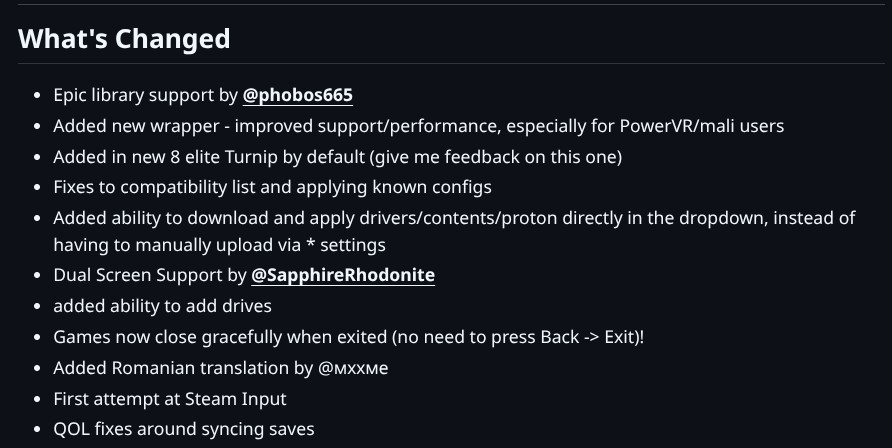
The new version of GameNative that brings support for the Epic Games Store is version 0.7.1, and according to the github page, the feature was added by a user that goes by @phobos665. This is a big addition, as owners of compatible devices such as the Retroid Pocket 5 (available on Amazon for $249), can now access their Epic Games library. And if you have been grabbing Epic's weekly free games, you should have a healthy list of games to choose from.
Getting your Epic Games library up and running is pretty straightforward. Once you have installed the latest version of GameNative, tap on your profile at the top right corner. Tap on “Settings” and scroll down until you see Epic games Integration. Tap on it and it should open up a dialog box. Tap “Open Epic Login”, and a new Epic Games sign in tab should open in your browser.
After signing in, another page showing an authorization code should open. Copy the authorization code and paste into the dialog box open on GameNative. Tap “login” and you should receive a message that says “login successful”. Your Epic Games Store library should now appear in your device's library.
In addition to adding support for the Epic Games Library, the latest version of GameNative also brings some new features such as new Turnip drivers for Snapdragon 8 Elite, dual screen support, an easier way to properly close games, and the ability to add drives.
Source(s)
Github via Retrohandhelds
 Add as a preferred source on Google


