




Samsung One UI 9: Security features you must turn on yourself
Samsung started rolling out One UI 9, based on Android 17, in mid-September. The Galaxy S26 and S26 Ultra came first, and the update reached Europe at the end of the month. The Galaxy Z Fold8 and Z Flip8 ship with it, while Samsung has published separate dates for the Galaxy S25 and older models. Samsung also promotes the update with new security features. Some of them are limited to a few countries, and others only work after you turn them on.
Scam Detection for calls is limited to a few countries
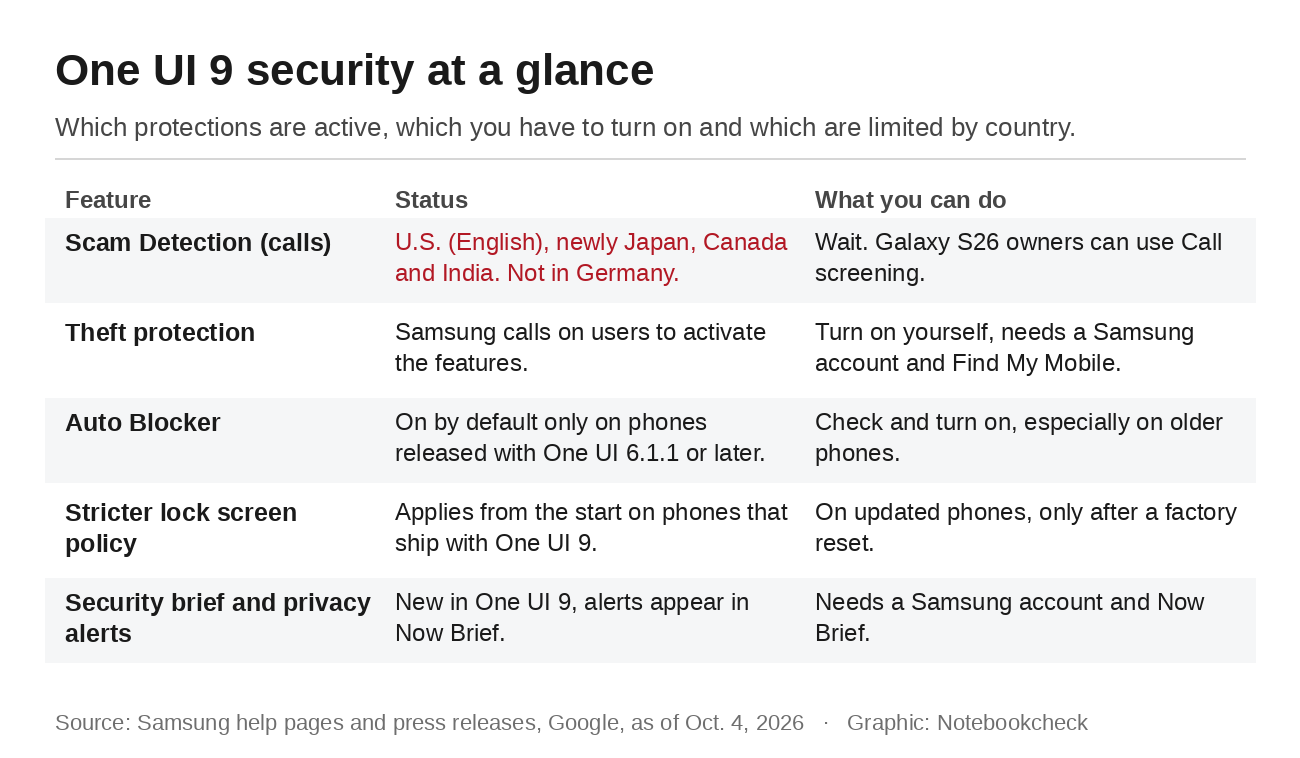
The biggest gap concerns Scam Detection. Google built the feature, which runs on an on-device Gemini model and warns you during a call with what Google calls "an instant audio and haptic alert" when the conversation looks like a scam. It arrived on the Galaxy S26 in February, but according to Google only in English in the U.S. A footnote adds: "Feature must be turned on in Settings." With One UI 9, Samsung says Scam Detection "will be available in Japan, Canada, and India." No European country is on that list, and Samsung's German press release for the update doesn't mention the feature at all.
Google offers Scam Detection more widely in its own Phone app, but only on the Pixel 9 and newer Pixel models. Those are available in countries such as Germany, the U.K., France and Spain. Even there, the feature is off by default. Galaxy S26 owners get Call screening instead. Samsung says the Call assistant will "answer calls and ask the caller who they are and why they're calling," and the conversation appears as text. It works in 13 languages, including English, German and Spanish. You'll find it in the Phone app under More options, Settings and Call screening.
Theft protection is something you have to enable
Since One UI 7, Samsung has bundled several anti-theft features. Theft Detection Lock locks the screen when the phone detects motions associated with theft, such as someone snatching it. Offline Device Lock locks the screen if a thief keeps the phone disconnected for a long time. Remote Lock lets you lock it "using just a phone number and a quick security challenge." Identity Check asks for biometric authentication before sensitive security settings can be changed outside the safe places you've set, and Security Delay adds a one-hour wait for changes such as new biometrics.
Samsung doesn't say whether these switches are on out of the box. In 2025, however, the company explicitly called on Galaxy users to activate them, and its help pages walk through each one. The path is Settings, Security and privacy, Lost device protection and Theft protection. You need a Samsung account and Find My Mobile turned on.
Whether Auto Blocker is on depends on the phone's launch software
Auto Blocker is Samsung's defense against malware that sneaks in through other routes. It blocks apps from unauthorized sources, commands sent over USB, suspected malware images in messaging apps and unofficial software updates. According to Samsung, it is on by default only on Galaxy devices "released with One UI 6.1.1" or later. The Galaxy S24 launched with One UI 6.1. On phones like that, a later update doesn't turn the feature on if it was off before.
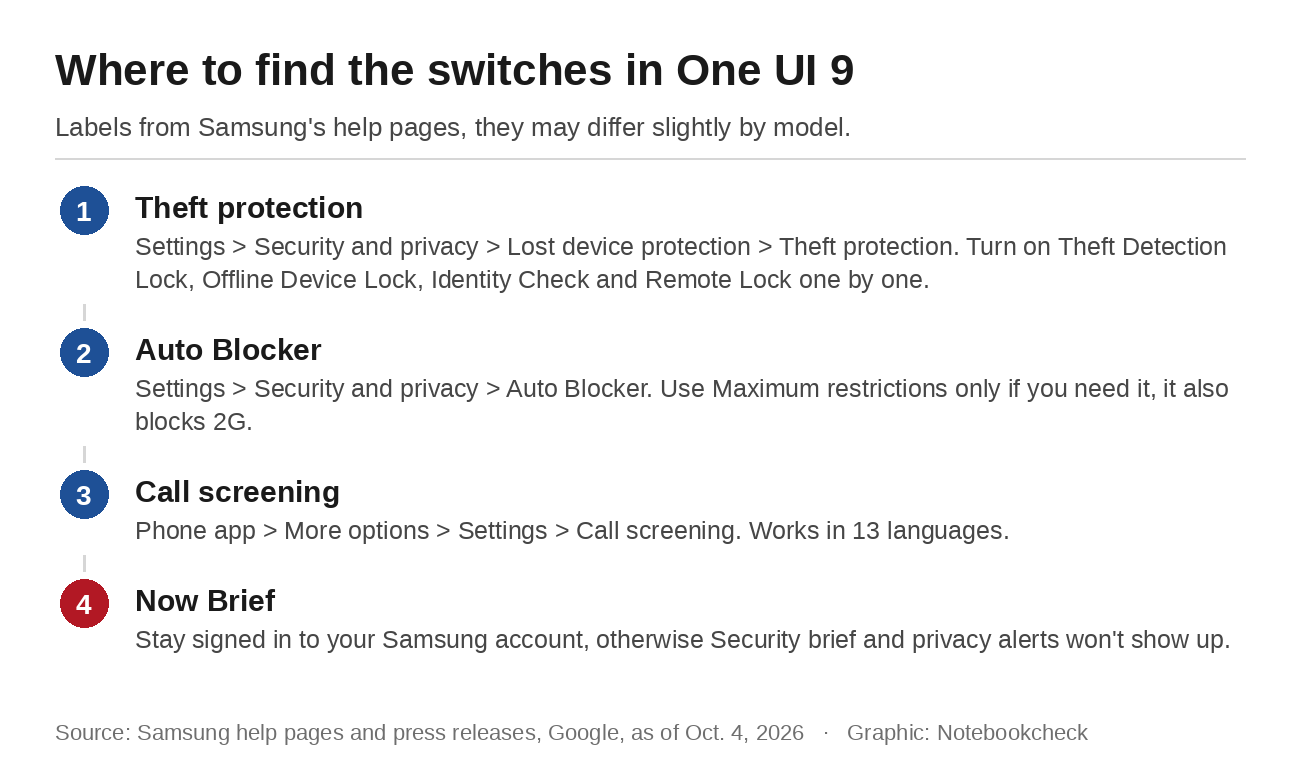
You can check under Settings, Security and privacy and Auto Blocker. There is also a Maximum restrictions mode. It blocks older 2G networks, automatic reconnection to unsecured Wi-Fi and shared albums, and it removes location data from pictures you share. Samsung warns that in areas with only 2G coverage, calls, messages and mobile data may stop working while this mode is on.
Phones that ship with One UI 9 have a stricter lock screen
The new lock screen policy shows how much a new phone and an updated one can differ. On devices that launch with One UI 9, the wait after wrong PIN, pattern or password entries grows step by step and reaches 24 hours after the 12th failed attempt. On the 13th, the phone is "permanently locked and can only be unlocked by performing a factory reset," which wipes its data. For now, this mainly affects the new Fold8 and Flip8. If you update to One UI 9 instead, Samsung says your previous security settings stay as they are, and the stricter policy "will only take effect if you perform a full factory reset." Separately, Android asks for your PIN, pattern or password at least once every 72 hours, even if you usually unlock with a fingerprint.
Security brief and privacy alerts show up in Now Brief
One UI 9 also adds Security brief and privacy alerts. Security brief collects warnings about malware, apps from unknown sources and unnecessary permissions. Privacy alerts use on-device AI to flag "unnecessary attempts to access permissions in the background." Both appear in Now Brief, and according to Samsung's footnotes, Now Brief requires a Samsung account login and shows customized content only with your consent. If you've turned off Now Brief or don't use a Samsung account, you won't see these alerts. For privacy alerts, Samsung lists phones going back to 2023.
Right after updating, it's worth a quick look at your settings. Checking Auto Blocker and theft protection takes seconds, and you'll barely notice either in daily use. Scam Detection will take longer, since Samsung hasn't announced more countries.
Source(s)
Samsung Global Newsroom: One UI 9 rollout and new Scam Detection countries
Samsung Newsroom Germany: One UI 9 rollout for the Galaxy S26 series (German)
Samsung Mobile Press: Footnotes on Now Brief and privacy alerts
SamMobile: Galaxy S26 One UI 9 rollout reaches Europe
Google: Scam Detection in the Galaxy S26 Phone app
Google Phone app Help: Use Scam Detection
Samsung Support: Call screening on the Galaxy S26 series
Samsung Support: How to use security settings and theft protection
Samsung Newsroom Canada: Samsung encourages users to activate new security measures
Samsung Support: Protect your Galaxy device with Auto Blocker
Tom's Guide: Auto Blocker stays off after updating to One UI 6.1.1
Samsung Support: One UI 9.0 lock screen security policy changes
 Add as a preferred source on Google


