




Used phones: Check for the previous owner's lock before you pay
Black Friday and the holidays are when a lot of used smartphones change hands, through classified ads, at flea markets or from refurbishers. One problem is easy to miss. If the previous owner never removed the phone from their accounts, it stays linked to them, and a factory reset doesn't change that. At the latest during setup, the phone asks for a password only that person knows. Without it, you can't use the device.
Why a factory reset isn't enough
Apple, Google and Samsung tie their anti-theft locks to the owner's account, not to what's stored on the phone. Apple calls its version Activation Lock. According to Apple, it turns on automatically when Find My is enabled, and from then on the Apple Account password is required before anyone can erase or reactivate the device. Google's equivalent is usually called Factory Reset Protection, or FRP. After a reset, Google says the phone can only be set up with a Google Account that was already on it. If you can't provide that, "you won't be able to use the device at all." Samsung adds its own Reactivation Lock on top, which asks for the owner's Samsung account. That's what makes these locks work against theft. A stolen phone can be wiped, but it can't be set up again without the owner's account.
Android 15 made FRP much harder to get around. As Android Authority reported, it now stays active even if someone skips the setup wizard, and it blocks new accounts, a new screen lock and new app installs. Google's stated goal was to make stolen phones unsellable. So don't count on online unlocking services either.
How to check an iPhone before you buy
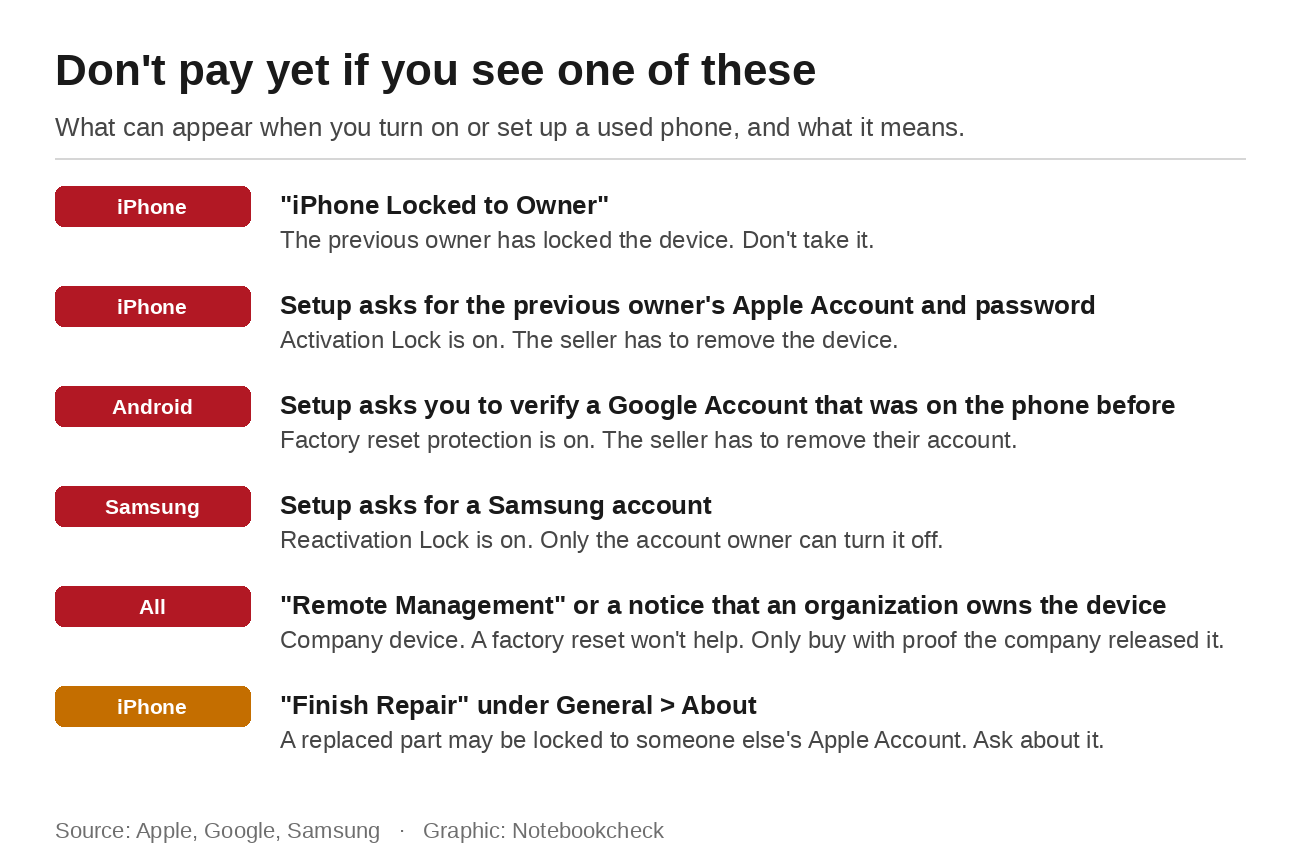
Apple's support article on Activation Lock lists the steps. Turn the iPhone on and unlock it. If you see a message saying the iPhone is locked to its owner, don't take it. If you land on the lock screen or Home Screen, the phone hasn't been erased yet, so the seller should erase it in front of you. Then start setup and watch what it asks for. If it wants the previous owner's Apple Account and password, the device is still linked to their account. The seller can remove it with their password on the device itself or remotely through iCloud in a browser. In Apple's own words, "don't take ownership of any used iPhone or iPad until it has been removed from the previous owner's account." The phone is ready once you see the Hello screen. The same steps apply to iPads.
There is no online lookup anymore. Apple took down its Activation Lock status page in January 2017, so testing the device itself is the only way to know.
On an iPhone, also check Settings, General, About. If the phone has been repaired, iOS lists replaced parts there under Parts and Service History. If the battery, display or front camera shows a "Finish Repair" label, the part may have come from another iPhone and still be linked to someone else's Apple Account. Apple says a part like that isn't eligible for warranty or AppleCare service until it's unlocked, and the device can't be traded in.
Android and Samsung: Remove the accounts first, then reset
On Android, the order matters. The seller first removes their Google Account under Accounts in Settings, and on Samsung phones the Samsung account as well. Only then do they reset the phone. Google says removing the account is what turns the protection off. Samsung describes the same steps in its trade-in help and warns that a factory reset does not lift the lock automatically. If the seller isn't there in person, they can also remove the phone remotely, through the device list in their Google Account's security settings or through Samsung's device finder in a browser.
You can check the result yourself on the spot. After the reset, start setup and connect the phone to Wi-Fi. If it asks you to verify an account that was on the phone before, the protection is still active. If you get to the point where you can sign in with your own account, the phone is free. With a used Android phone, it's also worth checking how long it will get updates. For the Pixel 6, that window is closing now.

Former company phones: IT still has a say
Phones that used to belong to a company or school are a separate case. Many organizations enroll their iPhones through Apple's Automated Device Enrollment. According to Apple, the device then checks with Apple's servers during setup to see whether a management service is assigned and enrolls with it. Administrators can also prevent anyone from removing the management profile. On the iPhone, this shows up as the Remote Management screen. Android has the same concept in zero-touch enrollment. A device like that shows a notice at startup that it's managed by an organization, and Google says it sets itself up for the company again after a reset.
A factory reset won't help here. Only the organization that manages the device can release it, and Apple itself points people to the IT department in that case. If you see one of these screens, only buy if the seller can show the device has been released. Be especially careful with batches of ex-lease business phones.
When you buy online and the phone is shipped, you can't test it before paying. Ask the seller to confirm in writing that they've removed the phone from all their accounts, and pay with a method that has buyer protection. If the phone arrives locked, you have something to point to.
If the phone is already locked
If you've already paid, go back to the seller first. They can remove the lock remotely at any time, as long as they can still get into their account. Apple also offers an Activation Lock support request, but it requires proof of purchase. Apple's help page doesn't say what it accepts as proof for a private sale. If you paid through a platform with buyer protection, open a case there before the deadline runs out. A seller who stops responding is a bad sign. Stopping the resale of stolen phones is what these locks were built for.
If you're selling an old phone yourself, run the same checks from your side. Our guide to selling a phone covers which other accounts are still tied to the device.
Source(s)
Apple: Activation Lock for iPhone and iPad
Apple: How to remove Activation Lock
Apple: About Activation Lock and Self Service Repair
Apple: iPhone Parts and Service History
Apple: Automated Device Enrollment and device management
Google: Help prevent others from using your device without permission
Google: Zero-touch enrollment for users
Samsung: Turning off the Android activation lock (German)
Android Authority: Android 15 Factory Reset Protection upgrades
 Add as a preferred source on Google


No comments for this article
