




The phone you sold is still signed in to your accounts
The phone from two years ago has been in someone else's hands for a long time. Sold, given away or traded in, and reset to factory settings first. Most people treat that as the end of the matter.
Google does not. Its help page lists the reasons why you might not recognize a device in your account, and one of them is this: "You recently reset your device to factory settings. The device could still show up." The reset clears the phone. It does not clear the entry in your account. Access can outlive the hardware, and the same thing happens with an old mobile number.
Most people have more in these lists than they expect. Old phones, a laptop from a former employer, a TV that was signed in once for a single evening. Each entry is a device that can still reach the account.
A new password does not sign out every device
The common assumption is that changing a password signs everyone else out. It does at some services and not at others, and most providers say nothing about it at all. Running sessions are the weak point here. A stolen session cookie gets an attacker in without the password and without the second factor.
Google is the clearest of them. Change your password there and you are signed out everywhere, with three exceptions: devices you use to verify that it is you when you sign in, some devices with third-party apps you have given account access, and helpful home devices you have given account access. A smart speaker sits in that last group.
Amazon states the effect as well, but only in the English version of its help pages: "Changing your password will sign you out of Amazon apps and websites on any non-Kindle device." Kindles stay signed in.
Netflix makes it a checkbox. Its help center says: "We recommend that you leave the Sign out all devices box checked." Clear that box and you change the password while every session keeps running.
Microsoft, Apple and Instagram say nothing about this in their official help pages. Apple keeps the two things apart. In its guide for an account that may have been taken over, the password is step one, and removing unfamiliar devices comes four steps later as a separate task. We ran into the same limit recently with app passwords, which a password change does not touch at all.
So you cannot rely on a password change. You have to look at the device list anyway.

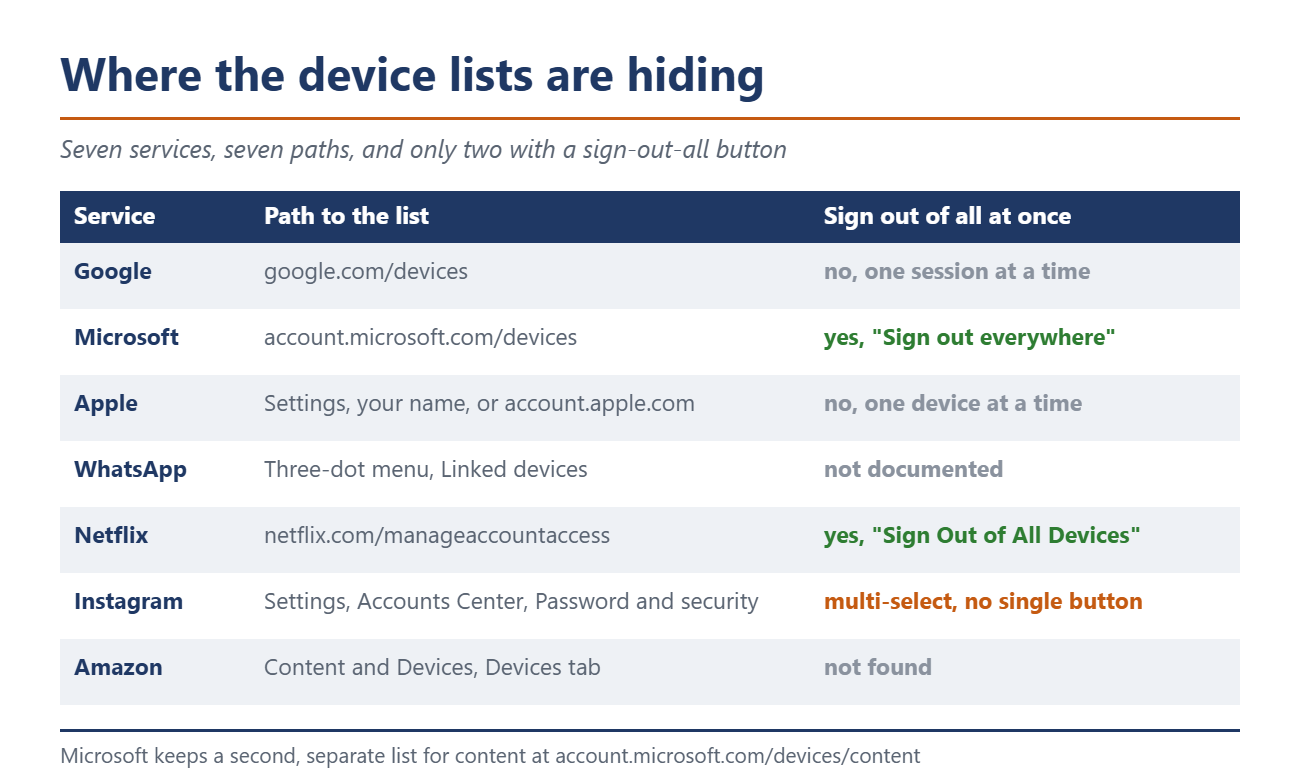
Where the device lists are hiding
Every service buries them somewhere else, and several keep more than one list. The overview below takes you straight there. Two of them offer a button that signs out everything. At the other five you sign out device by device.
What the lists do not tell you
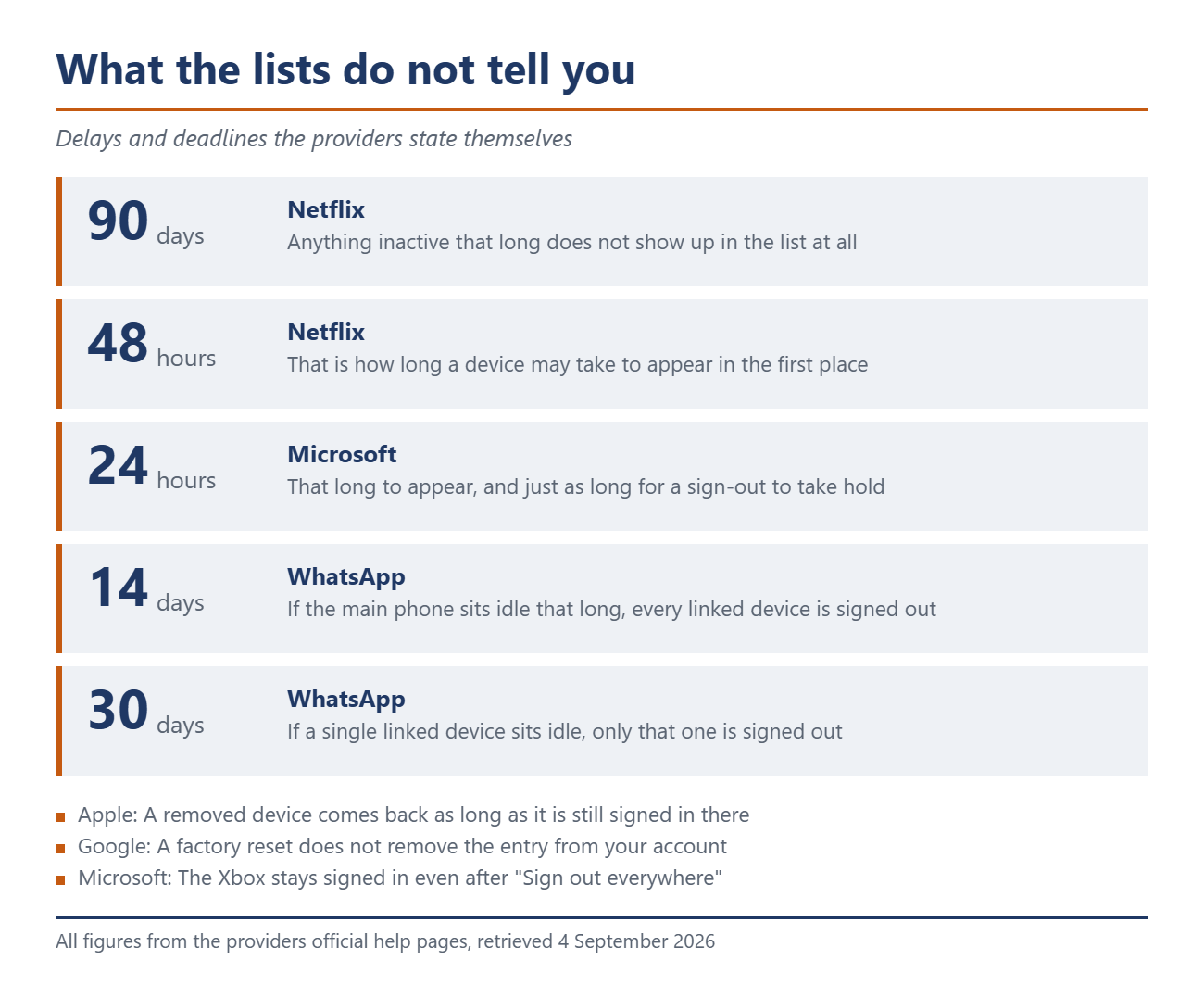
An empty or short list proves nothing. Netflix states outright that devices can be missing. Anything that has not been active in the last 90 days does not show up at all, and neither do devices used only for Netflix games or only to reach Tudum. A device may take up to 48 hours to appear in the first place.
Microsoft quotes the same delay of up to 24 hours for its own list, and it needs just as long for a sign-out to take hold. The Xbox is exempt from that and stays signed in.
Apple has a catch of its own. Remove a device that is still signed in to your account and it comes back. The help page puts it like this: "If you’re still signed in to your Apple Account on the device, it might reappear on your Apple Account screen the next time your device connects to the internet." A phone you sold only disappears for good once you sign out of iCloud, Media & Purchases, iMessage, FaceTime and Game Center on it, or erase it.
The timestamps are also worth less than they look. Google points out that the time shown can come from background syncing rather than from someone actually using the device. An entry from this morning does not mean anyone held that phone this morning.
WhatsApp cleans up on its own, on two different timers
WhatsApp handles linked devices better than the rest, because the service does the tidying for you. There are two separate timers, though, and they get confused a lot. If your main phone goes unused for more than 14 days, every linked device is signed out. If a single linked device sits idle, that one drops out after 30 days. WhatsApp allows no more than four linked devices at a time anyway.
That makes WhatsApp the exception. Nothing expires on its own at any of the other services, or at least nothing they document.
10 minutes, one pass
Work through the seven addresses from the overview one by one. Sign out of every entry you cannot place right away. Signing out one of your own devices by mistake costs you a fresh login. Missing one that is not yours costs more.
Keep three things in mind while you do it. Several rows with the same device name can belong to one device or to several, and Google advises signing out of all of them when in doubt. With Apple you have to sign out on the device itself as well, otherwise the entry comes back. And with Microsoft and Netflix the sign-out only takes effect after hours, so an immediate second look still shows the old state.
If a device turns up that means nothing to you at all, signing out is only the first step. Change the password after that and check your two-factor settings.

Source(s)
support.google.com/accounts/answer/3067630 · support.google.com/accounts/answer/41078 · support.microsoft.com/en-us/account-billing/how-to-sign-out-of-your-microsoft-account-everywhere · support.apple.com/en-us/102649 · faq.whatsapp.com/378279804439436 · help.netflix.com/en/node/128180 · help.netflix.com/en/node/365 · www.amazon.com/gp/help/customer/display.html
 Add as a preferred source on Google


No comments for this article
