




Phone lost, account locked: what really helps now

Your phone is gone. Stolen, dropped in a lake, it makes no difference. You still know the password to your Google account, but Google wants the second factor now, and that lived on the phone you no longer have.
This is the moment that decides whether you lose an afternoon or an account. The decision itself was made much earlier, on the day you switched two-factor sign-in on.
We read through the recovery procedures at Google, Apple and Microsoft, and then the ones at 1Password, Bitwarden and Dashlane. All six come down to the same thing. Nothing can be set up after the fact. Every way back has to be laid before you need it.
In our piece on security keys, eight wrong entries in a row wipe every registration on the device. This time it is not a piece of hardware that goes. It is your inbox.
What the providers actually ask for
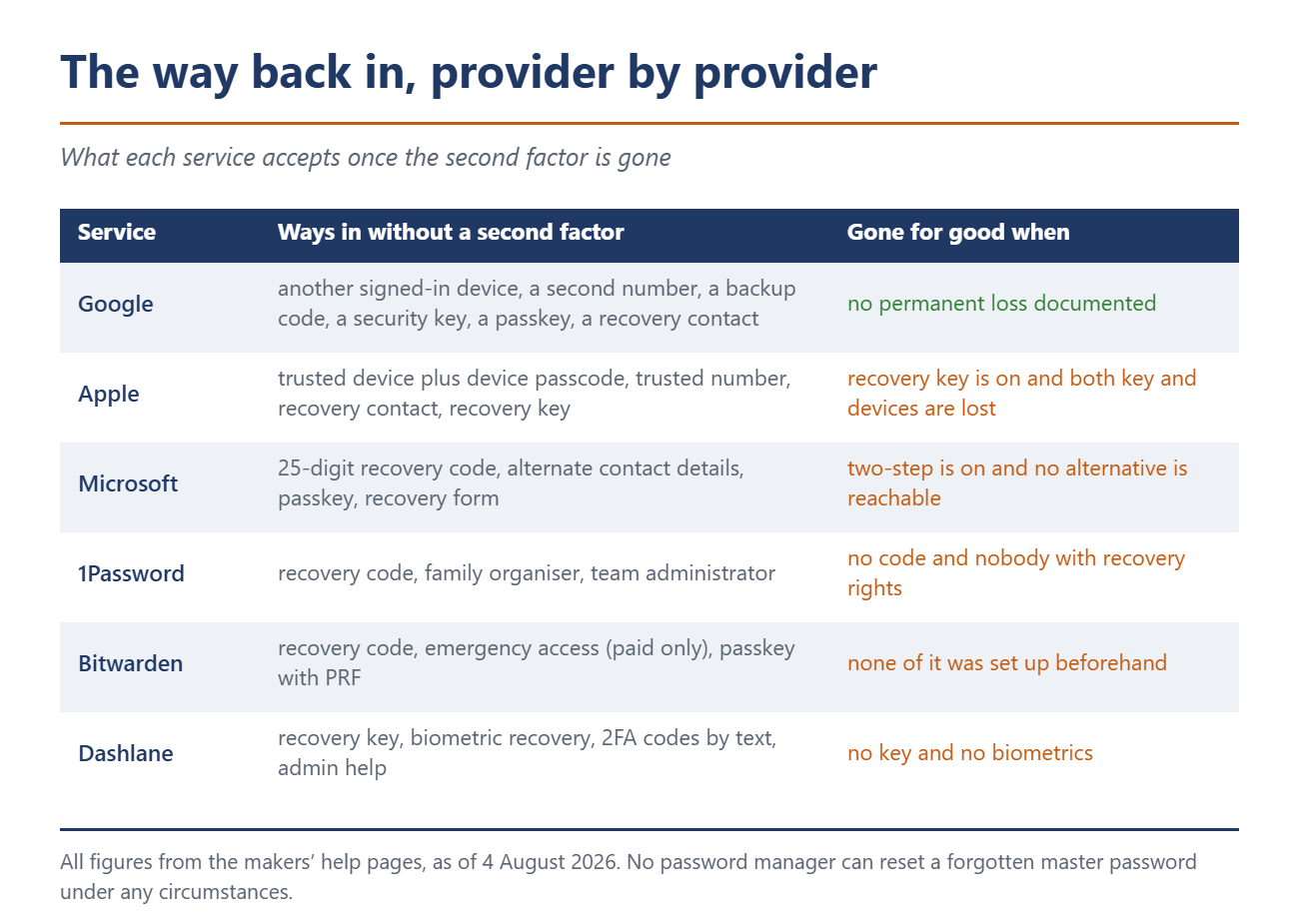
The easy route is the same at all three big providers: a second device that is still signed in. Without one, the options thin out fast.
Google accepts another signed-in phone, a second registered number, a backup code, a security key or a passkey from another device. The backup codes are the part people underrate. Ten of them, eight digits each, every one good for a single use. Generate a new set and the old one dies on the spot.
Apple treats your iPhone passcode as a full recovery factor. It is “also used to reset your Apple Account password and to recover your end-to-end encrypted data if you lose access to your account”. The number you tap to unlock your phone does much more than guard the lock screen.
Microsoft hands out no block of codes at all. You get exactly one 25-digit recovery code, and you cannot go back for it later: “You cannot retrieve or download an existing Microsoft account recovery code.”
The waiting is the real problem
Lose the second factor and you land in account recovery. It takes time, and that is deliberate.
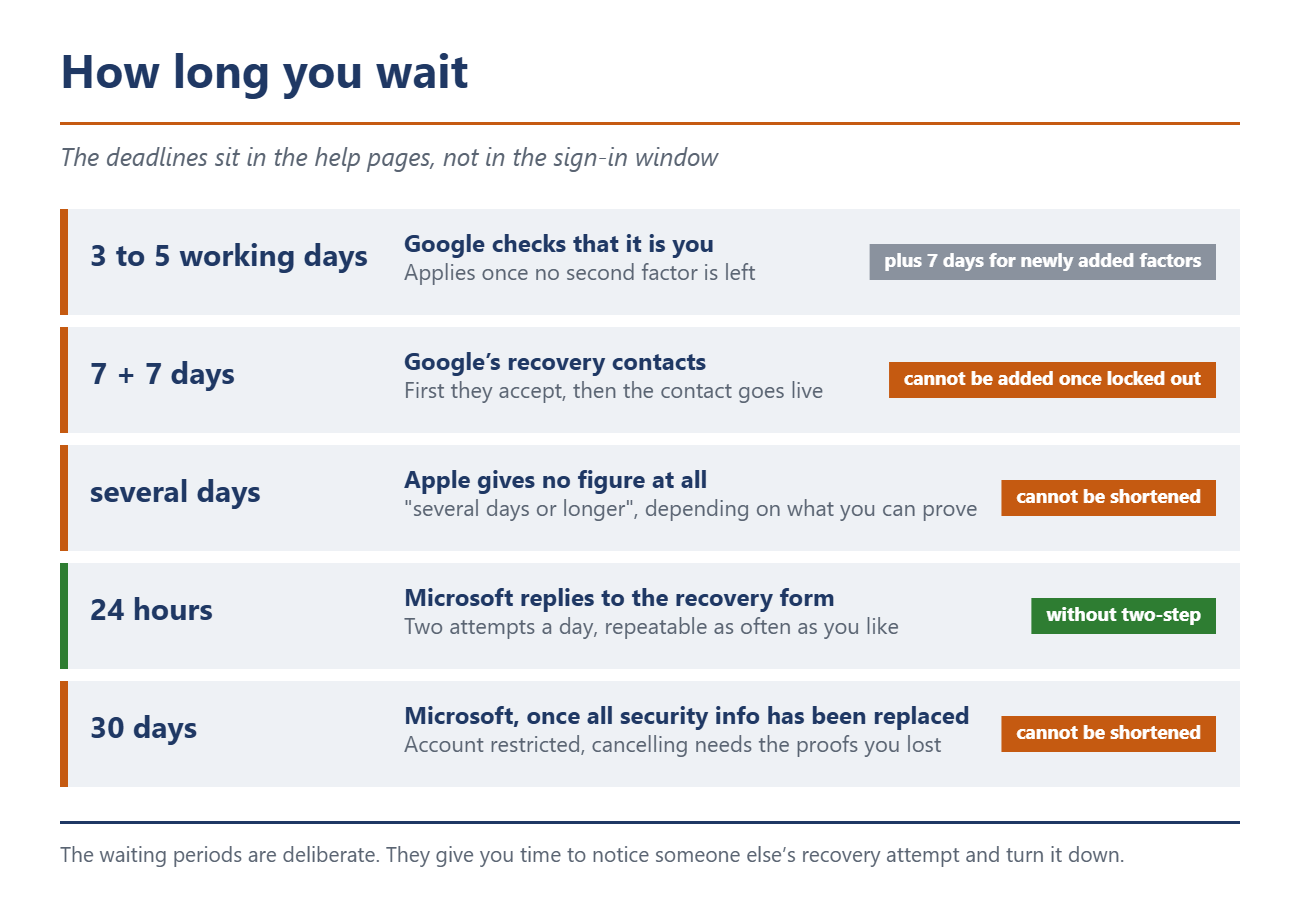
Google puts a number on it: “it can take 3-5 business days for Google to make sure it’s you”. Adding a fresh phone number at the last minute does nothing, because “it may take up to 7 days for those changes to take effect”.
Google’s newest safety net comes with the same catch. Recovery contacts let up to ten people you trust confirm who you are. The contact has seven days to accept, and another week runs before the contact can be used at all. By the time you need it, the door is shut: “You can’t add a recovery contact while you’re locked out of your account or in the account recovery process.”
Apple gives no number, only “several days or longer”, and answers the obvious follow-up itself. “Can the waiting period be shortened? No.”
Microsoft is the odd one out. The recovery form comes back within 24 hours, as long as two-factor sign-in is switched off. Replace every piece of security information on the account and Microsoft locks it for 30 days.
Three traps almost nobody knows about
Microsoft’s 30 days can only be cut short with the thing you just lost. The help page says: “We can’t expedite the 30-day process unless you cancel the request.” And to cancel: “You’ll need access to these security proofs to complete the cancel request.” If two-factor sign-in is on and none of the stored alternatives still reach you, Microsoft gives you a line you rarely see in a support document: “we cannot help you, sorry.”
Apple kills a running recovery the moment you use the account. No warning, no message: “If your Apple Account is in use during your request, your account recovery will be cancelled automatically.” An iPad sitting in the living room, still signed in, is enough. The only device you may keep using is the one you started the request on.
The Authenticator backup fails on the one account you would expect it to cover. For passwordless Microsoft accounts the backup holds the account name and nothing else: “then only the account name is backed up. When you restore, you will need to sign in again.” There is a platform wall on top of that: “accounts backed up using an iOS device cannot be restored on an Android device.” Move from iPhone to Android and the backup is worth nothing.
With password managers it really is over
Google and Apple will let you back in eventually, as long as you can prove enough. With password managers there is no such authority. Family and team plans are the exception, where an organizer or an administrator can reset you. Pay for your own account and there is nobody above you.
Bitwarden puts it without softening: “Bitwarden employees and systems have no knowledge of, way to retrieve, or way to reset your master password.” On losing the second factor: “there is no way for Bitwarden to recover the account or its data. You will need to delete your account and create a new one.” The recovery code that would save you sits in the settings, behind the master password prompt. It only helps the person who wrote it out beforehand.
1Password adds a widespread misunderstanding. The 34-character Secret Key looks like an emergency code and is not one: “Your Secret Key is not: A backup code. It doesn’t let you sign in if you forget your 1Password account password.” Since 2024 there has been a real recovery code. It works more than once, and only if you can still get into the email account on file.
Dashlane is the only one of the three that will text you fresh codes when the second factor is gone. It will not reset the master password either. What it offers instead is a recovery key plus biometric recovery on Android and iPhone.
What to set up today
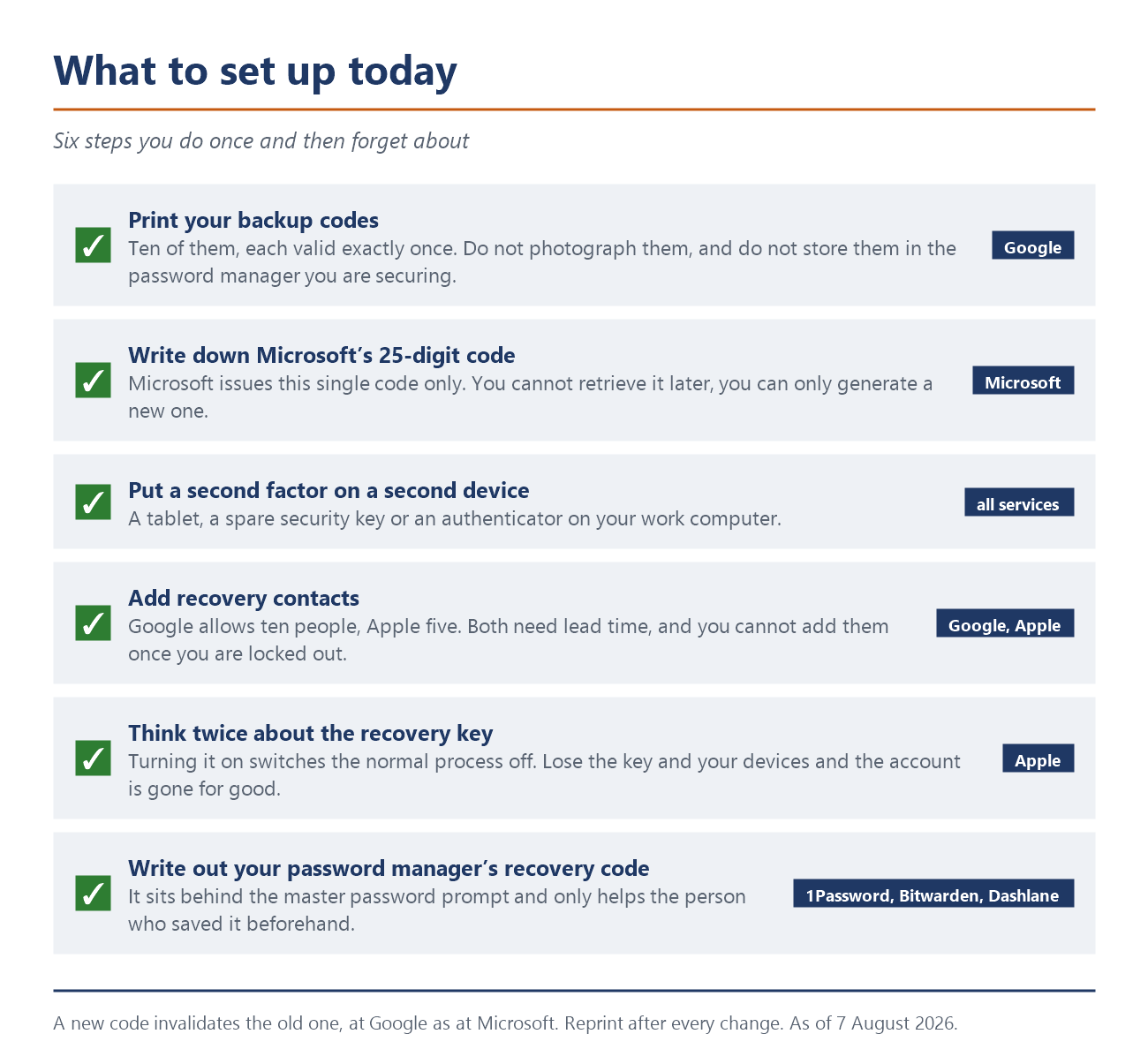
Print your backup codes. Do not photograph them, and do not file them in the password manager you are trying to protect. Apple spells this out for its recovery key: not in the Passwords app, not in iCloud Drive, because “if you lose access to your Apple Account, you won’t be able to open these apps to find it”.
Put a second factor on a second device. A tablet, an old spare key, an authenticator on your work computer. One phone carrying the only factor is the mistake everything else follows from, and it is the first thing we tell people who ask how to secure an account properly.
Add your trusted contacts now. Google allows ten recovery contacts, Apple five. Both need lead time, and at Google that means seven days twice over.
Think twice about the recovery key. Turn it on at Apple and the normal process switches off. Lose the key and your devices after that, and “you’ll be locked out of your account permanently.”
Sources
Google: Fix common issues with 2-Step Verification, Google: Sign in with backup codes, Google: Recovery and authentication factor changes, Google: Recovery contacts, Apple: Recovery key for your Apple Account, Apple: Account recovery, Apple: Account recovery contact, Apple: Advanced Data Protection for iCloud, Microsoft: Account recovery code, Microsoft: Help with the account recovery form, Microsoft: Security info change is still pending, Microsoft: Restore credentials from Authenticator, 1Password: About Your Secret Key, 1Password: Recovery Codes, Bitwarden: Lost Two-Step Device, Bitwarden: Forgot Master Password, Bitwarden: My Master Password, Dashlane: Account Recovery Key, Dashlane: Lost 2FA Recovery Codes
 Add as a preferred source on Google


