




Most security keys ship without a PIN, and websites rarely ask
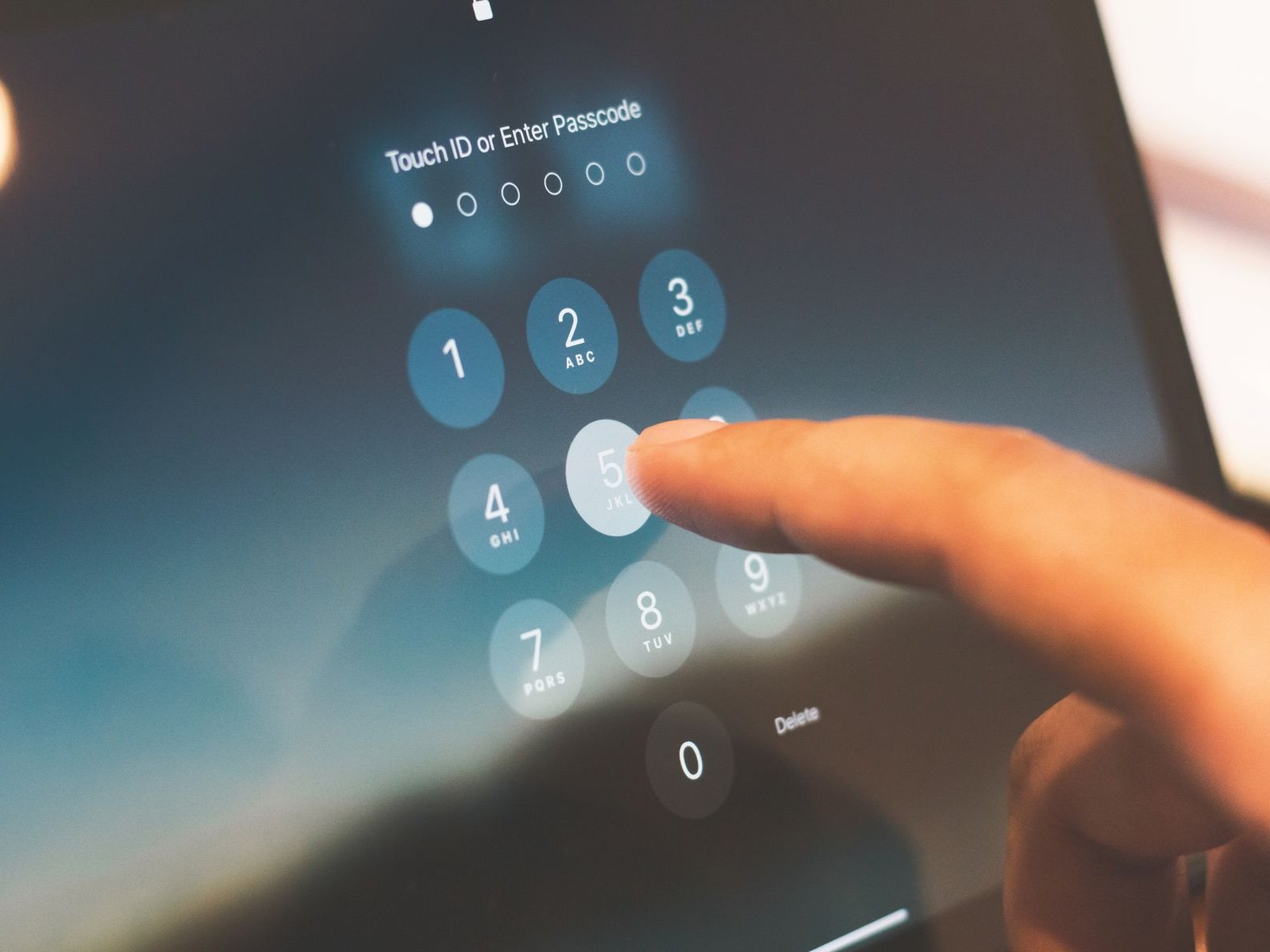
A security key on your keyring looks like maximum security. A piece of hardware nobody can steal remotely. The US cybersecurity agency CISA calls phishing-resistant sign-in the "gold standard" in its October 2022 fact sheet and names FIDO and WebAuthn "the only widely available phishing-resistant authentication".
What few people know: on many of these keys, a tap is enough out of the box. No PIN, no fingerprint, nothing. Whoever holds the thing is, as far as the service behind it is concerned, the rightful owner.
This is not an oversight and not a cheap-product problem, it is in the manuals. Yubico puts it in its Technical Manual as a side note: "By default, no PIN is set." And a paragraph later: the stored credentials "can be left unlocked and used for strong single-factor authentication".
A single factor, in other words. Exactly what passkeys were meant to replace.
Tap or prove it, that is the difference
FIDO2 has two levels, and both carry the same certification seal. User Presence only means a human was there and touched the key. Who touched it, the key does not check. User Verification means that human proved who they are, by PIN or fingerprint.
How thin the first level is, of all makers Nitrokey documents. The Nitrokey FIDO2 guide states: "The first FIDO operation is automatically accepted within two seconds after connecting Nitrokey FIDO2." Plugging it in counts as proof of presence. The same page adds that configuration and reset operations are not accepted this way. The Nitrokey Passkey guide carries the same sentence without that limit, and for the Nitrokey 3 the maker does not document the behaviour at all.
On Feitian's BioPass models K26, K27 and K45 the LED gives it away: a slowly blinking green light means tap, a fast one means place your finger. One device, two security levels, told apart by a blink rate.
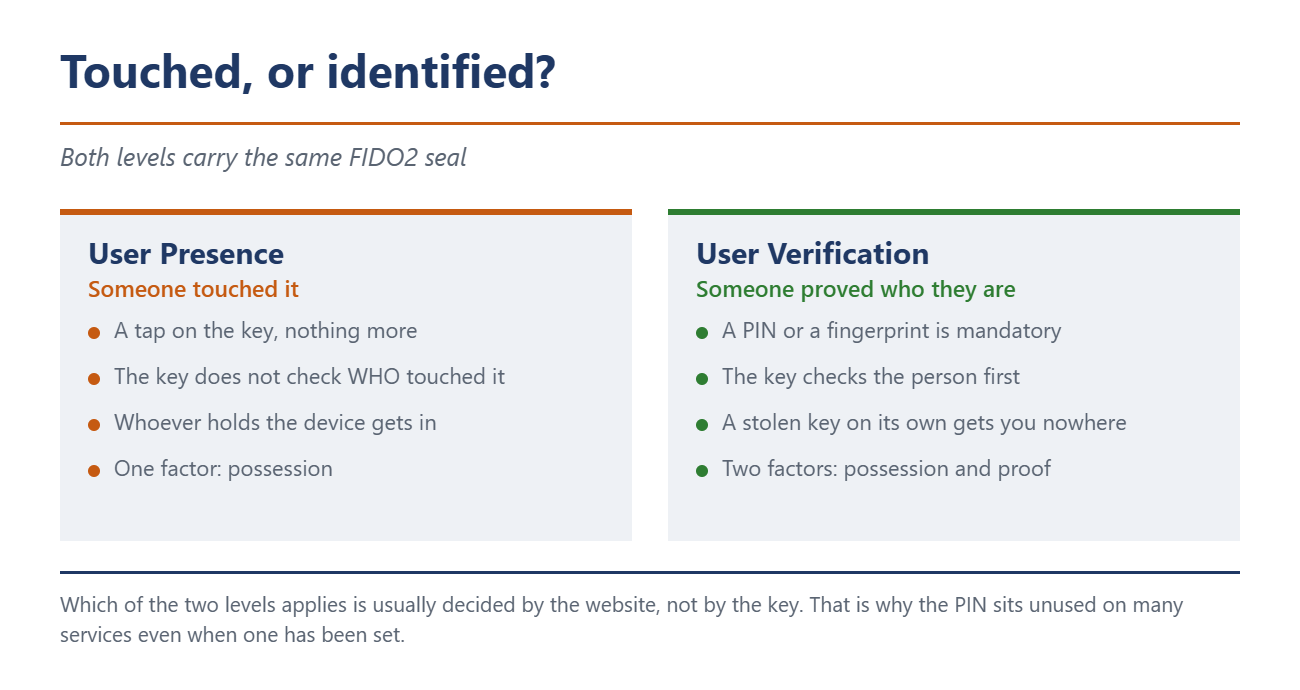
The website usually decides about your PIN
The second uncomfortable point: even a PIN that is set does not mean it will be requested.
Token2 explains this more plainly than any other maker: "The decision whether to authenticate with a security key with or without a PIN rests with each website or authentication service." At sign-in the service sets a parameter called userVerification, with three possible values. With discouraged it asks for no PIN. With preferred, the standard case, it only asks if one is set. Only required makes it mandatory, and the service then forces you to set one during enrolment.
For you that means: without a PIN set, even preferred will not ask. And even with a PIN you stay unasked if the service sends discouraged. There is a way to flip this, more on that shortly.
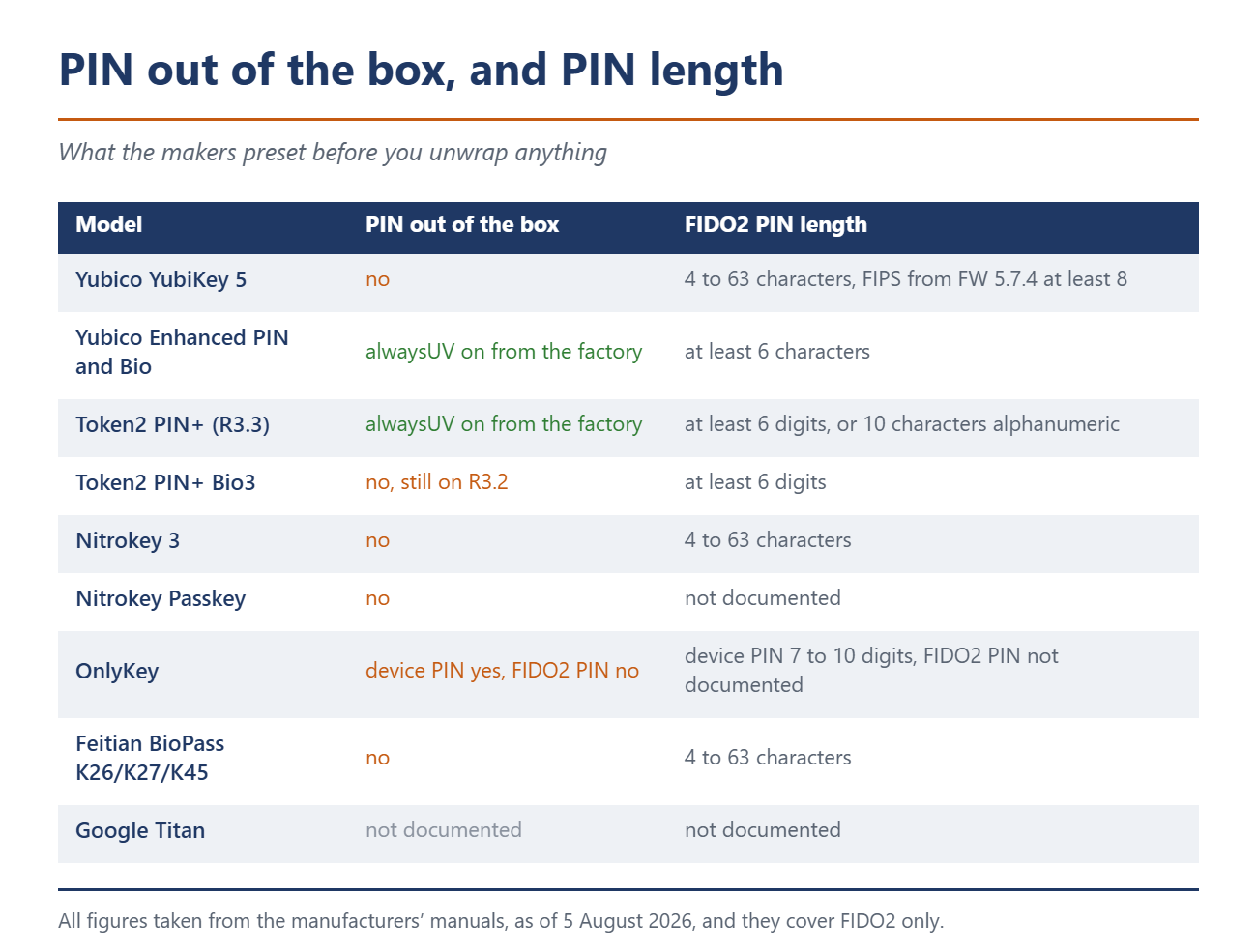
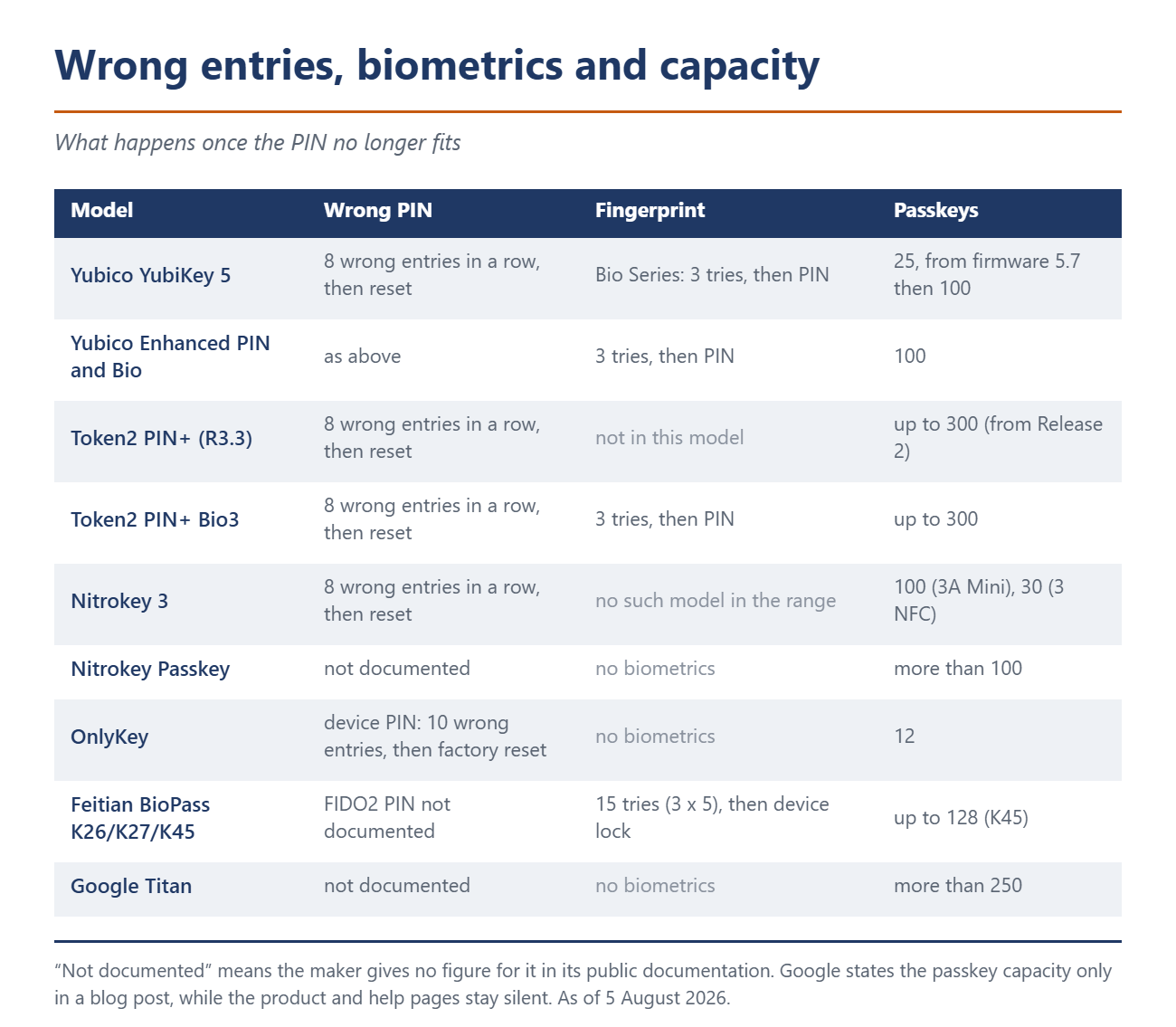
What stands out is how small the group is that demands a PIN out of the box: Yubico's Enhanced PIN line and Token2's PIN+ with firmware R3.3. Everyone else ships without. The second half of the table shows what happens when the PIN does not fit after all.
How to spot quality when buying
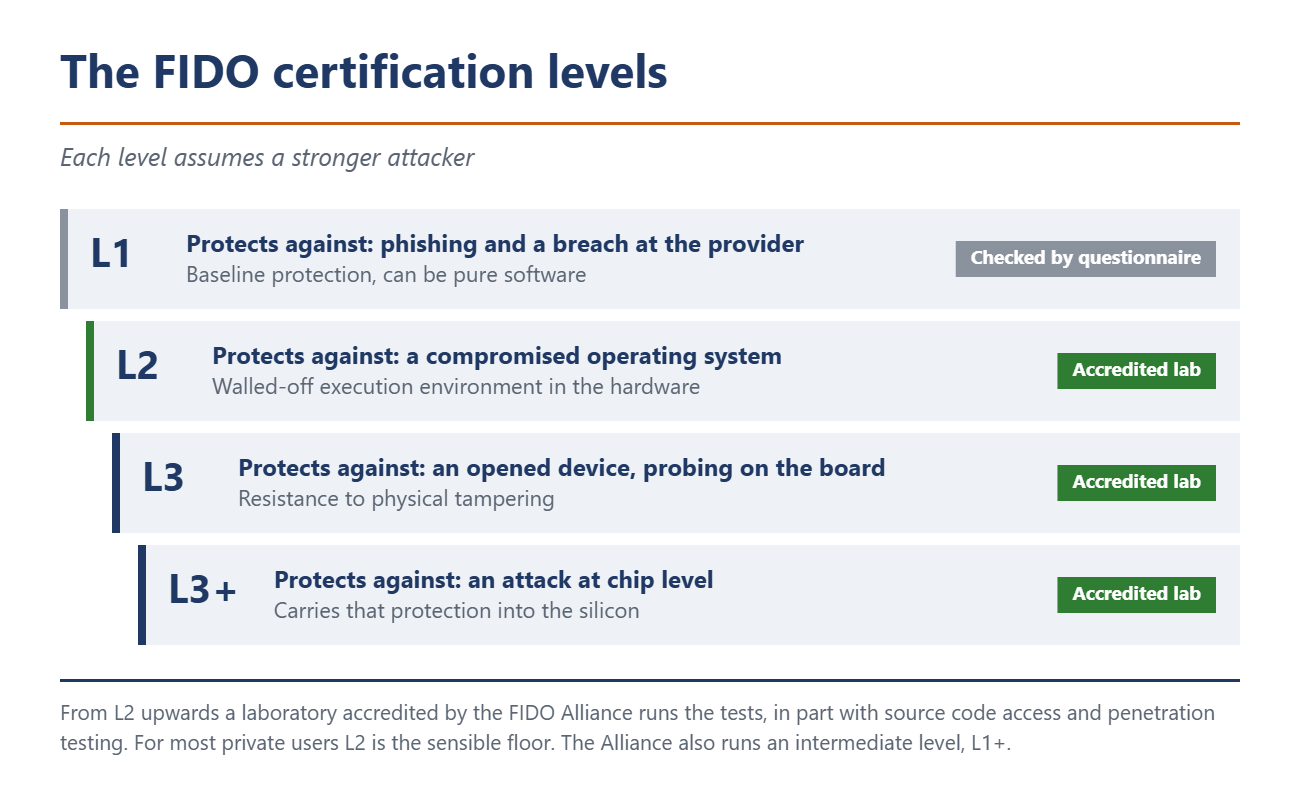
The numbers in the table say nothing about how well a key is built. That is what the FIDO Alliance certification levels are for, and they appear in every maker's data sheet. There are five: L1, L1+, L2, L3 and L3+.
L1 is the baseline against phishing and against breaches at the service provider. It can be pure software and is checked by questionnaire. L2 additionally requires a walled-off execution environment in hardware, so a compromised operating system cannot reach the keys. From L3 the device must also withstand physical tampering, and L3+ extends that to the chip level. From L2 upwards an accredited laboratory tests, in part with source code access and penetration testing.
For most private users L2 is the sensible floor. Token2 advertises it for the PIN+ series, but on the biometric Bio3 the certification covers the firmware only. Certification of the fingerprint part is still under way, the maker says.
The switch that overrules the website
There is a way out, and it is called alwaysUV, short for "always require user verification". With it active, the key demands a PIN no matter what the service asks for. Token2 describes the effect: "This setting enforces PIN request in all cases, irrespective of whether the RP requests it or not." So it also bites when a service sends discouraged.
Getting at that switch is another matter. Token2 ships it enabled from firmware R3.3 on. As of 5 August 2026 the PIN+ Bio3 still runs R3.2, and according to the maker it will never get R3.3, jumping straight to R3.4 instead, where alwaysUV is on by default as well. Yubico enables it on the Enhanced PIN line and the Bio Series. On a regular YubiKey 5 you have to set it yourself, and it is documented only for the ykman command line tool. With OnlyKey, Feitian and Google, alwaysUV does not appear in the documentation we checked at all, and with Nitrokey only in a release candidate from June 2026, not in the user documentation.
One catch remains. Token2 has documented that alwaysUV together with discouraged used to hang on older Windows versions, the screen flipping endlessly between "Touch your security key" and "Enter PIN". According to its test table, Windows 10 22H2 and early Windows 11 builds were affected. From Windows 11 23H3 on, Token2 reports the problem as fixed.
One special case shows how easily you expect the wrong thing. OnlyKey advertises PIN entry on the device rather than on the computer. For the device PIN that holds, for the FIDO2 PIN it does not: that one is "entered via keyboard", OnlyKey writes in its own command documentation. So it lands on the computer keyboard like everywhere else. At least the two PINs sit in series, a locked OnlyKey performs no FIDO2 operation at all. More striking anyway: OnlyKey's last firmware dates from December 2022, while Yubico shipped firmware 5.8 in July 2026.
Eight wrong entries in a row, and every login is gone
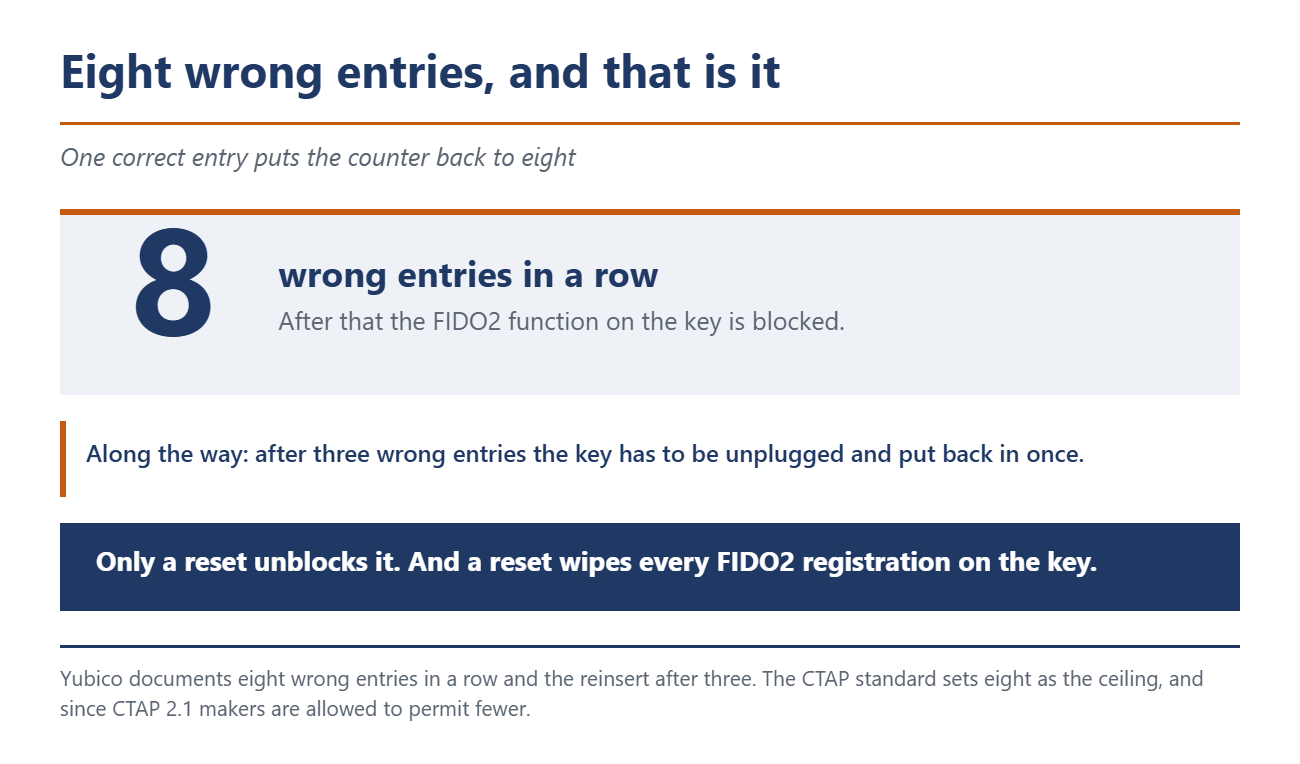
The PIN has a price, and hardly anyone talks about it. How easily the password’s successor comes under pressure otherwise is shown by the Pass-the-Passkey attacks. Yubico, Token2 and Nitrokey all state eight failed attempts. The FIDO standard CTAP sets eight as the ceiling, and since CTAP 2.1 makers may allow fewer. Yubico adds that the key has to be unplugged and reinserted after three wrong entries. Important: it is eight wrong entries in a row, one correct entry resets the counter. Anyone who has genuinely forgotten the PIN gets exactly those eight tries.
After that, "the end" means more than most expect. Yubico writes: "Resetting the key will remove the PIN, but it will also destroy all the U2F and FIDO2 credentials on the YubiKey, whether they are discoverable or not." Every service the key was registered with has to be set up again. Nitrokey and Token2 describe the same.
A good PIN you can actually remember therefore matters more than a maximally complicated one. Token2 enforces rules the standard does not require: at least six digits on the PIN+ models, eight on the Octo firmware, or ten characters alphanumeric. No ascending or descending sequences, no palindromes, no more than three identical digits.
On fingerprint sensors the makers diverge widely. Yubico and Token2 fall back to the PIN after three failures. Feitian states fifteen failures for K26, K27 and K45, after which the key is locked and, according to the manual, only a factory reset with data loss helps. For the newer K49 and K50, filed by Feitian as BioPass FIDO2 Plus, the figure is missing. The YubiKey Bio is particularly treacherous: with plain U2F sign-in there is no PIN to fall back on, and after three failures the key goes straight into a "biometrics blocked" state. Yubico itself, in a developer note, calls the Bio series a poor choice for login tools of that kind.
What you should do now
Set a PIN. The one step that turns one factor into two. On Yubico in the Yubico Authenticator, on the Nitrokey 3 via Nitrokey App 2 or nitropy, on the older Nitrokey FIDO2 directly in the browser during first registration, because the app does not support that model. On Token2 through the in-house tool.
Check whether alwaysUV is available. On Yubico via ykman fido info and ykman fido config toggle-always-uv, on Token2 already active from R3.3. With the other makers it is worth asking support, because the documentation is silent.
Register a second key. Eight wrong entries in a row and every registration is gone. A second key in the drawer is the only insurance.
Do not rely on a single manufacturer figure. Yubico's Technical Manual states 25 passkeys for the 5 series in one place and 100 in the capability matrix. Token2 lists the chip certification on one and the same page as EAL5+ and as EAL6+. Check on your own device.
Watch firmware and certification. On Token2 and Yubico the firmware of certified models cannot be updated, and that is deliberate. What the device can do when you buy it, it can do for good. Yubico's firmware 5.8 from July 2026 can harden the reset, for instance by blocking it over NFC or requiring a five second touch. Those are factory options set during programming, though. On a normally purchased key they are off.
Source(s)
Yubico: YubiKey Technical Manual, FIDO, Yubico: YubiKey Bio Series, Yubico: ykman CLI Guide, FIDO Commands, Token2: FIDO2 Security Keys PIN Protection, Token2: FIDO2 Security Keys FAQ, Nitrokey: Set PINs, OnlyKey: Command Line Documentation, FIDO Alliance: Authenticator Certification Levels, CISA: Implementing Phishing-Resistant MFA, October 2022
 Add as a preferred source on Google


