




Account hijacked despite 2FA: a stolen cookie is enough
The antivirus reports success. Malware found, removed, all clean. Two days later your Google account is sending out spam, and the device list shows a computer that is not yours. Two-factor authentication was switched on the whole time.
What happens here is called session hijacking, the takeover of a session that is already running. The attacker needs neither your password nor your second factor. All they need is the small file your browser stores after you sign in, so that you do not have to type anything again on your next visit. That file is the session cookie.
Google describes it openly on its own Chromium blog: the theft happens after sign-in and therefore bypasses two-factor authentication. And it is hard to defuse with antivirus software, because the cookies keep working even after the malware has been removed.
How the theft works
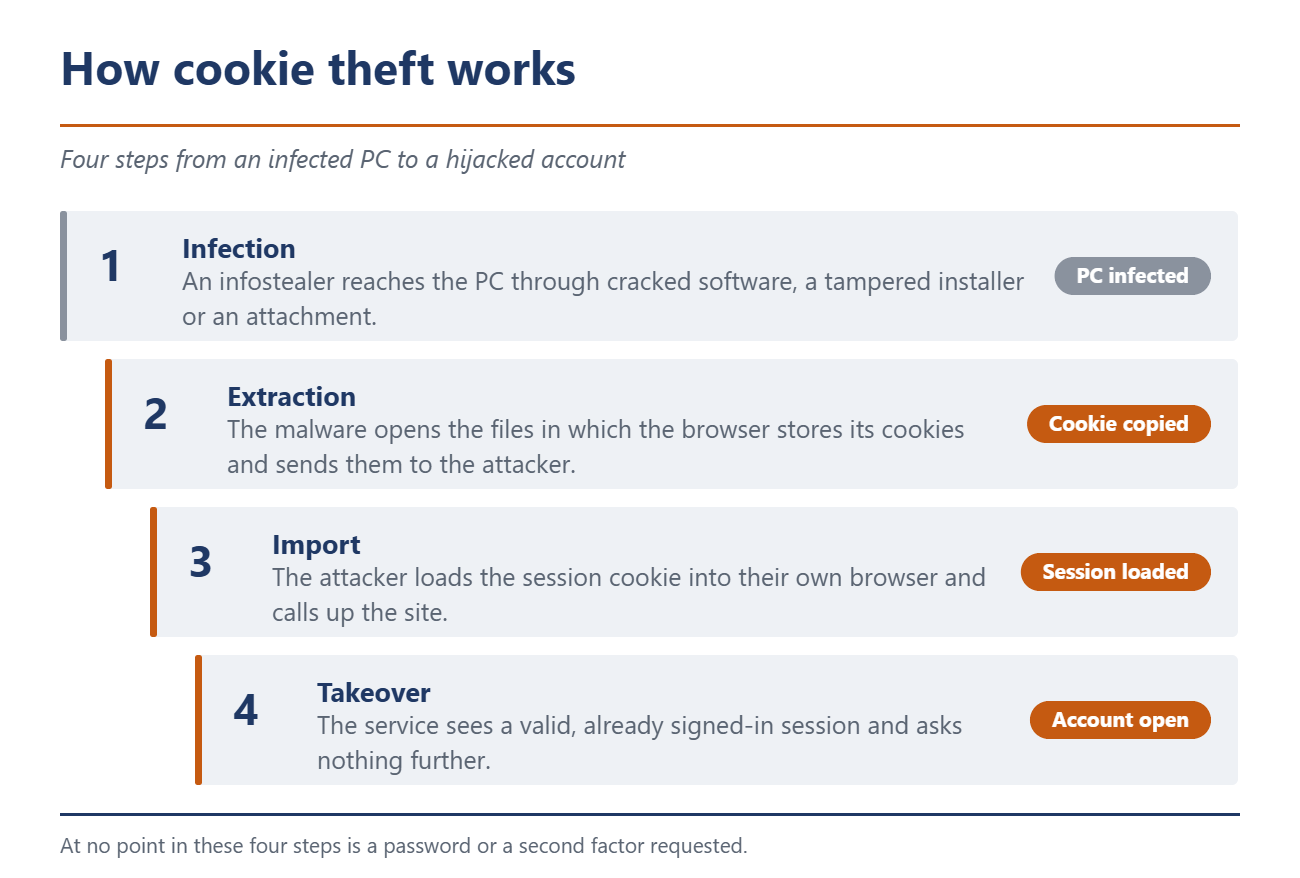
At the start there is almost always an infostealer, a program built to collect credentials. It reaches the machine through cracked software, a tampered installer or an attachment. Once there it reads the files in which the browser stores its cookies. The attacker then imports the cookie into their own browser and calls up the site. The service sees a valid, signed-in session and asks nothing more.
How big this market is shows in the Global Threat Intelligence Report that security firm Flashpoint published on 11 March 2026. For 2025 Flashpoint counts more than 11.1 million machines infected with infostealers and 3.3 billion credentials and cloud tokens taken from them. Session cookies are not even part of that count.
How close this comes to home was shown by Operation Endgame. On 24 June 2026 Europol reported a strike against the infostealers StealC and Amadey and against the SocGholish distribution network, with German involvement. 326 servers and 142 domains were taken down, and 27 million sets of credentials recovered. Victims were notified through Have I Been Pwned, among other channels.
The second factor sits in the wrong place. An SMS code, an app prompt and a security key all check who is signing in. The cookie is only created afterwards, as proof that this check was passed. Whoever holds the proof does not have to pass the check again. Even Google’s Advanced Protection Program does not change that. Anyone who stays signed in may not be asked for the security key again, according to Google. How to secure your accounts properly is covered in A password alone isn’t enough.
What the browsers are doing about it
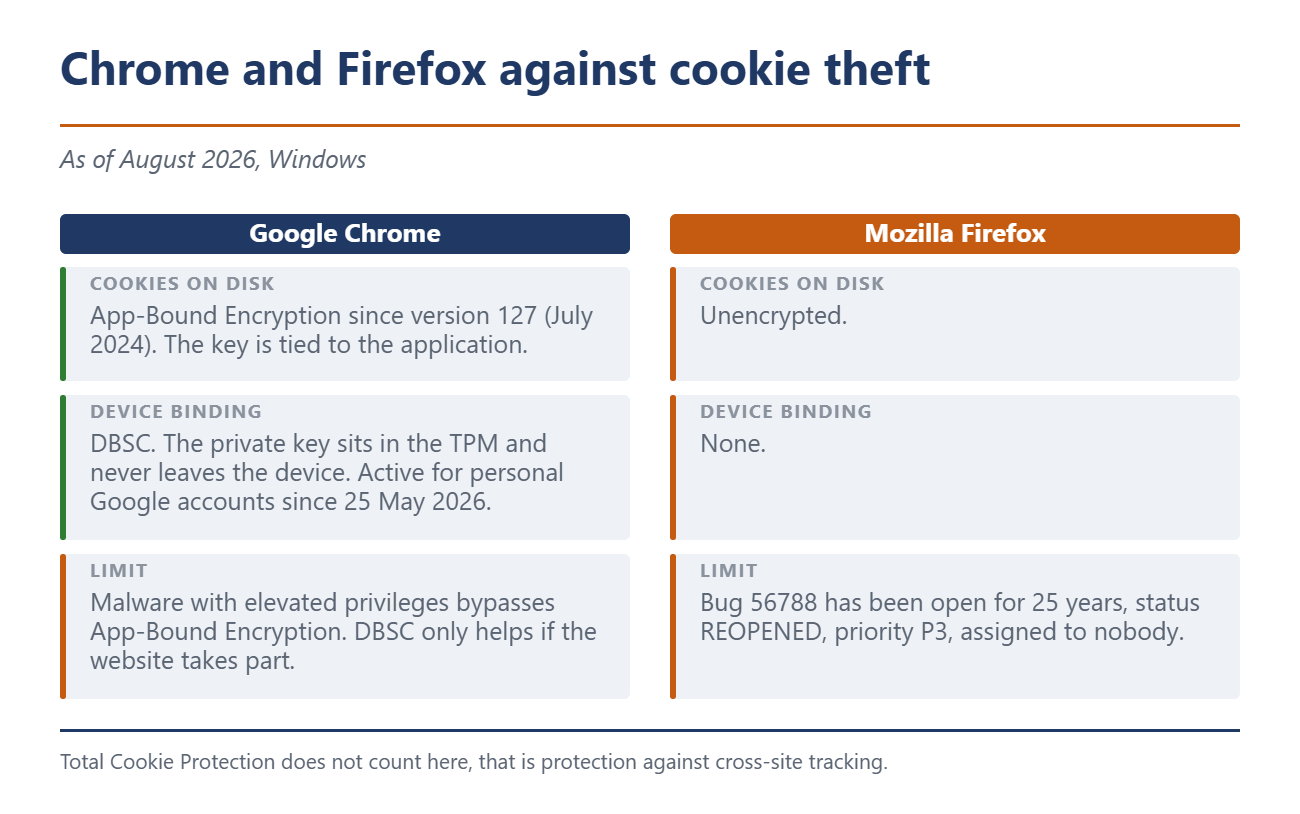
On Windows, Chrome has encrypted cookies with App-Bound Encryption since version 127 from July 2024 and ties the key to the application. Google names the limit itself: malware running with elevated privileges gets around the protection. That makes the theft more expensive, it does not prevent it.
The real progress is called Device Bound Session Credentials, DBSC for short. The browser generates a key pair whose private half never leaves the device. On Windows it sits in the TPM, the security chip on the mainboard. The service regularly asks whether the browser still holds that key. A cookie on somebody else’s machine fails that question.
For websites the technology has been available since Chrome 145. Google switched it on for itself on 9 April 2026 with Chrome 146 under Windows and has been rolling it out since 25 May 2026 for Workspace accounts and personal Google accounts, with nothing for users to enable. Two limits remain. According to the W3C specification, DBSC does not prevent access while the attacker is still sitting on the device. And every website has to take part itself, which is why the protection arrives at Google services first.
Firefox looks worse here than many people assume. Its cookie database sits unencrypted on the disk. The entry in Mozilla’s bug tracker, bug 56788, was filed 25 years ago, closed as WONTFIX in 2000 and reopened two years ago. It carries priority P3 and is assigned to nobody. Total Cookie Protection does not change this, that is tracking protection.
What you can do now
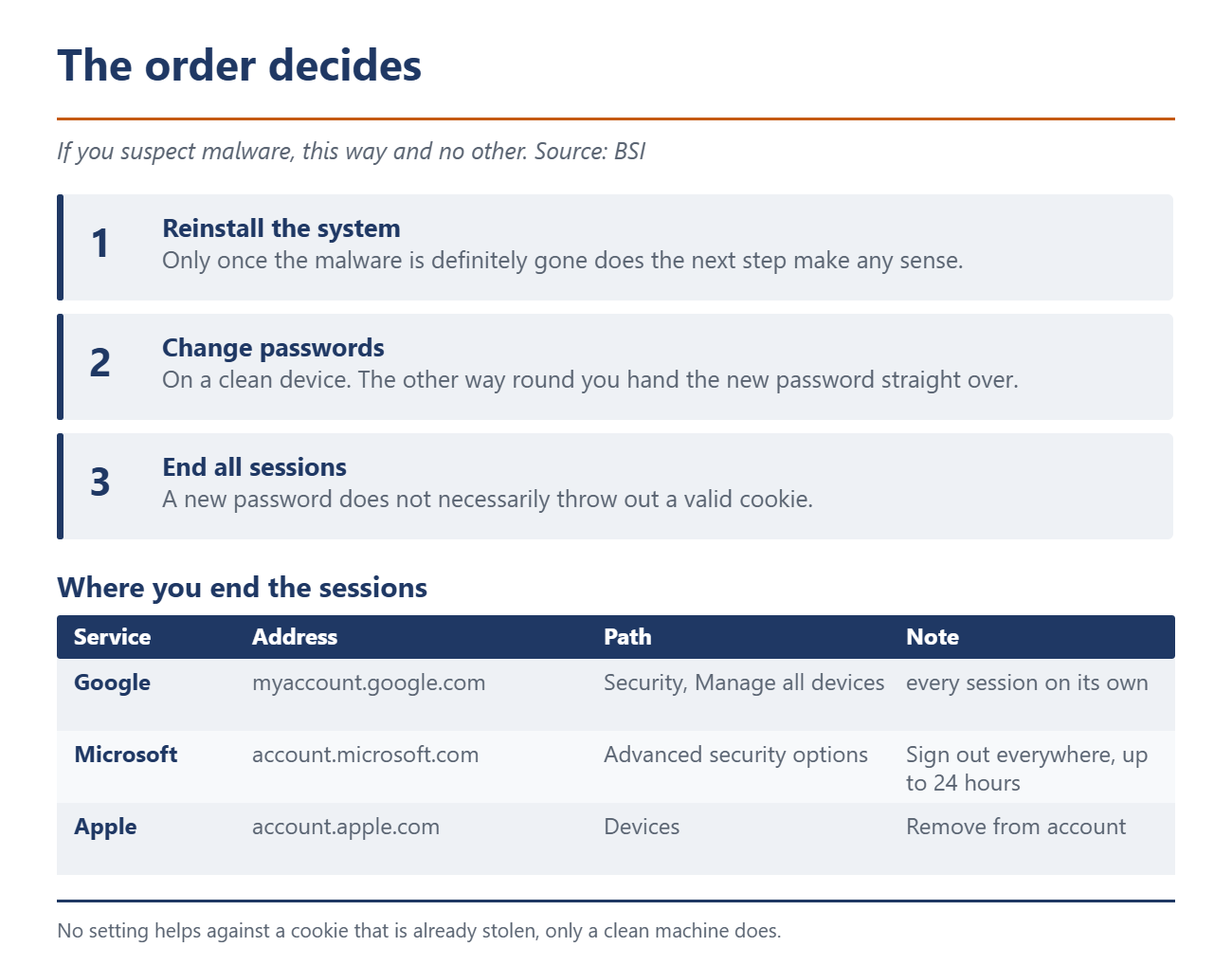
The order is what decides. For an infection with malware the German Federal Office for Information Security, the BSI, sets out the sequence: reinstall the system first, change the passwords afterwards. Anyone who does it the other way round and types the new password on the infected machine hands it straight over.
Then comes the step that most people skip. A new password does not necessarily throw out an attacker who holds a valid cookie. You have to end the open sessions separately.
Google: myaccount.google.com, Security section, "Manage all devices". Every session is listed on its own, tap the device and sign it out. Google does not offer a single button for all of them.
Microsoft: account.microsoft.com, advanced security options, "Sign out everywhere". According to Microsoft the sign-out can take up to 24 hours, and the Xbox is excluded.
Apple: account.apple.com, Devices section, select the device, "Remove from account". The device shows up again if somebody is still signed in on it.
What passkeys do and what they do not
Passkeys are seen as the successor to the password, and the BSI calls them a very secure form of authentication. That is true, but once again it only covers the act of signing in. A passkey stops somebody from signing in as you. It does not stop somebody from taking over the session you already have open. That the sign-in itself remains attackable is shown by Pass-the-Passkey.
The honest picture is uncomfortable. In its security blog of 9 April 2026 Google writes that on no operating system is there a reliable way to prevent cookie theft with software alone once malware sits on the device. What DBSC changes is the shelf life of the loot. The stolen cookie is then only usable on the machine where it was created.
Until that applies everywhere, the awkward part stays with you. No cracked software, downloads only from the original source, and on any suspicion reinstall the system first and end the sessions afterwards. In that order.
Source(s)
 Add as a preferred source on Google


