




Your new Google password does not lock out the old apps
After a scare, nearly everyone does the same thing. An email looks off, an unfamiliar sign-in shows up in the account overview, and the first move is to change the password. New password, check the second factor, and for a moment things feel settled again.
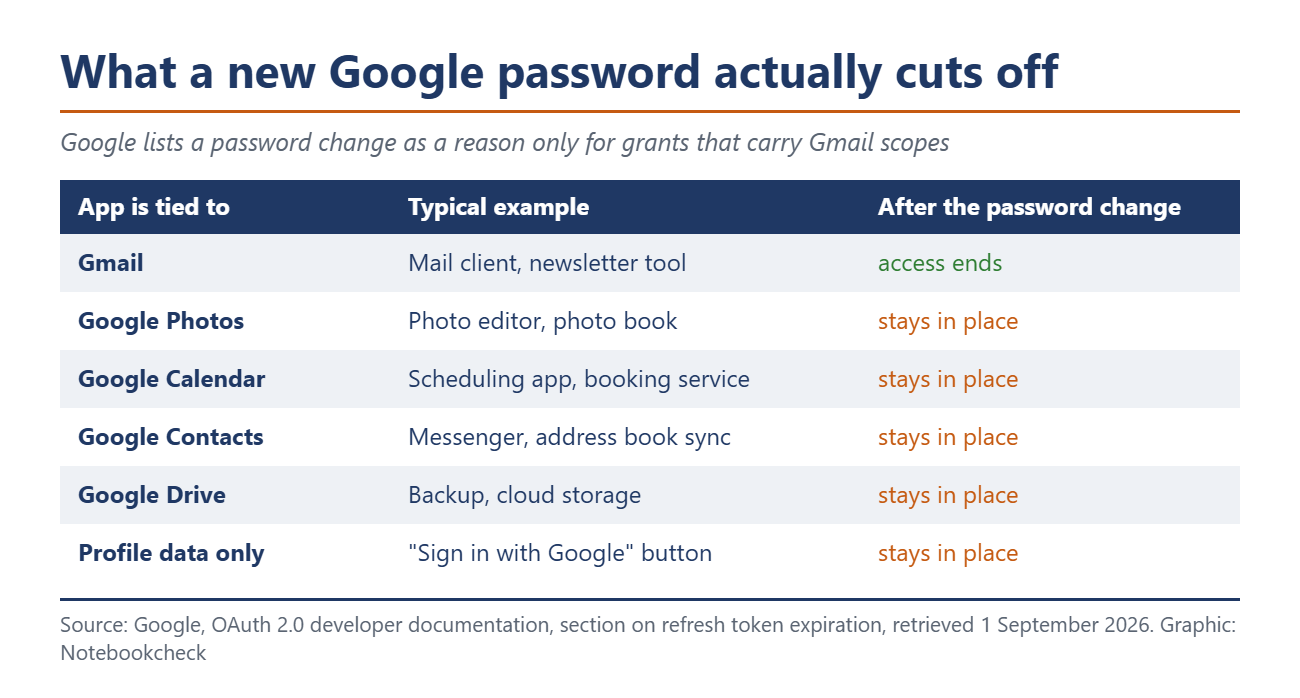
With Google that feeling is only half right. Its developer documentation lists the reasons an outside app loses access to your account. One of them says the user changed passwords and the refresh token contains Gmail scopes. Everything turns on that small "and". If the app has access to your inbox, it loses that access. If it only reaches your photos, your calendar, your contacts or your files in Drive, it keeps them.
This is no edge case, because the "Sign in with Google" button sits in tens of thousands of apps, and few of them ever wanted your mail. They wanted your profile, your photos, your calendar. Those are the grants that survive a password change.
Six reasons, and only one of them is you
Google names six situations in which an access grant stops working. The user revokes it, the token has gone unused for six months, the password changed and Gmail is involved, the account exceeded its ceiling of live grants, a time-limited grant expired, or an administrator restricted one of the services.
Read that list again from the back. Four of the six happen without you doing anything and without you being told. That password rule only applies when Gmail is involved. That leaves one lever you control yourself: remove access.
Google's ordinary account help says the same thing in plainer words. Changing your password signs you out everywhere, Google writes, with three exceptions: devices you use to verify your identity, some devices running third-party apps you granted account access, and helpful home devices you linked.
One mechanism does cut outside access. Google calls it cross-account protection and uses it to send security alerts to connected services, which can then sign you out on their side. It fires on suspicious events such as a hijacked or suspended account, and the provider has to opt in. Changing your password yourself is not one of those events.
The permission outlives the key
Something gets lost in daily use here. There is the technical key an app uses to reach your account, and there is the permission you granted at some point, and the two do not die together.
That key expires once nobody has used it for six months, while the permission stays. It sits in your account as an entry, and when you open the app again two years later it simply works, with no fresh consent screen anywhere. From where you sit, it looks as though nothing ever lapsed.
On top of that comes automatic sign-in, which Google describes in its own help pages. Once you agreed that your profile may be shared with an app, your next visit signs you in without a single tap.
Removing access closes the tap, nothing more
Mistake number two hides in the cleanup itself, and Google's help page on linked apps carries the line that is easy to skim past. If you unlink an app, data that was already shared may remain stored in that app. To get rid of it you have to go to the provider's own site and delete it there.
So removing access works forwards only, and your contact list from 2021 still sits with the provider even after the entry disappears from your Google account. With a service that still exists, that is merely annoying. With one that has since been sold, you no longer even know who holds the copy.
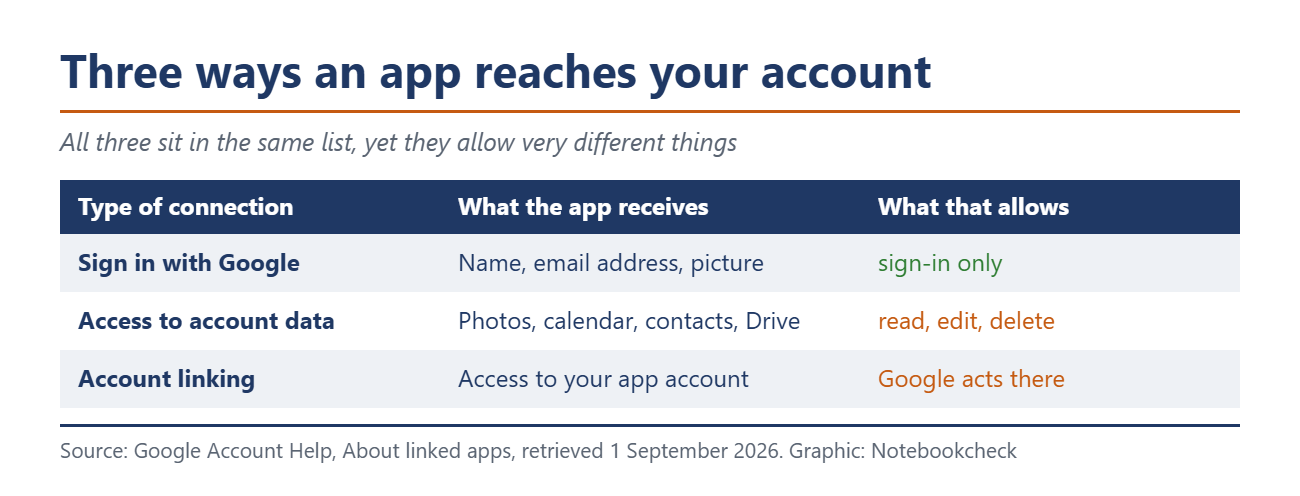
How much an app may touch depends on the level you confirmed back then. Google draws three kinds of connection, and they allow very different things.
A second list has been growing since August 12
So far this has been about grants from the past. Another sort is forming next to them. At Made by Google in New York on August 12, 2026, Google announced 13 further Connected Apps for Gemini, from meeting transcripts to doctor's appointments, rolling out over several weeks.
Google's own availability table adds a limit the announcement leaves out. Ticketmaster, Zocdoc, Thumbtack, Angi, Otter.ai, Granola and GetYourGuide are listed there as US only and English only. Pandora stays inside the US and Puerto Rico, iHeartRadio covers five countries, Localiza is Brazil and OpenTable is the UK. Outside those markets, two of the 13 are within reach, Wix and Fever, and Wix speaks only English.
Underneath sits a difference in design. A classic grant reads. A connected app acts. It books an appointment, writes into a document, creates something, the moment you ask Gemini for it. In the Gemini privacy hub, updated August 10, 2026, Google carries a line of its own that applies to connections you add yourself. Google neither monitors nor secures the data from such Connected Apps, and connecting them may expose your data, passwords, devices and accounts to unauthorised access.
These connections live somewhere other than the old grants. Clean up one list and you have never laid eyes on the other.
Ten minutes, once a year
Getting there is quick, your Google account holds the third-party connections under Security. Every app is listed with the date you granted it and what it may reach. Anything you do not recognise straight away can go. So can anything you have not opened in a year.
Two steps belong after that, and neither takes long. Check separately in your Gemini app settings which Connected Apps are active there, because that list does not clean itself up alongside. If an app really did see sensitive data, delete your account with that provider, otherwise the copy stays.
Setting a new password is still the right move. It protects your access and throws out anyone sitting in a live session with stolen credentials. It just does not clean up what you handed over yourself.
Source(s)
 Add as a preferred source on Google


