




Sign in with Google: Deleting the app does not revoke access
The blue button saves half a minute. No form, no new password, one tap on "Sign in with Google" and the service is ready. The part nobody sees happens next. The service receives a token, and that token now belongs to the service. It lives on their servers, not on your phone. That is why it stays there after you delete the app.
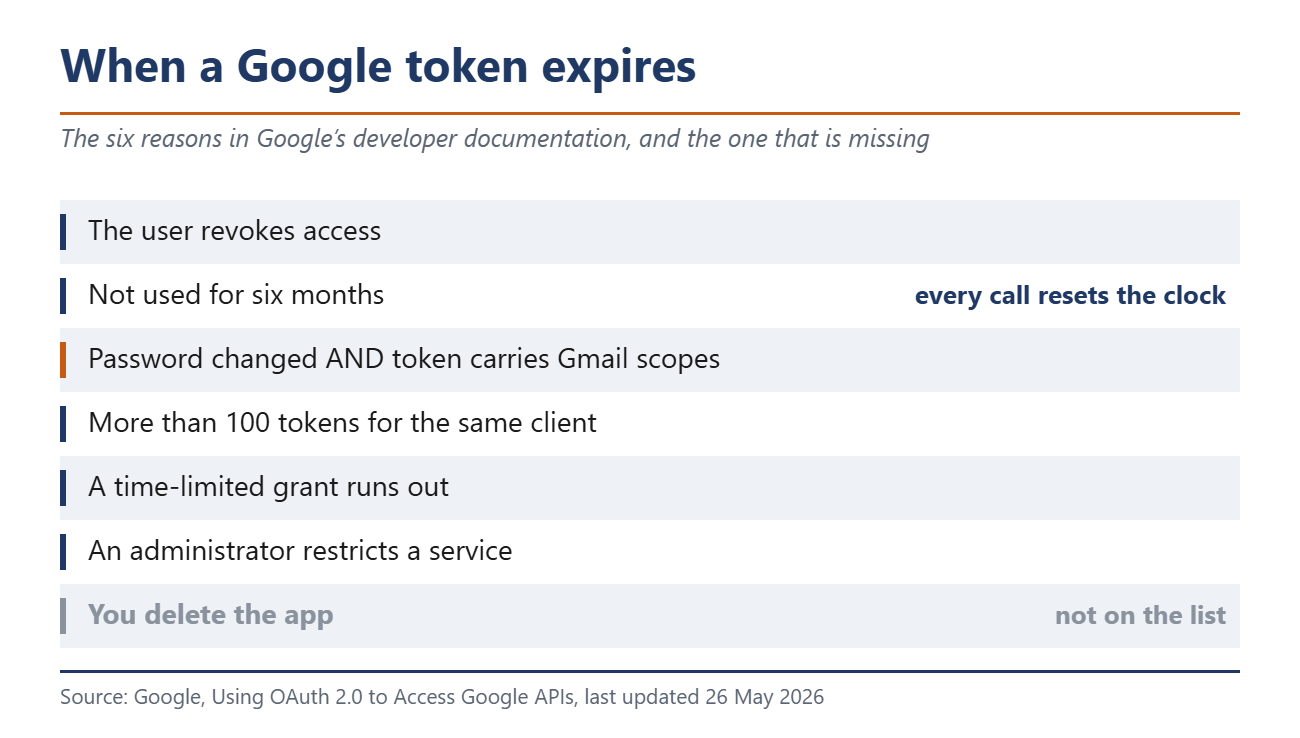
Google’s developer documentation lists the reasons a refresh token stops working. It expires when the user revokes access. It expires after six months without use. It expires when the user changes the password and the token contains Gmail scopes. It also expires when the account holds more than 100 tokens for the same client, when a time-limited grant runs out, or when an administrator restricts a service. Deleting the app is not on that list. The uninstall never reaches the provider’s server.
The six-month rule does not clean up
That second reason sounds reassuring. Half a year, then it is over. The clock only runs while nothing touches the token, and every call resets it to zero. A service that syncs contacts in the background renews its own access without limit. So does one that reads your calendar once a week. The rule only applies where nothing is happening anyway.
Google added a second cleanup in June 2025, and it cuts both ways. Developer clients unused for six months are deleted automatically. The help page spells out what stops working. The service can no longer be used for Sign in with Google, and existing tokens fail. So a service where you never set your own password may one day refuse to open.
A new password only protects the inbox
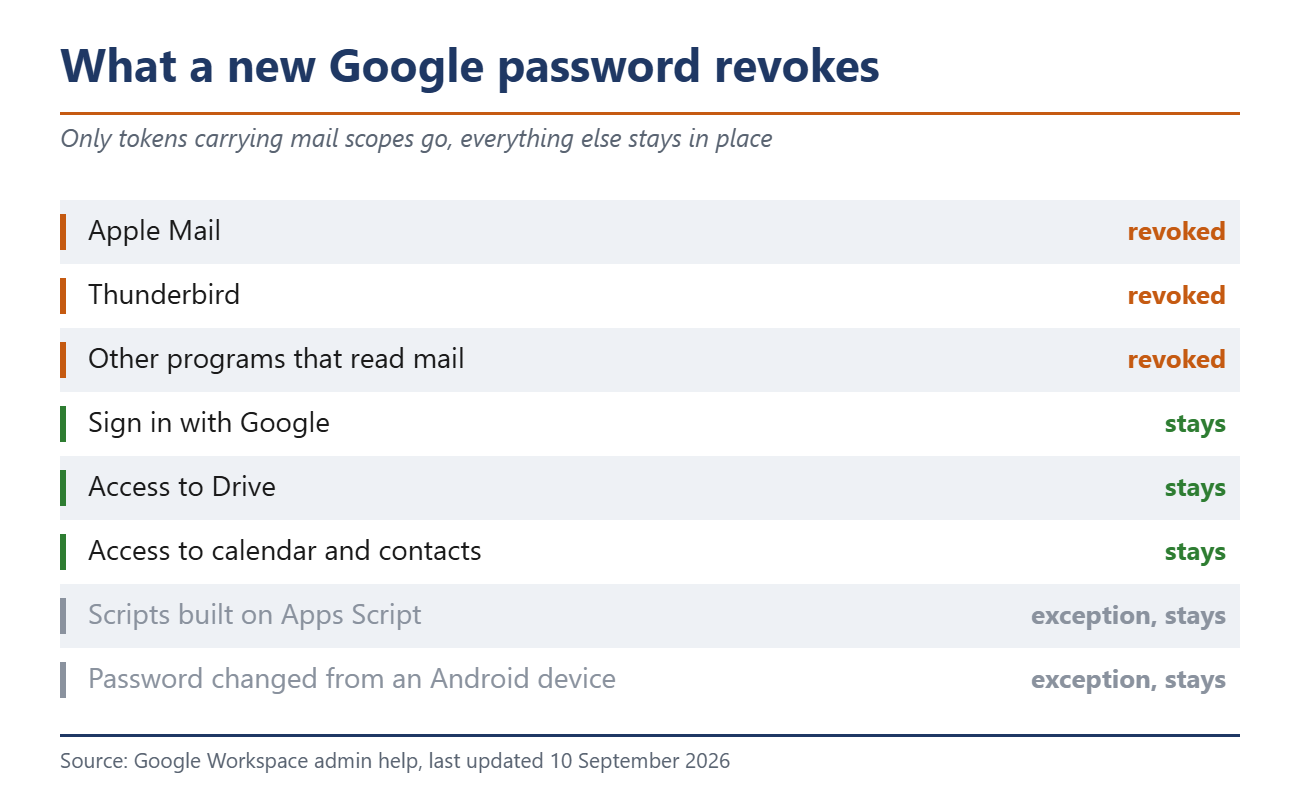
The most common advice after an uneasy feeling is to change the password. At Google that works in one place. The admin help says tokens for certain products are revoked when a password changes, and it means the ones carrying mail scopes. Apple Mail and Thunderbird stop syncing. So do other programs that read mail.
Everything else survives the new password untouched. That includes plain Sign in with Google, access to Drive, to the calendar and to contacts. The developer documentation has the decisive half sentence that nobody outside the industry reads. A token dies when the user changes the password and that token contains Gmail scopes.
Even for mail, Google names three exceptions. Scripts built on Apps Script are excluded. A password changed from an Android device leaves that device’s access in place. IMAP sessions authenticated this way are not affected either.
Where to look, provider by provider
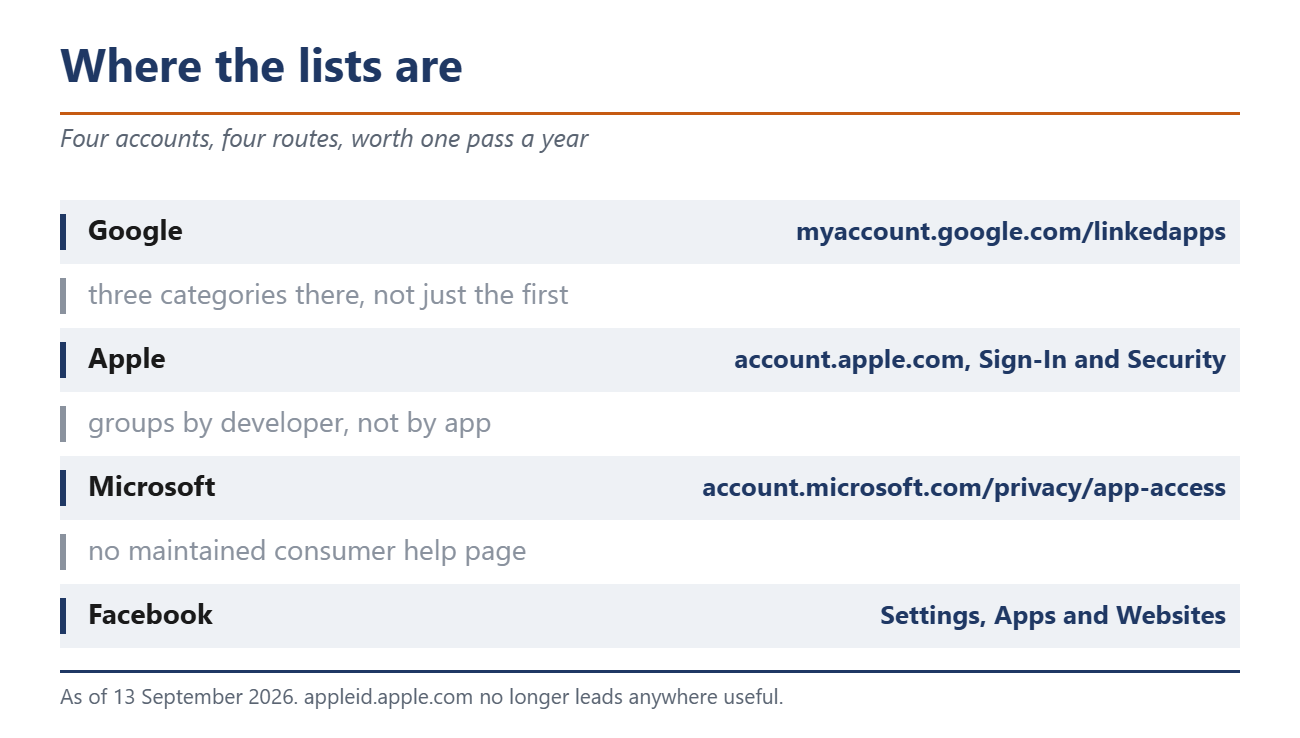
Google keeps the list at myaccount.google.com/linkedapps. It holds three categories, and anyone who checks only the first has missed half of it. Sign in with Google covers the plain logins. Account access covers the services that read data. Linked accounts form the third group. To remove an entry, select it, open the details, then choose either to stop using Sign in with Google or to remove access.
Apple has moved the page. The old appleid.apple.com no longer leads anywhere useful. The current help names account.apple.com, then Sign-In and Security, then Sign in with Apple. On an iPhone the path is Settings, your name, Sign in with Apple. One detail matters here, because Apple groups by developer rather than by app. Removing one access removes it for every app from that developer.
On Facebook the section is called Apps and Websites. Microsoft accounts go to account.microsoft.com/privacy/app-access, with a caveat worth knowing. No maintained consumer help page covers it, and the official Microsoft guide deals with work and school accounts. That guide holds one line consumers should note. Some permissions cannot be revoked once an administrator has granted them.
What revoking cannot do
The cleanup stops here, and Google says so in its own help. Deleting a connection stops the automatic sign-in. It does not delete the data held inside the third-party service.
Facebook puts it in similar terms and hands the problem onward. The app or game may have stored info from when you used it, the help says, and you should contact the developer about deleting anything they still hold. Apple shows the same thing from another angle. Sign in with Apple a second time and you are back in the very same account.
Researchers at the University of Illinois at Chicago measured this across 95 major services. They presented the work at USENIX Security in 2018. Back then 89.5 percent of the services they evaluated offered no way at all to invalidate active sessions. The figures are eight years old and the mechanics have not changed.
How many connections an average account has is something nobody knows. Google, Apple, Microsoft and Meta do not publish the number, and no study measures it. That gap is itself an answer to how closely this area gets watched.
Why this is not a thought experiment
In August 2025 attackers used stolen tokens belonging to the Salesloft Drift application to reach Salesforce data at numerous companies. Google Threat Intelligence documented the sequence. Access started on Aug. 8 and lasted until at least Aug. 18. One day in, the attackers were also reading mail from a small number of Google Workspace accounts. Salesloft and Salesforce revoked all active tokens two days after the last observed access. Passwords did not help and neither did two-factor sign-in, because a valid token needs neither.
Meta has admitted its own cleanup can fail. In 2020 the company said a flaw had let an estimated 5,000 developers keep receiving information. The users had not touched those apps for more than 90 days.
The work on your side stays small. Four lists, one pass through each, and out goes anything you do not recognise or have not used in months. If a service stops opening afterwards, you have your answer about whether it was still working.
Source(s)
Google Developers: When an OAuth token stops working
Google Help: Review and remove linked apps
Google Admin Help: Which tokens a password change revokes
Apple Support: Managing Sign in with Apple
Facebook Help: Apps and websites in your account
Google Threat Intelligence: Data theft through stolen Salesloft Drift tokens
 Add as a preferred source on Google


