




Backup codes: Instagram wants a screenshot, Microsoft forbids one
Two-factor authentication is switched on, setup is done, and a list of 10 codes appears. A line next to it tells you to keep them safe. You are then left with 10 eight-digit strings and no idea what "safe" means here.
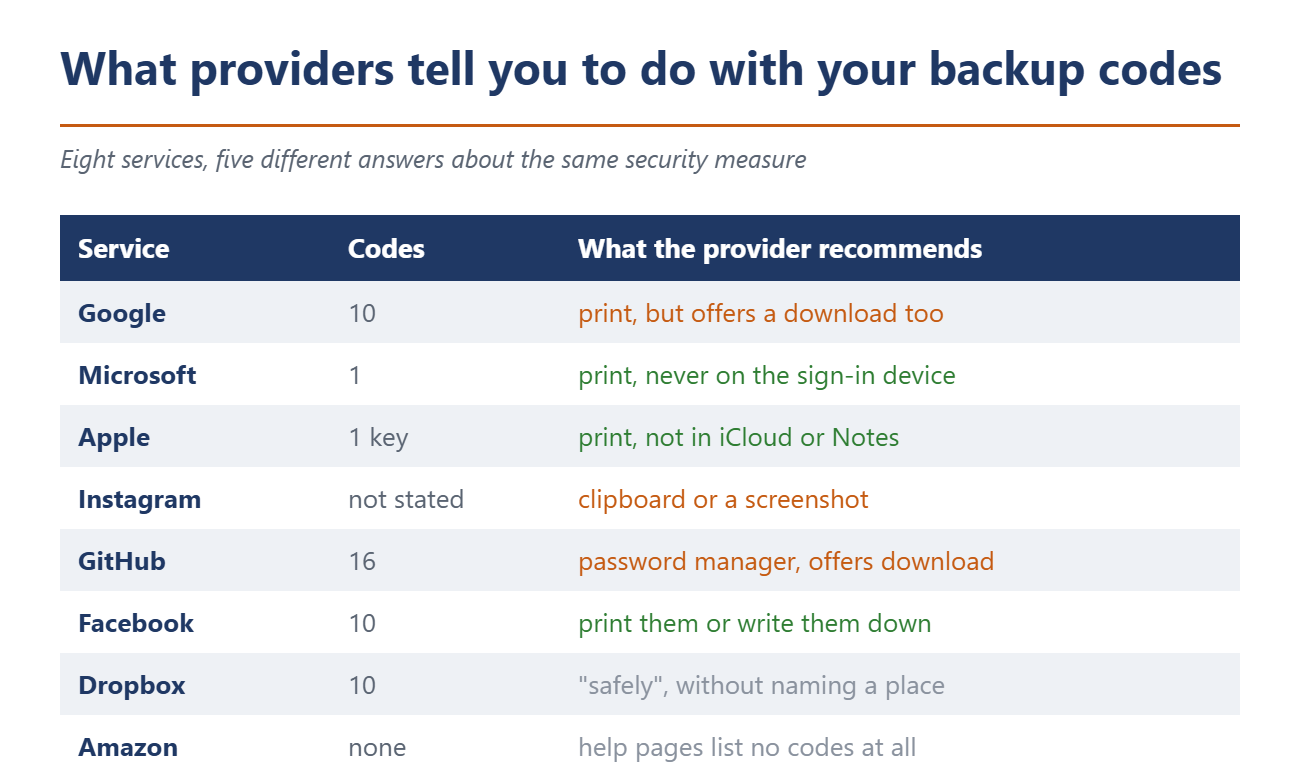
The big providers answer that question so differently that two of them contradict each other outright. Microsoft says of its recovery code: "For security, do not store the code on a device used to sign in to your account." Instagram takes the opposite line. Its help pages say: "You should copy the codes to your clipboard, take a screenshot of them or save them in some other way so that they're available when you log into Instagram." Same person, same phone, opposite instructions.
Eight providers, five answers
Google issues 10 codes and offers both printing and downloading. Its help page recommends putting a printed copy "somewhere safe, like where you keep your passport or other important documents." Two sections later the same page contradicts itself. Under the heading for a lost backup code it says: "Search your computer for: Backup-codes-username.txt with your username." Google assumes the file is on the machine, and it supplies the naming scheme too.
Apple also rules out certain locations, though for a different reason. The 28-character recovery key should not be stored in the Passwords app, in iCloud Photos, in Notes or in iCloud Drive. Apple's concern is access rather than theft, because anyone locked out of the account can no longer open those apps.
GitHub is the only one that explicitly recommends a password manager, and it puts a download button right next to that advice. Dropbox requires a tick next to "I've stored my recovery codes in a safe place" without ever explaining which place qualifies. Facebook lists only printing and writing down. Amazon's help pages do not mention backup codes at all.
This is where the malware looks
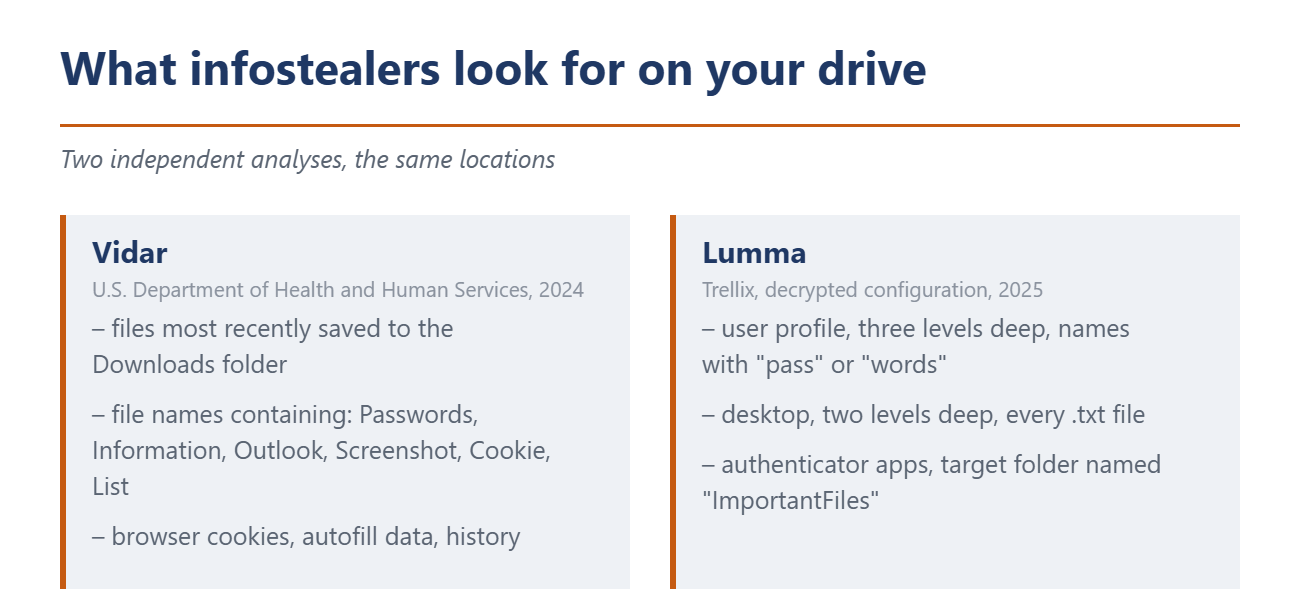
The U.S. Department of Health and Human Services published a citable analysis of the Vidar malware in 2024. The report describes how the program collects the most recently downloaded files from the Downloads folder and additionally hunts for file names containing certain words. It lists Passwords, Information, Outlook, Screenshot, Cookie and List.
A year later the security firm Trellix printed the decrypted configuration of the Lumma infostealer, meaning the instruction list from its command server. It searches the entire user profile three levels deep for files whose names contain strings such as "pass" or "words." The desktop gets searched two levels deep, for every single text file. The folder where Lumma gathers its haul is called "ImportantFiles."
Every one of those storage recommendations therefore runs into a documented search pattern. The screenshot Instagram suggests lands on the device as an image file with "Screenshot" in its name. The Google file is called Backup-codes-username.txt and matches twice over, through the extension and through the word in the name. The same configurations also target authenticator apps, so the second factor itself is on the list. A stolen session cookie already showed how little two-factor authentication helps once an attacker is past the login, as we covered in a separate piece on hijacked accounts. What is documented here is the attackers' search pattern. No one has counted how often backup codes turn up in those collections.
And if you never saved them
The opposite case is worse than most people expect. Microsoft's help page for the account recovery form repeats one sentence twice: "If you have turned on two-step verification and cannot access any of the alternate methods to get a verification, we cannot help you, sorry." Support staff may not send password links and may not change account details. Anyone who tries anyway may submit the form twice a day and gets an answer within 24 hours, which gives you an answer, not access.
Google sets no fixed deadline at all. Recovery can take hours or several days, and an active two-factor setup lengthens the wait rather than shortening it. That is deliberate, not a backlog, because the delay gives the real owner a chance to reject someone else's request. The help article ends with a link headed "Create a replacement Google Account."
Apple says several days or longer and no longer publishes a figure. Asked about a shortcut, it answers with a flat no. One condition surprises people. If the account is still in use on any device during the waiting period, Apple cancels the process automatically. A forgotten iPad on a shelf resets the clock to zero. Our guide to a lost phone covers what else helps there.
Where they belong
Germany's federal cybersecurity agency, the BSI, is unusually blunt about this construction. In its assessment of common two-factor methods it calls recovery mechanisms fundamentally critical whenever a single-factor procedure replaces two-factor authentication. A backup code is precisely that, because it cancels the second factor you have just set up.
The BSI names no storage location. That comes, of all places, from the password manager vendors, and for their own emergency codes. Bitwarden says to keep the code outside the vault, because the company cannot hand it back. It recommends a printed copy in a safe place. 1Password gives its Emergency Kit the same advice, a printout for a safe deposit box or for wherever the passport and birth certificate are kept. The advice loops back on itself. GitHub sends backup codes into the password manager, and the password manager sends its own emergency code back onto paper.
In practice that means three things. Print the codes or copy them out by hand and file them with the documents you already keep. Delete the downloaded file afterwards and empty the recycle bin, because a deleted file in the Downloads folder is not yet a deleted file. Set up a second route back into every account that matters, whether that is a spare address, a second device or, on Apple, a recovery contact. Anyone holding only the codes gets exactly one shot. The same pass through your accounts is worth doing for the devices still signed in there.
Source(s)
support.google.com/accounts/answer/1187538
support.microsoft.com/de-de/accounts-billing/manage/how-to-get-a-microsoft-account-recovery-code
support.microsoft.com/en-us/accounts-billing/manage/help-with-the-microsoft-account-recovery-form
support.apple.com/en-us/109345
support.apple.com/en-us/118574
help.instagram.com/1006568999411025
docs.github.com/en/authentication/securing-your-account-with-two-factor-authentication-2fa/configuring-two-factor-authentication-recovery-methods
help.dropbox.com/account-access/enable-2-factor-authentication
www.bsi.bund.de/DE/Themen/Verbraucherinnen-und-Verbraucher/Informationen-und-Empfehlungen/Cyber-Sicherheitsempfehlungen/Accountschutz/Zwei-Faktor-Authentisierung/Bewertung-2FA-Verfahren/bewertung-2fa-verfahren_node.html
www.hhs.gov/sites/default/files/vidar-malware-analyst-note-tlpclear.pdf
www.trellix.com/blogs/research/a-deep-dive-into-the-latest-version-of-lumma-infostealer/
bitwarden.com/help/two-step-recovery-code/
support.1password.com/emergency-kit/
 Add as a preferred source on Google


No comments for this article
