




SIM swapping now starts in your carrier account, not in a shop
The phone shows no signal. No bars, no emergency calls, nothing. 20 minutes later an email arrives saying somebody signed in to your inbox, and the code for it went to a number that was yours a moment ago. That is how the State Criminal Police Office of Lower Saxony describes the outcome, and the investigators call the hijacking of a mobile and an email account a total loss. In one case known to them, the hijacked inbox showed that the victim held cryptocurrency, and the money was gone afterwards.
The common picture of SIM swapping goes like this: someone forges an ID, walks into a shop and is handed a replacement card. That happens, but the route the investigators warn about needs no shop and no paperwork.
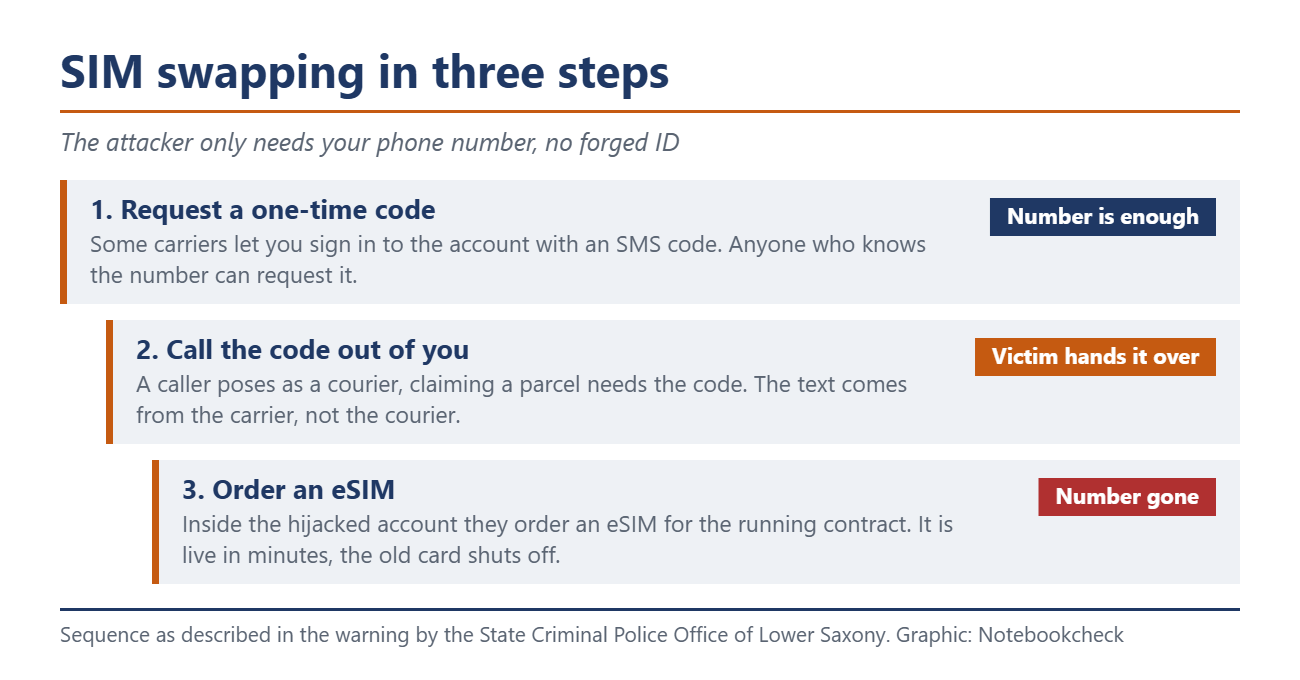
Three steps, and none of them needs an ID
The way in is your online account at the carrier, and the attackers get there with the phone number alone. Some carriers let you sign in to that account with a one-time code instead of a password, and anyone who knows the number can request it. That code is what the attackers collect from you.
So they call and pose as a courier. A parcel is on its way, they say, and it can only be delivered if you read out a code from a text message for security reasons. The message does arrive, only it comes from the carrier and not from the courier, which is easy to miss in the moment. Reading out the code opens your account.
Inside the account they order an eSIM for the running contract. No piece of plastic has to travel anywhere, the profile is a file and live within minutes. Once it runs on the attacker's device, the card in the victim's phone usually shuts itself off.
From then on every text lands on the other device, and because most online services let you reset a password by email or text, the rest follows. We took apart how quickly a number becomes a master key using the example of old phone numbers.
You cannot switch on a lock against porting
At this point the obvious idea is to nail your own number down. In the US you can. Verizon calls the porting lock Number Lock, T-Mobile offers it as Port Out Protection, and AT&T bundles several locks into Wireless Account Lock, which sits only in its own app.
A lock aimed specifically at porting and SIM swaps does not exist in Germany, and there is a reason. Number portability here is a legal entitlement under section 59 of the Telecommunications Act, and since 1 December 2021 carriers may not charge for it. A permanent bolt the customer slides shut himself sits awkwardly next to a right the legislator wanted to be easy to exercise. What German carriers have instead is a password for the hotline and the option to block a SIM after it is lost. Both take effect after something has happened.
The switch that does exist sits in front of the account
The attack starts at the online account, so that is where the defence is decided. All three major carriers now have a second factor for signing in, but the differences matter here.
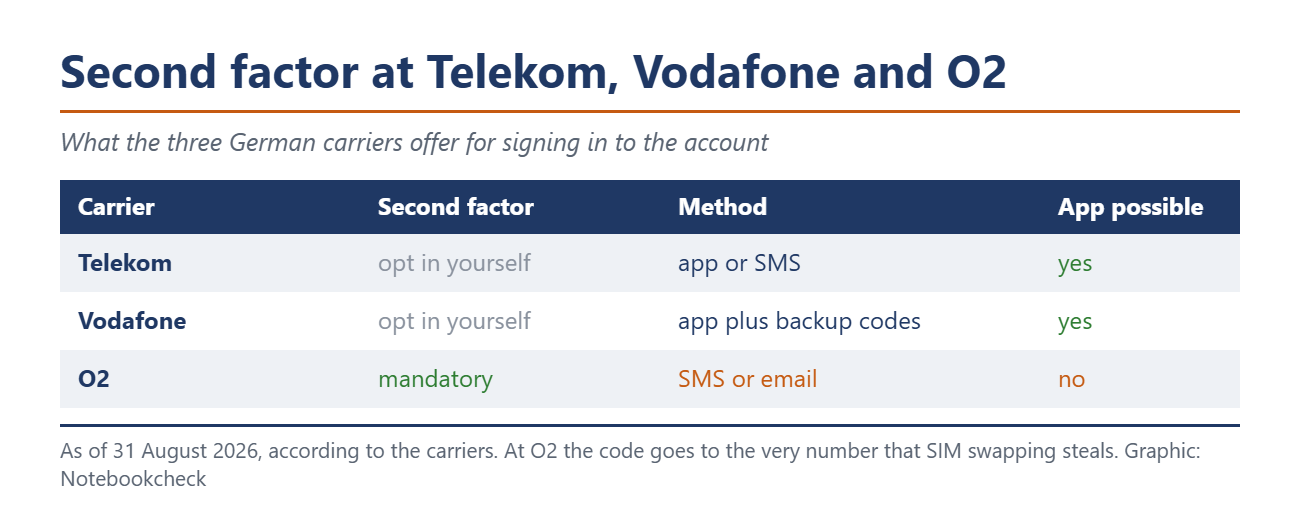
At Telekom the feature is called Mehr-Faktor-Authentifizierung and only takes effect once you set it up yourself. You pick the method, app or SMS, and on top of that the moment, either every sign-in or only important actions. Vodafone advises generating backup codes right away when you switch it on, so a lost phone does not also cost you the account. At O2 the second factor is mandatory, and there the check runs through the customer number when neither an o2 number nor a verified email address is on file.
Why an SMS second factor points the wrong way here
Now put the attack and the settings side by side. What gets stolen is the phone number, and the second factor meant to protect the account is an SMS to that very number, by default at O2 and on request at Telekom. As long as only the password is gone, it works. Once the number is gone, the second factor protects the attacker instead of you.
In the same announcement that makes the second factor mandatory, O2 writes a sentence that is easy to skim past. Never pass the code on by phone or in a chat, it says, the service team never asks for it there. That is precisely where the fake courier calls.
Anyone who has a choice takes the app. A code from an authenticator app stays on the device and does not travel with the number. Anyone without a choice shifts the weight onto the email account. That account then needs a strong password of its own and a second factor that is not tied to the same number again.
Five minutes to get this done
Sign in to your carrier's portal and check whether a second factor is set up. At Telekom you find it in the login settings, at Vodafone under Mein Konto and Login-Daten, at O2 it is active anyway. If it says SMS and an app is on offer, switch. At Telekom also set the moment to every sign-in.
While you are there, check that the password for the carrier account is used nowhere else. It is the key to an eSIM order, so it belongs in the same category as your online banking password. Then look at what serves as the hurdle on the phone. At Telekom that is the Kundenkennwort, set up and changed through the contact form. Vodafone replaced it in mobile with the Service-PIN, which you can see in MeinVodafone but cannot change, only request anew, and it then arrives by post.
And then the rule that is not a setting. Nobody who calls you needs a code from your text messages. No courier, no service team, no bank. Whoever asks needs the code because they are confirming something in your name right now. Hang up, dial the official number yourself, ask. The same logic applies to the password for two-step verification at WhatsApp, which has been replacing the old six-digit PIN since the end of August.
Source(s)
 Add as a preferred source on Google


