




Prime Big Deal Days: Is that email really from Amazon?
Amazon's Prime Big Deal Days start on October 6 and run for 48 hours in 22 countries, including the US, the UK, Canada and Germany. For scammers, it is the busiest week of the fall. People are waiting for order confirmations and shipping updates anyway, so one more fake message is easy to miss. This year, customers in Germany are also getting real emails from Amazon that are about money.
Why this week is especially risky
On October 1, Germany's Federal Court of Justice ruled that the clause Amazon used to raise Prime prices in 2022 is invalid (case III ZR 205/25). The consumer group Verbraucherzentrale NRW had brought the case. Members who have had Prime since before September 15, 2022, now pay the old price again, €69 a year or €7.99 a month. Amazon calls the cut temporary in its email and has not announced refunds for earlier years. Those are the subject of a separate class action.
For scammers, that is ideal material. A real email about money that reaches millions of people is a perfect template for a fake one that promises a refund in exchange for bank details. Figures from Check Point published on October 1 show the scale. In September, 1,284 new domains related to Amazon or Prime were registered, 37% more than a year earlier. Check Point rated 1 in 16 of them as malicious or suspicious. It also found fake Amazon login pages aimed at users in Japan, Vietnam and the UK, plus fake Amazon storefronts from Germany and Japan. The lures are familiar, from free gift cards to supposedly locked accounts. In Germany, email led Amazon's impersonation reports last year with 46%. In the UK, phone calls overtook email, 44% versus 37%.
The safest check is in your account
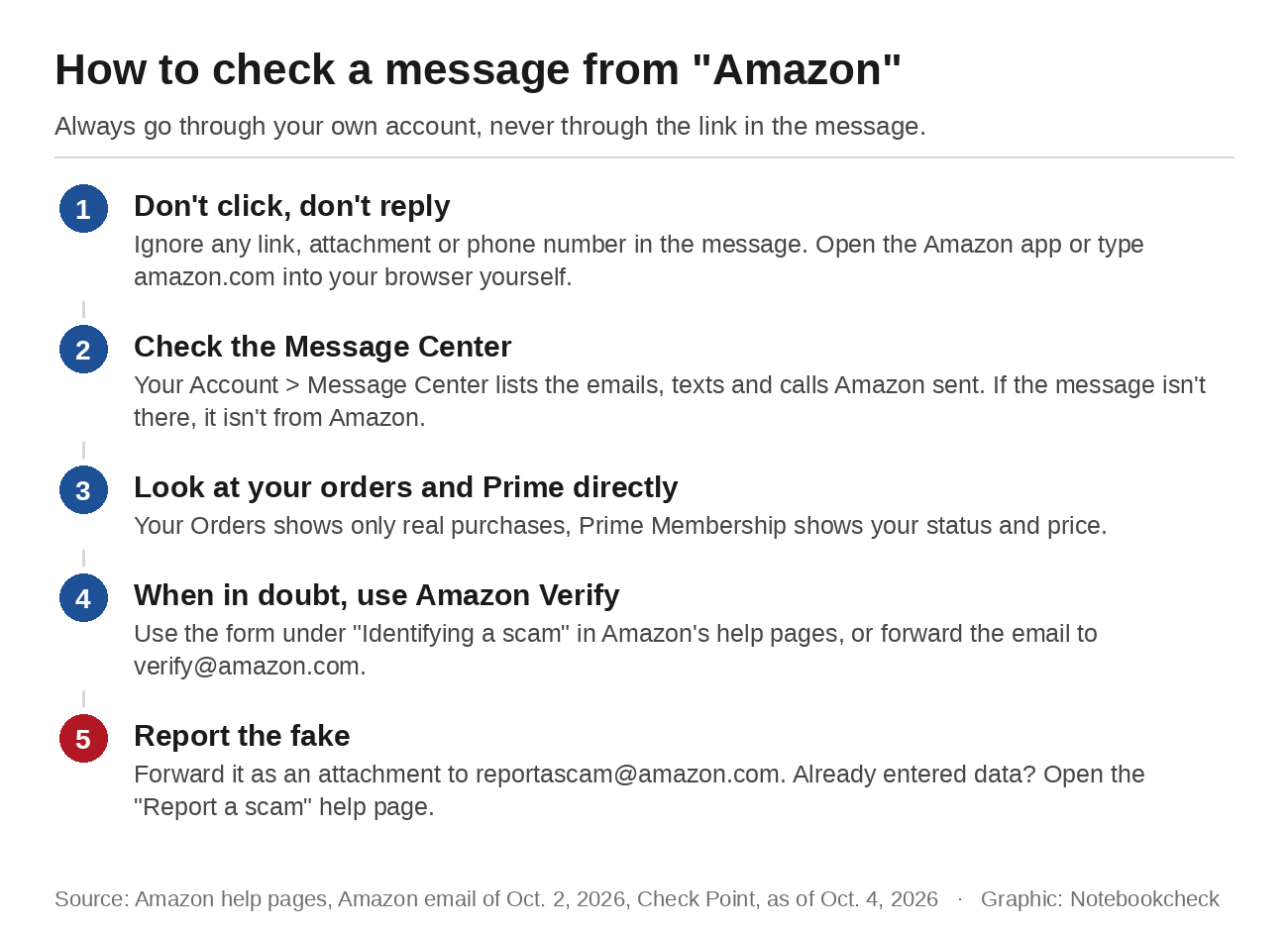
Sender names, logos and tone can all be faked, and Amazon says so in its own help pages. The only reliable record is your account. Open the Amazon app or type the address into your browser yourself, never through a link in the message. Under Your Account, you'll find the Message Center, which according to Amazon holds every email the company has sent you. If an email isn't listed there, it didn't come from Amazon.
On the German site, the Message Center now has separate sections for emails, text messages and calls. The real Prime fee email from October 2 is listed there, sent from prime@amazon.de. Orders are even quicker to check. A shipping notice for something you didn't buy is most likely fake, and Your Orders shows only real purchases. Your Prime membership page shows whether your plan is active and what it costs.
Amazon can verify messages for you
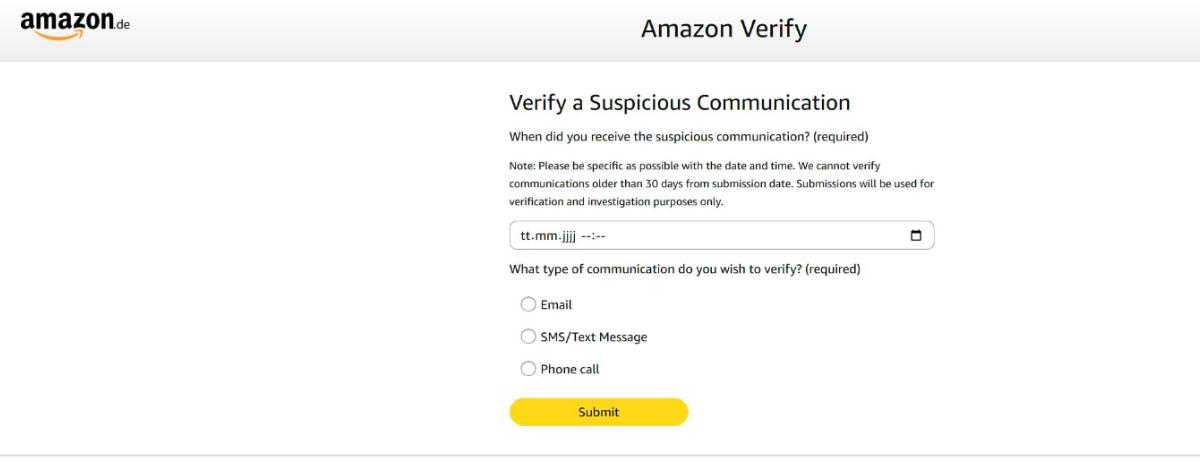
If the Message Center doesn't answer the question, Amazon offers its own checks. You can forward a suspicious email to verify@amazon.com, which Amazon says anyone can use, customer or not, and get a reply saying whether it is genuine. Amazon's help pages also include a verification form for emails, texts and calls, and the German version accepts messages up to 30 days old. In the US, Alexa for Shopping can now answer the same question. Amazon says 360,000 customers contact customer service every year just to ask whether a message is real.
What Amazon will never ask for
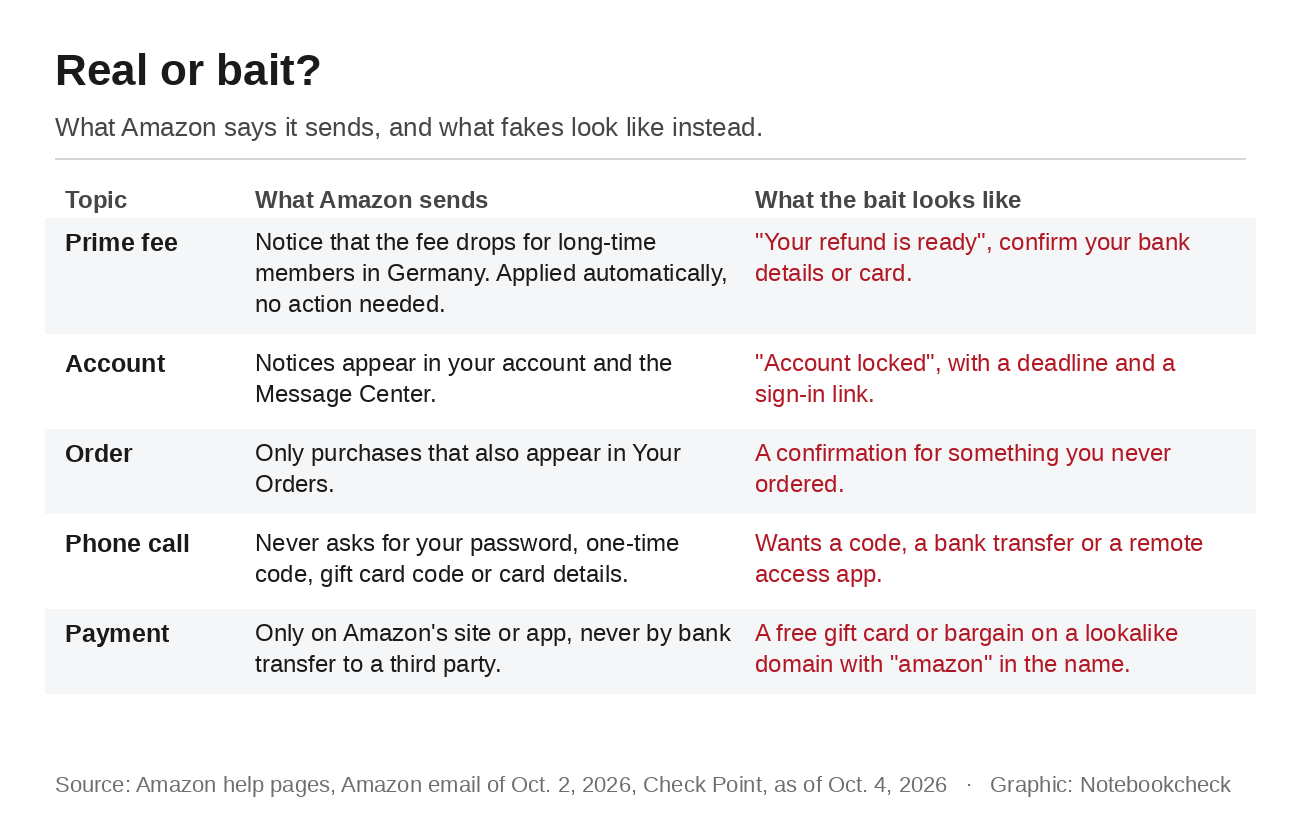
According to its help pages, Amazon never asks for your password, one-time codes, gift card codes or card details over the phone. It also never asks you to pay outside its website or app, including by bank transfer. Anyone who wants you to install a remote access app isn't Amazon either. For calls, Amazon's advice is simple. If in doubt, hang up and contact customer service yourself through the app or website.
The German Prime email shows what a genuine notice looks like. It only informs. Amazon writes that the lower price applies from the next payment, that the change happens automatically and that members don't need to do anything. A message that promises a refund for past years and asks for bank or card details doesn't match what Amazon sent. German members who want money back can register for the class action with the Federal Office of Justice. They should look up that page themselves instead of following a link.
Passkeys and two-step verification before the sale
The best protection is an account that a phished password alone can't open. Amazon supports passkeys, which you set up under Your Account and Login & security. After that, you sign in with your face, fingerprint or device PIN. Because a passkey is tied to Amazon's real web address, it won't work on a lookalike site. Amazon lists iOS 16, Android 9, Windows 10 or macOS Big Sur as the minimum. The same menu lets you turn on two-step verification, with codes sent by text or generated in an authenticator app. The app is the safer option, since text codes can be diverted through a SIM swap. Our guide to securing your accounts explains how passkeys, app codes and passwords work together.
If you've already clicked and signed in, act fast. Change your Amazon password right away, on the real site. If you entered card details, call your bank or card issuer. Amazon's "Report a scam" help page then walks you through the next steps, depending on whether you shared account details, bank information or remote access. Forward the fake itself as an attachment to reportascam@amazon.com, which keeps the header data Amazon uses to trace where it came from. If money is already gone, report it to the police as well. A new password doesn't end every risk, as our article on stolen session cookies shows.
Source(s)
Amazon: Prime Deal Days return on October 6 and 7 (German)
LTO: Federal Court of Justice ruling on the Prime price increase, III ZR 205/25 (German)
Verbraucherzentrale NRW: Class action against the Prime price increase (German)
Check Point: Domains and phishing ahead of Prime Big Deal Days 2026
Amazon: Scam trends by country
Amazon: Verifying messages with Alexa for Shopping and verify@amazon.com
Amazon Help: Identifying a scam
Amazon Help: Spotting fake emails (German)
Amazon Help: Spotting scam calls (German)
Amazon Help: Reporting a scam (German)
Amazon Help: About passkeys (German)
Amazon Help: Two-step verification (German)
 Add as a preferred source on Google


No comments for this article
