




Google refused to fix this Pixel 8, so its owner turned it into a retro gaming console
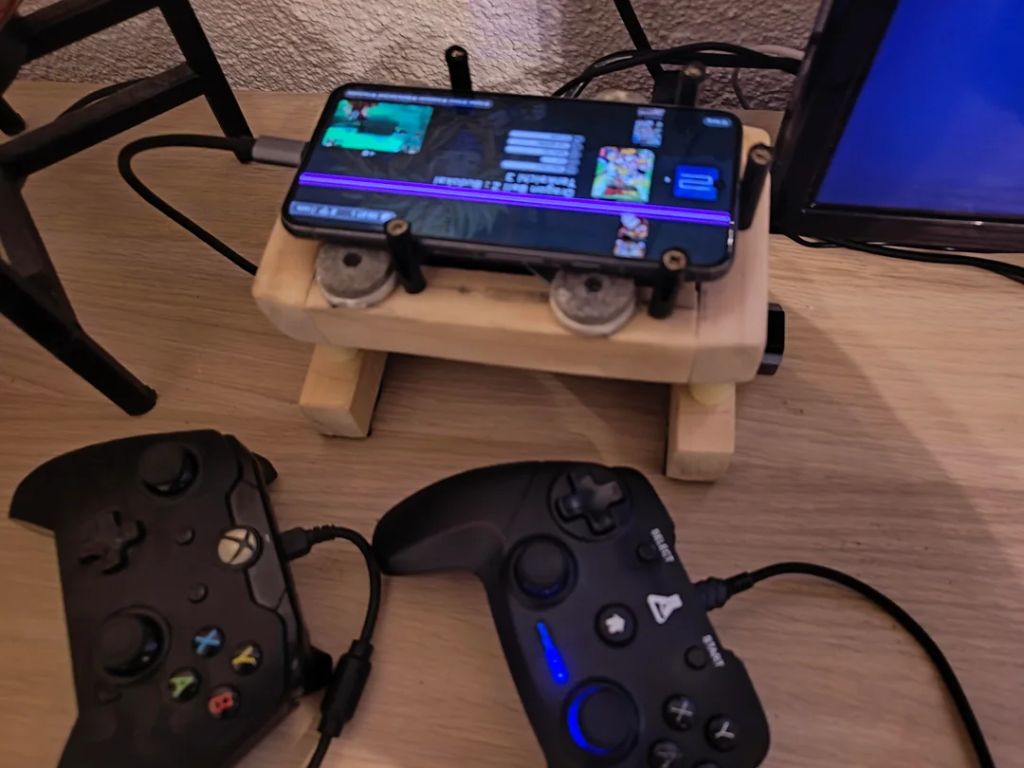
The average smartphone user would look at a broken screen and decide to replace it or buy a new phone. However, one resourceful owner refused to let his Google Pixel be recycled or go to waste. In the end, he turned it into a quick, mini gaming setup.
The Google Pixel 8 started showing a stubborn pink line running vertically across its display. The owner took it to Google, but the company said it couldn’t fix it. So he decided to use it as a retro gaming hub hooked up to a TV, complete with wired controllers for friends, a mouse, and an active cooling setup to prevent hitching and throttling.
The owner and Redditor Prior_Explanation_52 shared the entire story of his project on r/EmulationonAndroid and explained:
“I had a Google Pixel 8 lying around that was not being used anymore because of a big pink stripe on the screen. So I made a dock/console out of it with a fan from an old PC and a hub that has four USB ports, so I can connect two controllers, a mouse, and the fan. And it powers the phone too.”
To get a console-like feel for playing retro titles, he “installed ES-DE for console vibes and exploration. I’m glad I found a new use for this phone.” Later, he clarified in a follow-up edit that the phone itself wasn’t actually old and was as new as his daily driver smartphone, but the damaged screen made it unusable for texting, calling, browsing, or watching videos, so he gave the Tensor G3 a new purpose instead.
The setup features an inexpensive 4-port USB hub that sits in the center of the build. It splits power from a 45W USB-C charger and runs two wired controllers, a mouse, and a 50mm PC fan that blows cold air directly onto the back of the Pixel 8.
It’s an unorthodox way to implement an active cooling solution, especially for a mobile device, but given that Google’s Tensor chips are known to run hot during demanding tasks like emulation, the fan helps keep thermals low.
He used the Pixel 8’s built-in HDMI output via USB-C to get a straightforward, clean picture without any hiccups. He also installed EmulationStation Desktop Edition to give the setup a proper retro, console-like feel, with games showcasing original box art and libraries organized by home console emulator.
Source(s)
 Add as a preferred source on Google


