




Faster than any SSD – This open-source tool gives me a blazing-fast virtual drive
When I was testing a new SSD recently, a colleague asked for some “more practical” benchmarks in addition to the usual CrystalDiskMark and AS-SSD numbers. His idea was straightforward: just run a simple file-copy test.
What he didn’t consider, though, is that copying from one drive to the test SSD — or vice versa — makes it nearly impossible to tell which drive is causing any slowdown that shows up.
For a test like that, you need a drive that is consistently faster than any SSD you’re benchmarking. That eliminates any bottleneck on the source or destination side. And that’s where the open-source tool AIM Toolkit comes in. A popular alternative is ImDisk. Both tools offer the same two core features: they can create virtual drives in RAM, and they can mount image files as virtual drives.
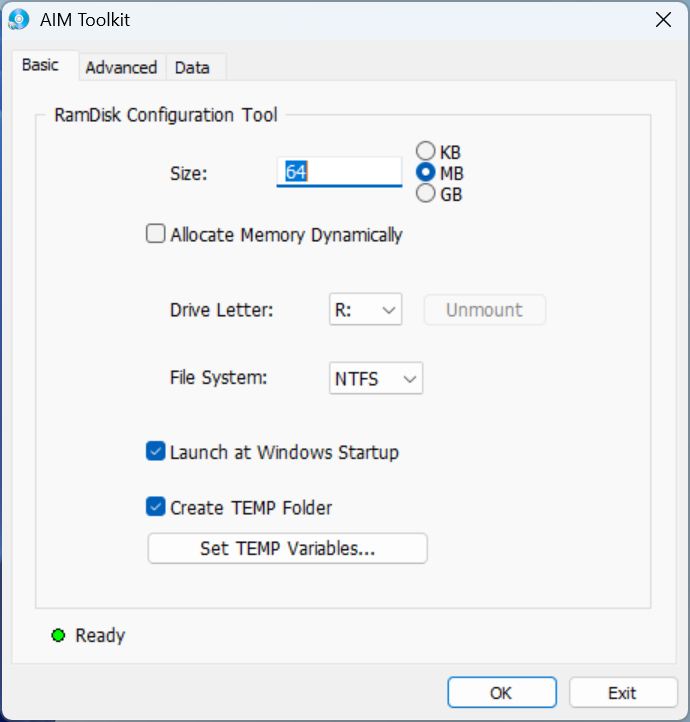
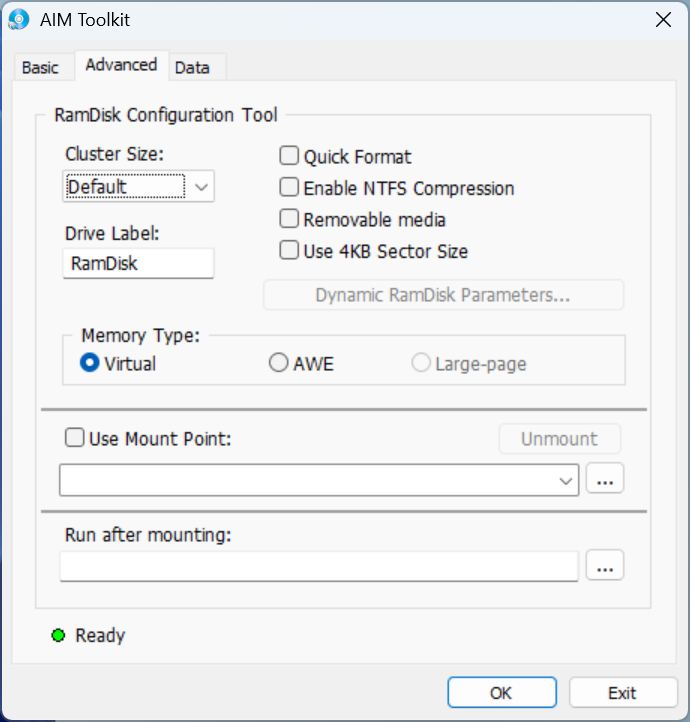
Both tools include command-line options and a graphical interface, making them very easy to use. Creating a temporary RAM disk takes almost no effort, and you can even configure the tools to rebuild the RAM disk automatically every time your system restarts.
Advantages and use cases
But the upside is obvious: extremely high read/write speeds that outpace SSDs by a factor of 20 to 100. On top of that, both reads and writes are nearly instantaneous, and fragmentation is far lower because data is often stored in contiguous blocks.
That opens the door to a number of useful applications. I’ve already mentioned the SSD copy test. Beyond that, RAM disks are great for temporary files in video-editing workflows, for video and audio transcoding, and for extracting compressed archives like ZIP files. CAD/CAM software benefits from faster temporary file handling, software builds complete more quickly, and even browser cache offloading can speed up page loads. Game caches — like shader caches — also load faster, so large Minecraft modpacks, for example, start up noticeably quicker.
Virtualization is another big one: VM images run much faster when they’re hosted in RAM-but you will also need a lot of RAM, then.
Disadvantages
Of course, RAM disks depend heavily on how much memory you’ve got. You won’t be creating massive 1-TB drives. If you have 16 GB of RAM, you might be able to spare half or a third of it for a temporary test drive.
Another drawback is that RAM disks are volatile. A shutdown or reboot wipes the entire virtual drive, making RAM storage unsuitable for anything you need to keep long-term. It’s really meant for testing or temporary data.
At the moment, recommending tools that benefit from having more RAM might not be ideal — memory prices aren’t exactly friendly right now (RAM offers on Amazon). But if your PC is already well-equipped, it’s absolutely worth experimenting with a small RAM disk. Try moving your browser cache to it, for instance, and you might be surprised at the difference.
 Add as a preferred source on Google


