




ChatGPT, Gemini, Meta: How to opt out of AI training

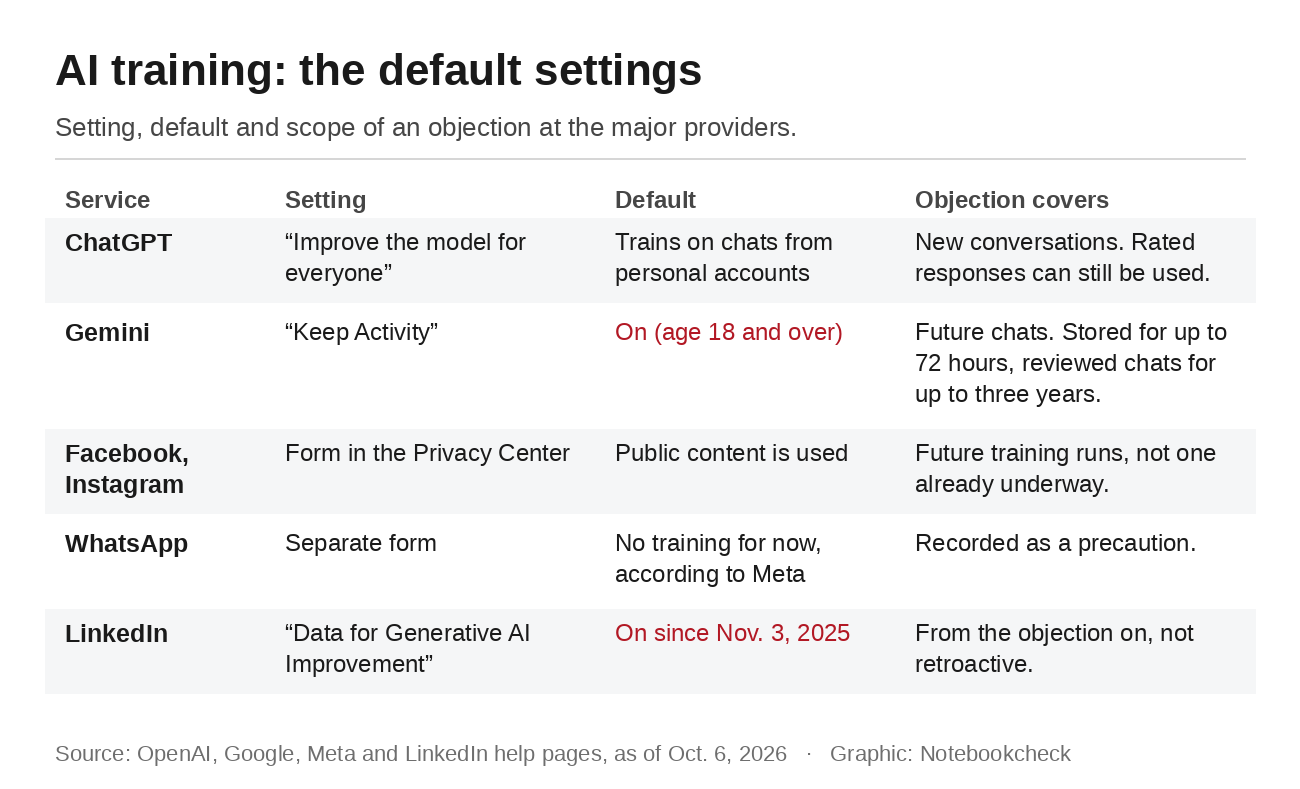
Anyone who uses ChatGPT, Gemini, Facebook, Instagram or LinkedIn usually also supplies material for the companies' AI models. On Gemini and LinkedIn, the training setting is on by default. OpenAI trains on chats from personal accounts unless you object, and Meta uses public posts from adult users without asking. You can stop this everywhere, sometimes with a toggle and sometimes with a form. All four companies share one limitation. An objection only applies to future training, not to training that has already happened.
Brussels is negotiating the right to object
Legally, the companies usually rely on their legitimate interest under the GDPR, and OpenAI says so explicitly in its EU privacy policy. In November 2025, the European Commission proposed writing this legal basis into its Digital Omnibus reform package while adding an unconditional right to object. A Council document from June still contains that right. According to Tech Times and borncity, it is missing from an internal compromise text by the Irish Council presidency dated September 3, which the privacy group noyb published. Germany supported removing it, according to another Council paper. Nothing has been decided yet. The Council is still negotiating, and in Parliament the committee vote is not planned until early 2027, followed by trilogue talks. Until then, the GDPR applies in its current form.
ChatGPT: One toggle, with an exception
OpenAI calls the setting "Improve the model for everyone." In the browser, open the account menu, select Settings and Data controls and turn the option off. In the app, it is in the same place via the sidebar and your profile. OpenAI also accepts an objection through its privacy portal, and it then stays linked to the account. After that, OpenAI says it will no longer use your new conversations for training. The company does not say anything about older chats. One exception remains. If you rate a response with a thumbs up or thumbs down, the entire conversation can still be used for training. Our article on 53 user images that ended up online shows what that can look like. For sensitive questions, use a temporary chat. It does not appear in your history, is not used for training and is kept for up to 30 days for safety purposes. The training setting does not affect ad profiles built from your chats, which have their own setting, as we explained in our article on OpenAI's planned ChatGPT ads.
Gemini: Turn off Keep Activity
Google combines everything in one setting called "Keep Activity," formerly Gemini Apps Activity. According to Google, it is on by default for users aged 18 and over. On gemini.google.com, go to Settings & help and Activity, select "On" at the top and choose "Turn off" or "Turn off and delete activity." Google then stops using your future chats for training, as long as you do not give feedback. Your conversations do not disappear right away, though. Even with the setting off, Google keeps them with your account for up to 72 hours to provide the service and process feedback. Chats that human reviewers have already seen are not deleted with the rest and are kept for up to three years. Our article on deleted Gemini chats has more details.
Meta: One form for Facebook and Instagram, another for WhatsApp
Meta does not offer a simple toggle. It uses forms instead, which you can reach through the right to object section of its Privacy Center. One form covers Facebook and Instagram if both accounts are in the same Accounts Center. It applies to public posts, photos with captions and comments, as well as your interactions with Meta AI. Meta says it does not use private messages unless someone in the chat deliberately shares them with the AI. You get a confirmation by email after submitting. We described how Meta handles photos on Instagram in our article on Muse Image.
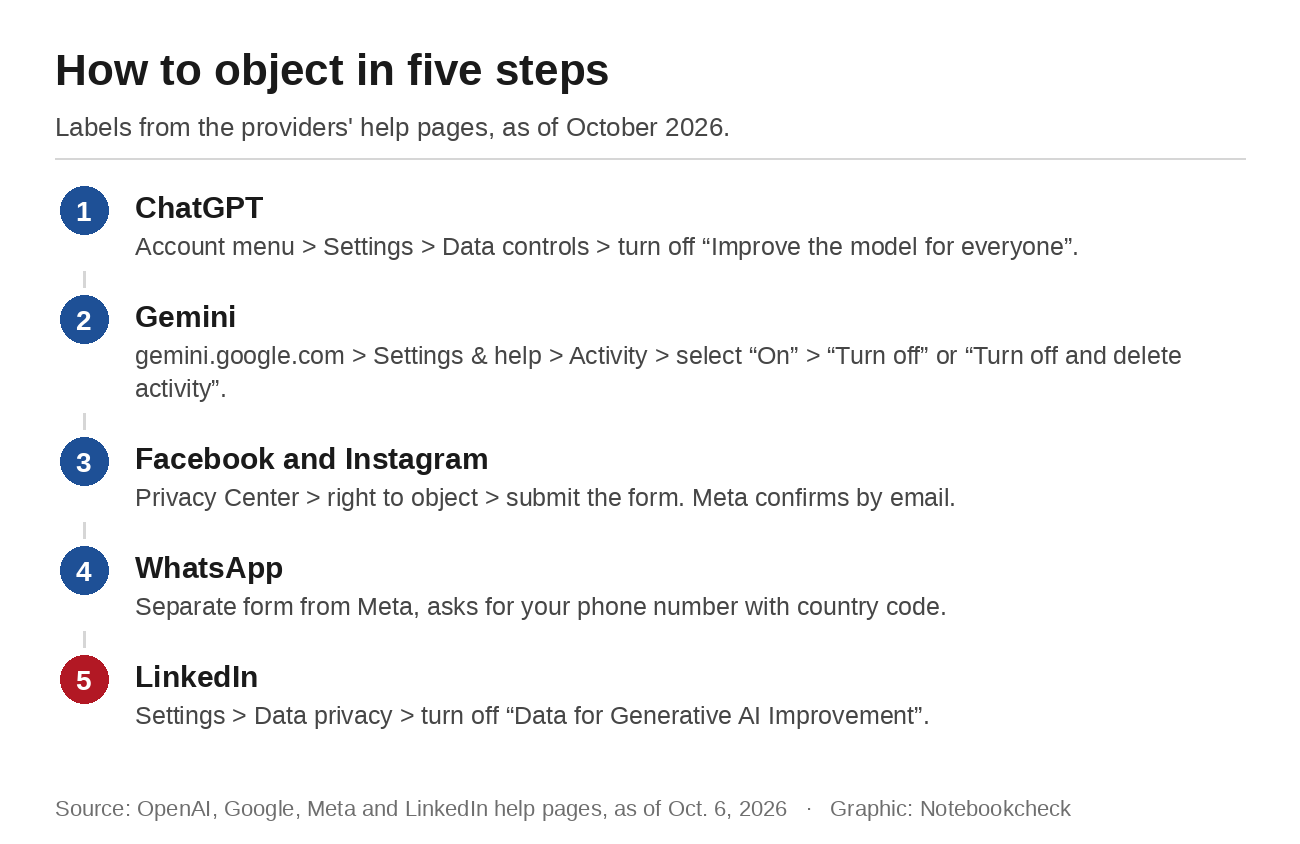
Meta names two gaps itself. If you appear in an image or post that someone else shares publicly, Meta can use that information despite your objection. If you submit the form after a training run has started, your data is still used in that run, though not in later ones. WhatsApp has its own form, which asks for a phone number with country code. According to Meta, chats with AIs on WhatsApp are not used for training at the moment. An objection is recorded in case that changes.
LinkedIn: The setting has been on since November 2025
Since Nov. 3, 2025, LinkedIn has also used data from members in the EU to train its content-generating AI models. The setting is called "Data for Generative AI Improvement." You can find it under Settings and Data privacy, in the section on how LinkedIn uses your data. In an account we checked in early October, it was on. LinkedIn says turning it off applies from that point on and does not affect training that has already taken place. Private messages are excluded, and the network says it does not use data from members it believes are under 18. For models that do not generate content, such as those used for personalization or abuse detection, there is a separate objection form.
Going through all four takes about 15 minutes. Other services work in a similar way. Twitch, for example, lets Amazon's AI learn from streams until you turn it off. None of these settings is a guarantee. What you post publicly or share with an AI may already be in a model before you object.
Source(s)
OpenAI Help Center: Data controls in ChatGPT
Gemini Apps Help: Manage and delete your Gemini Apps activity
Google: Gemini Apps Privacy Hub
Meta Privacy Center: How Meta uses information for generative AI
Meta: Objection form for Facebook and Instagram
Meta: Objection form for AI chats on WhatsApp
LinkedIn Help: LinkedIn and generative AI FAQs
Council of the EU: Digital Omnibus, Council document 10729/26 from June 2026
noyb: Leaked compromise text from the Council presidency
Tech Times: EU Council nears GDPR deal
borncity: Digital Omnibus and AI training without consent (German)
 Add as a preferred source on Google


No comments for this article
