


ChatGPT, Gemini, Claude: How to delete what AI remembers about you

All three major chatbots now have a memory. ChatGPT, Gemini and Claude keep track of what you are working on, how you like your answers and who matters in your life. That saves you from repeating yourself. It also means the AI holds on to details you may have forgotten sharing, such as a diagnosis from a chat in the spring or an ex's name.
All three have changed how memory works since the summer, Claude most of all. One thing that was true in July no longer is. Deleting a chat in Claude does not automatically delete what Claude learned from it. ChatGPT has always worked that way, and Gemini is now the only one where remembered details are still tied to your chats.
ChatGPT keeps memories separate from chats
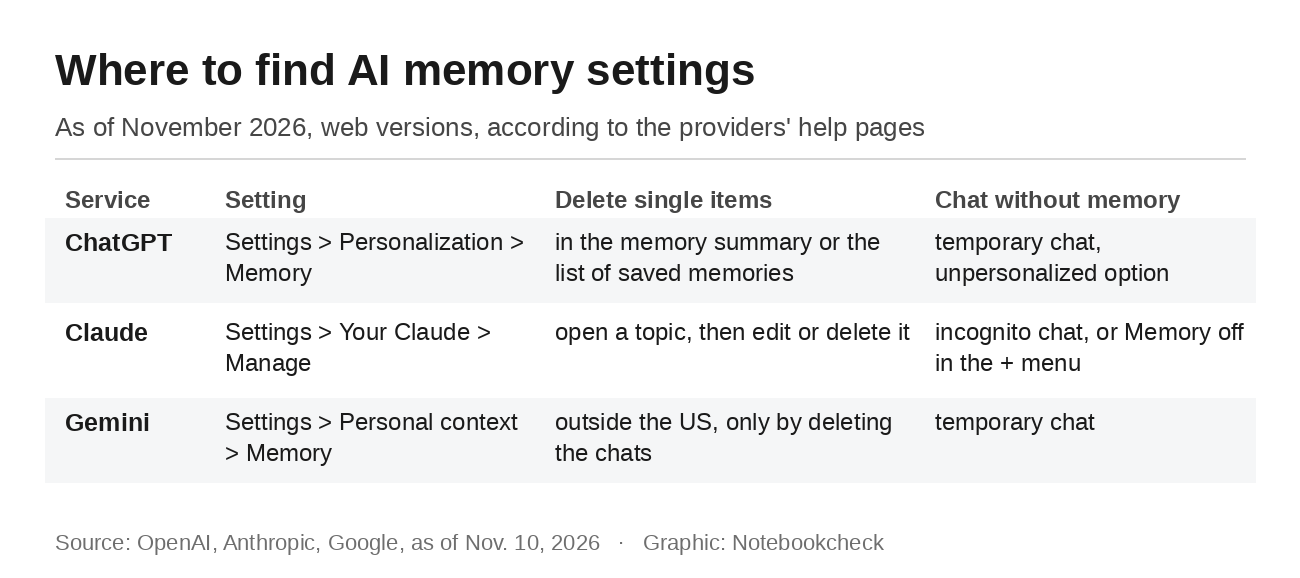
The controls are under Settings, Personalization and Memory. Depending on your account, you will see a memory summary, which OpenAI describes as a high-level view of information ChatGPT may use to personalize responses. The legacy experience shows a list of saved memories instead. According to OpenAI's help article, memory can draw on past chats, saved memories, custom instructions, files in your library and connected apps such as Gmail, depending on your plan and region.
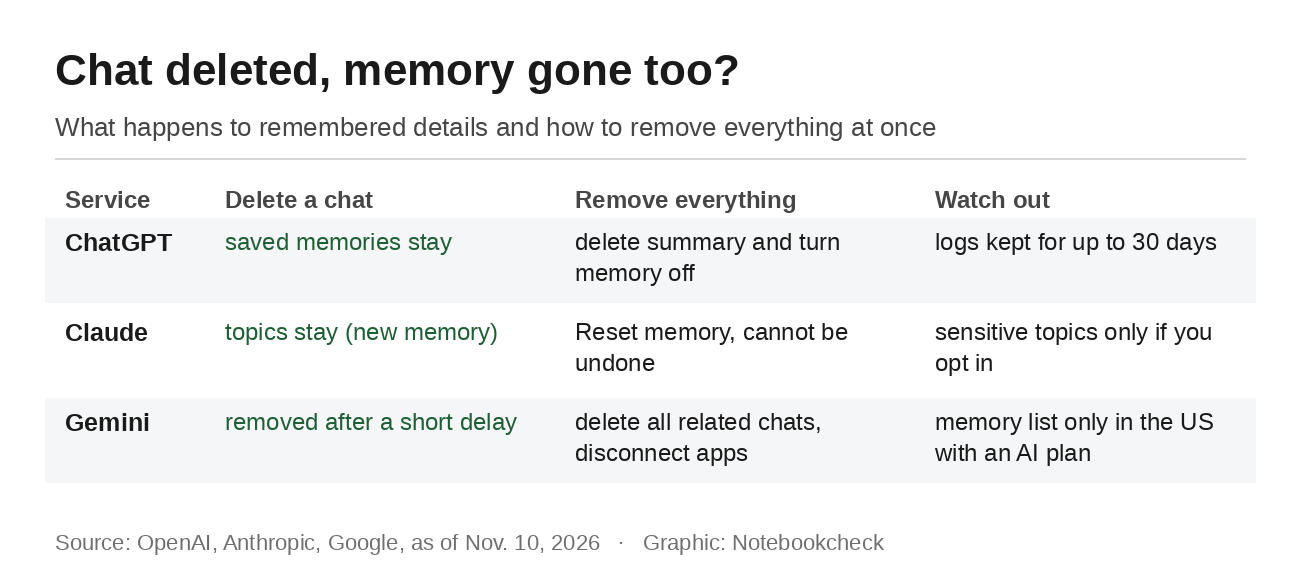
How you delete something depends on where it is stored. OpenAI says saved memories are stored separately from chat history, and deleting the original chat does not automatically delete a saved memory. To remove information completely, you need to delete it everywhere it appears, which means the memory summary or saved memories, the original chat, archived chats, saved files and connected apps. The "Don't mention this again" option sounds like deletion, but OpenAI says it only reduces future references and does not delete the original source. OpenAI may also keep logs of deleted saved memories for up to 30 days.
For a single conversation without memory, there is temporary chat. It does not create memories, but since the summer it can use existing ones. If you do not want that, pick the unpersonalized option before you start, because you cannot change it later. If you save a temporary chat, it becomes a regular chat and can feed into memory again. Locked chats also keep using your regular memory.
Claude saves topics that outlast your chats
Anthropic has rebuilt Claude's memory. Instead of summarizing conversations afterward, Claude now saves individual topics as you chat, such as your role, ongoing projects, people and writing preferences, according to Anthropic's help article. Memory is on by default on the Free, Pro, Max and Ultra plans. You will find it under Settings and Your Claude, or under Memory in the older settings layout. Select "Manage" to see every topic, then open one to edit or delete it.
The detail that matters most is further down that page. When a conversation is deleted, the memory entries generated from it are not removed, so you have to delete them yourself. That is a change from the summer, when Claude's memory still updated after a chat was deleted. To remove everything at once, turn memory off and choose "Reset memory." That also deletes project memories and cannot be undone. "Pause memory" only stops Claude from using and adding to memory.
Some information never makes it in by default. Topics such as health, religion, political views and ethnicity are only saved if you turn on sensitive topics yourself. Anthropic says government ID numbers, financial account numbers, criminal history and immigration status are never saved, even if you ask. Chats in which Claude used linked accounts in Personal Finance stay out of memory as well. For one-off conversations, there are two options. An incognito chat, opened with the ghost icon, does not appear in your chat history or your memory. Alternatively, turn off "Memory" in the "+" menu before you send the first message. The chat then stays in your history, but Claude does not save anything from it.
Gemini remembers what is in your chats
Gemini's memory is built from your saved chats. According to Google, you need a personal Google Account, you have to be 18 or older and Keep Activity has to be on. In the web app, the switch is under Settings and Personal context. Outside the US, there is no list where you can delete individual items. To remove something, you delete every chat that contains it in Gemini Apps Activity, and Google says there may be a short delay before Gemini stops using it. You can also correct Gemini directly in a chat.
If you have connected apps such as Gmail or Google Photos, that is not enough. Google says you need to delete the chats and disconnect the app. If you only disconnect the app, Gemini might still use the information from a past chat. If you only delete the chats, Gemini might find it again in the app. Gemini's Chrome autofill feature shows how far it already reaches into other Google services.
Google is further ahead in the US. There, you can ask Gemini to remember specific details, and 9to5Google reports that a memory summary started rolling out on November 9, letting you view what Gemini remembers by category and delete it. According to Google's help page, asking Gemini to remember things requires a Google AI plan and is only available in the US. For a single question that leaves no trace, use temporary chat. It does not appear in your activity, does not give personalized responses and does not save anything for future personalization.
How to clean up your AI memory
A simple question is the quickest place to start. OpenAI says you can ask ChatGPT what it remembers about you, and Google suggests asking Gemini whether it used information from past chats. In Claude, the topic list under "Manage" is the fastest route. If something shows up that is wrong or bothers you, delete it where it is stored. In ChatGPT and Claude, that is the memory entry. In Gemini, it is the chat the information came from.
Next, check the settings for model training, because those are separate from memory. Turning off memory does not stop your chats from being used to improve the models. We have a separate guide on how to opt out of AI training. For anything you only want to ask once, a temporary or incognito chat is the cleanest option, and it is less work than tidying up in three places afterward.
Source(s)
OpenAI Help Center: Memory in ChatGPT
Claude Help Center: Use Claude’s chat search and memory to build on previous context
Gemini Apps Help: Get personalization with memory of your past Gemini chats
Gemini Apps Help: Manage what Gemini remembers about you and customize responses
Gemini Apps Help: Use Gemini Apps, temporary chat
9to5Google: Google Gemini rolling out ‘Memory summary’ with everything it remembers about you
 Add as a preferred source on Google


