




Google Photos: the AI search needs a model of your face
The AI search in Google Photos answers questions a normal search cannot. Where did I camp last summer. Show me every picture where my daughter is laughing. The feature has been available in Germany since March, and the app calls it Ask Photos. Google lists what it requires in a collapsed section of its help page.
Two settings have to be on before the search answers
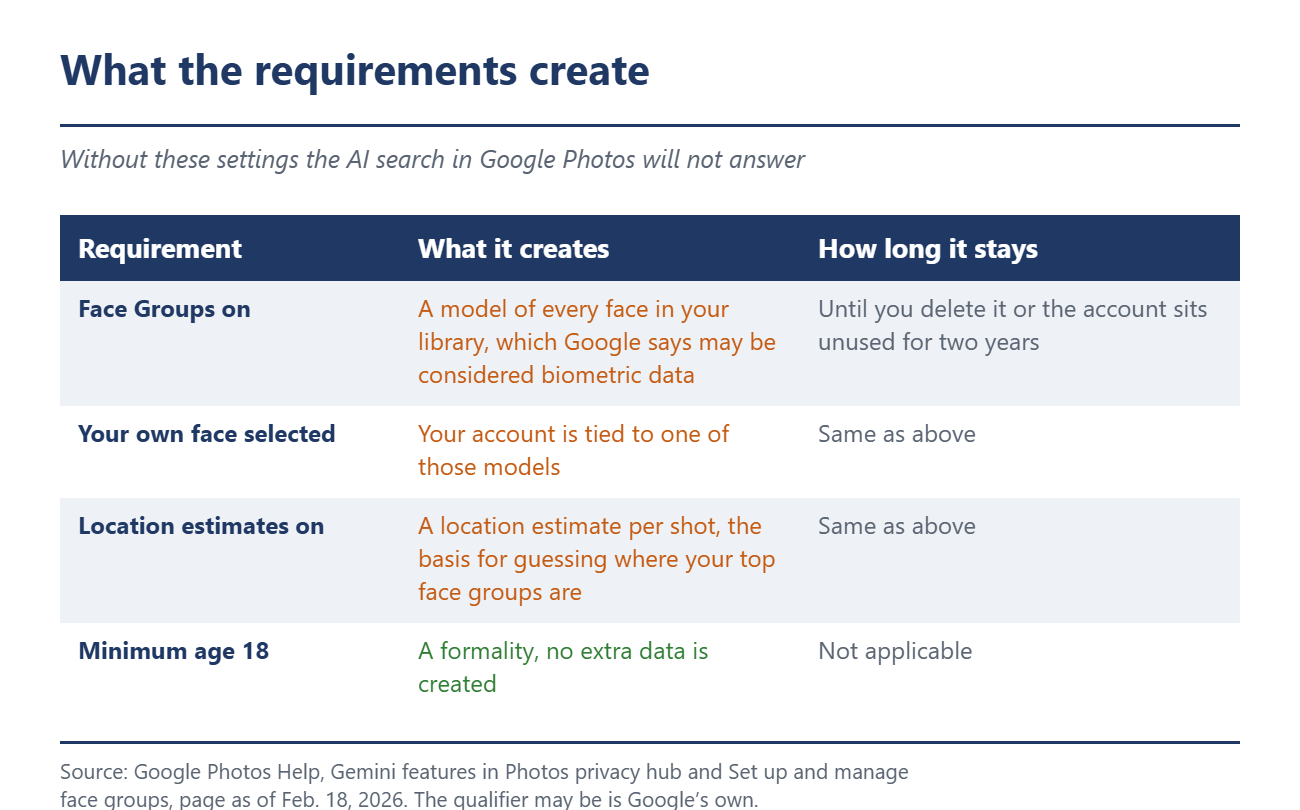
Google names four conditions. You have to be at least 18, an eligible user in a launched country, have Face Groups switched on with your own face selected, and allow location estimates for your photos. The first two are formalities. The other two are the actual price.
On a separate help page Google writes about Face Groups: "When 'Face Groups' is on, you let us know that you want models of the faces that appear in your photos to be made. These models may be considered biometric data in some jurisdictions." The qualifier is Google's own. A model is built for every face in the library, which includes friends, children and strangers who happened to be in the frame. Switching the feature off later deletes the groups, the models and every label you added yourself. While it stays on, the same page says face models, face groups and face labels are stored and used until you delete them or the account is inactive for more than two years.
What Google calls an inference
What Google derives from the pictures is more revealing than the pictures. The privacy hub says the company may process photos and videos to improve edits or to draw inferences. It then spells out what an inference is: "Inferences include things about people, like guessing the age and locations of your top face groups and inferring insights related to your life."
So the estimated age and estimated whereabouts of the people who show up most often in your own pictures. Plus insights related to your life, a phrase Google never defines anywhere. The same page says Google uses these inferences for personalized memories, edits and creations. Google has been generous with retention periods around Gemini before, as the case of the reviewed chats showed.
One word decides what the training promise covers
The reassuring sentence appears twice on that page, both times in plain sight. "We don't train any generative AI models outside of Google Photos with your personal data in Google Photos." The limitation is collapsed in the question and answer section below. Google does not train models outside of Google Photos "directly on your imagery and audio from your Google Photos library". Connect other Google services and "Google may train on things like summaries, inferences, and generated media that are based on the contents of your Photos library".
The word directly is the decisive qualifier. Images and audio are excluded, while summaries and inferences appear in the same sentence as training material. The clause is also new. The Internet Archive shows that the Nov. 12, 2025 version of the page said nothing about training on summaries and nothing about insights related to your life. The January 2026 version contains both passages in their current wording.
The paragraph comes with a catch for readers in Germany, and for once the catch works in Google's favor. Connecting Google Photos to the Gemini apps is not offered anywhere in the European Economic Area. The country list in Google's help does not contain a single EU member. A second help page states the feature is "Not available in the European Economic Area, Nigeria, Switzerland, or the United Kingdom." The training clause therefore describes what Google reserves for the day the connection arrives. Google has been late with individual features in Europe before, or absent altogether, most recently with the Spark agent.
Where to find the settings
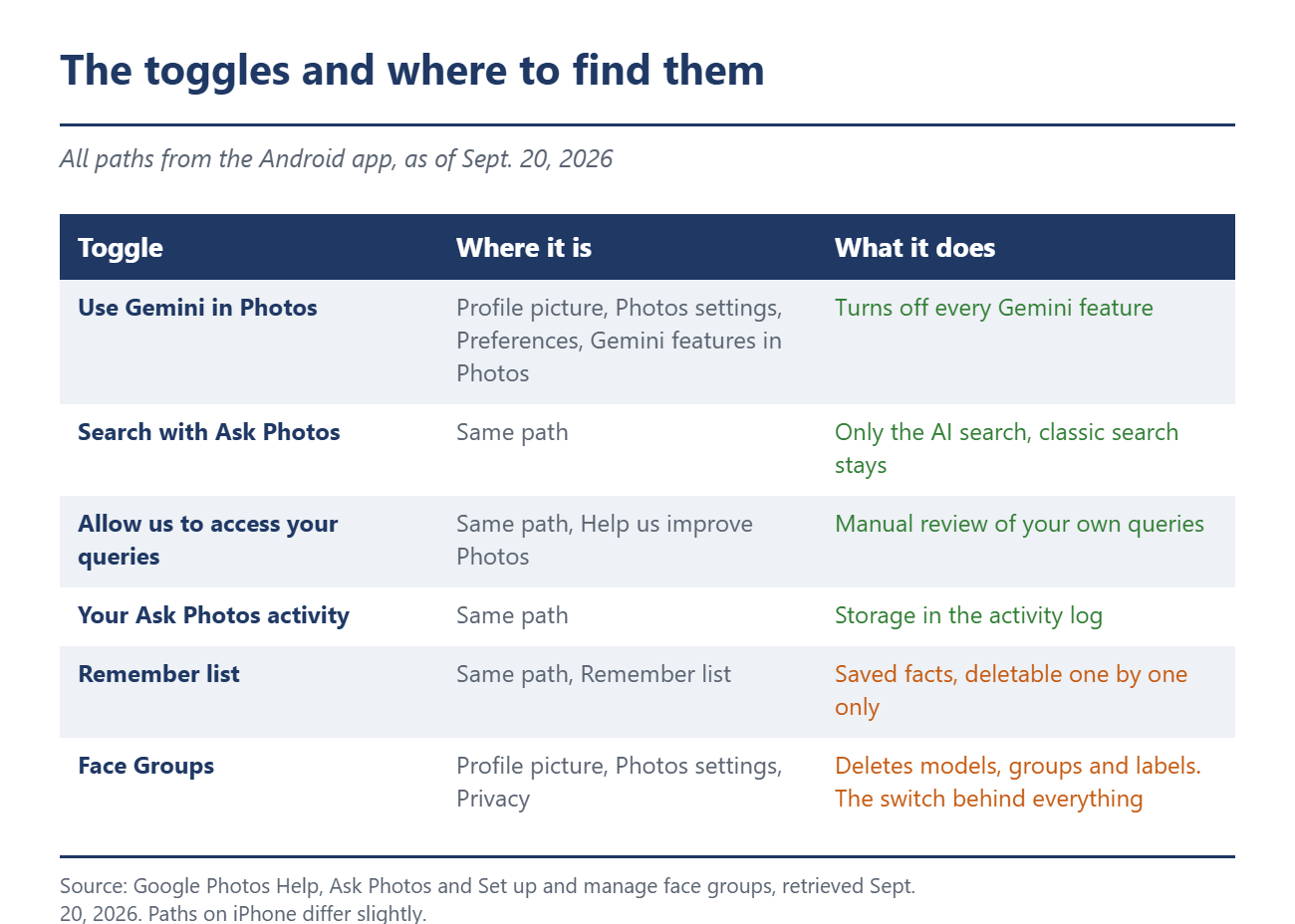
In the Android app you get there through the profile picture in the top right, then Photos settings, Preferences, Gemini features in Photos. There are four toggles on that page. The top one turns off every Gemini feature. The second removes only the AI search and the classic photo search stays active. The third governs whether your own queries may be read manually to improve the service, the fourth covers the activity log. The remember list is on the same screen, holding every fact you handed the assistant in conversation, and it can only be cleared line by line.
Face Groups is in a different place, under Photos settings in the Privacy section. Nothing else works without it, because the AI search will not start at all. Flip only the top Gemini toggle and the face models stay in your account. This is another one of those settings you set once and then forget, much like the share link you forgot about years ago.
Some context belongs here, because a lot of false information circulates on this subject. The German fact checking site Mimikama examined a shareable graphic in April that claimed Google trains its AI on private photo libraries, and rated it misleading. That rating is correct. Google does not say this, and anyone claiming it is missing the point. What went unexamined there is the question of the inferences, and Google's own text answers that one.
What remains is a plain trade-off. The AI search in Google Photos is convenient and finds shots you would otherwise scroll for half an hour. It costs a model of every face in your library, estimated locations for the most important people in it, and conclusions about your life whose scope Google leaves open. Anyone who considers that a fair deal leaves the toggles on. Anyone who does not needs two minutes for the opposite.
Source(s)
 Add as a preferred source on Google


