




ChatGPT: what the training toggle does not switch off

ChatGPT has a setting that puts people at ease. It is called "Improve the model for everyone", it sits under Data Controls, and flipping it feels like closing a door. From now on the AI learns nothing from me.
That is true, but only as far as the sentence OpenAI writes about it: "Once you opt out, new conversations will not be used to train our models." Two limits are already in that one sentence. It is about new conversations, and it is about training. Everything else is outside its remit.
What the toggle actually does
It keeps your conversations out of model training from the moment you flip it. It applies to the whole account, no matter which device you use, and you can flip it back at any time. Voice mode has a separate control.
What it does not do is written down just as plainly. Your conversations stay in your history, they are simply no longer used for training. And because the history stays, everything built from it stays too. That is where the part most people miss begins.
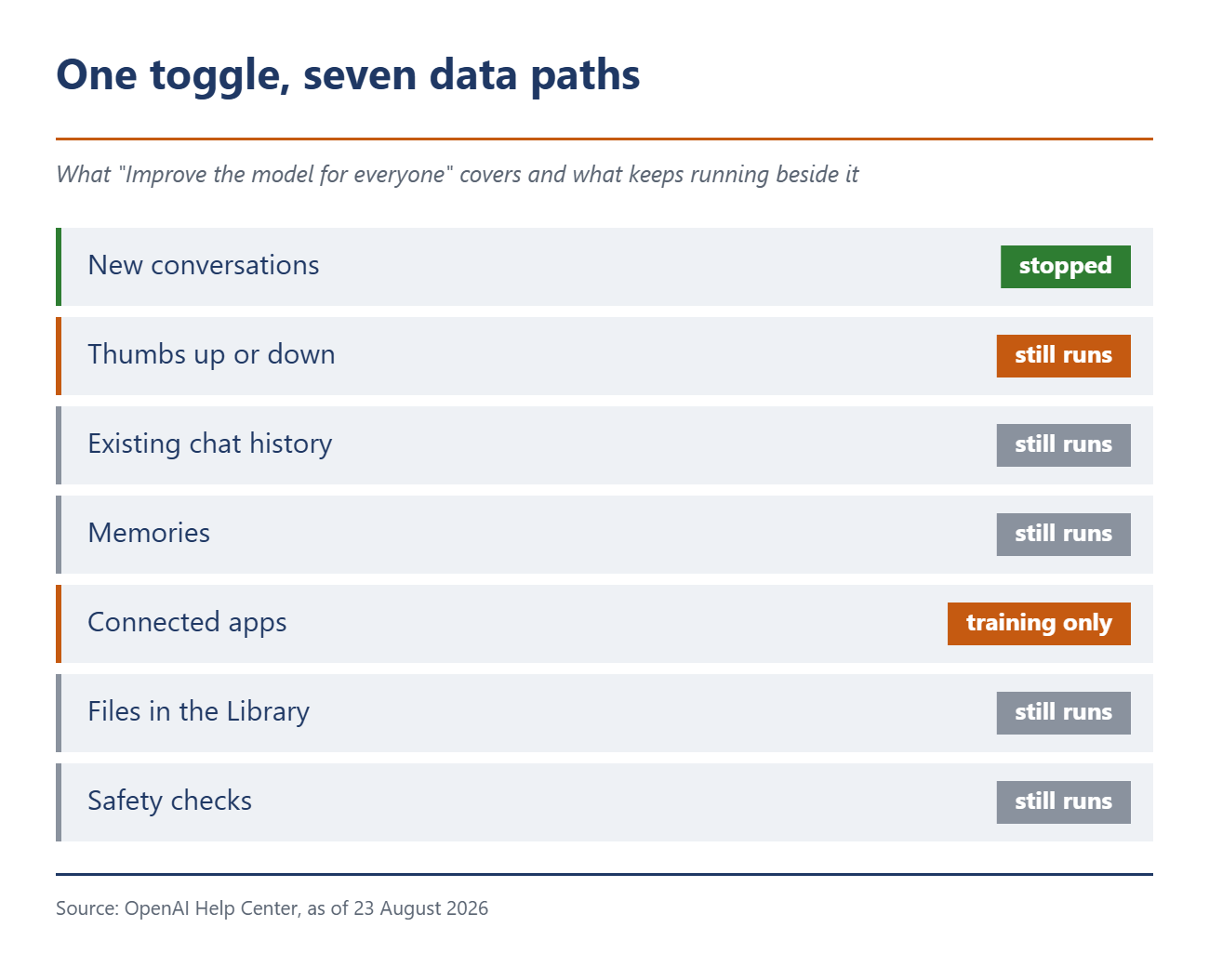
| Area | Does the toggle handle it? | What you have to do yourself |
|---|---|---|
| New conversations | Yes | Nothing |
| Thumbs up or down | No | Skip the rating |
| Existing chat history | No | Delete chats individually or clear the account |
| Memories | No | Delete the summary and switch memory off |
| Connected apps | Training only | Disconnect the app, check permissions |
| Uploaded files | No | Delete them separately in the Library |
| Safety checks | No | Cannot be switched off |
One: the thumbs undo the toggle
On the same page that carries the core promise, a later paragraph opens it up again. Rate an answer with thumbs up or thumbs down and you are giving feedback. And then, OpenAI writes, the entire conversation attached to that feedback may be used to train its models. Explicitly including cases where you opted out beforehand.
That is the only documented route by which a complete chat can still end up in training with the toggle off. It is triggered by a gesture most people treat as basic politeness. Support conversations work the same way.
Two: the toggle has no memory of the past
OpenAI frames the promise as forward looking, not as a recall. Whatever piled up before you flipped the switch could be used for training, because that is exactly what the company reserves for personal accounts. The opt-out takes effect from the moment you set it. I could not find a sentence about retroactive effect on any of the help pages.
Three: memories are a second system
Memory is the feature that lets ChatGPT remember things about you so you do not have to repeat them. It does not hang off the training toggle, it sits under personalization. And it is more persistent than it looks.
The summary in your settings does not show everything. It is meant to capture the most important details, but according to OpenAI not everything ChatGPT remembers from your chats. Asked directly whether the summary contains all memories, the company answers "Not necessarily".
The sharpest point comes further down. Deleting your memories and switching memory off does not delete the old chats. Turn memory back on later and ChatGPT may build fresh memories from whatever is left in your history, explicitly including older conversations. The memory you deleted can come back.
On top of that, in the older saved-memories system a memory outlives the chat it came from. And OpenAI may keep a log of deleted saved memories for up to 30 days.
Four: connected apps play by their own rules
Anyone who has linked Gmail, Drive, Canva or another service to ChatGPT has opened a second channel. On Free, Plus, Go and Pro, OpenAI may use information from connected apps for training as long as the toggle is on. On Business, Enterprise and Edu it does not do so by default.
So the toggle covers that direction. What it does not cover is the other one. The app sees excerpts from your conversations, with memory on also content from your memories, plus your IP address, device and browser type, language, region and approximate location. That data falls under the provider terms, not under OpenAI's.
Five: deleting does not delete everywhere
A deleted chat disappears from your account immediately and is scheduled for permanent deletion within 30 days. With two exceptions OpenAI names itself: if the chat has already been de-identified and disassociated from you, or if it has to be retained for security or legal obligations.
The files matter more in practice. Anything you uploaded into a conversation also lands in your Library, and the Library is separate. Deleting a chat does not delete a file stored there. The same goes for files in a project or a custom GPT, which stay until the project or the GPT itself is deleted.
OpenAI draws the conclusion itself: to remove something fully from what ChatGPT knows about you, you have to delete every source it appears in.
Six: the safety checks never stop
The Data Controls help page carries a line that is easy to skim past. Switching off memory and personalization does not disable safety features that may use limited, safety-relevant context in rare, high-risk situations so ChatGPT can respond more safely. There is no toggle for that.
Temporary Chat, which many people read as an incognito mode, is no exception either. It is not used for training, creates no memories and disappears after 30 days. OpenAI may still keep a copy for up to 30 days for safety purposes and review it to monitor for abuse. Your custom instructions still apply there as well.
What to actually do
Taking this seriously means more than one switch. First the toggle itself, under Profile, Settings, Data Controls. Second personalization and memory, where you delete the summary and turn the feature off. OpenAI says that control is on the web and still rolling out on mobile. Third, clear out the Library, because that is where the files sit that deleting chats will not catch. Fourth, look under Settings, Apps to see which services are connected and disconnect what you do not need.
And fifth: leave the thumbs alone. A rating is the one gesture that can push an entire conversation into training despite the opt-out.
For conversations that should leave as few traces as possible, Temporary Chat is the better tool. Not the training toggle. How far the data paths now reach is clear from the new activity recorder for the Mac, which arrived in Europe on 20 August.
Source(s)
 Add as a preferred source on Google


