




ChatGPT's new privacy center changes none of your settings
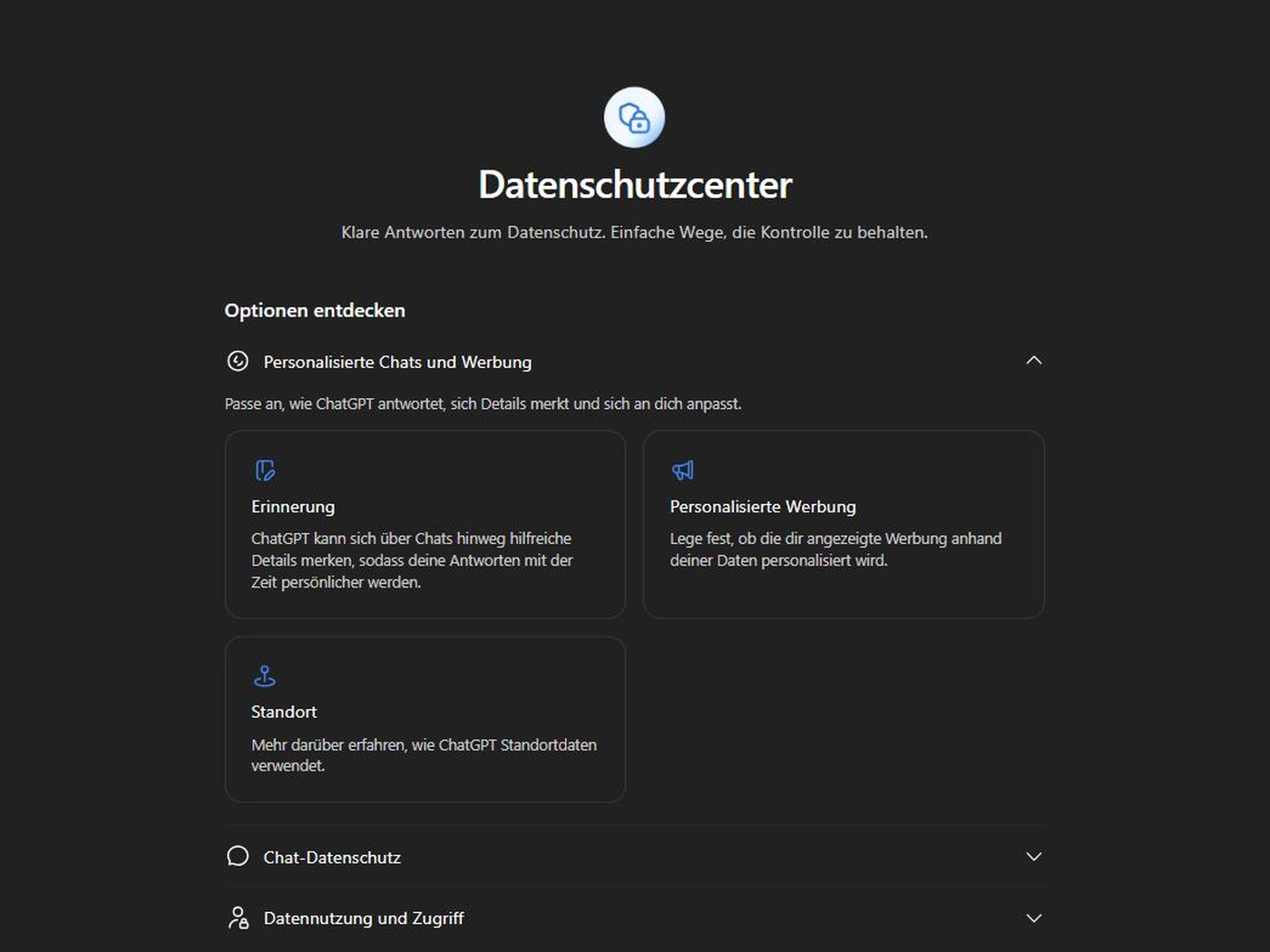
ChatGPT added a menu item this week. It is called the privacy center. You reach it from the Help entry in the account menu, and it gathers seven topics in one place, from memory and ads to deleting your account. OpenAI announced it in the ChatGPT release notes on Monday. The page itself changes nothing.
Where to find it and who gets it
On the web you open the account menu, select Help, then select Privacy center. On iOS and Android you find the entry under Settings instead. The direct address is chatgpt.com/privacy-center. We opened it on Tuesday morning in a European account on the Free plan, where it was already fully localized.
OpenAI names signed-in users on the Free, Go, Plus, Pro and Business plans, on the web and in the iOS and Android apps. Enterprise, Edu and ChatGPT for Healthcare stay out. The rollout is gradual, and the company says so itself. "If you don't see Privacy Center, it may not be available for your account or app version yet." Which of the seven topics reach you depends on your plan, region, account and workspace settings.
What the page does and what it leaves out
Three groups hold the topics. Personalized chats and ads covers memory, personalized ads and location. Chat privacy holds a single topic, temporary chat. Data use and access covers plugins and apps, multi-factor authentication, model improvement, and the export or deletion of your data. Every topic opens a panel with three or four questions and a button labeled Manage. That button carries a small arrow, because it takes you out of the center and into Settings.
OpenAI states the limit plainly in its own documentation. "Your privacy controls remain in Settings." The center explains what each control does and helps you find it. That is where its job ends. "Opening the privacy center does not change your settings, delete your data, or override your organization's policies." The page works as a map. It does not work as a switchboard.
Three sentences worth the detour
The memory panel asks what to do when you do not want ChatGPT to remember something. The answer runs a good deal longer than one click. "Deleting a chat does not automatically delete a memory saved from it," the privacy center says. OpenAI's memory documentation then spells out the full job. You delete the saved memory and the chat where you first shared the information, and after that you work through the memory summary, saved memories, regular and archived chats, files in Library, and connected apps.
OpenAI limits model improvement to future chats. Switch it off and your coming conversations stay out of the models. Whatever is already in your account stays put, because "turning it off does not delete your chats or remove them from your history," and your memory settings do not move either. We walked through the same gap in our piece on the training toggle.
The third sentence covers ads. Turning off personalization leaves the ads themselves in place. "If you turn off ads personalization, you will still see ads based on the context of your current chat thread," OpenAI writes. Its ads documentation is blunter still, because turning personalization off "doesn't remove ads." Only the Free and Go plans see ads at all, and OpenAI notes that personalized ads are not initially available in the European Economic Area or Switzerland. Advertisers receive none of the underlying material, no chats, no chat history, no memories, no personal details.
How to get something out of the visit
The page is useful as an inventory. Walk the seven topics from top to bottom and select Manage on each one. You then pass through every switch that applies to your account. Two of them repay the minute they cost, multi-factor authentication and the list of connected apps. Data use and access also holds the export of your own data and the button that deletes the account for good. What the center leaves out is the trail ChatGPT lays outside the app, among it the __obi cookie on third-party sites.
Source(s)
 Add as a preferred source on Google


