




Mac Screen Sharing: your password does not help here

Apple rarely ships an update that closes exactly one flaw. On 6 August it did. macOS Tahoe 26.6.1, Sequoia 15.7.9 and Sonoma 14.8.9 arrived with a single entry in the security document, filed under "Screen Sharing".
Apple's own wording is short: an attacker on the network may be able to authenticate to Screen Sharing without valid credentials. No password, no privileges. Twelve days later CISA added the flaw to its catalogue of actively exploited vulnerabilities and gave US federal agencies three days to patch.
Why the password does not help
Screen Sharing is the feature that lets you see and control a Mac from a distance. Switch it on and you normally pick who may connect and set a password. That is exactly where the false sense of safety sits. The flaw hits before authentication.
Changing the password, removing users from the list, disabling the legacy VNC login: none of it makes a difference, and the security firms Huntress and MacStadium say so in the same words. There are exactly two ways out. The update, or switching the feature off.
| Situation | Affected? | What to do |
|---|---|---|
| macOS Tahoe before 26.6.1 | Yes, if sharing is on | Update to 26.6.1 |
| macOS Sequoia before 15.7.9 | Yes, if sharing is on | Update to 15.7.9 |
| macOS Sonoma before 14.8.9 | Yes, if sharing is on | Update to 14.8.9 |
| macOS Ventura and older | Yes, no patch coming | Switch Screen Sharing off |
| Screen Sharing off | No | Nothing |
| New password set | Yes, that does not help | Update or switch it off |
| Restored from an old image | Yes, vulnerable out of the box | Update before going online |
From 7.1 to 9.8
On the day of the update the flaw counted as medium severity. The first score was 7.1 out of 10 and assumed an attacker already had privileges on the system. On 14 August CISA corrected that. The privilege requirement fell away, integrity and availability jumped to high, the score rose to 9.8. Four days later came the entry in the catalogue of actively exploited vulnerabilities, with a note that the attack can be automated.
What Apple does not write is worth noting. All three security documents lack the usual line about a report of active exploitation. Those reports came from elsewhere, first from the Dutch NCSC, then from Microsoft.
A home router does not automatically keep you out of it
Most reports say the machines at risk are the ones with port 5900 open to the internet. That holds for the attacks observed so far. It does not hold for the flaw itself. Apple writes about an attacker on the network, and MacStadium reads that as meaning anyone who can reach the service.
So that includes someone on the same Wi-Fi, an infected device on your home network, or a guest on a company network. For you it means this: the home router protects you from scanners on the internet as long as you have not set up port forwarding. It does not protect you from the laptop someone carries in.
40,000 exposed Macs, and most of them are private
Security researcher Pedro Vilaça scanned for exposed machines in early August. Around 40,000 reachable Screen Sharing services, almost half of them in the US. The most interesting part is his footnote: most of them are residential connections.
These are not primarily servers. They are Macs belonging to people who set up remote access at some point and never thought about it again. There is no official measurement with a cut-off date, Huntress speaks of tens of thousands without a figure. Vilaça's scan is a single data point, not a series.
Patching does not clean a machine that was already hit
On 18 August Microsoft described what the attackers do once they are in. And that survives any update, because it has nothing to do with the flaw.
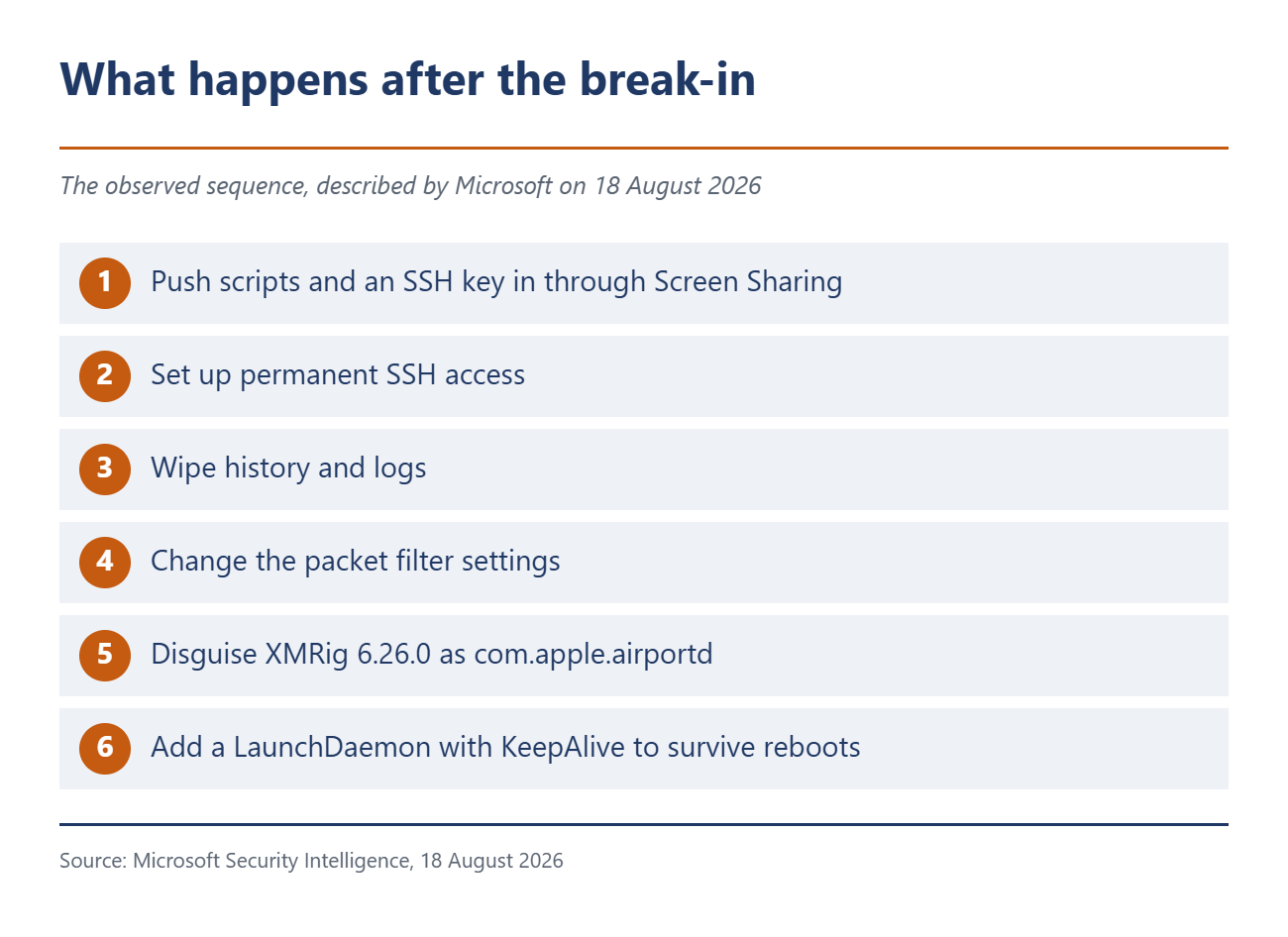
The chain after the break-in
According to Microsoft the attackers push scripts and an SSH key onto the Mac through Screen Sharing and set themselves up with permanent access. Then they wipe history and logs, change the packet filter settings and install the Monero miner XMRig in version 6.26.0.
The copy is ad-hoc signed, dropped under a hidden path and passed off as com.apple.airportd, so it looks like an Apple system process. It is started through a LaunchDaemon with KeepAlive so it survives every reboot.
Nobody gives numbers. Microsoft writes about a limited number of affected devices, the Dutch NCSC about several systems where port 5900 was reachable from the internet and root access was gained in every case. Whether it went beyond cryptocurrency mining is open.
What to do now
First, check whether Screen Sharing is even on. The path runs through the Apple menu, System Settings, General in the sidebar, then Sharing. It sits a long way down, you have to scroll. If the switch is off, you are out of it.
Second, check Remote Management on the same page. It is the second remote route into the same Mac and should be off unless you deliberately use it. The two cannot be active at the same time anyway.
Third, update. The only builds that close the flaw are 26.6.1, 15.7.9 and 14.8.9. There is no patch for macOS Ventura and older, so switching the feature off is the only option there.
And if you restore a Mac from an older recovery image, you get a vulnerable build and have to update before it first touches the network.
Fourth, if your Mac sat on the network with the port open, the update alone is not enough. SSH keys and LaunchDaemons need going through, credentials need rotating. If you want certainty, wipe and reinstall.
If you really need remote access
Then it does not belong out in the open. The advice from the researchers at Calif, who took the patch apart, is short: best to turn Screen Sharing off, and if it has to be on, put it behind a VPN or a firewall rule. For how many switches people open once and then forget, see what the training toggle in ChatGPT does not cover.
Source(s)
Apple security releases: macOS Tahoe 26.6.1, macOS Sequoia 15.7.9, macOS Sonoma 14.8.9. Plus NVD on CVE-2026-65400 with the CISA data, the Dutch NCSC advisory, the analysis by Huntress, the assessment by MacStadium and the attack description from Microsoft Security Intelligence.
 Add as a preferred source on Google


