




Apple finally lets you get rid of this annoying Messages shortcut in iOS 27
Apple is finally addressing one of the iPhone’s small irritations, one that is way more capable of ruining your mood than it should be. If you’ve ever accidentally activated dictation or started recording a voice message instead of moving on after sending a text, iOS 27 has a much-needed fix.
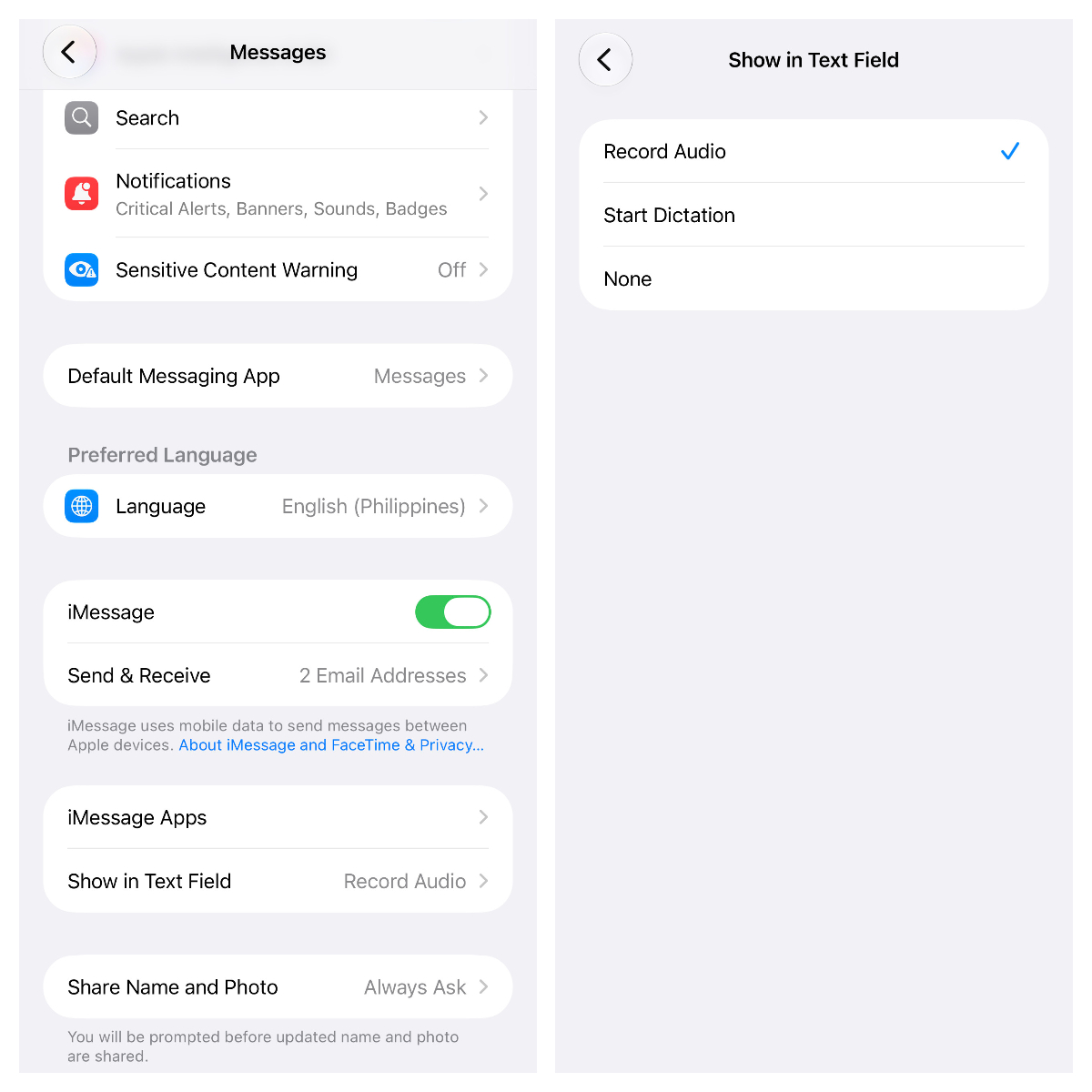
There’s a new Show in Text Field toggle under Settings > Apps > Messages that lets you control what is shown on the right side of the Messages text box. You can disable Record Audio, change it to Start Dictation, or remove the shortcut altogether by choosing None.
This change is in response to a long-standing complaint. The issue came to mainstream attention when Justin Bieber publicly criticized the placement of the button, saying that he kept accidentally hitting the dictation shortcut because it shares the same area as the Send button after a message has gone through. Apple seems to have taken the criticism to heart, with iOS 27 finally giving users a choice rather than keeping the shortcut in its current place.
The change also makes more sense from a usability perspective. For many iPhone users, dictation or voice messages are rarely used, but the shortcut has always been a space-hog in the conversation view. Now you can program that spot to your workflow or leave it blank if you’d rather prefer to avoid any accidental presses.
If you send voice clips occasionally, you can still tap the + button to the left of the text field and choose Audio. Additionally, you can use the microphone icon in the bottom right corner of your regular keyboard if you want to create a long audio message, as long as dictation is enabled under Settings > General > Keyboard.
The long-awaited change is now available in the iOS 27 developer beta and will come to everyone with an iPhone 11 or newer when the public version drops in September.
Source(s)
MacRumors, teaser image: Brett Jordan via Unsplash
 Add as a preferred source on Google


