




Update | You Should Be Modding: Lossless Scaling Optimization Guide

[Tuesday Tweaks] is the section of my new tri-weekly column series You Should Be Modding dedicated to either a dealer's choice of modern/retro game mods... or universal tools, like Lossless Scaling. In a way, Lossless Scaling is being somewhat lenient with the definition of "mods" since it doesn't actually modify game files whatsoever, but its impact can very much result in a non-vanilla experience. More specifically, the most popular function of Lossless Scaling isn't related to its scaling functionality at all: rather, it's the vendor-neutral Frame Generation it offers.
Lossless Scaling Frame Generation is most popular for its use achieving 60-120 FPS in games that otherwise shouldn't run well or at all, especially on mobile or handheld platforms like Android phones or Steam Deck playing AAA PC games. There's nothing strictly wrong with this, but I do notice that when Lossless Scaling is in the news, it's usually to simulate frames that would be actually-achievable on better hardware rather than impossible due to program or app limitations.
This column piece is a bit different from that. For one, I'll actually be teaching you how to optimize Lossless Scaling instead of simply showing you how good it is at faking smooth framerate (pretty good, honestly.) Then, I'll tell you some games and genres where Lossless Scaling is incredibly useful, even if you already have a swole, muscled CPU and GPU to achieve high framerates naturally. Let's dive in.
May 18, 2026 08:50 PM GMT update
Upon further testing, the profiles screenshotted below have been revised and some text regarding settings has been changed. Be sure to double-check your settings, and use multiple profiles if you run a wide range of games! For reference, the hardware used for testing the settings below includes an Intel Core i7-10700K and an Nvidia GeForce RTX 3060 Ti.
My Lossless Scaling Profiles
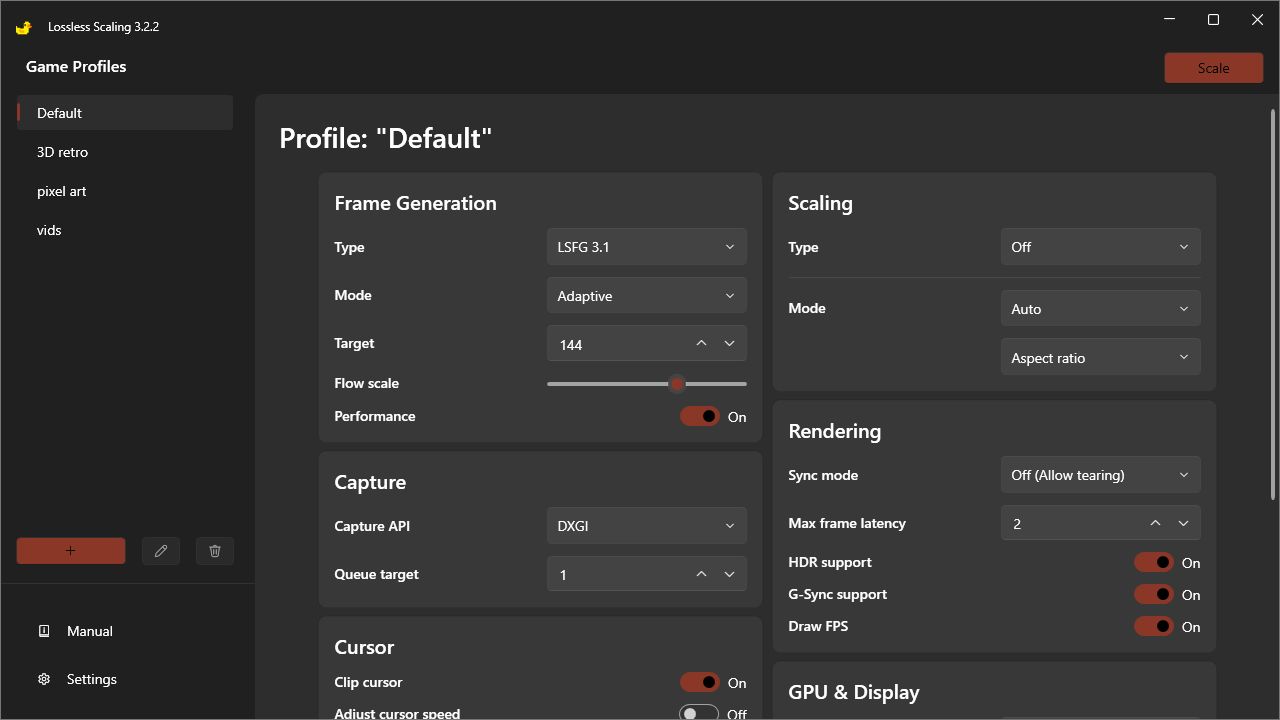
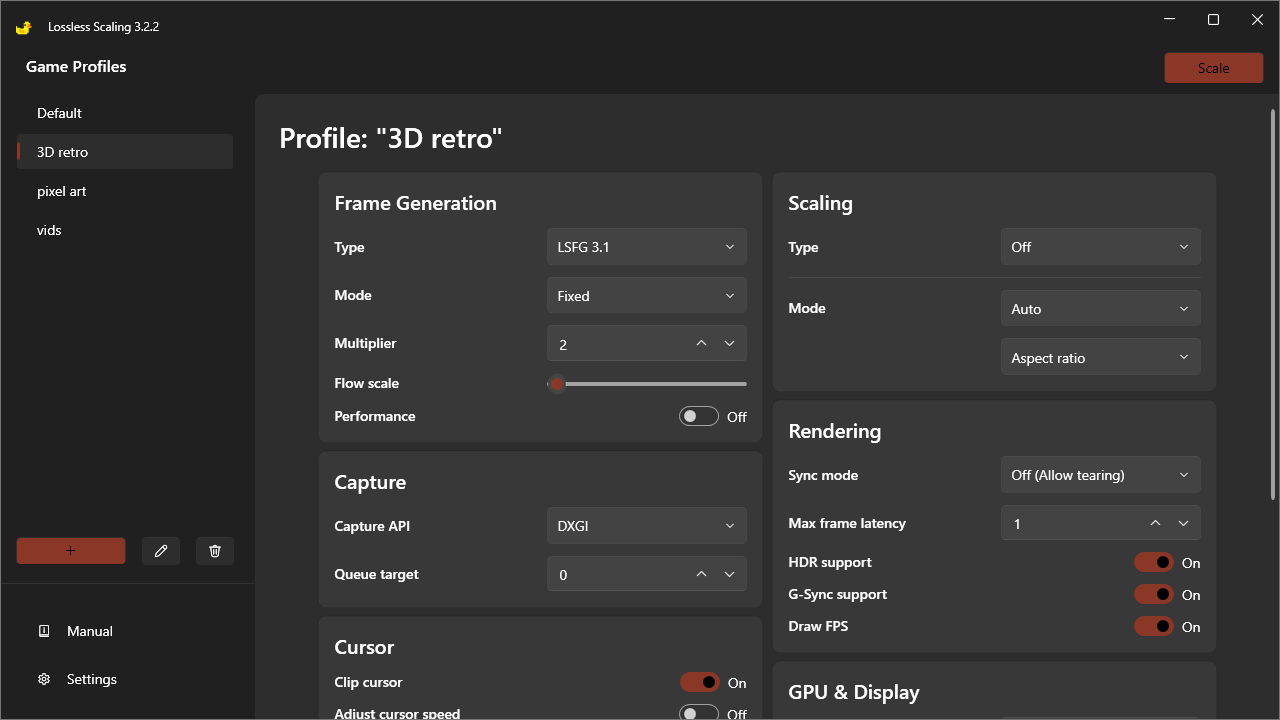
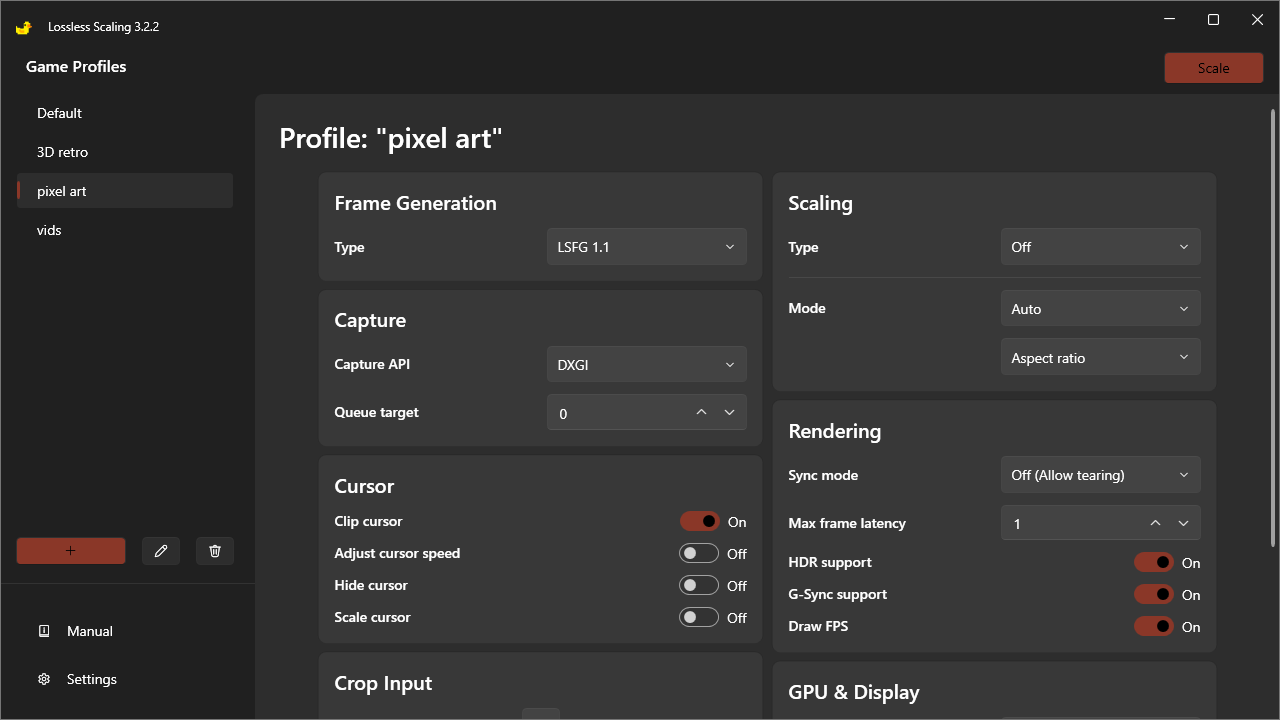
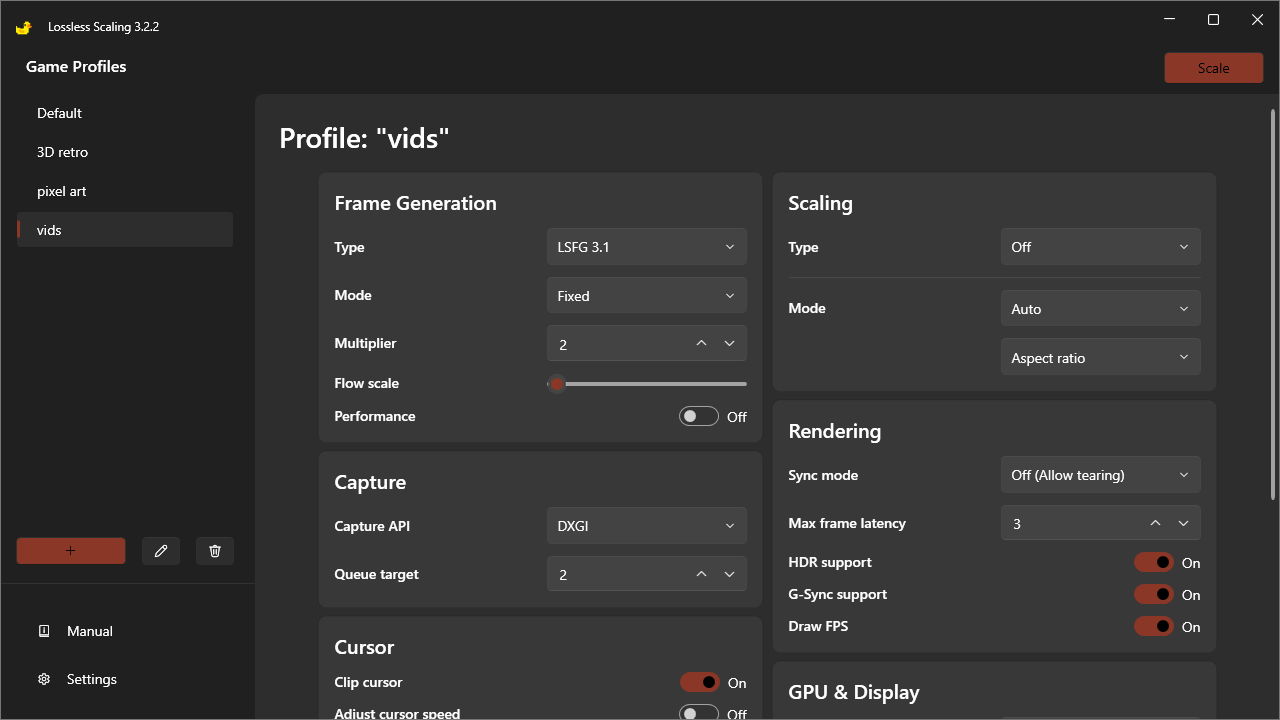
Important Note: Manufacturers recommend to sticking to a minimum of 30, ideally 60 FPS, before applying Frame Generation for good reason. In truly GPU-bound titles pushing your GPU to a native 20-30 FPS, enabling Frame Generation atop that almost inevitably creates visual artifacts of some kind, even when optimizing Lossless Scaling for performance. Real GPU headroom at 30-60 FPS is almost essential, with 60+ FPS being near-mandatory for FG in first-person games without substantial artifacts. If noticeable artifacts are happening on "Variable", even under those conditions, consider switching instead to a flat 2X as the original version of this article recommended. If on a 240+ Hz monitor and hoping to use 3X+ or Adaptive, consider 60 FPS a minimum and target a native FPS closer to a capped 100-120.
- Lossless Scaling Frame Generation Type — The underlying tech used. LSFG 3.1 has the best performance and supports dynamic Adaptive LSFG. LSFG 2.3 has better image quality and may improve input lag, but does not support Adaptive LSFG. LSFG 1.1 is the most limited in that it only supports 2X Frame Generation, but fully disables Flow Scale and has the most resistance to artifacts in turn.
- Lossless Scaling Frame Generation Mode and Multiplier/Target— Fixed Multiplier allows you to use a factor 2X, 3X, etc over base framerate, while Adaptive allows you to target your refresh rate. Adaptive is generally recommended, or 2X if Adaptive gives you noticeable artifacts. Higher multipliers further increase risk of artifacts, and sadly artifacts are near-guaranteed by Adaptive in GPU-bound titles if you can't reasonably exceed 30 FPS average.
- Lossless Scaling Frame Generation Flow Scale — A performance modifier where lower values reduce the risk of visual artifacts but cost more performance. Can only truly be disabled with LSFG 1.1, which I recommend for 2D games and their panning camera movements. Target 75% for 3D games, and consider lower values in first-person games or other titles with erratic camera movement.
- Lossless Scaling Frame Generation Performance Mode — Another performance modifier. "Off" risks a greater performance penalty, but "On" risks visual artifacts. Usually harmless for 3D games, but may be better left off for games (ie FPS, TPS) with more erratic camera movement.
- Lossless Scaling Capture API — DXGI is the default, but requires using OBS Game Capture Mode to capture footage. WGC is generally better, but can create compatibility issues on older versions of Windows.
- Lossless Scaling Queue Target — Explained within Lossless Scaling itself, settable from "0" to "2". Refers to the frame buffer used by Lossless Scaling, with lower values offering lower latency but risking greater performance dips than higher values.
- Lossless Scaling Sync Mode — V-Sync 1/2, or double-buffered V-Sync, buffers two frames or halves framerates in case of FPS drops to remove screen tearing. V-Sync 1/3, or triple-buffered V-Sync, buffers three frames to remove screen tearing but doesn't risk dramatically dropping FPS. "Off" may be best for most users, especially in mechanically-demanding games.
- Lossless Scaling Max Frame Latency— Ties into the above V-Sync option, or substitutes for it if you leave it off. Heavy performance impact, so veer toward 2+ in modern titles.
- Lossless Scaling HDR Support and G-Sync Support — Enable HDR even if you're using an SDR monitor, as failing to do so can cause noticeably lowered brightness in some games. G-Sync need only be manually enabled if you're on G-Sync, otherwise FreeSync/Adaptive Sync should work automatically.
- Lossless Scaling Preferred GPU — Best left on auto unless you're using a dual-GPU setup.
- Lossless Scaling Output Display / Multi-Display Mode — Best left on Auto/Off unless you're on a multi-monitor setup.
A Word On The Actual Scaling Function of Lossless Scaling
It's pretty good! Integer and XBR scaling make pixel art games look much sharper on modern displays, while Anime4K can clean up older cartoons up a bit (though I'd generally find using Nvidia's RTX video enhancement to be better for those purposes). LS1, FSR, and NIS are also available for modern games, but you'll typically be better off using built-in DLSS, FSR, or XeSS in those cases instead of relying on Lossless Scaling's actual scaling.
Remember That Lossless Scaling Can Be Used With A Second GPU, But Doing So Is A Pain
One particularly cool use of Lossless Scaling is the ability to offload Frame Generation to a second GPU. This is great to reap the benefits of Frame Generation without a loss in base performance and thus latency, but may require you to run video through the secondary GPU and won't work well with older, weaker iGPUs. The Gamers Nexus video has a good overview of this.
Games I've Used Lossless Scaling In
- Sonic Unleashed Recompiled (PC) — So, Sonic Unleashed Recompiled is a funny case because it already supports unlocked FPS compared to the original release's rarely-maintained 30 FPS cap. The problem is, the game engine legitimately breaks above 30 FPS and especially above 60 FPS, making certain obstacles highly difficult if not impossible to clear. I used Lossless Scaling to boost 60 FPS to 120 FPS within Unleashed Recompiled, and found it to be a joy for both the rapid-pace Daytime Stages and more deliberate hack'n slash inspired Nighttime Stages. This balance effectively eliminated most engine problems produced above 30 FPS, and made the ones introduced at 60 FPS at least more reactable to play around. Definitely comfortable enough recommending this app for challenging 3D platformers.
- Sonic Mania (PC) — Sonic Mania is a beloved 2D platformer with excellent support for various CRT filters for its PC release, but only supports 60 FPS, which can result in lacking motion clarity on most modern displays. Artifically boosting that framerate to 120 FPS does sharpen up the game in motion, though, and doesn't cause any issues I've seen with the CRT filters either.
- Okami HD (PC) — Okami is a timeless game, and Okami HD is an excellent port of a timeless game that only makes tasteful improvements to the original's texture quality and overall resolution. Sadly, Okami is also a 30 FPS game, and once you become enough of an FPS snob (though perhaps not realizing that the industry-wide pivot to flat screens instead of CRTs is more to blame than you'd think,) that becomes unacceptable. A simple 2X Frame Gen within Lossless Scaling then brings Okami HD back up into a perfectly-playable 60 FPS.
- Tekken 8 (PC) — Tekken 8 is one of the most punishing 3D fighting games on the market, but despite being based on Unreal Engine 4 and supporting both DLSS and FSR, is hard-locked to 60 FPS. This is a genre-wide issue that also applies to Street Fighter 6 and other fighting games. While not all of them have game engines strictly locked to framerate, fighting games in general are known to display attack properties in startup frames, advantageous (plus) frames on block or hit, and minus frames on block or hit. This phenomenon is documented extensively by their communities as "frame data", and always counts frames at an assumed 60 FPS. It's sensible enough for those reasons, but fighting games can be among the most demanding titles on the market in terms of reaction and input timing demands from their players. 2X Frame Gen (or Adaptive to 144 Hz) on Tekken 8, or really any fighting game, is a game-changer*.
- Final Fantasy XVI (PC) — Another great use case for Lossless Scaling Frame Generation is when you're playing a modern game that does support the vendor-neutral AMD FSR 3 Frame Generation but not while also using Nvidia DLSS. You see, I'm a plebian RTX 30 Series user, and that means Nvidia won't actually let me use its own Frame Generation. Without Lossless Scaling or games that support DLSS alongside AMD FSR FG, I am simply cooked if a game does not run well enough. For a title as unreasonably demanding as FFXVI, Lossless Scaling Frame Generation can save the experience.
- Retro Emulation, In General — For emulated games that can't be modified to run above 30 or 60 FPS without causing engine issues, I can't recommend Lossless Scaling Frame Generation enough, especially for games reliant on pixel art. For those who might be confused as to why I keep asserting the flat-panel LCDs most of us are using are so much worse than the CRTs of old and the Pulsar or OLED displays of new, a Digital Foundry video illuminates the situation very well. Short version is, motion fidelity at 60 and even 30 FPS used to still be pretty good thanks to CRTs and their lack of sample-and-hold blur, and modern gamers are required to either run titles at 120+ FPS or own an expensive OLED/G-Sync Pulsar display to recreate those levels of smooth motion.
*It won't help you in real-life tournaments and could loosely be qualified as cheating, but no more so than G-Sync Pulsar and CRT users are already cheating compared to the rest of us. Better motion clarity is just nice to have, and if you're on an existing high-refresh rate display without the money to shell out for an old CRT or new OLED/Pulsar display with improved motion fidelity even at 60 FPS, Lossless Scaling Frame Generation is a godsend. For the sake of people you play online with, though, be darn sure you can run the game at a stable 60 FPS with some GPU headroom before you enable FG, lest you disrupt the online experience with your disgusting sub-60 FPS on rollback netcode. I know you people exist, and I do not like what you do with all my heart.
Source(s)
Lossless Scaling on Steam, Original
 Add as a preferred source on Google


