




iFLYTEK AI Recorder P1: An AI assistant as a wearable device
Small but mighty?
An AI assistant in the form of a wearable device—small and compact, with the power of ChatGPT. How mighty is the Mini AI Recorder, and for whom is it designed for? Here is our review.Marc Zander (translated by Marc Zander) Published 🇩🇪 🇳🇱 ...
Conclusion following the Hands-On Test of the P1 AI Recorder
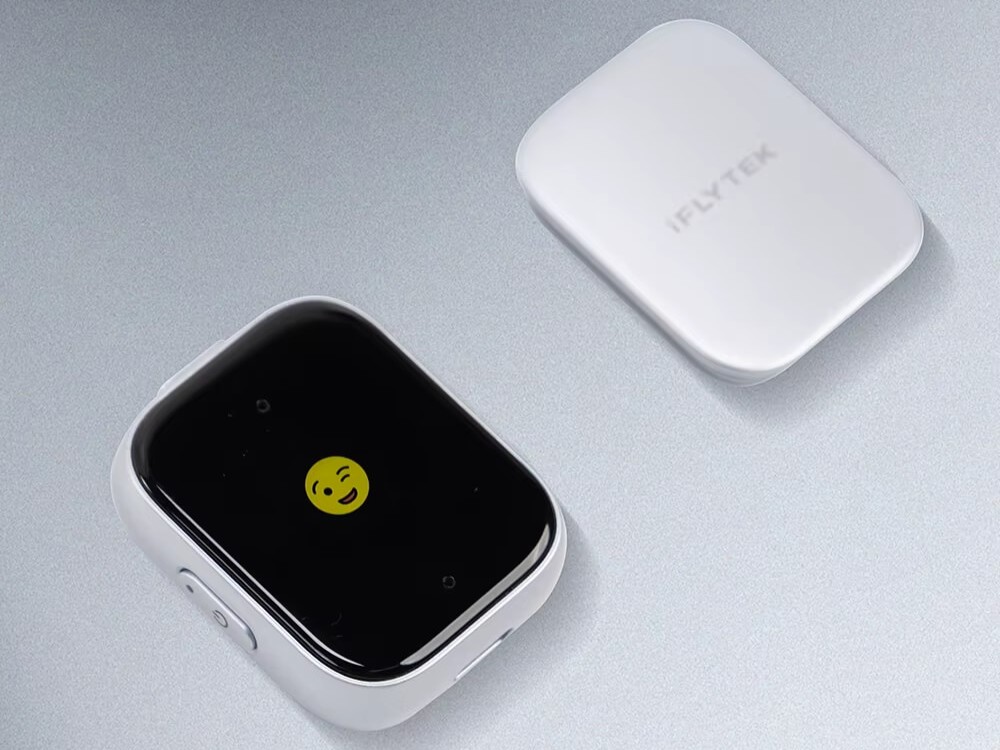
The P1 is simply a compact recording device that, without the app, is really just a recorder. Why the screen is designed to be a tiny dot in the center of the front, rather than spanning the entire surface, as on a smartwatch, remains a mystery of the manufacturer. The real work here is done by the Deepting app, which offers a straightforward set of features and, most importantly, also works with recordings from a smartphone – which you’re likely carrying with you anyway. The app’s major advantage is the ability to use ChatGPT via prompts, allowing you to edit recorded and transcribed audio files to precisely suit your own needs. Other AI recorders, by contrast, offer more or less predefined tasks but lack the ability to edit via prompts.
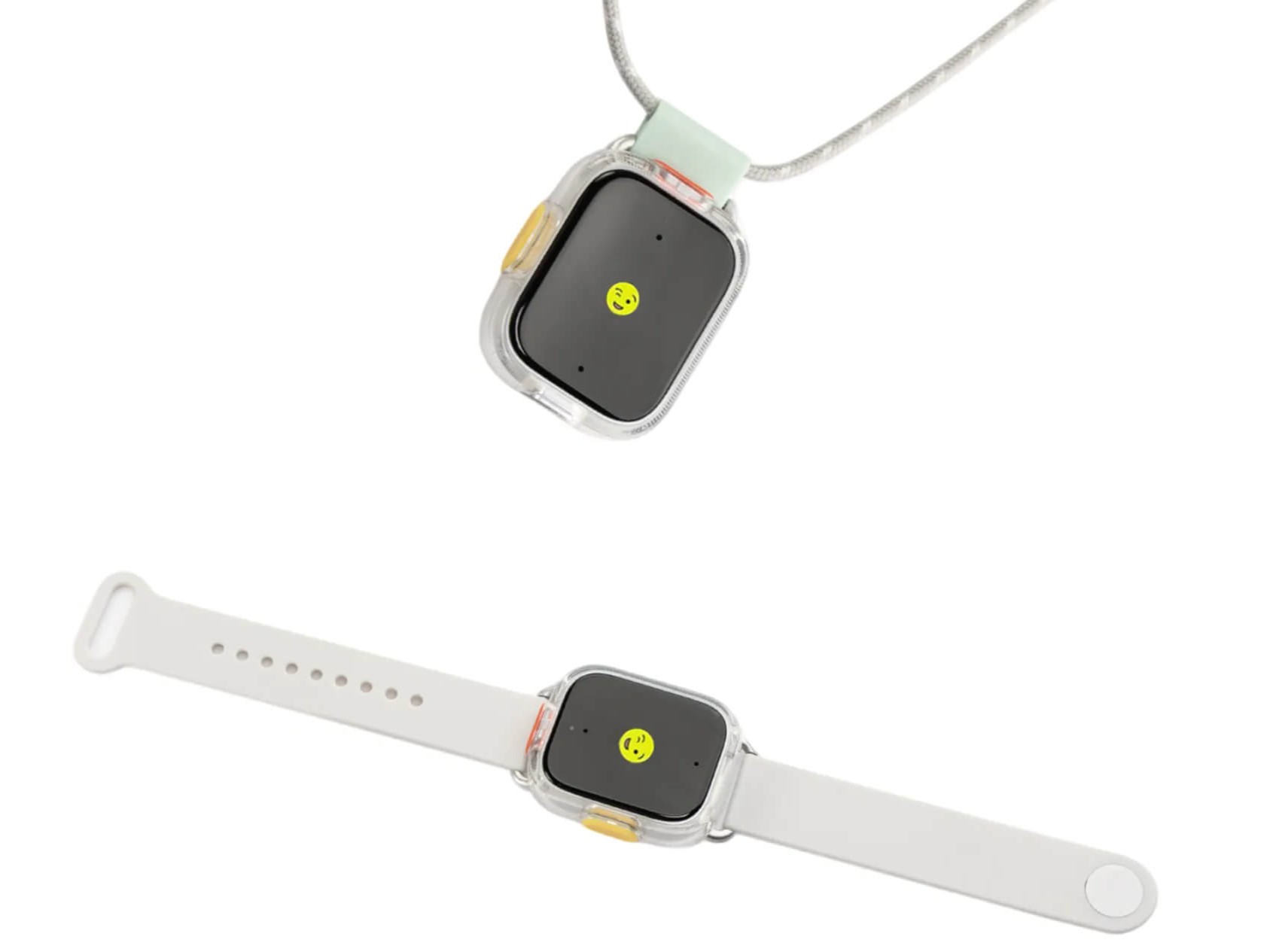
The compact design has the advantage that you can wear the P1 like a smartwatch or on a necklace (accessory required). It comes with a clip for attaching it to a shirt or blouse. With this attached, you’re ready to record in two seconds. However, if you put the device in a briefcase, you might spend longer looking for it or risk losing it. It’s difficult to operate with large hands. Recordings from nearby sources and the transcription are excellent, as are the editing options. The P1 does what it’s supposed to do, and does it very well. As with all AI recorders, the same rule applies here: Always obtain permission from the people you’re recording beforehand.
Pros
Cons
Where to buy the iFLYTEK P1 AI Recorder
You can buy the P1 KI recorder directly at the iFLYTEK online store for $ 142,80 (sometimes with an 8 percent discount) plus $ 13.13 for shipping insurance, with free shipping. Aliexpress offers it for $ 120.19 with free shipping. Amazon.com offers the P1 for $119 plus $10.16 for shipping.
Technical details about the iFLYTEK AI Recorder P1
| Internal storage capacity: | 64 GB (approx. 700 hours of recording)/Cloud storage: unlimited |
| Microphones: | 2x mono, 360° omnidirectional |
| Battery: | USB-C rechargeable 9-volt-battery (up to 25 hours of recording time/85 days of standby) |
| Maximum recording distance: | approx. 5 m |
| Screen: | size approx. 0.56 inches (1.42 cm) |
| Connectivity: | Wi-Fi, Bluetooth 5.3 |
| Weight: | approx. 22 grams |
| Dimensions: | approx. 3.5 × 1.2 × 4.3 cm (W × D × H) |
Package contents and initial setup of the P1 AI Recorder from iFLYTEK
In addition to the AI recorder, the small package contains a very short USB-C-to-USB-A cable, a quick start guide in five languages (English, Japanese, Korean, Spanish, Traditional Chinese), and a magnetic clip for attaching it to a shirt pocket, pants, or similar items. If that’s not enough, you can order a wristband with your purchase, which turns the gadget into a sort of smartwatch-style AI assistant. Alternatively, there’s also a neck strap available. Interestingly, the screen on the front is tiny; the rest of the surface is a thick black border, beneath which the two microphones are located.
To use the P1 AI assistant, you’ll need the Deepting app, which you can download for free from the App Store and Google Play Store. Here, you can pair the gadget via Bluetooth and immediately receive three months of Deepting Pro for free, which corresponds to 2,100 minutes of recording per month (value: $38.97). You can record 300 minutes for free each month. The app interface is available only in English, Japanese, and Traditional Chinese. A total of eleven languages are supported for transcription: Arabic, Chinese, English, French, German, Italian, Japanese, Korean, Spanish, Thai, and Vietnamese.
The app is user-friendly and can also be used without an additional AI device by uploading conversations, videos, etc., recorded on a smartphone to the app for further processing. Supported file formats include MP3, WAV, M4A, AMR, AAC, MP4, 3GP, MOV, AVI, and MPEG. The P1 automatically handles file transfer once paired.

The P1 AI Recorder in Practice
The app is limited strictly to recording conversations. I first tried it with French, changing the transcription language from German to French beforehand. The transcript is displayed in the app in real time as the recording plays and is saved in the recorder and transfered to the app once the recording stops. After tapping “Transcribe,” the app correctly transcribed the words and correctly assigned them to the two speakers. After that, the Edit, Translate, Upload, and AI Summary features become available. The German translation was pretty decent; the sentence structure was sometimes incorrect, and a word was occasionally missing, but everything was understandable in context. All in all, a good feature. Unfortunately, the AI summary is only output in the selected language—in this case, French. Fortunately, there’s an option to enter a prompt, so I asked for the summary to be generated in German, which worked very well. iFLYTEK uses ChatGPT as its AI/LLM.
My next test was a recording of a German lecture on Albert Einstein and the theory of relativity. The transcript visible during the recording had virtually no errors, and the final transcript was of good quality. Here, I only used the AI features. The summary in German was very well, and the outline of the lecture created under “Notes”—including the structure and key points—was very neat; however, it took longer to generate, even though the lecture was only 3 minutes long. Anyone recording a two-hour lecture should be prepared for some waiting time. If desired, the feature can be reactivated or the AI-generated text can be copied. Here, you can also enter your prompt under “Ask AI” to have the AI perform additional tasks based on your personal interests, such as creating a mind map or an email with a summary and an appropriate subject line. Everything that’s possible with ChatGPT can be done directly here. Unlike many other AI recorders, there are no job-specific templates available here, so you’ll need to take the initiative yourself.


The iFLYTEK AI Recorder P1 Compared to the P1 Pro
Both devices are based on the same platform: the Deepting app. Therefore, the app’s features are identical. The only difference is the AI Recorder itself. The Pro version is three times as large and resembles a lighter in shape. The screen covers almost the entire front surface, and the recording distance can range from 5 meters (for the P1) up to 20 meters. Unlike the P1, the screen is touch-sensitive, allowing you to select various options—such as omnidirectional recording, directional recording, settings, file exports, and more. The P1 is stripped down to the bare essentials, featuring just one button to turn it on or off and another to start and stop recording. As a result, the target audiences are also different: While the P1 is better suited for everyday use, occasional office meetings, and students, the Pro version makes a more impressive and professional impression. Thanks in particular to its directional recording capability, it’s even better suited for interviews, lectures in larger rooms, and consultations of all kinds.
Transparency
The selection of devices to be reviewed is made by our editorial team. The test sample was given to the author by the manufacturer free of charge for the purposes of review. There was no third-party influence on this review, nor did the manufacturer receive a copy of this review before publication. There was no obligation to publish this review. As an independent media company, Notebookcheck is not subjected to the authority of manufacturers, retailers or publishers.
 Add as a preferred source on Google


