




Your second brain: Obsidian, Notion and who lets the AI in
The advice sounds the same everywhere these days. Build yourself a second brain, gather everything in one place, and then let an AI loose on it. What that recommendation usually leaves out is the hard part.
The question is not which program draws the prettiest links. The question is whether an AI can reach those notes at all, and whether it is allowed to leave anything behind. Nine otherwise very similar programs differ so sharply on that point that the decision is effectively made while you set them up.
We looked at nine programs: Obsidian, Logseq, Joplin, Anytype, Notion, Gemini Notebook (formerly NotebookLM), ChatGPT projects, Apple Notes and Microsoft OneNote. All prices and limits are as of 25 July 2026 and come from the vendors' own pages.
It is always just one folder
This is where many people get off, and rightly so. Letting an AI at your own notes sounds like handing over the whole computer. It does not.
Access covers exactly one directory that you pick yourself. In Obsidian it is called a vault and it is an ordinary folder. Put your notes there, hand an AI tool that path, and the tool sees the files in that folder. Not the tax records next to it, not the photos, not the browser history. One folder, chosen by hand, revocable at any time.
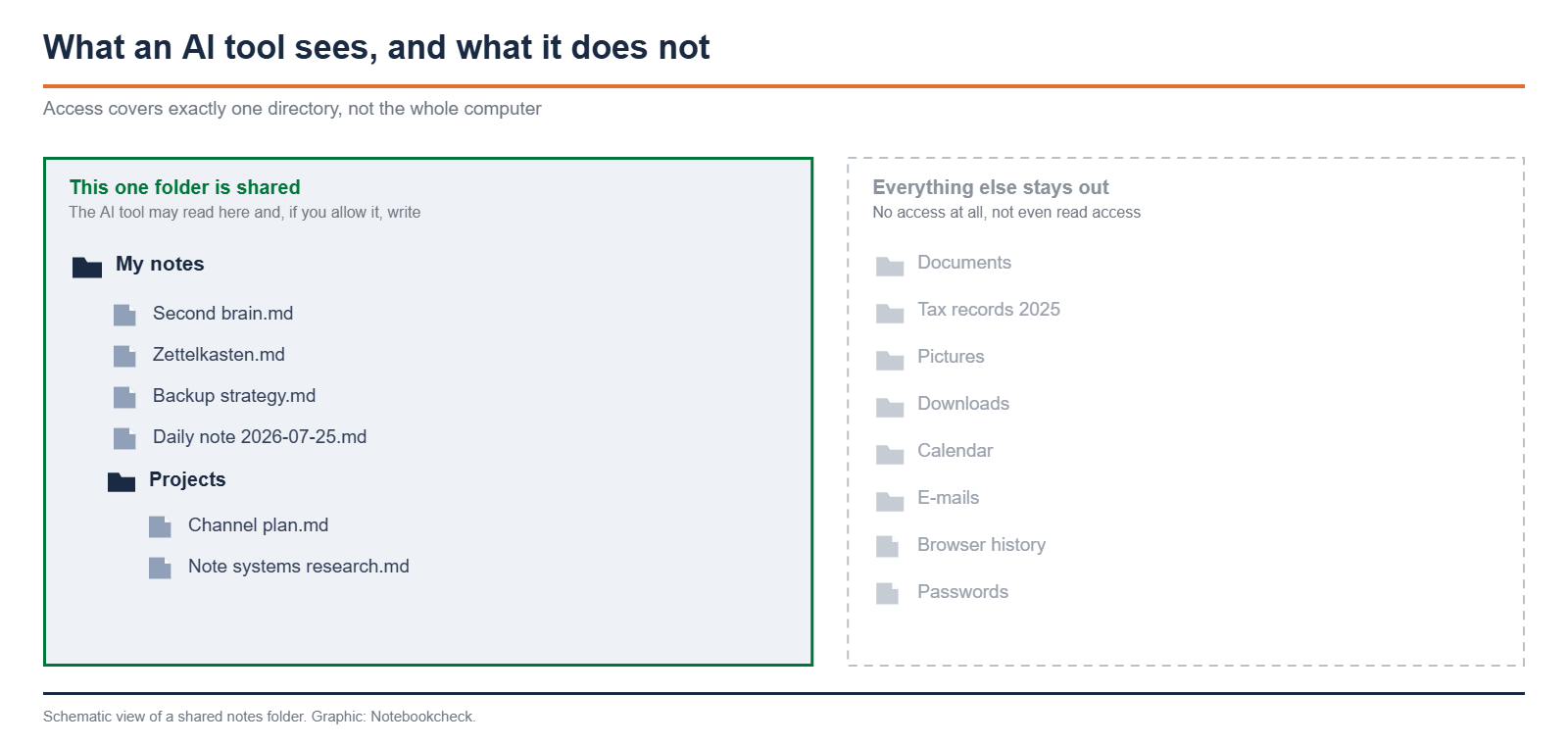
That is also why the file question weighs so much. A program that keeps its notes in its own database or in the vendor's cloud has no such folder. There is nothing to point at.
The AI does not only read, it also writes
And the access runs both ways. An AI tool can not only read the files, it can create and change them. Obsidian now advertises exactly that itself: its own command line names as a use case, in so many words, giving agentic tools access to a vault. So if you want, you dictate a thought and find the finished note in the folder, linked to what is already there.
That has a flip side, and it weighs more than the convenience. Write permissions mean a program may create notes, change them and move them to the trash. Joplin therefore ships its writing tools switched off and advises in its own documentation to turn them on only if you trust both the app and the model behind it. The sentence beside it is the real point: Joplin does not ask before each write.
A file or a database, that is what decides everything
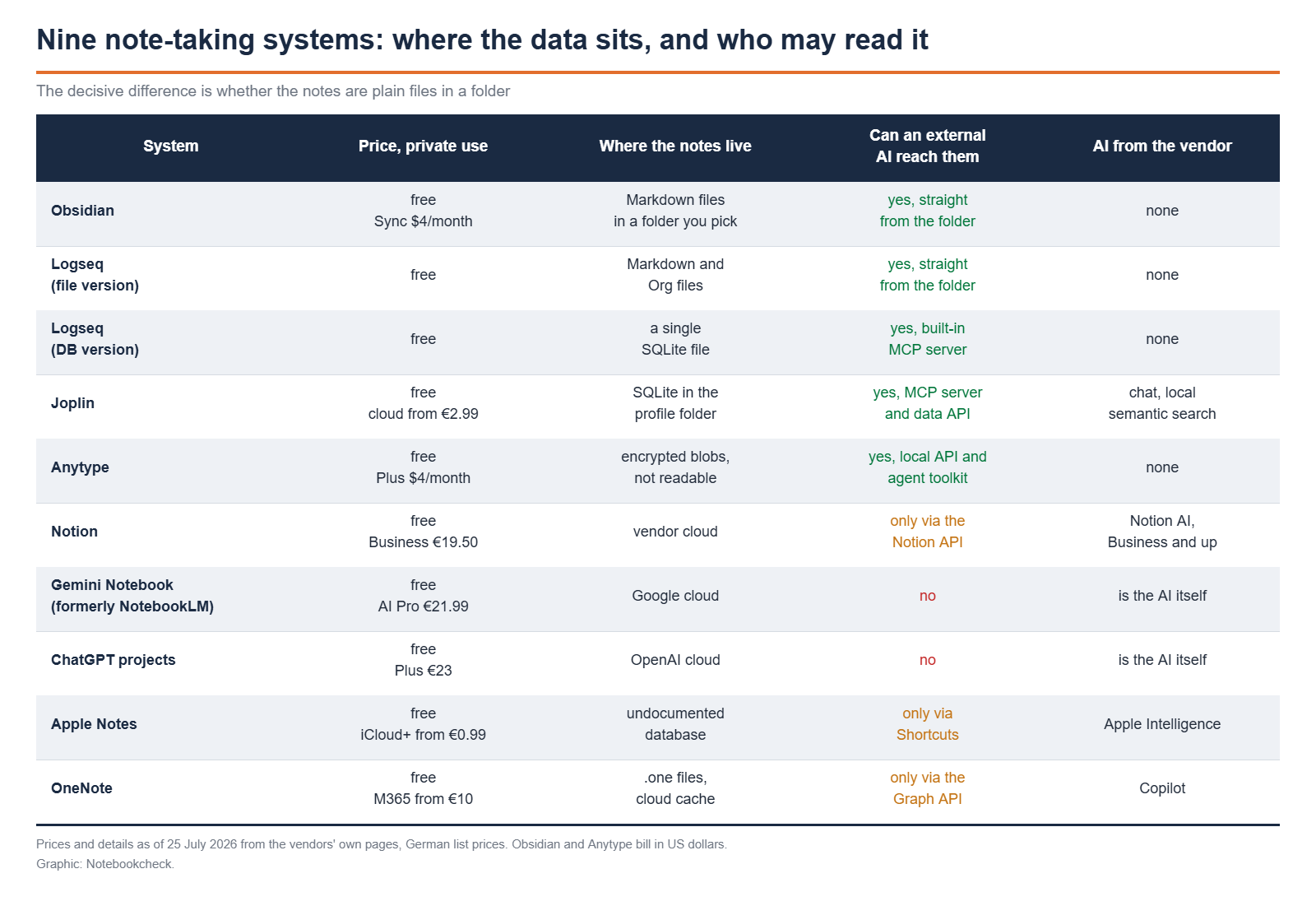
Obsidian is the clearest example of the first group. The notes are Markdown files in a folder you choose yourself. You can open them in any editor, and Obsidian picks up outside changes on its own. An AI needs no plugin and no interface for that, it simply reads and writes text files. Obsidian has no AI of its own, and to this day the official roadmap says nothing about one. The only in-house AI feature sits in the Web Clipper, summarises web pages before they land in the vault and expects you to bring your own provider.
With Logseq things get murky, and you should know that before you start. The last regular release is version 0.10.15 from 1 December 2025, and even its release title calls it Beta Testing. Since then there have only been nightly builds. The actual development sits in the new DB version. That one, however, trades away exactly what many people picked Logseq for: instead of individual Markdown files, a graph then lives on disk as a single SQLite database file. What you see in the file manager afterwards is a binary. In return, the DB version ships a built-in MCP server that AI applications can connect to directly.
Joplin takes the same road, only more consistently. The notes sit in a SQLite database in the profile folder, and even syncing through the file system does not give you readable text files. Joplin writes in its own FAQ, unusually openly, that the sync directory is basically a database and expressly not meant for users to edit. Anytype does store its data in a folder you can choose, but what lies there are encrypted blobs. Two points are missing from most comparisons: the program is not open source, only the protocols are MIT licensed, and there is no password reset. Lose the twelve words and you lose the data, as the documentation puts it.
Apple Notes and OneNote sit at the other end. With Apple there is no documented folder, no open format and no documented programming interface for notes. What does work are Shortcuts, which can find, create and append to notes. That is a detour, but a usable one.
With OneNote there is an interface through Microsoft Graph, but since 31 March 2025 app-only sign-in no longer works there, so a signed-in user is always required. Microsoft also writes itself that anyone who wants to back up or read out whole notebooks will run into the limits of this interface.
Two news items that overtake older comparisons
Two pieces of news have overtaken older comparisons. First, Google renamed NotebookLM to Gemini Notebook on 16 July 2026. The tool stays the same, existing notebooks are kept, links redirect. Anyone searching for guides, though, still mostly finds the old name.
Second, Joplin has built in AI, and locally at that. There is a chat that can point to Joplin Cloud, to an OpenAI-compatible service or to Anthropic. The more interesting part is the semantic search: Joplin downloads a model of around 140 MB onto the machine and builds the search index entirely on the device. No note content goes to a cloud in the process. On top of that comes its own MCP server that listens only on 127.0.0.1. Five reading tools are preset, the five writing ones are not.
What the cloud systems do with your content
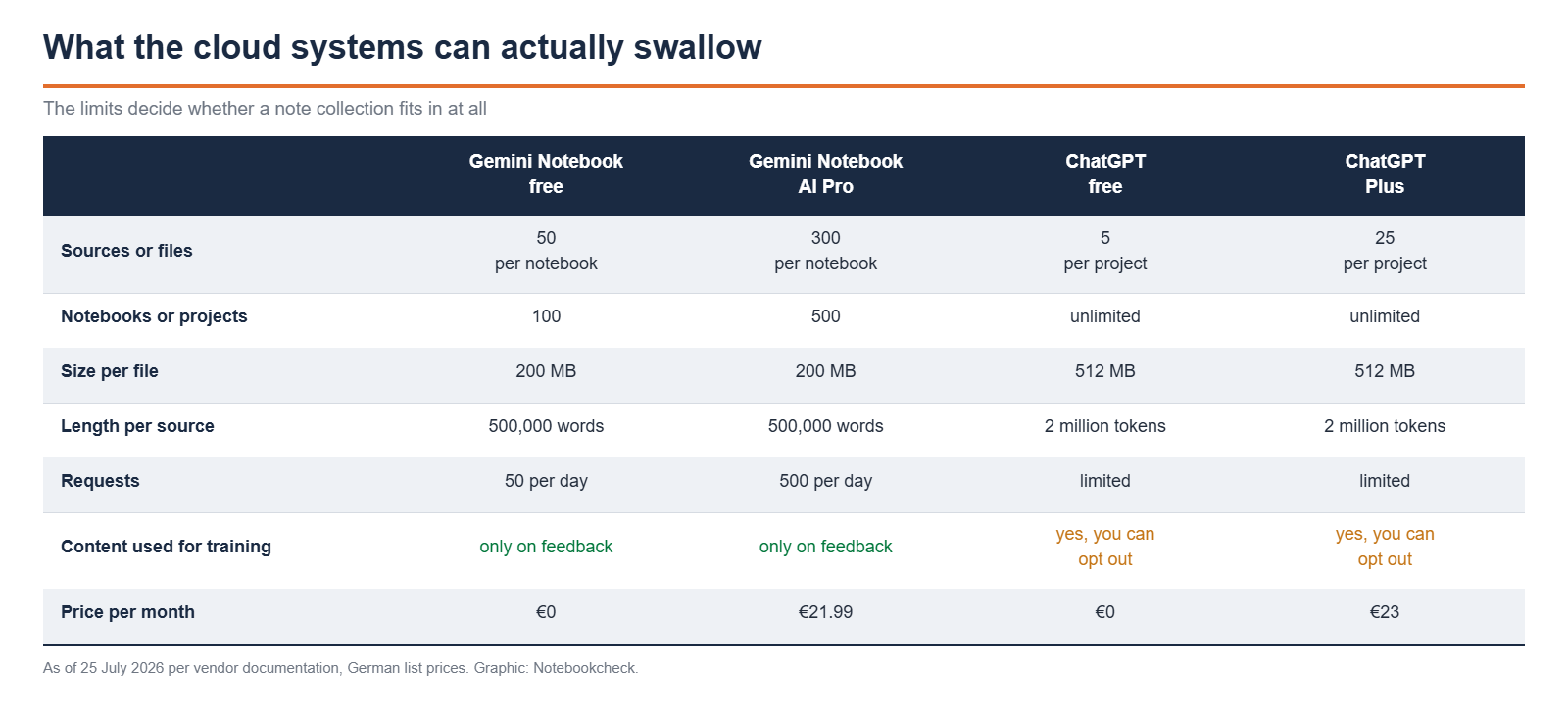
With the cloud systems it runs the other way around. You upload files to the vendor and the vendor's AI works with them. That is convenient and it works well, but it means the content leaves the house. With ChatGPT, content from projects is used for training on the consumer plans unless you opt out in the settings. Google and Notion put it the other way around and train only if you actively give feedback or agree.
Who should pick what
Anyone who wants an AI at their own notes for the long run takes Obsidian. Not because it is the prettiest program, but because a folder of text files is the only access that will still work in five years, whichever AI tool is current by then. The drawback is manual work, because there is no ready-made AI feature, only the command line as a docking point.
Anyone who wants the same thing but set up already takes Joplin. MCP server, local semantic search and chat are built in and cost nothing extra. All of it is off from the factory and switched on individually, the writing tools included.
Anyone who only wants to question documents takes Gemini Notebook. Fifty sources per notebook are free, enough for a course, a legal topic or a project. A note system it is not, and it does not want to be one. In return nothing can break there, because the AI never reaches your own files.
Anyone already living in the Microsoft or Apple world stays with OneNote or Apple Notes and should honestly drop the AI question. Both programs are fine for writing. As the foundation of an AI-backed knowledge system they are not, because access from outside is either missing or tightly limited.
Source(s)
Obsidian: Notes as Markdown files, Obsidian Roadmap, Obsidian CLI, Logseq releases, Logseq DB version and MCP server, Joplin MCP server, Joplin semantic search, Joplin sync directory, Anytype License, Anytype Data Security, Notion on AI and training, Google on renaming to Gemini Notebook, Gemini Notebook limits, ChatGPT projects, Apple Shortcuts for notes, Microsoft Graph and OneNote, Microsoft on the limits of the OneNote interface
 Add as a preferred source on Google


