


Windows: How to check if your PC gets updates in 2027

Starting June 19, 2027, Windows PCs without Microsoft's new update certificates will no longer receive anything from Windows Update. Microsoft is replacing the certificates that devices use to identify themselves to the service, as we reported in October. According to the Windows IT Pro Blog, PCs that are missing the new certificates will stop receiving all updates, from security patches to new features. The certificates ship with the regular monthly updates. An up-to-date PC needs no action.
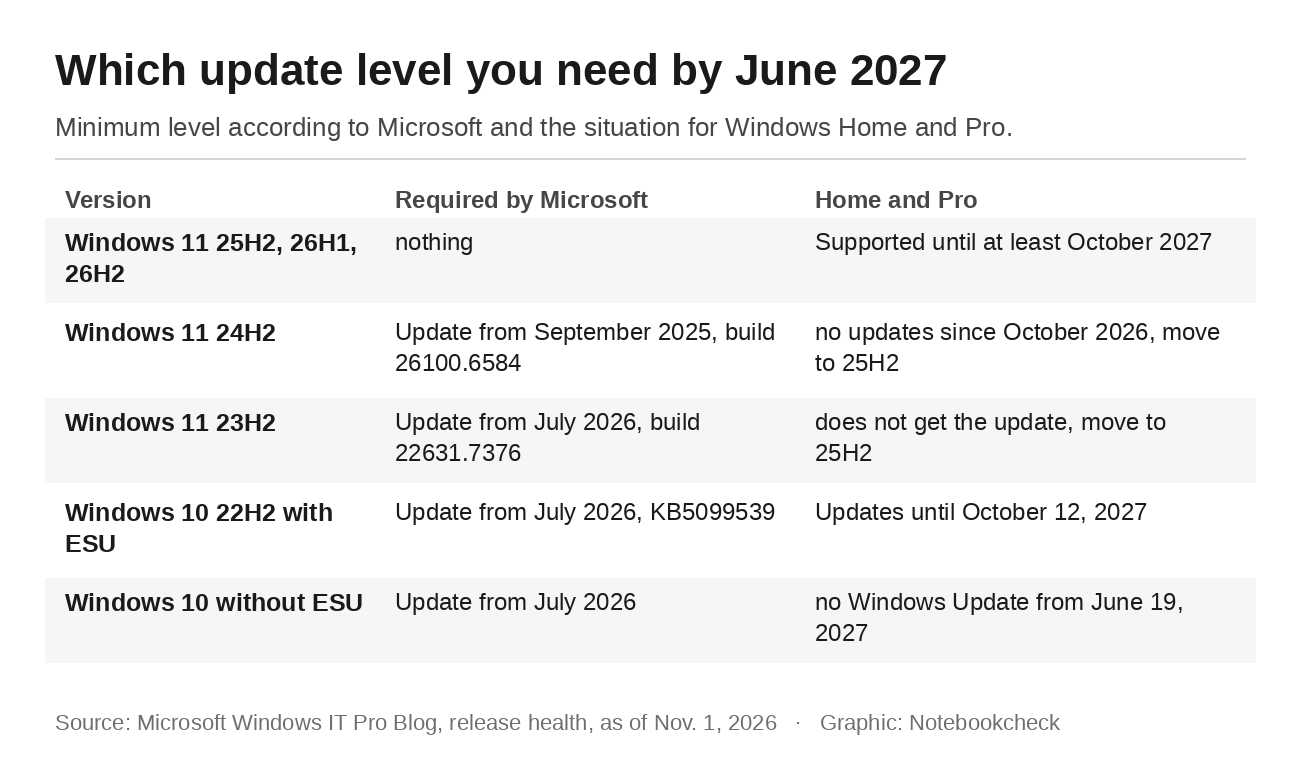
Not every PC is covered, though. Two widely used versions of Windows 11 are already out of support for home users. Version 24H2 in the Home and Pro editions has not received updates since October 2026, and 23H2 lost support in November 2025. Checking your own PC takes a couple of minutes. The table shows which update level is enough for each version.
Step 1: Check your version and build
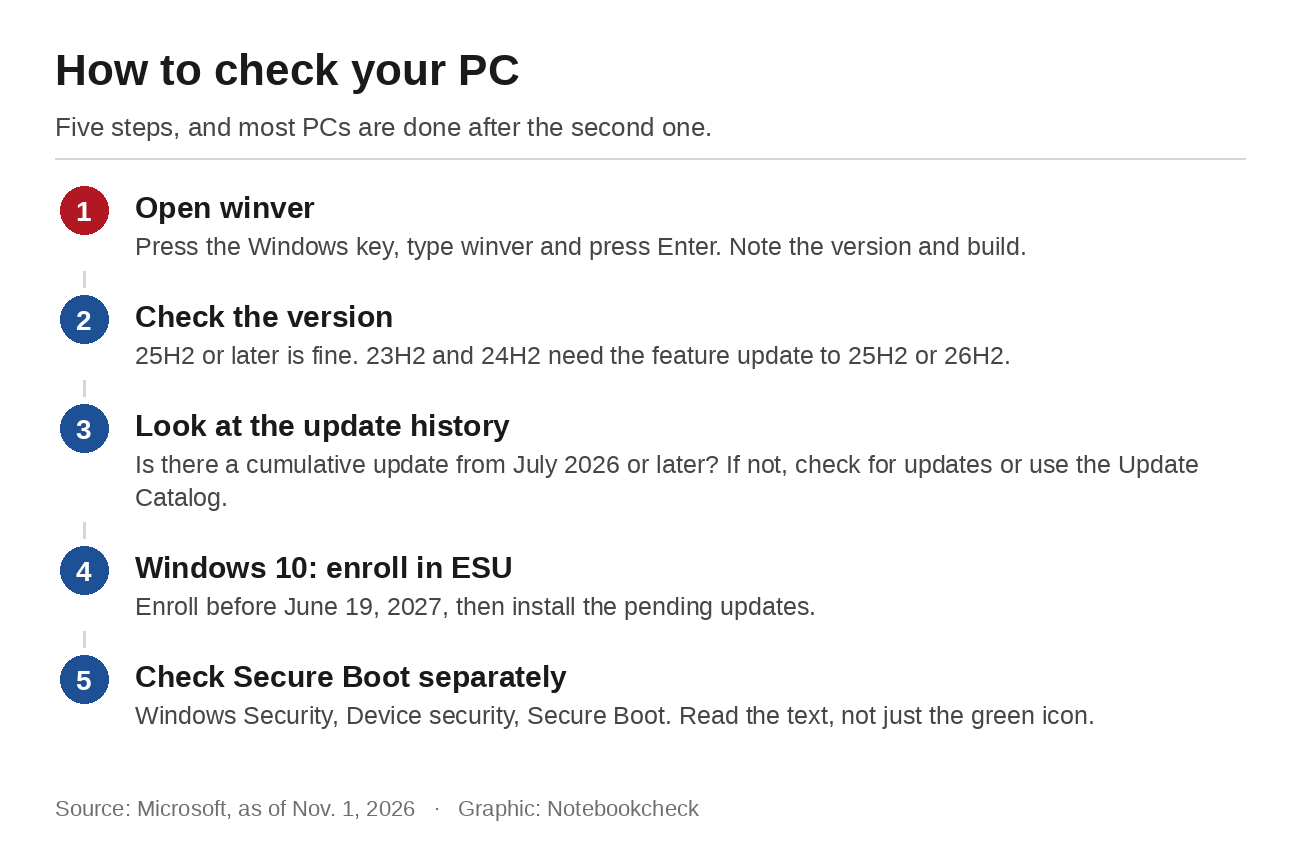
Press the Windows key, type winver and hit Enter. The window shows the version, for example 25H2, followed by the build, such as 26200.9818. The number before the dot identifies the version, the number after it the update level. The higher that second number, the newer the last installed update.
Windows 11 25H2 and newer versions such as 26H2 need no action, since Microsoft explicitly excludes them. According to Microsoft's Windows 11 release information, 25H2 is supported until October 2027 and 26H2 until October 2028. For 24H2, Microsoft says the September 2025 security update is enough, which means build 26100.6584 or later. Home and Pro editions of 24H2 no longer get new updates, however, as we explained in October. Such a PC should still move to 25H2 or 26H2. Otherwise it misses every new monthly security fix from now on.
For 23H2, the answer is clear. It needs the July 2026 update with build 22631.7376, which Microsoft only ships to Enterprise and Education devices for this version. A consumer PC on 23H2 therefore does not have it and will lose access to Windows Update in June 2027. If Windows Update offers you the feature update to 25H2 or 26H2, install it.
Step 2: Look at your update history
On Windows 11, the update history is in Settings under Windows Update. On Windows 10, you find it under Update and Security. It lists the installed cumulative updates with their KB numbers. For Windows 11 25H2 and 24H2, the July 2026 update was KB5101650. For Windows 10 with Extended Security Updates, it was KB5099539. If you see an update from July 2026 or later, your PC is ready. If it is missing, checking for updates usually solves the problem. If Windows Update fails, Microsoft says you can also download the packages manually from the Microsoft Update Catalog. There is no dedicated tool for checking the certificates. Version and update level are all that count.
The catalog is simpler to use than it sounds. Enter the KB number in the search field, pick the entry for your version and for x64 from the results and download the file. Double-clicking the downloaded MSU file starts the installation, and Windows then asks for a restart. What matters is choosing the right package. A package for 24H2 will not install on 23H2, and the reverse is also true. PCs with Arm processors have their own entries.
Windows 10 without ESU loses updates in June
Windows 10 PCs without Extended Security Updates are hit hardest. They have not received patches since October 2025, so they never got the required July update. According to Microsoft's ESU page, you can still enroll at any time until the program ends on October 12, 2027. Our guide to the Windows 10 deadlines explains how the timeline works. Enrollment requires Windows 10 22H2 in the Home, Pro, Pro Education or Workstations edition, the preparation package KB5126256 and a Microsoft account that is not a child account.
In the US, Microsoft offers three ways to enroll. It is free if you sync your PC settings, or you can redeem 1,000 Microsoft Rewards points or pay a one-time $30 plus tax. One license covers up to 10 devices. After enrollment, Windows Update downloads the pending updates, and the cumulative update installs the new certificates. After October 2027, the only options left are moving to Windows 11 or switching to another operating system.
Microsoft's PC Health Check app shows whether your computer can run Windows 11 at all. If it reports a missing TPM 2.0 chip or an unsupported processor, ESU is the only official way to keep getting security updates, and with them the new certificates, until October 2027. Waiting to enroll until after June 19, 2027, risks losing access to Windows Update before you get the chance.
Don't confuse this with Secure Boot certificates
A different set of Microsoft certificates already expired this year, and they have nothing to do with Windows Update. The Secure Boot certificates from 2011 protect the boot process and expired in June and October 2026. A PC without their successors still starts, but it gets no new protections for the boot process. The Windows Security app shows whether yours has the new certificates under Device security and Secure Boot. According to Microsoft, a green icon alone is no proof. What counts is the text below it, which confirms that all required certificate updates have been applied. Our Secure Boot guide shows how to test a PC in advance.
Source(s)
Microsoft Windows IT Pro Blog: Prepare for Windows Update certificate rotation in 2027
Microsoft: Windows message center
Microsoft: Windows 11 release information
Microsoft Support: KB5065426 for Windows 11 24H2 (September 2025)
Microsoft Support: KB5101650 for Windows 11 24H2 and 25H2 (July 2026)
Microsoft Support: KB5099414 for Windows 11 23H2 (July 2026)
Microsoft: Windows 10 Consumer Extended Security Updates
Microsoft Support: Windows Secure Boot certificate expiration and CA updates
Microsoft Support: Secure Boot certificate update status in the Windows Security app
BleepingComputer: Microsoft warns outdated Windows devices will stop getting updates
 Add as a preferred source on Google


