




Windows 11 24H2 support ends October 13: How to check and upgrade
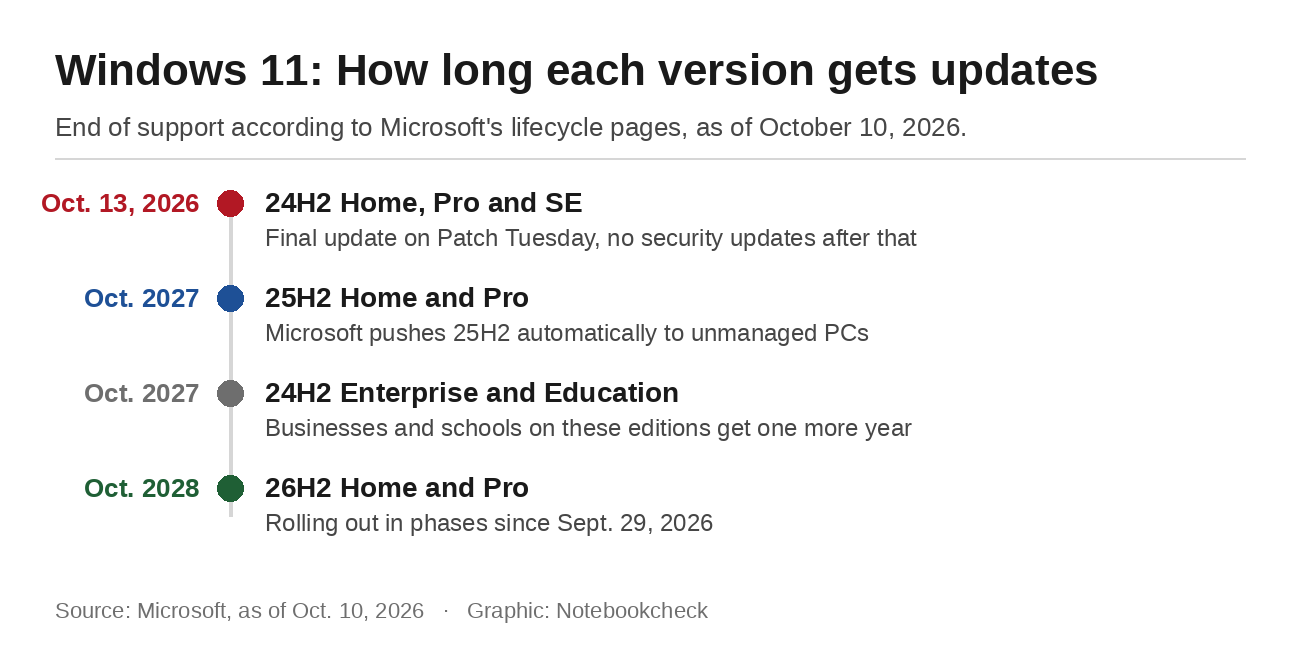
Microsoft ships its monthly security updates on the second Tuesday of every month. For some Windows 11 PCs, this Tuesday's batch is the last one. Windows 11 version 24H2 reaches end of support on October 13, 2026, for Home and Pro, and Microsoft's lifecycle page lists Pro Education, Pro for Workstations and SE under the same date. After that, the version gets no more monthly security updates. The PC keeps working, but every newly discovered flaw stays unpatched.
What stops on October 13
Microsoft's release health page for 24H2 says the version "will reach end of updates on October 13, 2026." Affected devices will no longer get fixes for known issues, time zone updates, technical support or the monthly security and preview updates. That makes the October Patch Tuesday release the final regular update for 24H2. Businesses get more time, since Enterprise and Education editions of the same version are supported until October 2027.
The newer versions last a lot longer. Version 25H2 gets updates on Home and Pro until October 2027, and Windows 11 26H2, which started rolling out on September 29, is covered until October 2028. Upgrading now buys two years without another deadline.
How to check your version
Settings shows the version. Right-click Start, open Settings, go to System and scroll down to About. The faster route is the Run dialog, which opens with Windows + R. Typing ms-settings:about there opens the same page directly. Under Windows specifications, Windows lists the edition and the version. If it says 25H2 or 26H2, you don't need to do anything. If it says 24H2, open Windows Update, ideally before Tuesday. If a PC has gone without updates for a long time, that is worth fixing anyway. Microsoft is replacing the Windows Update certificates in 2027, and outdated PCs will stop getting any updates after that.
Upgrading doesn't mean reinstalling
Versions 24H2, 25H2 and 26H2 share the same code base. New features already arrive through the monthly updates, and the upgrade only switches them on. In most cases it needs a single restart. A clean install isn't required.
On personal PCs that aren't managed by an IT department, Microsoft makes the call anyway. According to the release health page, those devices get 25H2 automatically. Microsoft extended that rollout to all unmanaged PCs back in April. You can control when the PC restarts by setting active hours, and the update itself can be postponed under Pause updates in Windows Update. A pause lasts up to 35 days. To extend it, you pick a new end date, which again can be no more than 35 days from today. After October 13, though, every day of pausing is a day without security fixes.
To go straight to 26H2, turn on the option to get the latest updates as soon as they're available in Windows Update. Microsoft offers 26H2 to 24H2 and 25H2 devices with that setting on and is rolling it out in phases over the coming months.

What the final patch still brings
The October update is the same for 24H2, 25H2 and 26H2 and adds a few features on top of the security fixes. According to Windows Central, the Copilot key can now be remapped to the right Ctrl key or the context menu key, under Settings, Bluetooth and devices, Keyboard. File Explorer shows PDF previews automatically, and touchpads get two new edge scrolling options. Microsoft turns such features on gradually, so they don't show up on every PC on the same day. For 24H2, this is where it ends. Any later features and fixes are reserved for the newer versions.
When Windows Update offers nothing
If the upgrade doesn't appear, a safeguard hold is often the reason. Microsoft uses these holds to keep devices from upgrading when a known problem with drivers, software or hardware is likely. Windows Update then says the upgrade is on its way and that "there is nothing that requires your attention at the moment." The Learn more link explains which issue affects the PC. Microsoft lifts the hold once the problem is fixed, but it gives no timeline. It only publishes details when a hold is broadly applied, and it names issues caused by third-party software or drivers only in certain cases.
For PCs that aren't offered the new version automatically, Microsoft points to the Windows Update Assistant as a manual route. With an active hold, that's a gamble, because it installs the very problem the hold is meant to prevent. Version 25H2 isn't flawless either. Microsoft currently lists a confirmed issue on its release health page that can make apps crash when they rely on Windows to decode Dolby Digital audio. It mostly affects older apps, and there is no fix yet.
Windows 11 SE laptops get no newer version
The deadline hits cheap school laptops running Windows 11 SE hardest. Microsoft launched SE in 2021 as its answer to Chromebooks. There will be no feature update after 24H2, and support for SE ends in October 2026, including updates, technical help and security fixes. Microsoft's own wording is: "While your device will continue to work, we recommend transitioning to a device that supports another edition of Windows 11." It doesn't mention a free way to get there. Parents whose children use such a laptop from a school program should ask the school what comes next.
Everyone else just needs a quick look at Settings, preferably before Tuesday. If it shows 24H2, start the upgrade yourself instead of waiting for the automatic rollout. Windows 10 follows different dates, which we have covered in a separate guide.
Source(s)
Microsoft Learn: Windows 11 Home and Pro lifecycle
Microsoft Learn: Windows 11 Enterprise and Education lifecycle
Microsoft release health: Windows 11, version 24H2 status
Microsoft release health: Windows 11, version 25H2 status
Microsoft Learn: Windows 11 SE overview and end of support
Microsoft Support: Which version of Windows am I running?
Microsoft Support: Pause updates in Windows
Microsoft Support: How to check safeguard holds affecting your device (KB5006965)
Microsoft Support: Windows feature updates and the Update Assistant
 Add as a preferred source on Google


No comments for this article
