




Windows 11 ships nine AI components, you can delete one
Microsoft runs a support page explaining which artificial intelligence sits inside a Copilot+ PC, meaning a Windows laptop with its own processing unit for AI work. That page lists four components. Microsoft’s own delivery list has nine.
The difference is not sloppiness. The list is titled "Release information for AI components" and it is the page on which Microsoft documents every update to these components, with version, KB number and date. Alongside the four familiar ones it carries five more: Execution Provider, Content Extraction, Image Search, Semantic Analysis and Settings Model. Content extraction, image search and semantic analysis, in other words the three that sound most like your own material being read, do not appear on the consumer page at all.
The component that did not exist before
Image Creation, the local model for generating pictures, has exactly three entries in that list. All three carry the same date, 28 July 2026. For comparison: Phi Silica, the local language model, sits there with 62 entries, Image Processing with 60, the Execution Provider with 63, spread across many months.
On that same 28 July the preview update KB5101684 arrived for Windows 11 24H2 and 25H2. It devotes a single sentence to the subject: this update allows you to remove the Image Generation AI component from supported Copilot+ PCs where the component is installed.
So Microsoft turned the image generator into a standalone, separately serviceable package on the very day it became removable. Before that it was not one. That also explains why the others stay. They are not built as separate packages at all. Microsoft writes that they are part of the Windows operating system, and about Phi Silica that it ships inbox with Windows.
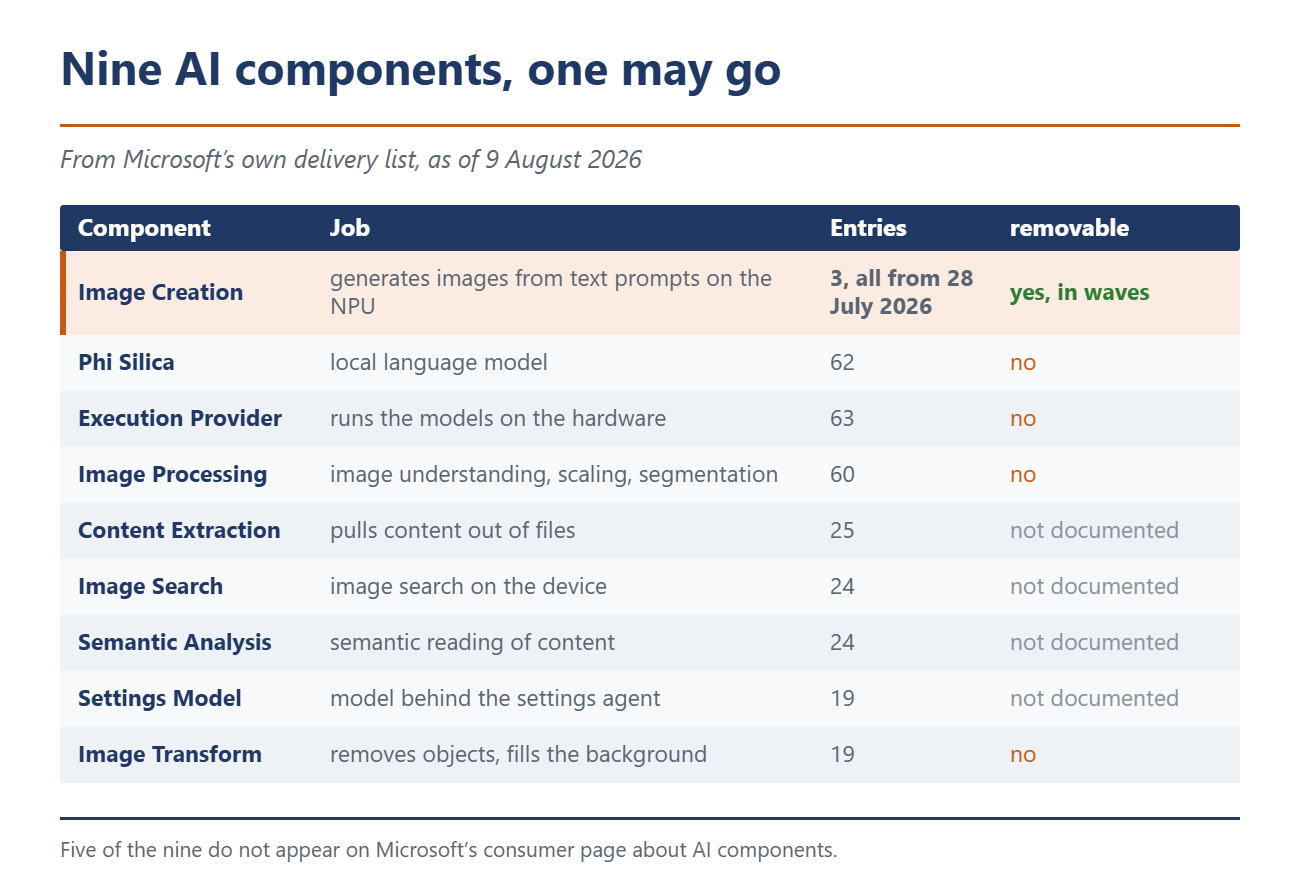
The second half of the announcement is usually skipped. The same update brought four other AI components along. It says this release updates the following AI components to version 1.2607.840.0, and then lists Image Search, Content Extraction, Semantic Analysis and Settings Model.
You may delete one component. Four others are updated in the same operation.
What actually happens on Patch Tuesday
Patch Tuesday came on 11 August, and it settled the question. The August update KB5121003 for 24H2 and 25H2 lists the 28 July preview among the updates it contains, and it carries no gradual rollout section at all. Microsoft itself calls that step the broad release to all eligible devices at the same time. Install the August update on a Copilot+ PC running 24H2 or 25H2 and the removal option is there.
Windows 11 26H1 misses out. Its August update, KB5121000, draws on a different preview line, and the removal option does not appear there. In the July preview the item still sat in the Gradual rollout tab, which Microsoft describes as delivery in phases. So if you went looking before the August update and came up empty, nothing was wrong on your end.
The component carries two names at Microsoft depending on the page. The update note writes Image Generation, the component page and the delivery list write Image Creation. Both spellings are current and both mean the same thing.
The switches everyone has
Most of this topic needs no Copilot+ PC. The following paths work on any Windows 11, including Home.
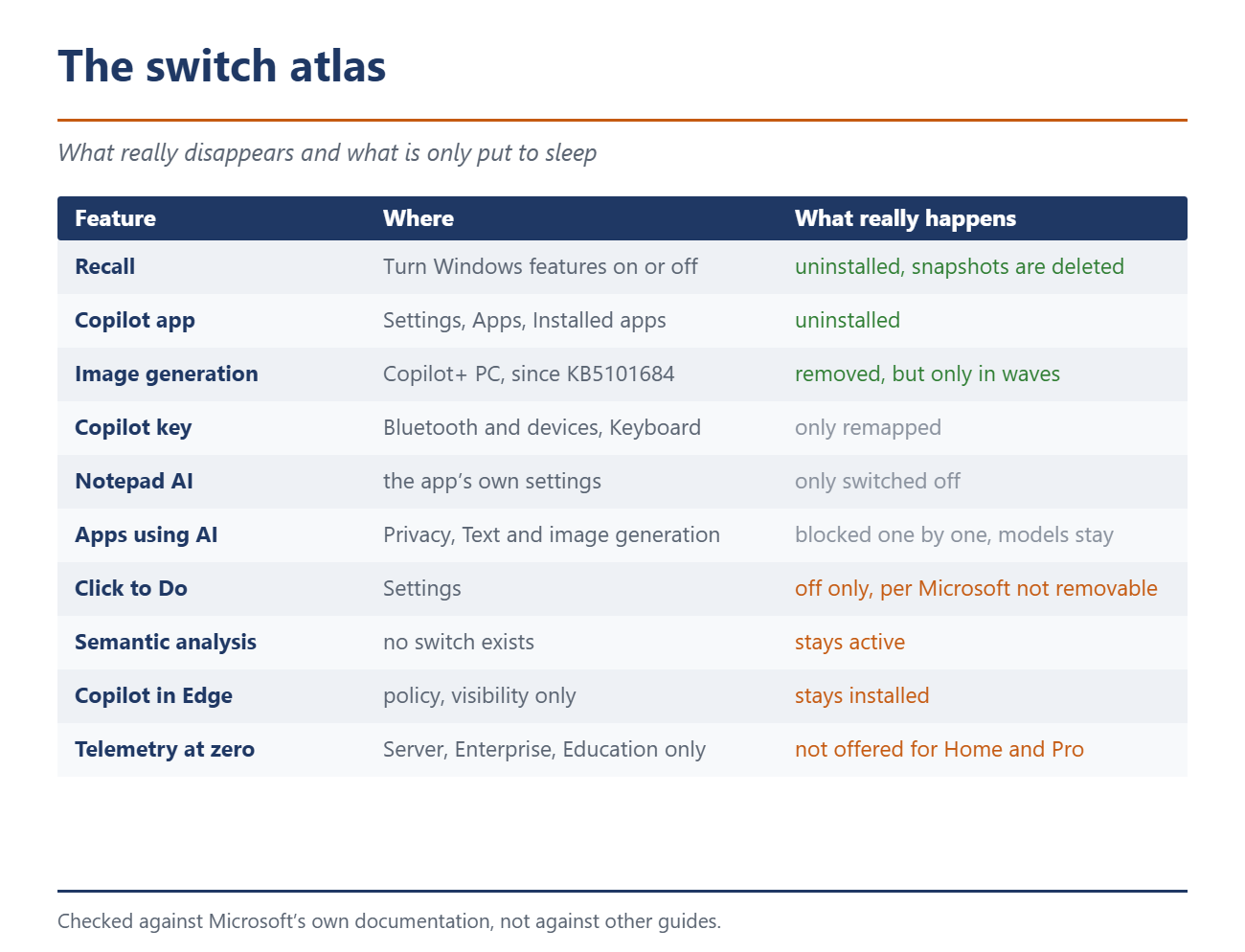
Remove Recall completely: open "Turn Windows features on or off", untick Recall, restart. Microsoft notes that snapshots saved earlier are deleted when Recall is removed. In PowerShell the same route runs through Disable-WindowsOptionalFeature -Online -FeatureName "Recall" -Remove.
Remove the Copilot app: Settings, Apps, Installed apps. The app uninstalls like any other.
Remap the Copilot key: Settings, Bluetooth and devices, Keyboard. The route through Personalisation and Text input given in older guides no longer applies. That the key became freely assignable at all was a reversal on Microsoft’s part.
Block it app by app: Settings, Privacy and security, Text and image generation. This page shows which apps have recently used local AI models and lets you block them one at a time. No Pro needed, no group policy. The most underrated lever in the whole topic.
Notepad: the AI features switch off in the app’s own settings dialog. It is the only documented switch of its kind in a bundled app.
What only Pro or Enterprise can do
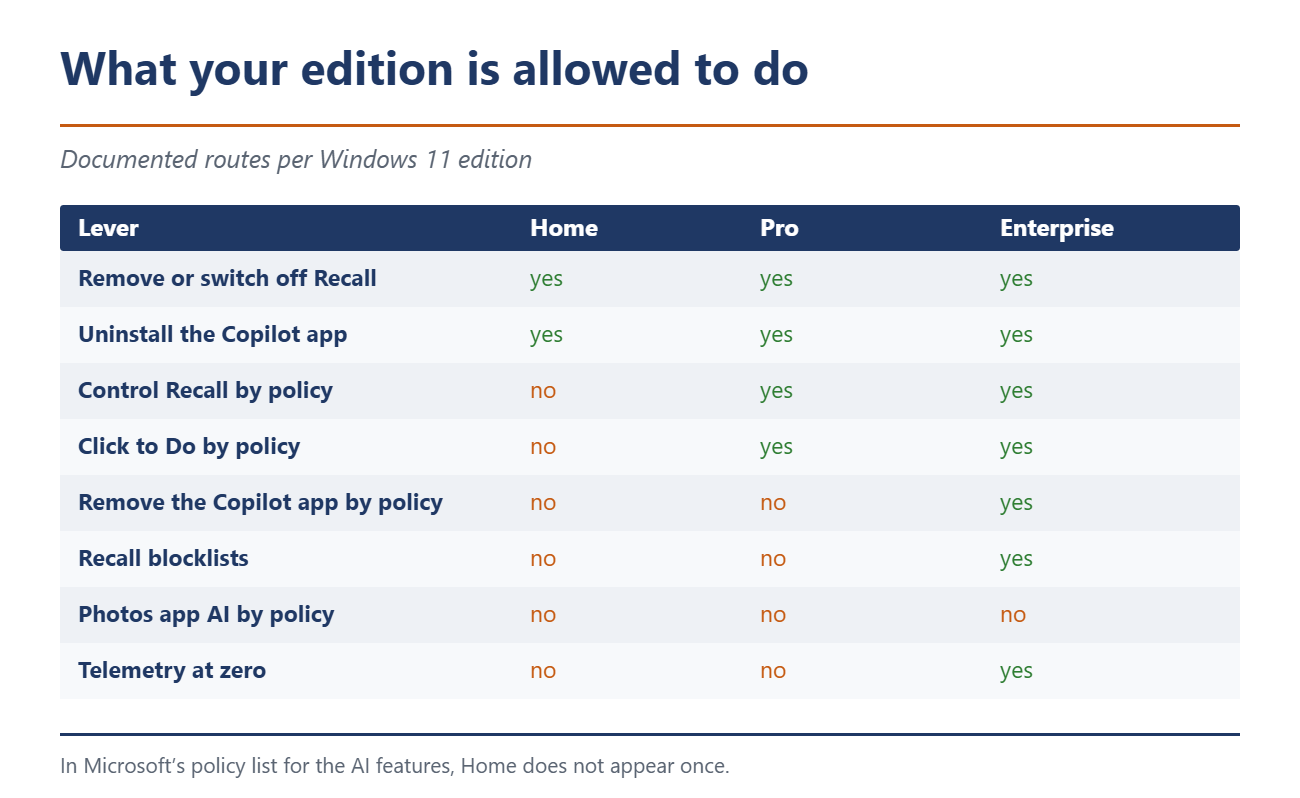
This is where it gets uncomfortable. The edition columns in Microsoft’s policy documentation are generated automatically from the Windows definition files, so they are not editorially maintained. In the list of AI policies, Home does not appear once.
With Pro you can set the Recall policies, block the Copilot key, switch off Click to Do and control the three policies around Paint. Removing the Copilot app by policy and Recall blocklists are beyond Pro, those stay with Enterprise and Education. Recall export is limited to the European Economic Area, so it does apply to devices in Germany.
For the Photos app there is not a single group policy. Not for Restyle, not for the Image Creator, not for Relight. Anyone who wants those gone has no documented route on any edition.
On the registry tips for Home that appear in many guides: Microsoft documents nowhere that Home honours these keys, and nowhere that it ignores them. In practice they often work. Documented that is not. Anyone wanting to go further ends up with third-party tools that strip the AI features out in one go.
What stays no matter what you click
Click to Do can be switched off but not removed. Microsoft says so itself and adds that the entry points then run into nothing and an error appears.
Semantic analysis is the most interesting case. It is a named, continuously updated component of the system and sits in Microsoft’s delivery list with 24 entries. There is no switch for it. Even with the settings agent switched off, semantic searches stay active according to Microsoft.
Copilot in Edge can be hidden by policy, but no code is removed in the process. How exposed the assistant can be was shown by a flaw that let websites slip commands to Copilot unnoticed. For Bing in Windows Search the matching policy is explicitly unavailable for Pro, and not available for Home either. And telemetry at zero exists only for Server, Enterprise and Education. Home and Pro do not get below the Required level.
In one place Microsoft says it outright. In the logging for removing AI components there is a dedicated event for the case that a package belongs to an AI component that is not removable.
One question stays open that Microsoft answers nowhere. AI components are serviced independently through Windows Update. Whether a removed component comes back with a later AI update is written on no page.
And in two months?
Windows 11 24H2 drops out of support for Home and Pro on 13 October 2026, 25H2 runs until 12 October 2027. Anyone setting up a 24H2 system AI-free now faces the switch in a good two months and asks the same questions again. That is not an argument against clearing it up. It is an argument for memorising the routes.
Source(s)
 Add as a preferred source on Google


