


Buying a used laptop: Check these locks before you pay
Buying a used laptop is easy when the price is right and the display has no scratches. You cannot tell from the outside whether the previous owner has released it. Accounts, company management and firmware passwords can keep a laptop locked so that even a fresh operating system changes nothing. Some locks take one call to the seller, others a new system board. We covered the phone version of this problem in our guide to the used smartphone. Laptops work in a similar way, with a few extra layers.
On a MacBook, Activation Lock decides
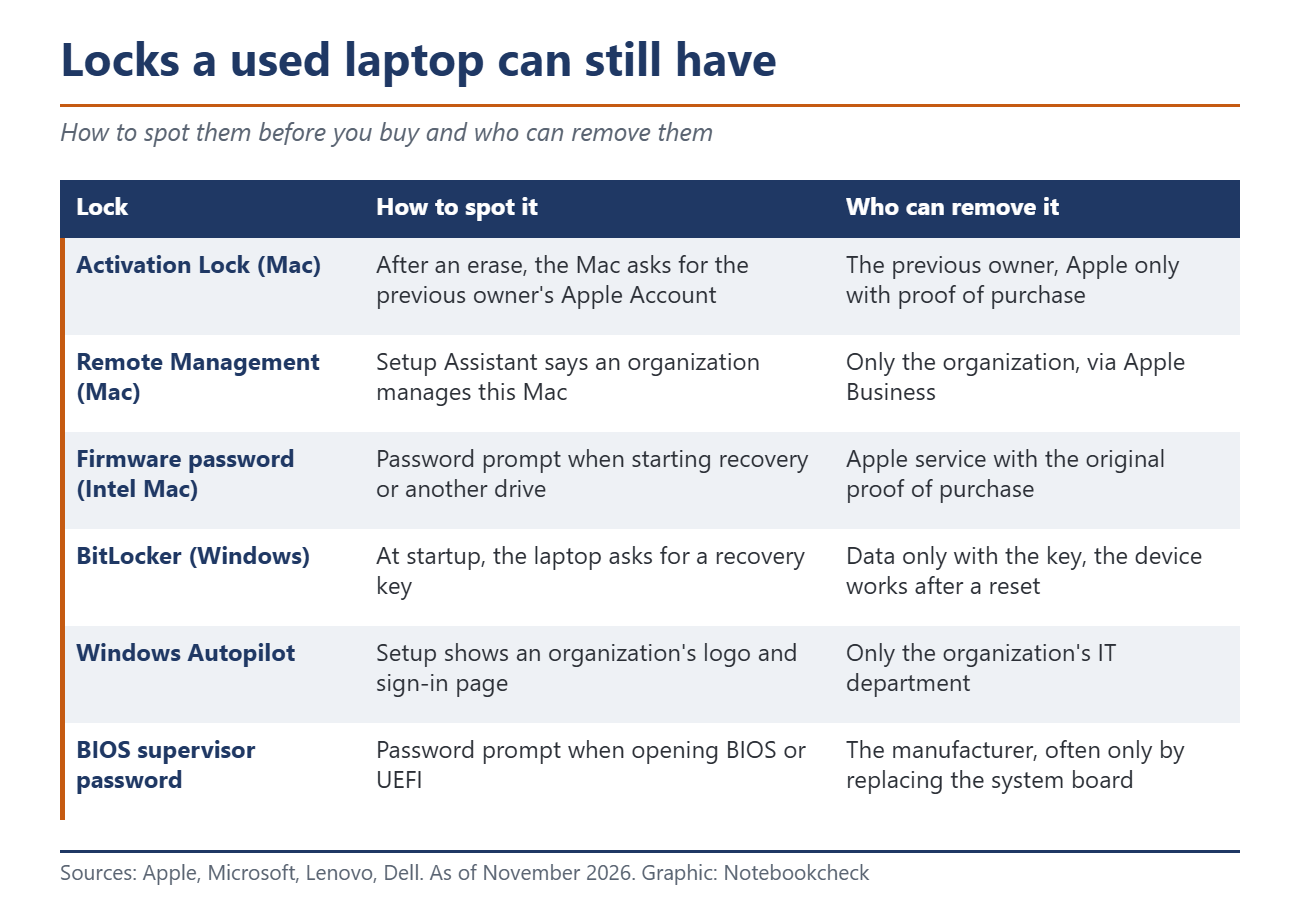
Macs with Apple silicon or the T2 Security Chip have Activation Lock. It is part of Find My, and according to Apple, "it remains enabled as long as you keep Find My turned on." Erasing the Mac does not remove it. To set up such a Mac again, you need the previous owner's Apple Account details. Without them, the only option is a request to Apple with proof of purchase, which in a private sale usually stays with the seller.
The second trap on Macs is Remote Management. Companies enroll their devices automatically through Apple Business, formerly Apple Business Manager. After an erase, Setup Assistant then shows a screen saying that an organization manages this Mac. Only the organization can release it. Older Intel Macs can also have a firmware password set, which blocks recovery mode and starting from other drives. According to Apple, a forgotten password can only be reset by an Apple Store or an Apple Authorized Service Provider, and only with the original proof of purchase. On Macs with Apple silicon, a recovery lock plays this role, and Apple says it can only be set through a device management service. It blocks access to recovery and the startup options.
Windows laptops: Accounts, BitLocker and the old employer
The Microsoft account is less strict. According to Microsoft, Find my device can locate and lock a laptop, and Microsoft does not describe any lock against a reset. It is still a nuisance, because the laptop stays listed in the previous owner's account. Microsoft therefore tells sellers to remove the device at account.microsoft.com/devices after resetting it.
Encryption matters more. Since Windows 11 version 24H2, many more laptops qualify for automatic device encryption, and the recovery key is stored in the previous owner's Microsoft account. If the laptop asks for a BitLocker recovery key at startup, you cannot get to the data without it. The laptop itself still works. In this case, Microsoft points to a reset, which removes all files, and Windows can then be set up again.
Former company laptops are a bigger problem. Many companies register their laptops with Windows Autopilot. The device is identified by its hardware, so according to Microsoft the company setup returns after a wipe and even after the operating system is reinstalled. During setup, the organization's logo, welcome message and sign-in page appear. Only the organization's IT department can deregister the device, and Microsoft tells companies to do this for every device that leaves them. If you already pay attention to updates and end of support on Windows laptops, also look out for a company logo during the first setup.
A BIOS password can cost a system board
Business laptops have a supervisor password in the BIOS. If it is set and unknown, the ThinkPad user guide says "there is no service procedure to remove the password." Lenovo replaces the system board for a fee instead. Dell only helps after proof of ownership and also names a system board replacement as the last resort. Dell explicitly warns against unofficial password tools. Some company laptops also have Absolute software built into the firmware. According to the vendor, it survives even a replaced drive. It lets the former company lock or wipe the device remotely.
How to hand over a used laptop cleanly
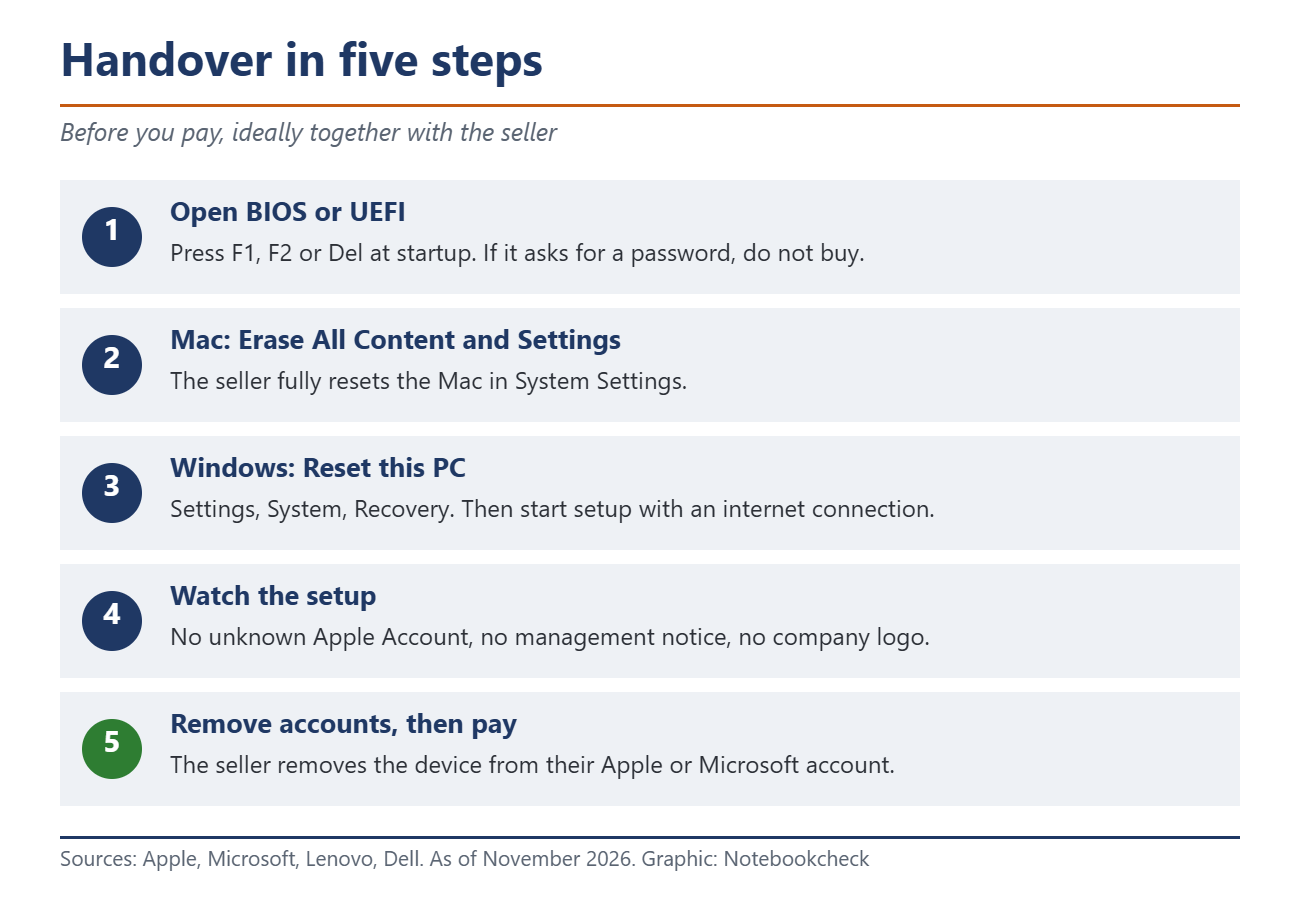
The safest way to buy is in person, where you can check the laptop yourself. Ask to see the laptop running and open the BIOS or UEFI before you pay, usually with F1, F2 or Del at startup. If it asks for a password there, walk away. With a Mac, ask the seller to run Erase All Content and Settings in System Settings. According to Apple, this resets the Mac to factory settings. If Setup Assistant then starts without asking for an unknown Apple Account and shows no management notice, the Mac is free. With Windows, have the seller choose Reset this PC under Settings, System, Recovery, and watch the setup with an internet connection, because Autopilot only appears once the laptop is online. If a company name shows up, the laptop is still managed by an organization.
When buying by mail, ask the seller to confirm in writing that all accounts are removed and no company management is active. If a Mac you bought is already locked, contact the seller first. According to Apple, the seller can remove Activation Lock remotely through iCloud.com, even if the Mac is offline. With refurbishers, ask whether former company laptops have been removed from Autopilot and Apple Business. Our article on the previous owner's app in a used car shows a similar problem. If you are the seller, sign out of your Apple or Microsoft account before the reset, turn off Find My and then remove the device from the device list in your account.
Source(s)
Apple Support: Activation Lock for Mac
Apple Business: Release devices
Apple Support: Set a firmware password on your Mac
Apple Support: What to do before you sell or give away your Mac
Microsoft Support: Find and lock a lost Windows device
Microsoft Support: Before you recycle, sell or gift your Windows PC
Microsoft Learn: BitLocker overview
Microsoft Support: Find your BitLocker recovery key
Microsoft Learn: Windows Autopilot FAQ
Lenovo ThinkPad user guide: Set, change and remove a password
 Add as a preferred source on Google


