



Windows 11 26H2 is installing itself: What to check before the update

If you use Windows 11 at home, a new version is now arriving on its own. Since Nov. 18, Microsoft has been gradually delivering Windows 11 26H2 automatically to PCs running versions 24H2 and 25H2 that aren't managed by an IT department, according to its official status page. That covers personal devices and business PCs without central management. Since late October you could install 26H2 manually through Windows Update. Now it installs automatically. Microsoft doesn't say when a given PC will get it, and the timing also depends on your Windows Update settings.
If you don't want to wait, you can get it right away. Go to Settings > Windows Update and select Check for Windows updates. If 26H2 is offered, select Download & install. Turning on Get the latest updates as soon as they're available also gets you updates sooner, Microsoft says. PCs managed by an IT department are left out of the automatic rollout and follow their administrators' policies, so work laptops get whatever the company decides.
What 26H2 changes and who gets it
The update itself is small. Microsoft ships 26H2 as an enablement package, Windows Central reports. The new features are already included in the monthly updates and only get switched on, so installation usually takes a few minutes. According to Microsoft's notes from Nov. 19, Windows Search shows results in a single list with file previews, and search from This PC in File Explorer is now indexer-based and faster. Windows Hello can briefly brighten the screen for face sign-in in a dark room, and the new Run dialog can be turned on in Settings. Our report on the 26H2 launch covers the AI actions in File Explorer.
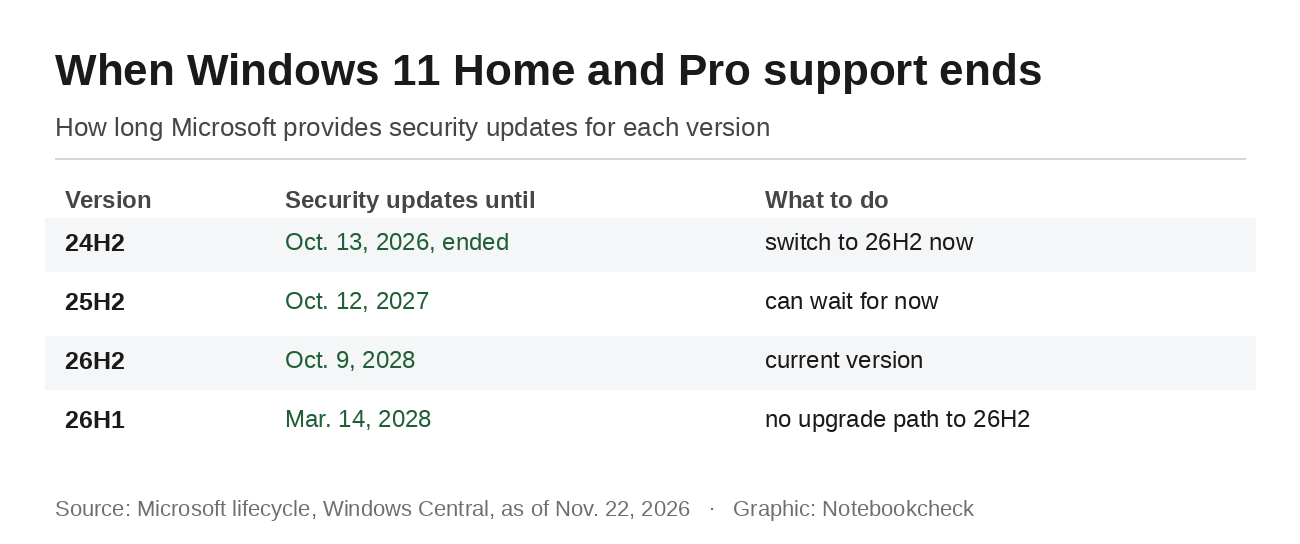
The support dates matter more than the features. According to Microsoft's lifecycle page, 26H2 gets security updates on Home and Pro until Oct. 9, 2028. Support for 24H2 already ended on Oct. 13, 2026, as we reported in October. If you're still on 24H2, you no longer get security updates and shouldn't wait. Version 25H2 is supported until Oct. 12, 2027. PCs running 26H1, a special version preinstalled on some new laptops, can't move to 26H2, according to Windows Central.
Check the known issues first
26H2 isn't entirely free of problems. Microsoft lists three issues on its status page. After moving to 26H2, some older USB Audio Class 1.0 devices failed to start, showed Code 10 in Device Manager and produced no sound. The Nov. 10 security update, KB5132061, fixes this. Remote Desktop connections could fail with error 0xC000000D for users without admin rights when the new Administrator protection feature is on, which has been fixed since late October. The only open issue affects SQL Server connections to external databases and mainly concerns servers. Microsoft currently lists no safeguard hold that blocks specific devices from 26H2.
Microsoft also warns about a restart many people won't expect. Over the next few months, Windows updates will replace the Secure Boot certificates, and some devices will restart one extra time during that process. This is by design and not a bug. Our guide to the 2027 update deadline explains why these certificates matter. In addition, there will be no optional preview update in the second half of December, while security updates arrive as usual.
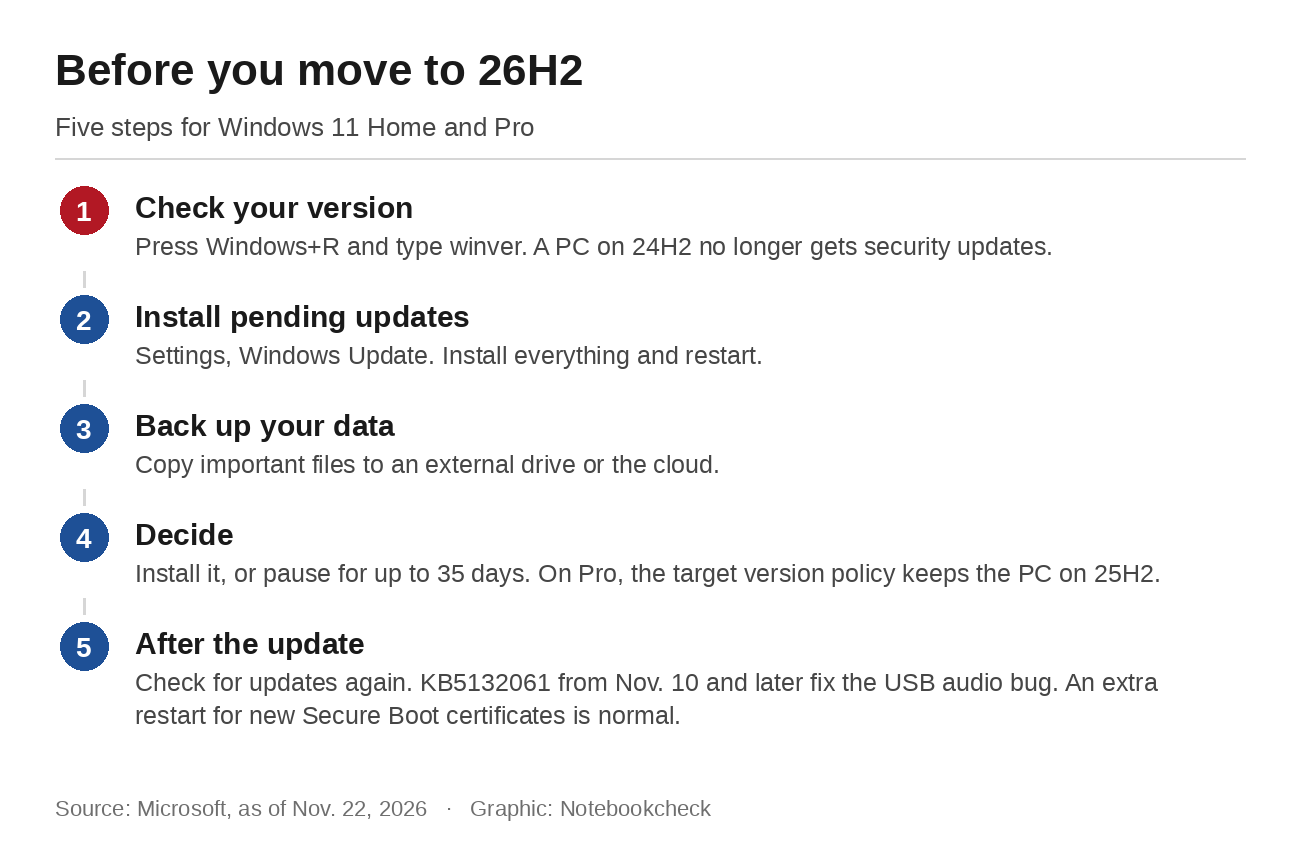
A few steps are worth taking before 26H2 arrives. Press Windows+R and type winver to see which version you're running. In Settings > Windows Update, install all pending updates first. After the upgrade, check for updates again so the fix for USB audio devices is installed too. Back up important files to an external drive or the cloud beforehand. The update is small, but a power cut or a full drive can disrupt any installation.
How to postpone 26H2
You can't turn the update off completely on Windows 11 Home, but you can buy time. According to Microsoft Support, Settings > Windows Update lets you pause updates for up to 35 days, and you can extend the pause again afterward. The catch is that pausing stops all updates, including the monthly security patches. When the pause ends, Windows immediately looks for everything it missed. This only makes sense on 25H2 and only for a few weeks. On 24H2, you'd just extend the time without protection.
Windows 11 Pro offers a more targeted option. The Group Policy setting "Select the target Feature Update version" lets you specify which version the PC should stay on, such as 25H2. According to Microsoft's documentation, you'll find it in the Group Policy Editor under Windows Components > Windows Update > Manage updates offered from Windows Update. Security updates keep coming, and only the feature update is held back. You'll need to remove the policy before October 2027.
If you run into problems after the update, go to Settings > System > Recovery and check whether Windows offers to go back to the previous version. Microsoft says this option is available for 10 days in most cases. For most people, though, the simpler route is to install 26H2 with all current updates and use it for the next two years.
Source(s)
Microsoft: Windows 11, version 26H2 known issues and status
Microsoft: Windows message center
Microsoft: Windows 11 Home and Pro lifecycle
Windows Central: Microsoft releases Windows 11 26H2
Microsoft Support: Pause updates in Windows
Microsoft: TargetReleaseVersion policy
Microsoft Support: Go back to the previous version of Windows
 Add as a preferred source on Google


