





For parents who want peace of mind? ICE Smart Junior 3.0 kids smartwatch with Apple Find My review
Find My Child.
Instead of a bulky child smartwatch with a SIM slot, the slim ICE Smart Junior 3.0 relies on Apple’s Find My network for location tracking. This way, parents can keep tabs on their child’s whereabouts more discreetly — and kids won’t have to wear a chunky gadget on their wrist.Christian Hintze (translated by Christian Hintze) Published 🇩🇪 🇫🇷 ...
Verdict – Apple Find My vs GPS and SIM slot
We like the easy-to-use OLED touchscreen on the ICE Junior 3.0. Kids can navigate the menus without much trouble, and there are plenty of handy functions like alarms, a calculator, and more — all presented in a child-friendly, colorful design.
On Android, however, the main selling point — location tracking — is basically useless. The watch then acts like a standard smartwatch. iPhone parents, on the other hand, get a much slimmer location tracker for their child than the usual thick SIM-based models. But keep in mind: without its own phone, your child can’t send messages or make calls. Whether you want to rely on other nearby Apple devices being around for location tracking is an important consideration too.
Pros
Cons
Price and availability
You can order the Junior 3.0 directly from the manufacturer’s website, ice-watch.com, for €69.
Anyone with younger kids knows the dilemma: when’s the right time to let them walk to school alone — especially if it’s a bit of a distance? Are they getting there safely? You can never be 100% sure. To calm that constant parental worry, there are various solutions — one being a kids’ smartwatch with location tracking.
The more expensive models include GPS and/or a SIM card, allowing kids to call preset numbers or send short messages.
The ICE Junior skips both SIM and GPS and instead relies entirely on Apple’s Find My network for location tracking.
Specifications
| Features | Junior 3.0 |
| Display | AMOLED 1.75", 390 x 450 px, 35 x 42 mm |
| CPU | 8763EWE-VP |
| Storage | Flash 128 MB |
| Battery | 300mAh, Lithium |
| Battery life | 5 to 7 days |
| Sensor | 3-axis G-sensor STK8321 |
| Water resistance | IP68 |
| SIM/GPS | No |
| Health functions | sleep monitoring, heart rate, blood oxygen level and blood pressure measurement, etc. |
| Other functions | notifications, watchface customization, pedometer, calculator, alarm clock, games, weather, music control, etc. |
| Sports modes | walking, running, cycling, soccer, tennis, hiking, baseball, etc. |
| Weight | 160 g |
| Warranty | 2 years |
| Price | 69 Euro |
Design and build – OLED in a plastic chassis
The watch case is made of plastic, topped with a protective glass over the AMOLED display. On the right side, there’s a metallic button (Power/Homescreen) and another smaller button below it.
The 2 cm silicone band is easy to swap out for other styles.

Setup and operation – 3-hour first charge
Before first use, the watch needs to charge for at least 3 hours. The proprietary magnetic charging cable is included, though it might be tricky to replace later.
While charging, it’s best to download the ICE Junior app (available for Android and iOS), which can also be used in “guest” mode. Reading the full privacy policy, however, gives the impression that the manufacturer may collect a fair amount of data, possibly store it outside the EU, and share it with third-party providers — not exactly ideal for a kids’ product. Pairing with the app is straightforward as long as all permissions are granted.
You can also use the watch independently via the touchscreen. The home screen displays time, steps, heart rate, and optionally the battery level.
On the watch itself, you can adjust settings, change watchfaces, play six simple games, set timers and alarms, open the calculator, and track basic activities.
When connected to the app, you can also view notifications, control music, and — on iOS — access the location tracking feature.


The ICE Junior app – colorful
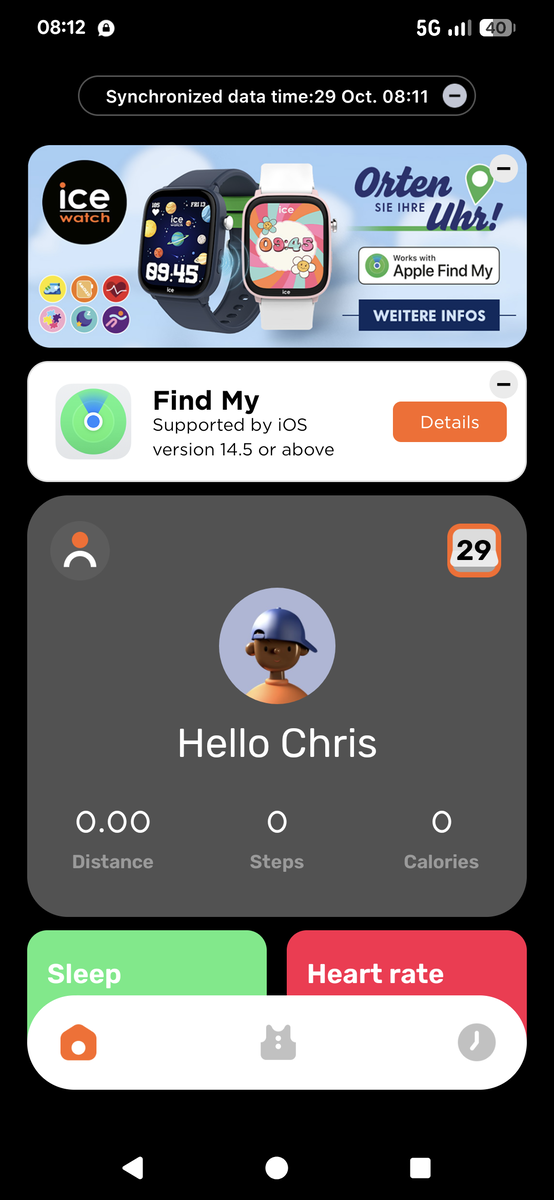
Every launch greets you with a loud self-promo video ad. The app interface is colorful — maybe a bit too colorful — which makes it feel somewhat cluttered. The large top banner on the home screen just links to the ICE website. Below that, you’ll find the Apple Find My feature.
Besides changing skins and watchfaces, the app mirrors much of what’s displayed on the watch itself.
In the final tab, you can tweak various settings such as gesture control, screen lock (“screentime” limits), and more. You can even use the watch to trigger your phone’s camera with a wrist shake.


Real-world test – Android use and Apple Find My
The vibrant OLED display stands out right away, with adjustable brightness (though higher brightness shortens battery life).
Navigation works well overall: swiping in different directions from the home screen brings up new sections (left for games, up for messages, etc.). However, some functions are duplicated, and responsiveness could be better — swipes and taps occasionally lag a bit.

There’s no location tracking on Android, but you can still access most of the watch’s other functions. That said, the price feels a bit steep for Android users. My own child quickly lost interest in the simple built-in games.
On iOS, the location feature is the main draw. For my test, I left the paired iPhone SE at home while I brought my kid to a climbing gym with the watch in their sports bag.
Back home, the iPhone correctly updated the location — moving from our house to the climbing hall. However, if your child is somewhere without nearby Apple devices, tracking won’t work. That’s where GPS or SIM-enabled watches clearly have the edge.
Battery life is rated at 5–7 days, which matches our experience, depending on how often the watch and tracking are used.
Transparency
The selection of devices to be reviewed is made by our editorial team. The test sample was given to the author by the manufacturer free of charge for the purposes of review. There was no third-party influence on this review, nor did the manufacturer receive a copy of this review before publication. There was no obligation to publish this review. As an independent media company, Notebookcheck is not subjected to the authority of manufacturers, retailers or publishers.
 Add as a preferred source on Google


