




Windows 10: October 13 is not what stops your security updates

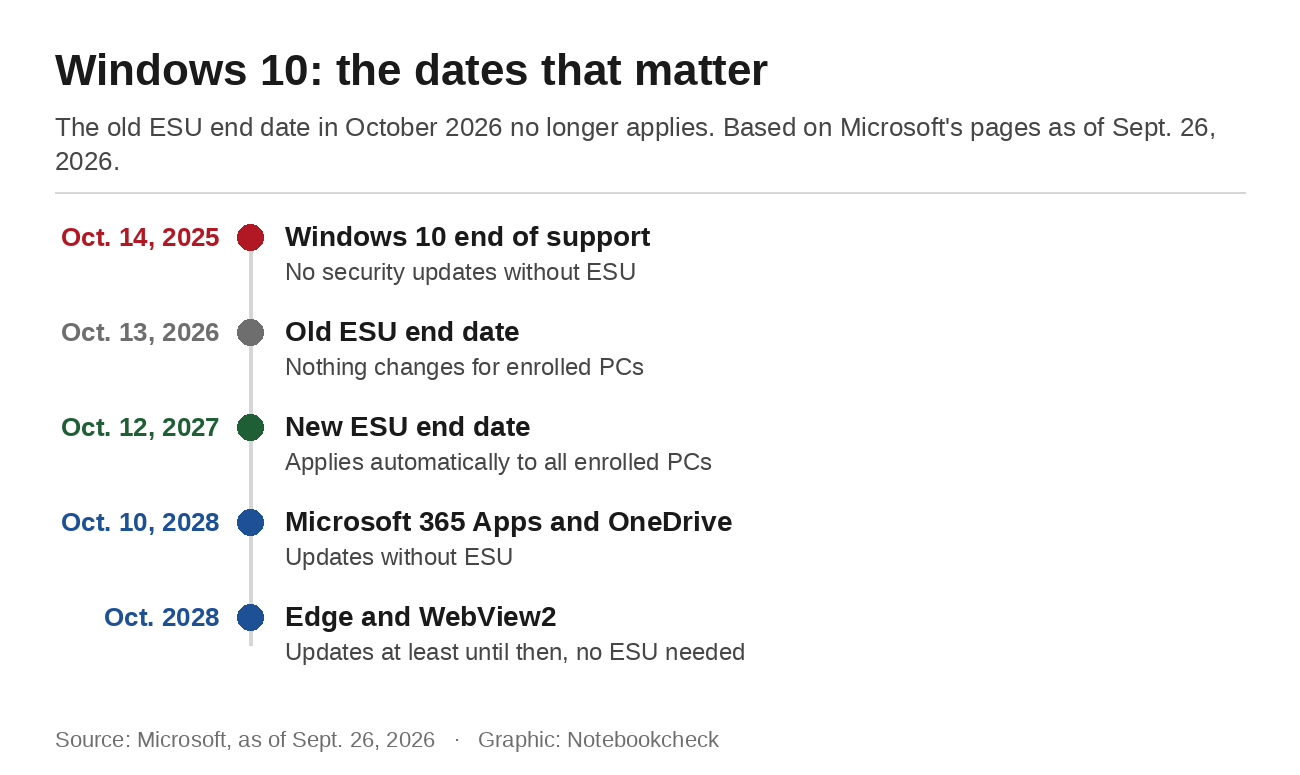
Search for the end of Windows 10 and a date in October 2026 turns up quickly. Germany's consumer advice center still says on its end-of-support page that Microsoft extended free support until October 14, 2026. Other guides name October 13, which is Patch Tuesday. Both dates are out of date. In June, Microsoft extended Extended Security Updates for home users by another year without much fanfare, as Notebookcheck reported at the time. The new end date is October 12, 2027.
What actually happens on October 13
For PCs already enrolled in ESU, October brings no change. Microsoft's ESU page puts it this way: "If you're already enrolled, your coverage will automatically continue through that date." No action is needed, so the October 13 Patch Tuesday update arrives as usual.
The date is not a turning point for PCs outside the program either, because they have gone without security updates since support ended on October 14, 2025. They do get a second chance. Microsoft says enrollment stays open until October 12, 2027, and an enrolled device then receives every critical and important update released since the end of support. Microsoft also warns that devices are more vulnerable before they enroll. The program itself is narrow. It covers critical and important security updates as defined by the Microsoft Security Response Center, with no new features, no other fixes and no technical support.
The condition for users in Europe
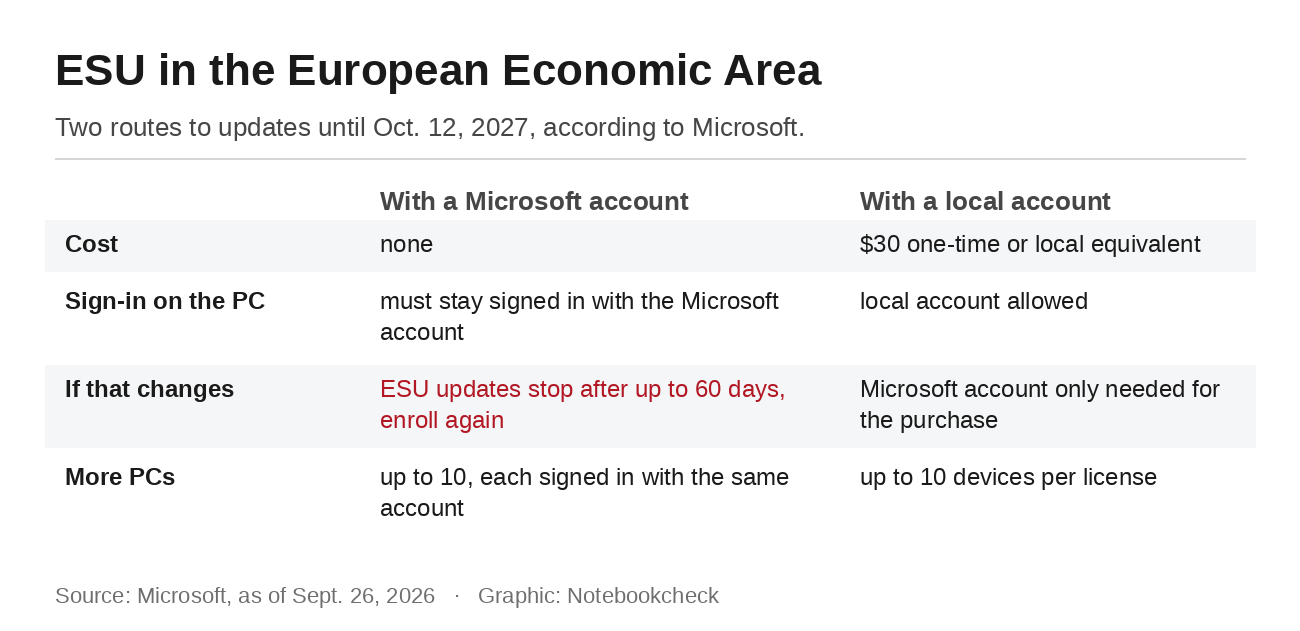
Consumers in the European Economic Area can get ESU at no extra cost, but Microsoft attaches a condition: "If you do not continue to sign in to your PC with your Microsoft account, ESU updates will be discontinued for your device after a period of time, up to 60 days." After that, the only fix is to enroll again. Anyone who starts the enrollment with a local account is first asked to sign in with a Microsoft account and then chooses whether to stay signed in or pay.
That hits the people who run Windows with a local account on purpose, or who switched back to one after enrolling. For them, Microsoft offers a second route, a one-time purchase of $30 or the local currency equivalent. The local account can stay, and a Microsoft account is only needed to make the purchase. Both options run until October 12, 2027.
One license covers up to 10 devices. Anyone who picked the free route has to stay signed in with the same Microsoft account on every additional PC as well, so the condition applies to each machine.
How to check whether your PC is enrolled
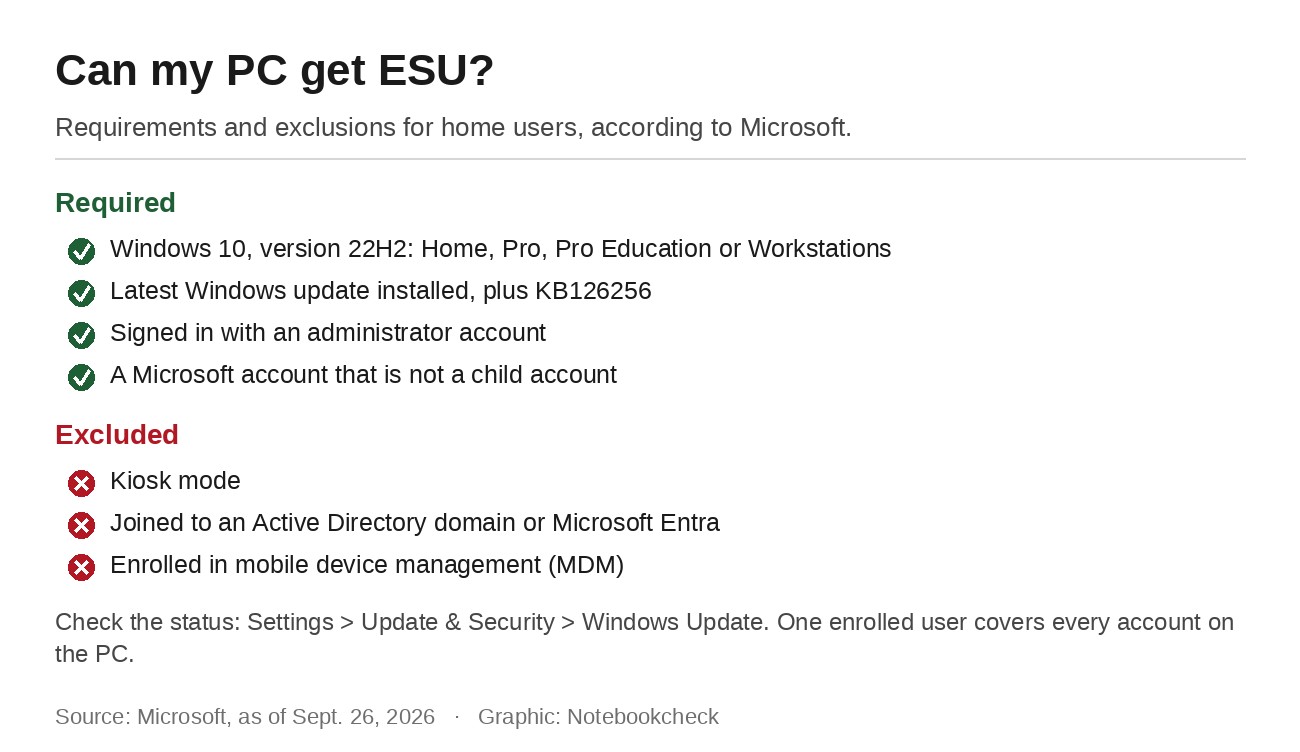
Windows shows the status under Settings, Update & Security, Windows Update. If the device is eligible but not yet enrolled, a link to enroll appears there. The requirements are Windows 10 version 22H2 in the Home, Pro, Pro Education or Workstations edition, the latest update and a licensing preparation package that Microsoft lists as KB126256. The signed-in account has to be an administrator, and the Microsoft account cannot be a child account.
Devices in kiosk mode are excluded, as are PCs joined to an Active Directory domain or Microsoft Entra and those enrolled in mobile device management. For families, one rule is handy. Once one user enrolls a PC, every other user on that device is covered too. A child's PC has to be enrolled by a parent with their own administrator account on it.
When Windows shows something else
Microsoft itself documented last fall that Windows 10 does not always report ESU correctly. After the October 2025 update, some enrolled devices showed an incorrect end-of-support message in Settings even though they kept receiving updates. Microsoft fixed that with KB5068781 in November. That same update then caused the enrollment wizard to fail on some devices, leaving them unable to install an ESU license until Microsoft followed up with KB5071959 the same day. Microsoft's list of known issues shows no ESU problem so far in 2026.
Anyone who sees a warning or no enrollment link should first make sure all updates are installed. Upgrading to Windows 11 remains possible after enrolling, as long as the hardware meets the requirements.
What keeps getting updates without ESU
Some software on Windows 10 keeps receiving updates regardless of ESU. Microsoft 365 Apps get feature updates up to version 2608 and security updates until October 10, 2028. The OneDrive app on Windows 10 22H2 is supported until the same date. Edge and the WebView2 runtime get updates on Windows 10 22H2 until at least October 2028, and ESU is not required for them. The operating system itself gets no security updates without ESU, and updates to Office or the browser do not fix flaws in Windows.
The group affected is still large. According to StatCounter, 25.15 percent of Windows desktops in Germany were still running Windows 10 in August 2026, roughly one in four. For them, October 13 is not a deadline. What matters is a quick look at Windows Update and, for everyone on the free route, the Microsoft account on the PC.
Source(s)
Microsoft: Windows 10 Extended Security Updates
Microsoft Learn: Windows 10 end of support and Microsoft 365 Apps
Microsoft Learn: Microsoft Edge supported operating systems
Microsoft Learn: Resolved issues in Windows 10, version 22H2
BleepingComputer: Microsoft quietly extends free Windows 10 ESU support to October 2027
Verbraucherzentrale (German consumer advice center): Windows 10 end of support explained
StatCounter: Desktop Windows version market share in Germany
 Add as a preferred source on Google


No comments for this article
