




CheckMag | No GPU, no problem. Hosting your own LLM is infinitely more fun than the censored offerings from the big players and works surprisingly well
What actually happens to your data when you query an AI is pretty much anyone's guess, but whatever happens with it, it certainly isn't yours anymore.
Alongside image and video generation, if you're keen to experiment with Large Language Models (LLM), but don't want to hand over your data to big tech, hosting your own is surprisingly easy and has several advantages over the big players.
Primarily, whatever you choose to do with it, all your data remains under your control, which, if you aren't keen to hand over your data to Mechahitler, is an immediate plus. You also get to use pretty much any model you like, whether it's Deepseek, Gemma2 or GPT, with the added advantage of being able to use versions that won't restrict the types of queries you throw into it.
KoboldCPP is an easy-to-use, single-executable AI text-generation tool designed to run GGUF and GGML Large Language Models. It supports both GPU and CPU and can act as a specialized backend for AI storytelling and chat. KoboldCPP can be downloaded from GitHub here and is available for Windows, Linux, Mac or Docker.
Hosting in a container makes it trivial to expose the LLM to every device on your network, and there are pre-built templates for the main platforms, including Unraid and TrueNAS. The same can be achieved with other installations as long as you add the necessary rules to your firewall.
Getting Started
Once you've decided on your platform of choice, you'll need to figure out what model to use. Hugging Face is the best place to look for models, and they'll need to be in GGUF format.
If you are planning to host D&D scenarios, you'll definitely want an uncensored model, otherwise, the LLM will ultimately refuse to harm any of the characters, and can generate undesirable results.
Some models, such as Deepseek and Claude, have a propensity to "think", which basically spews out the entire thought process of your query. This might be OK with a fast graphics adapter doing the heavy lifting, but without one, it slows the process down considerably. You'll have to experiment with models to find one that works for you, but Gemma2 is a good place to start.
Find the files page, and copy the URL that links to the GGUF file. Many models have multiple sizes, so you'll need to choose one that fits within the limitations of your available RAM.
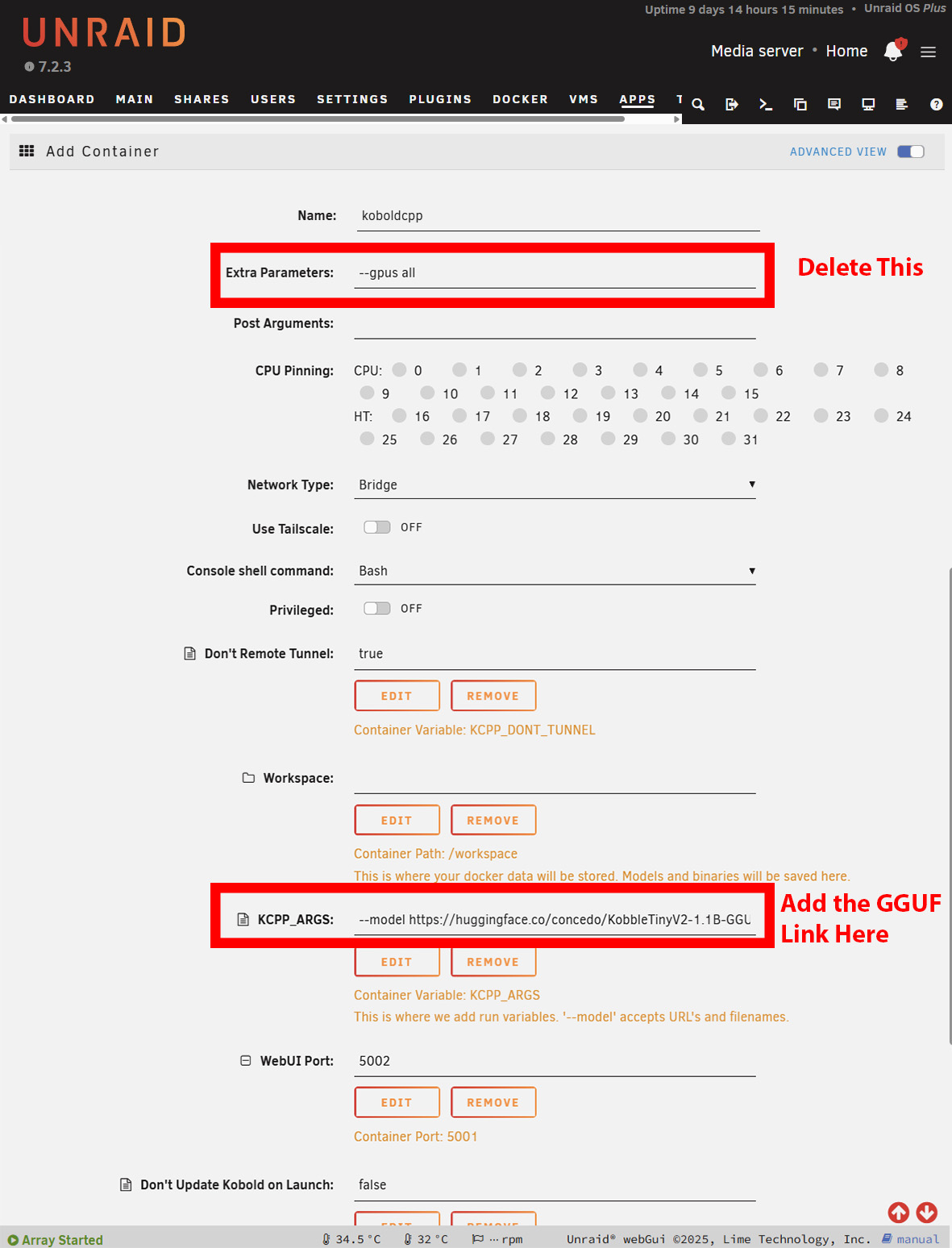
Installation on Windows is largely the same. However, you'll need to download the NoCUDA version if using without a GPU. It may take a while to start, as KoboldCPP will download the model before presenting you with the interface. On Windows, this is obvious, but on Unraid or TrueNAS, you'll have to open the logs to see the progress of the download. On Unraid, you may need to increase the Docker containers' available storage depending on how big your chosen model is.
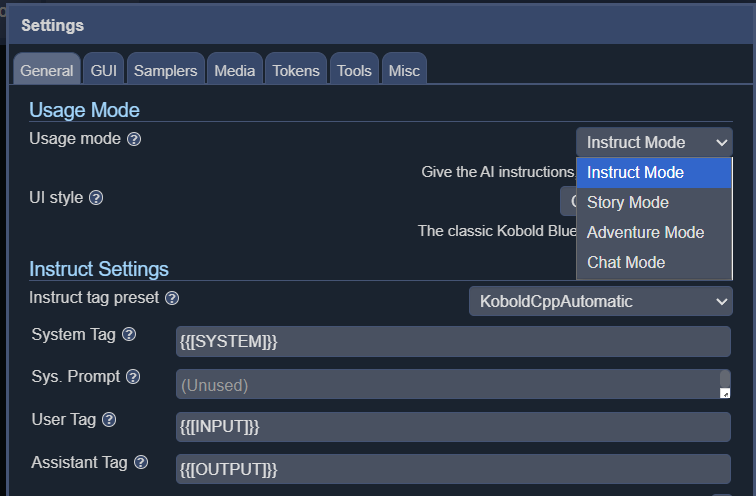
KoboldCPP offers 4 different interface modes, including instruct, story, chat and adventure.
While not the fastest by any stretch of the imagination, text is generated slightly slower than the average reading speed. Perfectly serviceable for D&D scenarios when running on a 16-core AMD 5950X (available on Amazon.com) and will likely run faster on more modern CPUs. The more cores you can throw at it, the better, and a decent amount of RAM will let you run larger models, although you should be fine with 16GB. The size and type of model will also have a significant impact on generation speed, and choosing a more lightweight model can significantly increase the overall speed.
Obviously, for the best experience, running Large Language Models with a GPU is optimal, however, if you are keen to try hosting your own, bypassing the restrictions or data privacy implications of ChatGPT, Claude or Gemini, you don't need any fancy hardware to get started and you can stll get a decent experience.
Source(s)
 Add as a preferred source on Google


