Deutsch
 Español
 Français
 Italiano
 Nederlands
 Polski
 Português
 Русский
 Türkçe
 Svenska
 Chinese
 Magyar
Samsung X520 Series
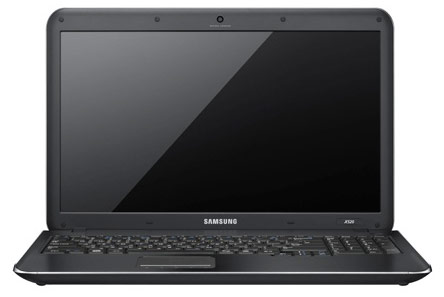 Processor: Intel Core 2 Solo SU3500, Intel Pentium Dual Core SU4100
Graphics Adapter: Intel Graphics Media Accelerator (GMA) 4500M, Intel Graphics Media Accelerator (GMA) 4500MHD
Display: 15.60 inch
Weight: 2.09kg, 2.1kg
Price: 700 euro
Average of 32 scores (from 33 reviews)
Samsung X520
Specifications
 Notebook: Samsung X520
Processor: Intel Core 2 Solo SU3500
Graphics Adapter: Intel Graphics Media Accelerator (GMA) 4500M 384 MB
Display: 15.60 inch, 16:9, 1366 x 768 pixels
Weight: 2.09kg
Price: 700 euro
Links: Samsung notebook section
Pricecompare
Average Score:
Reviews
Legacy? Samsung's X-range is having a downright family gathering in our editorial office at the moment. After we have reviewed the small X120 and the somewhat bigger X420 in the previous weeks, their big brother, X520, now dares to stride over our benchmark course. The little ones showed weaknesses in the keyboard and display. Will the big brother prove to be different or is there a great family resemblance?
Source: Stuff Magazine
 Archive.org version
A stylish, lightweight option for anyone seeking a simple laptop on a budget
Single Review, online available, Short, Date: 05/14/2010
Rating: Total score: 80%
Source: Stuff Magazine
Archive.org versionA stylish, lightweight option for anyone seeking a simple laptop on a budget
Single Review, online available, Short, Date: 05/14/2010
Rating: Total score: 80%
Source: Tech Advisor
Archive.org versionThe Samsung X520 is undeniably a light 15in laptop with usefully long battery life and enough to firepower to keep most users satisfied. But we weren't enamoured by the build and 'feel', which we hazard will not become a true classic in the line-up of Samsung's normally solid-feeling notebooks.
Single Review, online available, Medium, Date: 03/16/2010
Rating: Total score: 70% price: 70% performance: 80% workmanship: 60%
Source: Tech Advisor
Archive.org versionThe Samsung X520 is undeniably a light 15in laptop with usefully long battery life and enough to firepower to keep most users satisfied. But we weren't enamoured by the build and 'feel', which we hazard will not become a true classic in the line-up of Samsung's normally solid-feeling notebooks.
Single Review, online available, Medium, Date: 03/16/2010
Rating: Total score: 70% price: 70% performance: 80% workmanship: 60%
Source: Electricpig
Archive.org versionThe dinky but decent Samsung X120 is one of our favourites of a new slew of 11-inch lappies. So how does its bigger bro, the Samsung X520, fare? Is it a colossus without any standout skills? Or a big screen warhorse, ideal for multitasking? Read our definitive Samsung X520 review and we’ll tell you. There’s no escaping the fact that the Samsung X520 is a monster. Tipping the scales at 2.2kg and rocking a 15.6-inch screen, this isn’t a machine for those after lightweight portability . But that’s not to say it doesn’t have its plus points. A solid, if unspectacular laptop.
Single Review, online available, Medium, Date: 01/22/2010
Rating: Total score: 60%
Source: Electricpig
Archive.org versionThe dinky but decent Samsung X120 is one of our favourites of a new slew of 11-inch lappies. So how does its bigger bro, the Samsung X520, fare? Is it a colossus without any standout skills? Or a big screen warhorse, ideal for multitasking? Read our definitive Samsung X520 review and we’ll tell you. There’s no escaping the fact that the Samsung X520 is a monster. Tipping the scales at 2.2kg and rocking a 15.6-inch screen, this isn’t a machine for those after lightweight portability . But that’s not to say it doesn’t have its plus points. A solid, if unspectacular laptop.
Single Review, online available, Medium, Date: 01/22/2010
Rating: Total score: 60%
Source: Trusted Reviews
Archive.org versionAfter last week’s Asus UL50Vg, there’s now another option if you're after a relatively thin and light laptop with a large screen and, potentially, excellent battery life. Indeed, Samsung’s 15.6in X520 has more or less the same specifications as the Asus, including Intel's Consumer Ultra Low Voltage (CULV) processor. With the X520, Samsung has created a competent but never outstanding laptop and while it’s not a bad buy, at this size there are better options available.
Single Review, online available, Long, Date: 12/11/2009
Rating: Total score: 70% price: 70% performance: 70% features: 80% mobility: 80%
Source: Trusted Reviews
Archive.org versionAfter last week’s Asus UL50Vg, there’s now another option if you're after a relatively thin and light laptop with a large screen and, potentially, excellent battery life. Indeed, Samsung’s 15.6in X520 has more or less the same specifications as the Asus, including Intel's Consumer Ultra Low Voltage (CULV) processor. With the X520, Samsung has created a competent but never outstanding laptop and while it’s not a bad buy, at this size there are better options available.
Single Review, online available, Long, Date: 12/11/2009
Rating: Total score: 70% price: 70% performance: 70% features: 80% mobility: 80%
Source: IT Reviews
Archive.org versionDespite its low-powered processor, the X520 is perfectly adequate for undemanding users who aren't going to be doing much more than surfing the Internet, word processing and a bit of image-editing. And with good battery life and a decent keyboard, the X520 has got plenty going for it. On the downside, it's fairly expensive at £649. However, with Samsung releasing laptops like there's no tomorrow, its models tend to fall in price only a few months after they're released.
Single Review, online available, Medium, Date: 12/09/2009
Rating: price: 40% mobility: 80%
Source: IT Reviews
Archive.org versionDespite its low-powered processor, the X520 is perfectly adequate for undemanding users who aren't going to be doing much more than surfing the Internet, word processing and a bit of image-editing. And with good battery life and a decent keyboard, the X520 has got plenty going for it. On the downside, it's fairly expensive at £649. However, with Samsung releasing laptops like there's no tomorrow, its models tend to fall in price only a few months after they're released.
Single Review, online available, Medium, Date: 12/09/2009
Rating: price: 40% mobility: 80%
Source: Techradar
Archive.org versionDecent performance and comfort, but its not the most portable CULV laptop Samsung's X-series is made up entirely of machines powered by Intel CULV processors. The X520 is the largest laptop in the X-Series, making it one of the least portable, but its size makes it very comfortable to use and performance also proved to be good. The Samsung X520 offers a good mix of power and comfort, with portability slightly lacking. If you want a machine to accompany you on the daily commute, you should probably look elsewhere, but if you're not put off by its size or weight, this is a great option.
Single Review, online available, Medium, Date: 12/08/2009
Rating: Total score: 70%
Source: Techradar
Archive.org versionDecent performance and comfort, but its not the most portable CULV laptop Samsung's X-series is made up entirely of machines powered by Intel CULV processors. The X520 is the largest laptop in the X-Series, making it one of the least portable, but its size makes it very comfortable to use and performance also proved to be good. The Samsung X520 offers a good mix of power and comfort, with portability slightly lacking. If you want a machine to accompany you on the daily commute, you should probably look elsewhere, but if you're not put off by its size or weight, this is a great option.
Single Review, online available, Medium, Date: 12/08/2009
Rating: Total score: 70%
Source: Reg Hardware
Archive.org versionwith smooth, curved edges and an eye-pleasing design, the 15.6in X520 slips into Samsung’s new X-series range. With its good, albeit not nine-hour, battery life and a rather enticing design, the X520 certainly has its plus points. And despite some unnecessary design imperfections, such as the springy numeric keypad and thin trackpad buttons, it’s a decent choice for mobile workers. Alternatively, if you’re willing to shave an inch off the display, the X420 will save you around £50.
Single Review, online available, Long, Date: 11/24/2009
Rating: Total score: 80%
Source: Reg Hardware
Archive.org versionwith smooth, curved edges and an eye-pleasing design, the 15.6in X520 slips into Samsung’s new X-series range. With its good, albeit not nine-hour, battery life and a rather enticing design, the X520 certainly has its plus points. And despite some unnecessary design imperfections, such as the springy numeric keypad and thin trackpad buttons, it’s a decent choice for mobile workers. Alternatively, if you’re willing to shave an inch off the display, the X420 will save you around £50.
Single Review, online available, Long, Date: 11/24/2009
Rating: Total score: 80%
Foreign Reviews
Source: Facts - 2/10

Single Review, , Length Unknown, Date: 04/01/2010
Rating: Total score: 80%
Source: Facts - 2/10
Single Review, , Length Unknown, Date: 04/01/2010
Rating: Total score: 80%
Source: PC Go - 2/10
Single Review, online available, Very Short, Date: 01/01/2010
Rating: Total score: 72% price: 80%
Source: PC Go - 2/10
Single Review, online available, Very Short, Date: 01/01/2010
Rating: Total score: 72% price: 80%
Source: Chip.de - 01/2010
Single Review, online available, Very Short, Date: 12/01/2009
Rating: Total score: 60% price: 80%
Source: Chip.de - 01/2010
Single Review, online available, Very Short, Date: 12/01/2009
Rating: Total score: 60% price: 80%
Source: Notebookcheck
DE→EN Archive.org versionSingle Review, online available, Long, Date: 11/27/2009
Rating: Total score: 84% performance: 61% display: 75% mobility: 92% workmanship: 80% ergonomy: 79% emissions: 90%
Source: Notebookcheck
DE→EN Archive.org versionSingle Review, online available, Long, Date: 11/27/2009
Rating: Total score: 84% performance: 61% display: 75% mobility: 92% workmanship: 80% ergonomy: 79% emissions: 90%
Source: PC Welt
DE→EN Archive.org versionSingle Review, online available, Medium, Date: 10/09/2009
Rating: Total score: 46% price: 70% features: 61% mobility: 75% ergonomy: 60%
Source: T-Online
DE→EN Archive.org versionSingle Review, online available, Medium, Date: 10/09/2009
Rating: Total score: 46% price: 70% features: 61% mobility: 75% ergonomy: 60%
Source: PC Welt
DE→EN Archive.org versionSingle Review, online available, Medium, Date: 10/09/2009
Rating: Total score: 46% price: 70% features: 61% mobility: 75% ergonomy: 60%
Source: T-Online
DE→EN Archive.org versionSingle Review, online available, Medium, Date: 10/09/2009
Rating: Total score: 46% price: 70% features: 61% mobility: 75% ergonomy: 60%
Source: Notebookjournal
DE→EN Archive.org versionSingle Review, online available, Long, Date: 09/17/2009
Rating: Total score: 80% price: 80% performance: 30% features: 30% display: 40% mobility: 90% workmanship: 30% ergonomy: 80%
Source: Notebookjournal
DE→EN Archive.org versionSingle Review, online available, Long, Date: 09/17/2009
Rating: Total score: 80% price: 80% performance: 30% features: 30% display: 40% mobility: 90% workmanship: 30% ergonomy: 80%
Source: Techno Zoom
 IT→EN Archive.org version
Single Review, online available, Very Short, Date: 12/05/2009
Rating: Total score: 70% price: 70% performance: 80% mobility: 75% workmanship: 70%
Source: Techno Zoom
IT→EN Archive.org versionSingle Review, online available, Very Short, Date: 12/05/2009
Rating: Total score: 70% price: 70% performance: 80% mobility: 75% workmanship: 70%
Source: Kieskeurig
 NL→EN Archive.org version
Single Review, online available, Very Short, Date: 07/02/2010
Rating: Total score: 90% performance: 80% display: 100%
Source: Kieskeurig
NL→EN Archive.org versionSingle Review, online available, Very Short, Date: 07/02/2010
Rating: Total score: 90% performance: 80% display: 100%
Samsung X520-JB03FR
Specifications
Notebook: Samsung X520-JB03FRProcessor: Intel Pentium Dual Core SU4100
Graphics Adapter: Intel Graphics Media Accelerator (GMA) 4500MHD
Display: 15.60 inch, 16:9, 1366 x 768 pixels
Weight: 2.1kg
Price: 700 euro
Links: Samsung notebook section
Pricecompare
Average Score:
Reviews
Source: Digital Versus
Archive.org versionFollowing the trend for slimmed down, light machines with good battery life, the Samsung X520 is setting its stall out in a crowded marketplace, notable competitors are MSI and Acer. To stand out, it has a dual-core processor and build in DVD burner. Samsung have come up with a successful model in the slim, light, good battery life laptop department. You get close to 5 hours video play. Although the X520 gives limited performance, it’ll be enough for office docs, internet and a bit of photo work and video.
Single Review, online available, Medium, Date: 11/27/2009
Rating: Total score: 80%
Comment
Samsung: Samsung Group is the largest South Korean conglomerate and was founded in 1938. Samsung Group employed 489,000 people in 2014 and is one of the world's largest companies in terms of revenue and market strength. The name Samsung means "Three Stars" in Korean and represents the three sons of the company's founder. The company was founded in 1938 as a grocery store. With its subsidiary Samsung Electronics, founded in 1969, Samsung took up the production of electrotechnical items, focusing on consumer electronics and household appliances at an early stage. Other branches in which the large corporation is active include mechanical engineering, automobiles (Hyundai), insurance, wholesale, real estate and leisure. Samsung manufactures a wide range of electronic products, including smartphones, televisions, home appliances and semiconductors. The company's Galaxy line of smartphones is one of the most popular in the world. Samsung is also a major player in the semiconductor industry, making memory chips and processors for many other electronics manufacturers.
Only some 3D games with very low demands are playable with these cards.
Intel Graphics Media Accelerator (GMA) 4500M: The graphics core of the Intel GL40 and GS40 chipset features a slower clocked GMA 4500MHD (400 versus 533 MHz). Because of the slower core speed, full Blu-Ray Logo support is not given and the gaming performance is a bit worse.
Intel Graphics Media Accelerator (GMA) 4500MHD: Onboard (shared Memory) GPU built in the GM45, GE45 and GS45 chipset (Montevina). Because of two more shaders and a higher core clock, much faster than the old GMA X3100. Still not advisable for gamers (DirectX 10 games not playable or only with very low settings). The integrated video processor is able to help decode HD videos (AVC/VC-2/MPEG2) , e.g., for a fluent Blu-Ray playback with slow CPUs.
» Further information can be found in our Comparison of Mobile Graphics Cards and the corresponding Benchmark List.
Intel Core 2 Solo:
SU3500: Power efficient single core processor for small subnotebooks that is based on the Penryn core and includes all features (like Virtualization, C6 state, ...). The performance should be comparable with a 1.7 GHz Athlon II Neo K125.
Intel Pentium Dual Core: The return of the name Pentium, though it is a Yonah core. In fact, it is a double Core processor with a very good relation of performance to current consumption.
SU4100: Entry-level dual core processor for slim and light subnotebooks. Due to the Pentium name, the CPU may have less power saving features than Core 2 Duo processors.
» Further information can be found in our Comparison of Mobile Processsors.
» To find out how fine a display is, see our DPI List.
No weight comment found (one expected)!
71.25%: This rating is poor. More than three quarters of the models are rated better. That is rather not a purchase recommendation. Even if verbal ratings in this area do not sound that bad ("sufficient" or "satisfactory"), they are usually euphemisms that disguise a classification as a below-average laptop.
» Further information can be found in our Notebook Purchase Guide.