




Saving Power – Increase the runtime of your laptop with some simple steps and buying tips

Oftentimes for laptops, prospective buyers can be more interested in the battery life of the product than the actual specifications and hardware that lie under the hood. After all, what good is a portable computer if it cannot run on batteries for as long as the user requires? In this FAQ, we offer some novice tips and buying guides that any current or future laptop owner can take advantage of.
Use Windows Power Manager
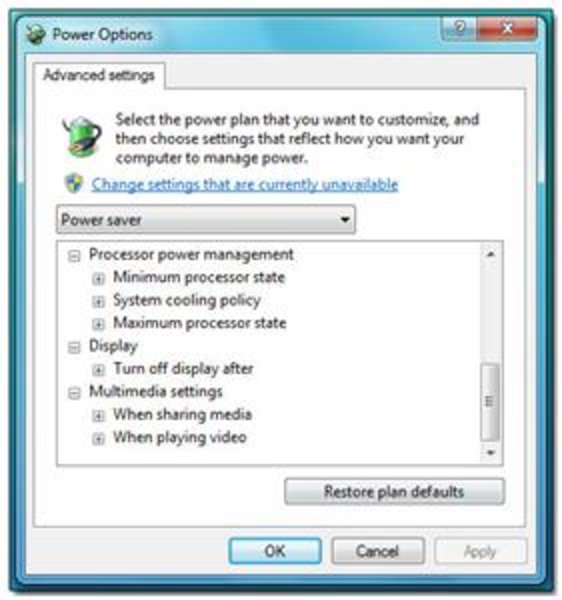
If a laptop will be running on batteries often, then the settings on the software end should be configured to reflect that kind of usage. Thus, the built-in Power Management utility for Windows 7 is a useful and user-friendly tool for optimizing battery life by manipulating laptop performance and behavior. The tool can be reached under Power Options in the Control Panel or just by typing in ‘powercfg.cpl’ in the Run Command window.
With the power manager tool, users are given direct access to a variety of power options. Windows includes a couple of pre-built battery plans such as power over performance, performance over power, and balanced. Of course, if you want more control over a power plan, you’d have to customize one yourself.
The Advanced settings window will let users do just that by allowing direct access to set behavioral commands for different computer components. For example, USB ports can be disabled and CPUs can be underclocked to conserve battery life. These are powerful and easily adaptable options that should be adjusted to fit the needs of the user.
Block Flash Ads and Close Unnecessary Processes
One of the easiest ways to increase runtime is to simply close and shut down unwanted programs and background activities. This will reduce hard drive access, free up RAM, and decrease CPU activity, all of which will directly benefit battery life.
A good example is the number of active windows and icons on the Windows task bar. Programs that automatically run on startup can be disabled if they are never actively used in order to reduce clutter, while excess browser tabs and graphic-heavy websites can be closed if no longer needed to save RAM and CPU cycles.
Additionally, many Flash-based ads around the web are notorious not just for their impracticality, but also for occupying more CPU power and are thus needless battery drains. To save battery power, users should install Flash-blocking programs or extensions for their browsers. The most popular free extension for this purpose is Adblock, which is currently available for Firefox, Safari, and Chrome. For Internet Explorer, users can disable Flash under the Tools and Manage Add-Ons menu, where the Shockwave Flash Object can be found. While incremental, these steps can make a difference in battery runtime during long sessions.
Disable Wireless/Bluetooth
Occasionally, wireless settings such as Wi-Fi and Bluetooth are enabled by default. This is sometimes unwanted especially since some users will rarely use the Bluetooth functionality on the laptop. We suggest disabling Bluetooth when not in use.
If the laptop is not going to connect to a network for any reason (such as working outdoors or on a train), then the wireless connection should be turned off. Otherwise, the laptop will continuously search for available local networks and drain valuable battery life in the process.
Reduce the Brightness of the Display

Adjusting the display brightness is one of the quickest methods to conserving battery life. Usually, the brightness settings are directly on the laptop keyboard and are often associated with the fn (function) key. A lower brightness level will mean that more time can be squeezed out of the battery. In fact, we have tested laptops here on NoteBookCheck where a measured difference of 10 watts can occur between minimum and maximum brightness settings!
If short on battery life, we suggest toning down the brightness to a level that will still allow for optimal working conditions. Brightness levels that are too low or high, however, can cause eyestrain and make reading text a chore. To prevent this, a higher brightness setting is suggested for working outdoors under sunny conditions while lower settings can be used for working indoors or in classrooms. In general, good modern displays can produce a brightness of over 200cd/m2, but such levels are not necessary for everyday office use. Play around with the brightness settings to optimize battery life and to see which levels are most comfortable for the eyes.
On a similar note, most new laptops are equipped with LED backlighting instead of the traditional fluorescent tubes. LED has the potential to produce a more even light throughout the screen while maintaining superior power efficiency compared to fluorescent lighting. Therefore, LED backlit screens are preferable if purchasing a new laptop with battery life in mind.
Use a Virtual Drive
Use of a DVD drive can be quite taxing on battery life because of the mechanical spinning motor required to read discs. Consequently, avoid constant use of the DVD drive when running on batteries. Instead, files on a disc should be copied and accessed through the hard drive or a USB flash drive if possible.
More often than not, however, many users could be using the DVD drive for playing clips or movies during long flights or car rides. If this is the situation, it is recommended to avoid playing the movie directly off of the DVD and to instead use a virtual drive. A virtual drive acts as an ordinary DVD drive, but will play disc images off of the hard drive or flash drive instead of physical DVDs. The disc image will be an exact copy of the DVD and can be created with some help from freeware programs, but retail DVD movies cannot be copied for legal reasons.
Common virtual drive programs include Alcohol 52% and Daemon Tools, both of which have free versions for personal use. Virtual drives should take away the hassle of carrying around DVDs, all the while improving battery life.
Consider a Solid-state Drive Upgrade
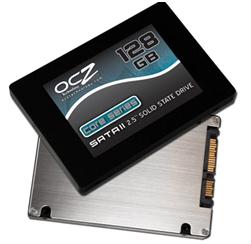
A solid-state drive (SSD) has many advantages over traditional hard drive discs (HDD), but in terms of battery life, the biggest advantage is the absence of moving parts. This, in combination with its different architecture, allows for generally more efficient power consumption.
Most SATA-enabled notebooks can have the original HDD easily replaced with a SSD. The process is no different from swapping hard drives or upgrading to larger capacities.
The largest disadvantage when upgrading to a SSD is the associated cost. If you’ve ever wondered why some laptops are $700 and others are $2500, one likely reason is because the latter is fitted with a high capacity SSD. The NAND flash chips currently used in many SSDs can run for as much as $1.00 to $2.00 per gigabyte as of 2011, so it can cost more than a few hundred dollars just to match the capacity of a HDD. While the upgrade is simple, the price required is off-putting for many.
Choose Integrated over Discrete Graphics Solutions
For those in the market for a new laptop and battery life optimization is of utmost concern, consider looking for a notebook with an integrated graphics controller instead of one with discrete graphics. Discrete graphics can be more powerful, but can also acutely reduce the battery life of any notebook even if graphic intensive processes are not running. This is largely due to the raw speeds and die sizes of discrete graphics chips, thus these chips demand more power from the battery just to keep them running idle.
Additionally, most portable users do not necessarily need the high-performance capabilities of a discrete graphics chip. If web browsing, email, music, word processing, Farmville, and streaming video are on top of the to-do list, then the advanced, often more expensive dedicated graphics option is simply overkill for the user. A laptop with Intel GMA HD or AMD Radeon 4200 would suffice.
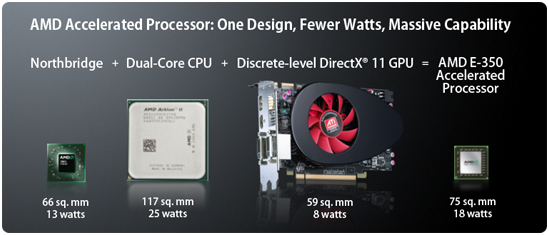
That is not to say integrated graphics are inadequate, however. Newer integrated graphics especially are much more powerful than the previous generations while remaining power efficient. This allows for smoother video and streaming performance and even support for full HD (1920x1080) resolution playback through an HDMI-out port. A prime example is the Intel GMA HD 3000 or the new AMD Fusion APU. These new chips are powerful enough for light gaming and high-definition video playback on-the-go without the need for battery-draining discrete graphics solutions.
Consider Switchable Graphics
Some users may need more graphical power than that provided by integrated graphics chips, however. Heavier graphics work such as moderate video editing or Adobe Photoshop usage will benefit greatly from a laptop with better graphics capabilities. For these users, laptops with switchable graphics preferences can provide the extra video-processing power needed while still saving on battery life.
A laptop with switchable graphics will contain both an integrated graphics chip and a discrete graphics chip, but will generally have only one active at a time. Depending on preference, the user can have the notebook run on the integrated graphics solution to preserve battery life or on discrete graphics during times where the additional processing power is needed. Switchable graphics thus allows for greater flexibility and utility out of a laptop, but expect to pay a little more for such capabilities.
A popular option is to look for laptops with support for Nvidia Optimus technology. Nvidia Optimus enables on-the-fly automatic switching between the dedicated GPU and the integrated graphics chip depending on user configuration or current running programs. This eliminates the need for any rebooting and can save plenty of time for uninterrupted work or multitasking. Unfortunately, Nvidia Optimus is currently only available for Windows 7-based notebooks as of this writing, so Macbooks and Linux-based machines are excluded. Newer MacBook Pros, however, run on Apple’s own proprietary graphics switching technology that is fully automated by the MacOS X operating system. While this system functions differently from Optimus, it can still provide a degree of energy management for Apple owners.
See our overview of the Nvidia Optimus technology here.
Purchase a New/Larger Battery
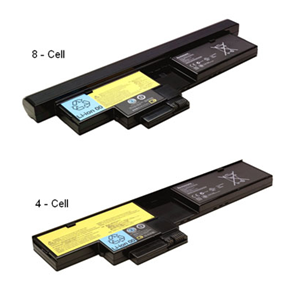
If buying a laptop online, especially from a brand name company like Dell, HP, Sony, or Lenovo, the buyer will usually be given the option to choose between a 6-cell, 8-cell, or 12-cell Lithium-ion battery module. A cell refers to one of the many independent, often cylindrical, lithium ion-based batteries that make up the entire laptop battery module itself.
Generally, a battery with more cells will last longer than a battery with less. This also scales quite nicely, as a 12-cell battery will last roughly twice as long as a 6-cell battery, assuming all else equal. Therefore, it might be worth considering a battery with more cells right from the get-go when purchasing a new laptop.
Be aware, however, that the larger the number of cells, the larger and heavier the battery module will be in general. Many laptops and netbooks nowadays dedicate almost the entire backside just for the battery. A module with a lower number of cells may fit snugly on the back, but a larger module will have some volume protruding outwards behind the laptop due to the increased cell count. Additionally, larger battery modules will demand more from your wallet, so make sure the extra weight and size will be worth the investment.
If the current laptop is more than a few years old, it is advisable to purchase a new battery if a new laptop is not yet worth the investment. All Li-ion batteries degrade overtime, so a battery that once provided 4 hours of use two years ago may only provide 1 to 2 hours today and will ultimately continue to provide less overtime. At this point, a new battery will aid laptop runtime much more significantly than many of the suggestions on this list.
While on the subject of batteries, certain new laptops allow for up to 2 batteries to be attached simultaneously for up to double the runtime. Thus, these laptops can be favorable options for future battery-conscious laptop owners. Examples include the Sony Vaio S Series and Lenovo’s updated ThinkPad series for 2011. With dual batteries, reaching double-digit hours when off the power grid should be easily reachable.
Consider External Battery Packs
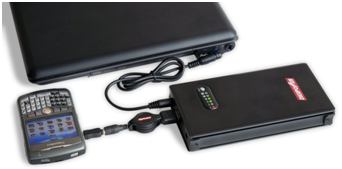
An alternative but similar option is to utilize an external battery pack instead of the specialized batteries that were designed to fit into specific laptops. These rechargeable external batteries connect directly to a laptop’s DC-in port and often include a number of different connection cords to ensure compatibility with a wide range of laptop models. The biggest advantage here is the immense versatility of an external battery pack; it can power and recharge not only existing and future laptops, but also potentially other electronics such as phones, cameras, iPads, and other similar devices. Thus, its usefulness extends through multiple gadgets as each can take advantage of the portable power source.
A typical external battery designed for laptops can range from $50 to $200, depending on the size, features, and output power. Keep in mind, however, that the battery will be an additional burden for those constantly on the move. Most promise at least several hours of usage, but be sure to check the milliamps/hr (mAh) rating to be convinced. Estimated runtime can be calculated from the product of its amps/hr rating and the voltage output, divided by the laptop power use in watts (Ah x Volts)/(watts). Of course, this conversion is a very rough approximation, and as such should not be the sole determinate for selecting external batteries.


 Add as a preferred