


 Deutsch
 Español
 Français
 Italiano
 Nederlands
 Polski
 Português
 Русский
 Türkçe
 Svenska
 Chinese
 Magyar
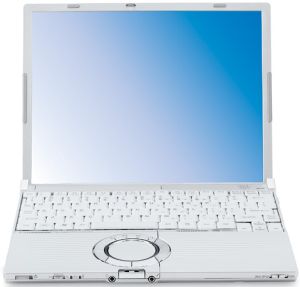
Panasonic Toughbook CF-W5
Specifications
Pricecompare
Average of 7 scores (from 10 reviews)
Reviews for the Panasonic Toughbook CF-W5
Source: PC Mag
 Archive.org version
The Panasonic Toughbook CF-W5 is a tough little ultraportable that caters to blue-collar professionals. These employees endure the elements of nature and the harsh reality of the outdoors. They often don't have the luxury of sitting behind an office desk. If high-end performance is not an issue, the W5 is an excellent candidate for workers exposed to the elements. Otherwise, take a look at the Lenovo ThinkPad X60 (Vista).
eher kurz gehaltener Test; online abrufbar
3.5 von 5, Leistung mäßig
Single Review, online available, Short, Date: 03/14/2007
Rating: Total score: 70% performance: 60%
Source: IT Reviews
Archive.org versionThe CF-W5 is the baby of Panasonic's Toughbook range, a thin (268 x 210 x 44mm), ultra-portable laptop weighing in at a very creditable 1.4kg including the power adapter, but the protection comes at a price. Expensive, yes, and lacking in some of the features its competitors have, but the Toughbook CF-W5 has a great blend of low weight and incredible battery life that makes it an ideal weapon for the mobile business user.
eher kurz gehaltener Test; online abrufbar
Preis/Leistung teuer, Ausstattung mangelhaft, Mobilität sehr gut
Single Review, online available, Short, Date: 02/09/2007
Rating: price: 40% features: 50% mobility: 90%
Source: vnunet.com
Archive.org versionThe CF-W5 is Panasonic's latest attempt to woo the corporate elite and those with deep pockets into buying a tougher than normal ultra-portable laptop. Unlike the fully 'ruggardised' CF-74 we reviewed a few months back, it isn't an ugly laptop covered in awkward rubber bits. Instead the silver plastic casing is subtle and attractive. A well built and attractive notebook that can take a knock or two, but the high price will deter many.
eher kurz gehaltener Test; online abrufbar
(von 5): 3, Preis/Leistung 2, Ausstattung 4, Ergonomie 3, Verarbeitung gut, Akkulaufzeit ausgezeichnet
Single Review, online available, Short, Date: 12/28/2006
Rating: Total score: 60% price: 40% features: 80% workmanship: 80% ergonomy: 60%
Source: Trusted Reviews
Archive.org versionThere's quite a bit squeezed into the slim chassis - on the right you'll find an Ethernet port, modem socket and two USB 2.0 ports, while the left is populated with the power socket, D-SUB port, expansion port, PC Card slot and an SD card slot. Unusually the front is pretty well stacked too with the eject switch for the DVD writer, a hardware switch for the wireless, headphone and mic sockets, and finally the power switch that glows green when the notebook is on. The ToughBook CF-W5 is pretty much an evolution of the CF-W4, which is not necessarily a bad thing. However, if you definitely aren’t planning on dropping your notebook on the desk from 30cm, there may be better options out there. That said, the W5 is still slim, light and well built. The battery life is also very impressive and the option of an integrated HSDPA module is something that the competition can’t offer yet.
eher kurz gehaltener Test; online abrufbar
(von 10): 7, Preis/Leistung 7, Leistung 8, Ausstattung 7, Verarbeitung gut, Akkulaufzeit beeindruckend
Single Review, online available, Short, Date: 12/08/2006
Rating: Total score: 70% price: 70% performance: 80% features: 70% workmanship: 80%
Source: Laptop Mag
Archive.org versionThe first thing you’ll notice when you pick up Panasonic’s new Toughbook CF-W5 will likely be its matte-silver finish, super-light weight, and pop-up optical drive. You won’t, however, need to pay much attention to the battery meter, since this system lasts a staggering eight hours on a charge. Throw in a durable design and an optional Verizon Wireless EV-DO card for anytime, anywhere connectivity and you have a pricey but highly recommended ultraportable.
eher kurz gehaltener Test; online abrufbar
4.5 von 5, Mobilität sehr gut, Verarbeitung gut
Single Review, online available, Short, Date: 11/17/2006
Rating: Total score: 90% mobility: 90% workmanship: 80%
Foreign Reviews
Source: Notebookjournal
 DE→EN Archive.org version
Single Review, online available, Long, Date: 10/10/2007
Rating: Total score: 80% performance: 50% features: 30% display: 30% mobility: 60% workmanship: 90% ergonomy: 70% emissions: 60%
Source: PC Welt
DE→EN Archive.org versionSingle Review, , Length Unknown, Date: 07/20/2007
Rating: Total score: 80% price: 40% performance: 60% display: 70% mobility: 80% workmanship: 90% ergonomy: 40%
Source: Notebook / Organizer / Handy
DE→EN Archive.org versionSingle Review, , Length Unknown, Date: 04/20/2007
Rating: mobility: 90% ergonomy: 50%
Source: Notebook / Organizer / Handy
DE→EN Archive.org versionSingle Review, online available, Short, Date: 01/05/2007
Rating: performance: 80% features: 80%
Source: Facts
DE→EN Archive.org versionSingle Review, , Length Unknown, Date: 01/05/2007
Rating: Total score: 58% features: 60%
Comment
Intel Graphics Media Accelerator (GMA) 950: Intel Graphics Media Accelerator 950 is an integrated (onboard) graphic chip on Mobile Intel 945GM chipset. It is a faster clocked version of the GMA 900 and supports no hardware T&L (Transform & Lightning) accelleration (which is required for some games).
These graphics cards are not suited for Windows 3D games. Office and Internet surfing however is possible.
» Further information can be found in our Comparison of Mobile Graphics Cards and the corresponding Benchmark List.
Intel Core Solo: Single core version of the Core Duo and successor of the Intel Pentium M; Because of the 65nm reduced structure width also smaller current consumption than Pentium M (maximally 27 Watts); the performance is comparable with the equivalent clocked Pentium M (somewhat faster because of a few improvements).
U1400: » Further information can be found in our Comparison of Mobile Processsors.
12.10":
This range of display format is largely the upper limit for tablets and the lower limit for subnotebooks.
The advantage of subnotebooks is that the entire laptop can be small in size and therefore easily portable. The tiny display has the added advantage of requiring little power, which further improves battery life and thus mobility. The disadvantage is that reading texts is exhausting for the eyes. High resolutions, which one is used to from a standard laptop, are almost not usable.
The same applies to tablets in this size range.
» To find out how fine a display is, see our DPI List.Panasonic: Panasonic Corporation was founded in 1918 in Japan, making it one of the oldest electronics companies (although it started with light bulb sales). The company operates in several business areas, including electronics, home appliances, automotive technology, aerospace, energy, and environmental technology. Panasonic sells televisions, cameras, audio and video equipment, home appliances such as refrigerators and washing machines, batteries, solar panels and LED lighting worldwide. Panasonic is also a major supplier of components and systems to the automotive industry and has invested in artificial intelligence and robotics in recent years.
72.57%: This rating is poor. More than three quarters of the models are rated better. That is rather not a purchase recommendation. Even if verbal ratings in this area do not sound that bad ("sufficient" or "satisfactory"), they are usually euphemisms that disguise a classification as a below-average laptop.
» Further information can be found in our Notebook Purchase Guide.